Strange clicking problem

could be. try it out, and if it doesnt work, change it back. or maybe you can adjust the settings so you dont receive a notification instead of blocking the program completely, in case its something you might need, like microsoft update.
 

My Computer

Computer Manufacturer/Model Number
Alienware AREA-51 M17x
OS
windows 7 ultimate 64bit
CPU
Intel Core2 Extreme x9000 2.8GHZ
Motherboard
Asus P965 Intel chipset
Memory
4Gig
Graphics Card(s)
2 NVidia GeForce 8800M GTX (SLi)
Sound Card
onboard
Monitor(s) Displays
17in. built-in, 47in JVC LCD
Screen Resolution
1080p
Hard Drives
2 250Gig Hitachi (RAID 0) @ 7200RPM
Case
17in. laptop
Mouse
touchpad, Logitech Anywhere Mouse cordless laser
Internet Speed
cable
I'd check every connection to see if anything is loose. You could also try picking up the PC from one end a letting it drop. If the noise happens or it stops working completely you now know there is something loose inside.
 

My Computer

Computer type
PC/Desktop
Computer Manufacturer/Model Number
OQO 2+
OS
Windows 8 Pro w/MC 32-bit
CPU
Intel Atom 1.86 GHz
Motherboard
OQO 2+
Memory
2 GB
Graphics Card(s)
Intel GMA 500
Sound Card
IDT
Monitor(s) Displays
LCD
Screen Resolution
800 x 480 (portable) 1280 x 1024 (docked)
Hard Drives
64 GB SSD
PSU
9 Ah Battery (portable) or OQO Brick (docked)
Case
Shirt Pocket Sized
Cooling
Tiny Fan
Keyboard
Slide out (portable) DiNovo Edge (docked)
Mouse
Eraser head (portable) Logitech Bluetooth (docked)
Internet Speed
WWAN or 802.11G (portable) T1 (docked)
Browser
IE 10
Other Info
DVD-RW OQO Docking Station
could be. try it out, and if it doesnt work, change it back. or maybe you can adjust the settings so you dont receive a notification instead of blocking the program completely, in case its something you might need, like microsoft update.

I'd love to try it out but I can't seem to find the place in Windows Firewall where you can change the level of security for programs accessing the internet. :confused:
 

My Computer

OS
MS Windows 7 Home Premium 64-bit
CPU
AMD Turion II Ultra M620
Motherboard
Hewlett-Packard 363A (Socket S1G3)
Memory
4.0GB Dual-Channel DDR2 @ 399MHz (6-6-6-18)
Graphics Card(s)
ATI Mobility Radeon HD 4
Sound Card
IDT High Definition Audio CODEC
Monitor(s) Displays
Generic PnP Monitor (1600x900@60Hz)
Screen Resolution
1600 x 900
Hard Drives
488GB Hitachi Hitachi HTS725050A9A364 ATA Device (SATA)
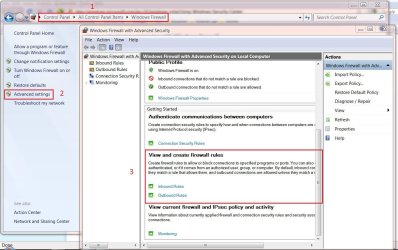
This might help, just follow the prompts...

1...Go to Control Panel\All Control Panel Items\Windows Firewall

2...Then advanced settings.

3...Scroll down a bit to View and create firewall rules.
 

Attachments

  • win7securitysettings.JPG
    win7securitysettings.JPG
    137.6 KB · Views: 11

My Computer

Computer type
PC/Desktop
Computer Manufacturer/Model Number
Gateway DX4831-01e (Mid-Tower Desktop)
OS
Originally Win 7 Hm Prem x64 Ver 6.1.7600 Build 7601-SP1 | Upgraded to Windows 10 December 14, 2019
CPU
Intel i3 530 2.93GHz, 2933MHz 2 Cores 4 Logical Processors
Motherboard
Gateway H57M01 133 megahertz
Memory
6GB of 1,333MHz DDR3 SDRAM
Graphics Card(s)
32MB Intel Graphics Media Accelerator HD IGChip
Sound Card
Realtek High Definition Audio
Monitor(s) Displays
Gateway HX2000 20inch TFT active matrix TN
Screen Resolution
1600 x 900 x 59 hertz
Hard Drives
WDC WD10EADS-00M2B0 [HDD] (1000.20 GB) -- drive 0,
HL-DT-ST DVDRAM GH41N [CD-ROM dr]
Four card readers, and Four USB 2.0
PSU
300watts.
Case
Mid-Tower Desktop
Cooling
Stock from Gateway
Keyboard
Natural Ergonomic Keyboard 4000, see Other Info
Mouse
Orig. Gateway wore out now using Insignia USB wired optical
Internet Speed
Vz FIOS 10ms png 57.64Mbps down 65.53Mbps up Speedtest.org
Antivirus
Zamana Anti-logger with Anti-malware, MSE, Windows Firewall,
Browser
IE11.0.9600.19399-Upd ver11.0.135, Firefox 68.0.1 x64
Other Info
System Specs by Belarc.

BIOS: American Megatrends Inc. P01-A0 11/17/2009

Replaced the MS 'Natural' Standard PS/2 Enhanced 101-102 Keyboard with a new Natural Ergonomic Keyboard 4000 on August 1st 2014.

Canon Pixma MG3222 Printer.

Updated to IE11 on 12102015 | Fios Quantum Router g1100

Additional AV: SpywareBlaster, manual Mbam, SAS
Yeah I got that far, but I can't see where I make sure all programs alert me when they're trying to access the internet :confused:
 

My Computer

OS
MS Windows 7 Home Premium 64-bit
CPU
AMD Turion II Ultra M620
Motherboard
Hewlett-Packard 363A (Socket S1G3)
Memory
4.0GB Dual-Channel DDR2 @ 399MHz (6-6-6-18)
Graphics Card(s)
ATI Mobility Radeon HD 4
Sound Card
IDT High Definition Audio CODEC
Monitor(s) Displays
Generic PnP Monitor (1600x900@60Hz)
Screen Resolution
1600 x 900
Hard Drives
488GB Hitachi Hitachi HTS725050A9A364 ATA Device (SATA)
That should be back on the main Firewall page. Look to the left menu, click on "Change Notification Settings"

Control Panel\All Control Panel Items\Windows Firewall\Customize Settings
 

My Computer

Computer type
PC/Desktop
Computer Manufacturer/Model Number
Gateway DX4831-01e (Mid-Tower Desktop)
OS
Originally Win 7 Hm Prem x64 Ver 6.1.7600 Build 7601-SP1 | Upgraded to Windows 10 December 14, 2019
CPU
Intel i3 530 2.93GHz, 2933MHz 2 Cores 4 Logical Processors
Motherboard
Gateway H57M01 133 megahertz
Memory
6GB of 1,333MHz DDR3 SDRAM
Graphics Card(s)
32MB Intel Graphics Media Accelerator HD IGChip
Sound Card
Realtek High Definition Audio
Monitor(s) Displays
Gateway HX2000 20inch TFT active matrix TN
Screen Resolution
1600 x 900 x 59 hertz
Hard Drives
WDC WD10EADS-00M2B0 [HDD] (1000.20 GB) -- drive 0,
HL-DT-ST DVDRAM GH41N [CD-ROM dr]
Four card readers, and Four USB 2.0
PSU
300watts.
Case
Mid-Tower Desktop
Cooling
Stock from Gateway
Keyboard
Natural Ergonomic Keyboard 4000, see Other Info
Mouse
Orig. Gateway wore out now using Insignia USB wired optical
Internet Speed
Vz FIOS 10ms png 57.64Mbps down 65.53Mbps up Speedtest.org
Antivirus
Zamana Anti-logger with Anti-malware, MSE, Windows Firewall,
Browser
IE11.0.9600.19399-Upd ver11.0.135, Firefox 68.0.1 x64
Other Info
System Specs by Belarc.

BIOS: American Megatrends Inc. P01-A0 11/17/2009

Replaced the MS 'Natural' Standard PS/2 Enhanced 101-102 Keyboard with a new Natural Ergonomic Keyboard 4000 on August 1st 2014.

Canon Pixma MG3222 Printer.

Updated to IE11 on 12102015 | Fios Quantum Router g1100

Additional AV: SpywareBlaster, manual Mbam, SAS
Odd, apparently it's set to notify me when it blocks a program. :confused: So when this clicking nonsense happens it should surely be telling me a program is trying to access the internet..
 

My Computer

OS
MS Windows 7 Home Premium 64-bit
CPU
AMD Turion II Ultra M620
Motherboard
Hewlett-Packard 363A (Socket S1G3)
Memory
4.0GB Dual-Channel DDR2 @ 399MHz (6-6-6-18)
Graphics Card(s)
ATI Mobility Radeon HD 4
Sound Card
IDT High Definition Audio CODEC
Monitor(s) Displays
Generic PnP Monitor (1600x900@60Hz)
Screen Resolution
1600 x 900
Hard Drives
488GB Hitachi Hitachi HTS725050A9A364 ATA Device (SATA)
Now you have me wondering..........

I do have my printer blocked in "Inbound Rules", but I've never received a warning hmmm...

Will look into this some more and get back to you.
 

My Computer

Computer type
PC/Desktop
Computer Manufacturer/Model Number
Gateway DX4831-01e (Mid-Tower Desktop)
OS
Originally Win 7 Hm Prem x64 Ver 6.1.7600 Build 7601-SP1 | Upgraded to Windows 10 December 14, 2019
CPU
Intel i3 530 2.93GHz, 2933MHz 2 Cores 4 Logical Processors
Motherboard
Gateway H57M01 133 megahertz
Memory
6GB of 1,333MHz DDR3 SDRAM
Graphics Card(s)
32MB Intel Graphics Media Accelerator HD IGChip
Sound Card
Realtek High Definition Audio
Monitor(s) Displays
Gateway HX2000 20inch TFT active matrix TN
Screen Resolution
1600 x 900 x 59 hertz
Hard Drives
WDC WD10EADS-00M2B0 [HDD] (1000.20 GB) -- drive 0,
HL-DT-ST DVDRAM GH41N [CD-ROM dr]
Four card readers, and Four USB 2.0
PSU
300watts.
Case
Mid-Tower Desktop
Cooling
Stock from Gateway
Keyboard
Natural Ergonomic Keyboard 4000, see Other Info
Mouse
Orig. Gateway wore out now using Insignia USB wired optical
Internet Speed
Vz FIOS 10ms png 57.64Mbps down 65.53Mbps up Speedtest.org
Antivirus
Zamana Anti-logger with Anti-malware, MSE, Windows Firewall,
Browser
IE11.0.9600.19399-Upd ver11.0.135, Firefox 68.0.1 x64
Other Info
System Specs by Belarc.

BIOS: American Megatrends Inc. P01-A0 11/17/2009

Replaced the MS 'Natural' Standard PS/2 Enhanced 101-102 Keyboard with a new Natural Ergonomic Keyboard 4000 on August 1st 2014.

Canon Pixma MG3222 Printer.

Updated to IE11 on 12102015 | Fios Quantum Router g1100

Additional AV: SpywareBlaster, manual Mbam, SAS
Yep, tis a strange one. It hasn't actually happened yet today so touch wood, the driver I downloaded for the touchpad may have done something (although that would make very little sense).
 

My Computer

OS
MS Windows 7 Home Premium 64-bit
CPU
AMD Turion II Ultra M620
Motherboard
Hewlett-Packard 363A (Socket S1G3)
Memory
4.0GB Dual-Channel DDR2 @ 399MHz (6-6-6-18)
Graphics Card(s)
ATI Mobility Radeon HD 4
Sound Card
IDT High Definition Audio CODEC
Monitor(s) Displays
Generic PnP Monitor (1600x900@60Hz)
Screen Resolution
1600 x 900
Hard Drives
488GB Hitachi Hitachi HTS725050A9A364 ATA Device (SATA)
Guess I was wrong, it was fine yesterday but upon starting up today it's done it straight off.
 

My Computer

OS
MS Windows 7 Home Premium 64-bit
CPU
AMD Turion II Ultra M620
Motherboard
Hewlett-Packard 363A (Socket S1G3)
Memory
4.0GB Dual-Channel DDR2 @ 399MHz (6-6-6-18)
Graphics Card(s)
ATI Mobility Radeon HD 4
Sound Card
IDT High Definition Audio CODEC
Monitor(s) Displays
Generic PnP Monitor (1600x900@60Hz)
Screen Resolution
1600 x 900
Hard Drives
488GB Hitachi Hitachi HTS725050A9A364 ATA Device (SATA)
....And upon downloading Zone Alarm Firewall and changing the settings to "High" on that, it still does it. Nightmare :zip:
 

My Computer

OS
MS Windows 7 Home Premium 64-bit
CPU
AMD Turion II Ultra M620
Motherboard
Hewlett-Packard 363A (Socket S1G3)
Memory
4.0GB Dual-Channel DDR2 @ 399MHz (6-6-6-18)
Graphics Card(s)
ATI Mobility Radeon HD 4
Sound Card
IDT High Definition Audio CODEC
Monitor(s) Displays
Generic PnP Monitor (1600x900@60Hz)
Screen Resolution
1600 x 900
Hard Drives
488GB Hitachi Hitachi HTS725050A9A364 ATA Device (SATA)
So sorry for the quadruple post.....but I just noticed that when the clicking sound happens, the CPU usage on MSN Messenger (and only MSN Messenger) shoots up....
 

My Computer

OS
MS Windows 7 Home Premium 64-bit
CPU
AMD Turion II Ultra M620
Motherboard
Hewlett-Packard 363A (Socket S1G3)
Memory
4.0GB Dual-Channel DDR2 @ 399MHz (6-6-6-18)
Graphics Card(s)
ATI Mobility Radeon HD 4
Sound Card
IDT High Definition Audio CODEC
Monitor(s) Displays
Generic PnP Monitor (1600x900@60Hz)
Screen Resolution
1600 x 900
Hard Drives
488GB Hitachi Hitachi HTS725050A9A364 ATA Device (SATA)
How far does the CPU shoot up too?
Do you have the newest version of Messenger?
Also try disabling the Messenger (Close it down all the way) to see if that helps.

Does Messenger run or start up when Windows starts?

Ryan
 

My Computer

Computer Manufacturer/Model Number
HP Pavilion dv5 Notebook PC
OS
Windows Seven x64
CPU
2.2 GHz Dual Core
Motherboard
Quanta 3600
Memory
4GB
Graphics Card(s)
ATI Mobility RADEON HD 3470
Sound Card
ATI
Monitor(s) Displays
Laptop
Hard Drives
ATA Hitachi HTS543215 (5400RPM)
Case
Laptop
Cooling
Fan
Internet Speed
Basic DSL 1.5 up and Down
CPU on MSN alone shot up to around 40% from about 15%

I use Windows Live Messenger 9

I googled this and someone mentioned it might be MSN today trying to load, so I've disabled that for now.

And yes it does.
 

My Computer

OS
MS Windows 7 Home Premium 64-bit
CPU
AMD Turion II Ultra M620
Motherboard
Hewlett-Packard 363A (Socket S1G3)
Memory
4.0GB Dual-Channel DDR2 @ 399MHz (6-6-6-18)
Graphics Card(s)
ATI Mobility Radeon HD 4
Sound Card
IDT High Definition Audio CODEC
Monitor(s) Displays
Generic PnP Monitor (1600x900@60Hz)
Screen Resolution
1600 x 900
Hard Drives
488GB Hitachi Hitachi HTS725050A9A364 ATA Device (SATA)
For a test go to Services and disable/stop it. then see if you get any more clicks.
 

My Computer

Computer type
PC/Desktop
Computer Manufacturer/Model Number
Gateway DX4831-01e (Mid-Tower Desktop)
OS
Originally Win 7 Hm Prem x64 Ver 6.1.7600 Build 7601-SP1 | Upgraded to Windows 10 December 14, 2019
CPU
Intel i3 530 2.93GHz, 2933MHz 2 Cores 4 Logical Processors
Motherboard
Gateway H57M01 133 megahertz
Memory
6GB of 1,333MHz DDR3 SDRAM
Graphics Card(s)
32MB Intel Graphics Media Accelerator HD IGChip
Sound Card
Realtek High Definition Audio
Monitor(s) Displays
Gateway HX2000 20inch TFT active matrix TN
Screen Resolution
1600 x 900 x 59 hertz
Hard Drives
WDC WD10EADS-00M2B0 [HDD] (1000.20 GB) -- drive 0,
HL-DT-ST DVDRAM GH41N [CD-ROM dr]
Four card readers, and Four USB 2.0
PSU
300watts.
Case
Mid-Tower Desktop
Cooling
Stock from Gateway
Keyboard
Natural Ergonomic Keyboard 4000, see Other Info
Mouse
Orig. Gateway wore out now using Insignia USB wired optical
Internet Speed
Vz FIOS 10ms png 57.64Mbps down 65.53Mbps up Speedtest.org
Antivirus
Zamana Anti-logger with Anti-malware, MSE, Windows Firewall,
Browser
IE11.0.9600.19399-Upd ver11.0.135, Firefox 68.0.1 x64
Other Info
System Specs by Belarc.

BIOS: American Megatrends Inc. P01-A0 11/17/2009

Replaced the MS 'Natural' Standard PS/2 Enhanced 101-102 Keyboard with a new Natural Ergonomic Keyboard 4000 on August 1st 2014.

Canon Pixma MG3222 Printer.

Updated to IE11 on 12102015 | Fios Quantum Router g1100

Additional AV: SpywareBlaster, manual Mbam, SAS
Seems to have fixed :) Thanks for all the help.
 

My Computer

OS
MS Windows 7 Home Premium 64-bit
CPU
AMD Turion II Ultra M620
Motherboard
Hewlett-Packard 363A (Socket S1G3)
Memory
4.0GB Dual-Channel DDR2 @ 399MHz (6-6-6-18)
Graphics Card(s)
ATI Mobility Radeon HD 4
Sound Card
IDT High Definition Audio CODEC
Monitor(s) Displays
Generic PnP Monitor (1600x900@60Hz)
Screen Resolution
1600 x 900
Hard Drives
488GB Hitachi Hitachi HTS725050A9A364 ATA Device (SATA)
Seems to have fixed :) Thanks for all the help.
Dave do you mean that disabling Windows Live Messenger 9 has corrected it?

You mentioned you use it regularly do you have anything to fall back on?
 

My Computer

Computer type
PC/Desktop
Computer Manufacturer/Model Number
Gateway DX4831-01e (Mid-Tower Desktop)
OS
Originally Win 7 Hm Prem x64 Ver 6.1.7600 Build 7601-SP1 | Upgraded to Windows 10 December 14, 2019
CPU
Intel i3 530 2.93GHz, 2933MHz 2 Cores 4 Logical Processors
Motherboard
Gateway H57M01 133 megahertz
Memory
6GB of 1,333MHz DDR3 SDRAM
Graphics Card(s)
32MB Intel Graphics Media Accelerator HD IGChip
Sound Card
Realtek High Definition Audio
Monitor(s) Displays
Gateway HX2000 20inch TFT active matrix TN
Screen Resolution
1600 x 900 x 59 hertz
Hard Drives
WDC WD10EADS-00M2B0 [HDD] (1000.20 GB) -- drive 0,
HL-DT-ST DVDRAM GH41N [CD-ROM dr]
Four card readers, and Four USB 2.0
PSU
300watts.
Case
Mid-Tower Desktop
Cooling
Stock from Gateway
Keyboard
Natural Ergonomic Keyboard 4000, see Other Info
Mouse
Orig. Gateway wore out now using Insignia USB wired optical
Internet Speed
Vz FIOS 10ms png 57.64Mbps down 65.53Mbps up Speedtest.org
Antivirus
Zamana Anti-logger with Anti-malware, MSE, Windows Firewall,
Browser
IE11.0.9600.19399-Upd ver11.0.135, Firefox 68.0.1 x64
Other Info
System Specs by Belarc.

BIOS: American Megatrends Inc. P01-A0 11/17/2009

Replaced the MS 'Natural' Standard PS/2 Enhanced 101-102 Keyboard with a new Natural Ergonomic Keyboard 4000 on August 1st 2014.

Canon Pixma MG3222 Printer.

Updated to IE11 on 12102015 | Fios Quantum Router g1100

Additional AV: SpywareBlaster, manual Mbam, SAS
Sorry this is extremely late, you don't have to disable Windows Live Messenger completely, just untick the box which says "Show Windows Live Today after I sign into Messenger".
 

My Computer

OS
MS Windows 7 Home Premium 64-bit
CPU
AMD Turion II Ultra M620
Motherboard
Hewlett-Packard 363A (Socket S1G3)
Memory
4.0GB Dual-Channel DDR2 @ 399MHz (6-6-6-18)
Graphics Card(s)
ATI Mobility Radeon HD 4
Sound Card
IDT High Definition Audio CODEC
Monitor(s) Displays
Generic PnP Monitor (1600x900@60Hz)
Screen Resolution
1600 x 900
Hard Drives
488GB Hitachi Hitachi HTS725050A9A364 ATA Device (SATA)
Back
Top