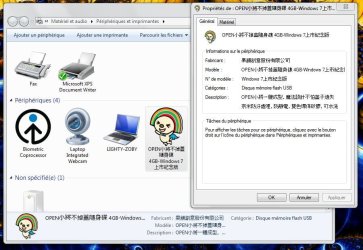
G gibald New member Local time 4:47 PM Messages 2 Oct 30, 2009 #1 Hey, look the picture attached ! It's my usb key... i think it's a little strange, don't you ? How do you think this can happen ?! Attachments usb.jpg 92.3 KB · Views: 19 My Computer OSwindows 7
Hey, look the picture attached ! It's my usb key... i think it's a little strange, don't you ? How do you think this can happen ?!
topcat1 New member Local time 5:47 PM Messages 24 Location Jax, FL Oct 30, 2009 #2 Is there an autorun.inf file on the flash drive? If there is, is there a line in the file that says "icon=<some .ico or .exe file>"? My Computer OSWindows 7 Ultimate 32-bitCPUDual Xeon E5420 2.5 GHzMotherboardIntel S5000XVNSATARMemory4GB Kingston DDR2667 FB-DIMMs (4x1GB)Graphics Card(s)ATI Radeon HD4850 1GBSound CardRealtek ALC260Monitor(s) DisplaysViewsonic VG2230wmScreen Resolution1680 x 1050Hard Drives-4 x WD Scorpio Black 250GB 7200 RPM 2.5" RAID 10 on Intel ESR2- -5 x WD Caviar Black 640GB 7200 RPM 3.5" RAID 5 on LSI 8708ELP-PSUThermaltake W0116RU 750WCaseChieftec WH-02B-BCooling2 x Noctua NH-U9DX CPU coolersKeyboardNorthgate Omnikey 102 !MouseLogitech Performance Mouse MXOther Info-Lite-ON BD-ROM Drive- -Lite-ON DVD-RW Drive- -Azio BTD-V201 Bluetooth adapter- -PCTV 801e TV Tuner-
Is there an autorun.inf file on the flash drive? If there is, is there a line in the file that says "icon=<some .ico or .exe file>"?