Strange empty Folders?

thingy

New member
Local time
2:26 AM
Messages
24
Dell XPS L702X - Windows 7 Home Premium SP1 64 Bit - IE8 - McAfee Security Center

With Hidden Files and Folders showing - in the Location C:\Users\User Name\AppData\Local - I have 58 empty Folders all with Alpha-Numeric Names such as....

{00F218BD-26FB-4C40-B58D-3E9BDE7091A6}
{1B60291D-9B78-40B1-972B-7232AEF65899}
{1CC52294-D006-48EC-8B05-893D2C7E83A5}
{2A1BF5D2-CBEC-4E51-933D-F5A1215A276D}

It would seem from their Dates that one - sometimes two - of these are created every day

There is no indication as to which Program is creating these empty Folders

Apart from Windows Updates I have not Installed any Software since getting this Laptop six weeks ago

It has been suggested to me that these Folders are something to do with McAfee or Windows Updates or use of a USB Flash Drive

Can anyone confirm any of this this?

Thanks
 

My Computer

Computer type
PC/Desktop
Computer Manufacturer/Model Number
PC SPECIALIST
OS
Windows 7 - Home Premium - 64 bit
CPU
Intel® Core™i7 Quad Core
Motherboard
ASUS® P6X58D-E: DDR3, USB 3.0, SATA 6.0GB/s, 3-Way SLI
Memory
12GB SAMSUNG DDR3 TRI-DDR3 1333MHz (3 x 4GB)
Graphics Card(s)
1GB NVIDIA GEFORCE GT 430 - DVI,HDMI,VGA
Sound Card
Sound Blaster® Audigy™ SE (£19)
Monitor(s) Displays
Samsung SyncMaster 913 TM
Screen Resolution
1281 x 1024
Hard Drives
C: 500GB SERIAL ATA 3-Gb/s

D: 500GB SERIAL ATA 3-Gb/s
PSU
450W Quiet 80 PLUS Dual Rail PSU
Case
PIANO BLACK ENIGMA CASE + 2 FRONT USB
Cooling
?SUPER QUIET 22dBA TRIPLE COPPER HEATPIPE CPU COOLER
Keyboard
Standard PS/2 Keyboard
Mouse
Microsoft USB IntelliMouse Optical (IntelliPoint)
Internet Speed
6.6 Mbps
Antivirus
Norton
Browser
IE 11
Do you have a Temp folder in the Local folder (i.e., C:\Users\User Name\AppData\Local\Temp)?
 

My Computer

OS
Win7U 64 RTM
CPU
Q9550
Motherboard
GA-EP45-UD3R
Memory
8GB Gskill
Graphics Card(s)
ASUS|EAH4850/HTDI/1GD3/A
Sound Card
xfi Plat
Monitor(s) Displays
Dell 2405fpw
Screen Resolution
1920x1200
Hard Drives
Seagate & WD sata Drives
PSU
Antec
Case
Antec
Keyboard
MS Natural Ergonomic 4000
Mouse
Logitech MX610 USB Cordless
The folders are named for registry entries.
I have no such entries on my own system nor am I familiar with the specific behavior.

Two theories are
1 - left overs from windows update
2 - left overs from a antivirus program doing something in the local folder. (possibly mcaffee?)
 

My Computer

Computer Manufacturer/Model Number
Insane hobo technologies. ;-)
OS
Windows 7 x64
CPU
Intel i7 2600k
Motherboard
Asrock z68 extreme 4 gen 3
Memory
G.skill Ripjaw 16gigs @ 1866
Graphics Card(s)
Nvidia gtx580 (evga)
Sound Card
Integrated HD audio + hdmi
Monitor(s) Displays
24" ASUS widescreen + 42" insignia
Screen Resolution
1080p (1920x1080)
Hard Drives
128 Samsung 830
256 Samsung 840
3 x 1tb storage drive (various)
1 western digital 1tb (eSATA)
1 Seagate 1tb (eSATA)
PSU
1 kilowatt SLI/Crossfire rated Silverstone modular
Case
NZXT Phantom + additional 220 fan
Cooling
Zalmann
Keyboard
Microsoft wireless 3000 (v2)
Mouse
MS - wireless 5000 (bluetrack)
Internet Speed
depends on if you ask me or my provider.
Other Info
The above information is provided as is, and the author assumes no responsibility for issues it may cause with your sanity or fanboyism.
Those folders are created every time you log in to Windows Live Messenger, and can be safely deleted at any time. I recall seeing somewhere that they are some kind of temp folder or something. If that is what they are supposed to be it would be nice if that also auto-deleted themselves after as they are always empty.
 

My Computer

Computer type
PC/Desktop
Computer Manufacturer/Model Number
Me
OS
Win 7 Ultimate x64
CPU
FX-8350 @ 4.6 GHz so far
Motherboard
Asus M5A97 EVO
Memory
ADATA XPG V1 Series Black 8GB DDR3 1600
Graphics Card(s)
Sapphire R9 270x Dual-X
Sound Card
Xonar DGX w/ Corsair Vengence 1300
Monitor(s) Displays
Acer S232HL Abid
Screen Resolution
1920x1080
Hard Drives
120 GB OCZ Vertex 3
500 GB Seagate 7200.12
PSU
Antec Earthwatts 650W Green
Case
Antec Three Hundred
Cooling
Cooler Master 212 EVO
Keyboard
Logitech G510
Mouse
Logitech G500s
Internet Speed
35000/3000
Those folders are created every time you log in to Windows Live Messenger, and can be safely deleted at any time. I recall seeing somewhere that they are some kind of temp folder or something. If that is what they are supposed to be it would be nice if that also auto-deleted themselves after as they are always empty.

Thanks for that explanation, though I am curious I have used live messenger and have no such folders.
 

My Computer

Computer Manufacturer/Model Number
Insane hobo technologies. ;-)
OS
Windows 7 x64
CPU
Intel i7 2600k
Motherboard
Asrock z68 extreme 4 gen 3
Memory
G.skill Ripjaw 16gigs @ 1866
Graphics Card(s)
Nvidia gtx580 (evga)
Sound Card
Integrated HD audio + hdmi
Monitor(s) Displays
24" ASUS widescreen + 42" insignia
Screen Resolution
1080p (1920x1080)
Hard Drives
128 Samsung 830
256 Samsung 840
3 x 1tb storage drive (various)
1 western digital 1tb (eSATA)
1 Seagate 1tb (eSATA)
PSU
1 kilowatt SLI/Crossfire rated Silverstone modular
Case
NZXT Phantom + additional 220 fan
Cooling
Zalmann
Keyboard
Microsoft wireless 3000 (v2)
Mouse
MS - wireless 5000 (bluetrack)
Internet Speed
depends on if you ask me or my provider.
Other Info
The above information is provided as is, and the author assumes no responsibility for issues it may cause with your sanity or fanboyism.
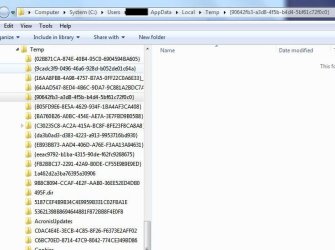
I think they may just be WU and system folders that somehow aren't making it to the Local\Temp folder, as per the screenshot of one of my machines below:

Local Temp Files.JPG


Have to run now. I'll be interested to see what it turns out to be. I don't have Live Messenger or Macafee installed. I do run MSE.
 

My Computer

OS
Win7U 64 RTM
CPU
Q9550
Motherboard
GA-EP45-UD3R
Memory
8GB Gskill
Graphics Card(s)
ASUS|EAH4850/HTDI/1GD3/A
Sound Card
xfi Plat
Monitor(s) Displays
Dell 2405fpw
Screen Resolution
1920x1200
Hard Drives
Seagate & WD sata Drives
PSU
Antec
Case
Antec
Keyboard
MS Natural Ergonomic 4000
Mouse
Logitech MX610 USB Cordless
James the folders thingy is referring to aren't in the Temp folder but in the,

C:\Users\User Name\AppData\Local

folder. You can even see one being created if you have Explorer opened to that location and you start up and sign in to Messenger.

Maguscreed, used or use? And if still use, is the latest version or an older version before this started happening?
 

My Computer

Computer type
PC/Desktop
Computer Manufacturer/Model Number
Me
OS
Win 7 Ultimate x64
CPU
FX-8350 @ 4.6 GHz so far
Motherboard
Asus M5A97 EVO
Memory
ADATA XPG V1 Series Black 8GB DDR3 1600
Graphics Card(s)
Sapphire R9 270x Dual-X
Sound Card
Xonar DGX w/ Corsair Vengence 1300
Monitor(s) Displays
Acer S232HL Abid
Screen Resolution
1920x1080
Hard Drives
120 GB OCZ Vertex 3
500 GB Seagate 7200.12
PSU
Antec Earthwatts 650W Green
Case
Antec Three Hundred
Cooling
Cooler Master 212 EVO
Keyboard
Logitech G510
Mouse
Logitech G500s
Internet Speed
35000/3000
Thanks for all your replies

I think I'll just leave them alone - although how many there will be in a couple of years time I dread to think!

Maybe I'll just delete the earliest ones every week or so
 

My Computer

Computer type
PC/Desktop
Computer Manufacturer/Model Number
PC SPECIALIST
OS
Windows 7 - Home Premium - 64 bit
CPU
Intel® Core™i7 Quad Core
Motherboard
ASUS® P6X58D-E: DDR3, USB 3.0, SATA 6.0GB/s, 3-Way SLI
Memory
12GB SAMSUNG DDR3 TRI-DDR3 1333MHz (3 x 4GB)
Graphics Card(s)
1GB NVIDIA GEFORCE GT 430 - DVI,HDMI,VGA
Sound Card
Sound Blaster® Audigy™ SE (£19)
Monitor(s) Displays
Samsung SyncMaster 913 TM
Screen Resolution
1281 x 1024
Hard Drives
C: 500GB SERIAL ATA 3-Gb/s

D: 500GB SERIAL ATA 3-Gb/s
PSU
450W Quiet 80 PLUS Dual Rail PSU
Case
PIANO BLACK ENIGMA CASE + 2 FRONT USB
Cooling
?SUPER QUIET 22dBA TRIPLE COPPER HEATPIPE CPU COOLER
Keyboard
Standard PS/2 Keyboard
Mouse
Microsoft USB IntelliMouse Optical (IntelliPoint)
Internet Speed
6.6 Mbps
Antivirus
Norton
Browser
IE 11
Back
Top