Solved Strange files showing in C:\

rundwald

New member
Member
VIP
Local time
12:33 PM
Messages
394
Location
UK, Hampshire
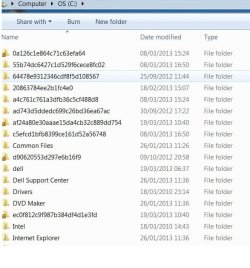
I have just moticed several items near the top of the file list when I open my hard drive. They have no extensions, and the names are such as 0a126c1e864c71c63efa64.

Should they be there nad visible, and as importantly, what are they, and do the need moving or even deleting?
I'm guessing the last will be no.
 

My Computer

Computer type
PC/Desktop
Computer Manufacturer/Model Number
Dell Inspiron 560MT
OS
Home Premium 64 bit
CPU
2.9 gigahertz Intel Core2 Duo 64 kilobyte primary memory cac
Motherboard
Board: Dell Inc. 0K83V0 A00 Serial Number: ..CN750939CP069B
Memory
4096 Megabytes Usable Installed Memory Slot 'DIMM0' has 102
Graphics Card(s)
ATI Radeon HD 4300/4500 Series
Sound Card
High Definition Audio Device NVIDIA High Definition Audio (
Monitor(s) Displays
DELL ST2210 [Monitor] (21.7"vis, s/n P479R01Q0VCU, January 2
Screen Resolution
1920x1080
Hard Drives
628.58 Gigabytes Usable Hard Drive Capacity
554.78 Gigabytes Hard Drive Free Space
Keyboard
Std Dell UK
Mouse
KEYBOARD, 105, UNITED KINGDOM, KWE9C0
Internet Speed
~8000 kbps
Antivirus
Avast Free
Browser
Chrome
Other Info
Office 2007: Photo Editing; Serif PhotoPlus X7
Can you please post a screenshot?
 

My Computer

Computer type
Laptop
Computer Manufacturer/Model Number
Employer provided Dell Latitude
OS
W7 Pro SP1 64bit
CPU
i7
Memory
8GB
Graphics Card(s)
Intel HD Graphics
Hard Drives
crappy SSD
Antivirus
Employer mandated Symantec Endpoint Protection
Browser
Pale Moon 64bit, IE11 64bit & Chrome 64bit
Just going by the name, it seems like they may be leftover directories from Windows Updates. I was thinking they normally should be cleaned up on their own, but someone else will be able to say if they are safe to manually remove.
 

My Computer

OS
Windows 7 Ultimate x64 SP1
CPU
Intel Core i7-2600
Motherboard
Gigabyte GA-P67A-UD3P-B3
Memory
12 GB Patriot Extreme DDR3-1333
Graphics Card(s)
Nvidia GTX 470
Monitor(s) Displays
Dell UltraSharp 2209WA
Hard Drives
OCZ Agility3 240 GB, WD5001AALS, WD7501AALS
PSU
OCZ ModStream 700W
Case
CoolerMaster HAF 912 Advanced
Cooling
CoolerMaster Hyper 212 Plus
Just going by the name, it seems like they may be leftover directories from Windows Updates. I was thinking they normally should be cleaned up on their own, but someone else will be able to say if they are safe to manually remove.
I was thinking that they were left over Windows Update folders too - but the info in the OP makes them sound like files (without extensions)... hence my request for a screenshot.
 

My Computer

Computer type
Laptop
Computer Manufacturer/Model Number
Employer provided Dell Latitude
OS
W7 Pro SP1 64bit
CPU
i7
Memory
8GB
Graphics Card(s)
Intel HD Graphics
Hard Drives
crappy SSD
Antivirus
Employer mandated Symantec Endpoint Protection
Browser
Pale Moon 64bit, IE11 64bit & Chrome 64bit
Just going by the name, it seems like they may be leftover directories from Windows Updates. I was thinking they normally should be cleaned up on their own, but someone else will be able to say if they are safe to manually remove.
Deacon Frost and UsernameIssues are spot on. Got some on my machine today after last weeks windows updates finally worked. Nothing to worry about. Just delete them. If they won't delete you may have to take ownership of the files. :geek:
http://www.sevenforums.com/tutorials/1911-take-ownership-shortcut.html
 

My Computer

Computer type
PC/Desktop
Computer Manufacturer/Model Number
Bluethunder II
OS
Windows 7 x64 Ultimate and numerous virtual machines
CPU
AMD FX-8350 Vishera 32nm Technology @ 4.2 GHz default
Motherboard
ASUSTeK COMPUTER INC. SABERTOOTH 990FX R2.0 (Socket 942)
Memory
G Skill 32.0GB Dual-Channel DDR3 @ 1204MHz (11-13-13-31)
Graphics Card(s)
EVGA GeForce GTX 960 4GB Super SC ACX 2.0+ with Back Plate
Sound Card
Creative X-Fi Titanium HD Audiophile PCIe
Monitor(s) Displays
LG L227WTG x 3
Screen Resolution
1680 x 1050 16:10
Hard Drives
238GB Samsung850 PRO SATA Disk Device (SSD)
1863GB Seagate ST2000DM 001-1CH164 (SATA)
1397GB Seagate ST1500DL 003-9VT16L(SATA)
466GB Western Digital WDC WD50 03AZEX-00K1GA0 (SATA) x 2
932GB Seagate ST310005 28AS SATA Disk Device (SATA)
PSU
Enermax Revolution87+ 1000 Watts Gold Certified Power Supply
Case
Rocketfish Full Tower
Cooling
Cooler Master Hyper 212 EVO Push Pull 120mm Fans
Keyboard
Logitech K740
Mouse
Logitech G100S Laser LED + Logitech Gamepad F310
Internet Speed
500 mbs down and 30mbs up
Antivirus
Malwarebytes Pro & Avast and MSE on certain Virtual Machines
Browser
Firefox (Main) Chrome, Internet Explorer (Back Up)
Other Info
Logitech X 230 2.1 Stereo System and 5.1 Yamaha RX V2090
B&W DM6 Monitor Speakers + Center and Surround Speakers
Using Mouse Without Borders (Google it)
I have just moticed several items near the top of the file list when I open my hard drive. They have no extensions, and the names are such as 0a126c1e864c71c63efa64.

Should they be there nad visible, and as importantly, what are they, and do the need moving or even deleting?
I'm guessing the last will be no.
Those must be folders. I usually get those when I update .Net Framework, install silverlight and other similar "microsoft things". When such installers are run, the setup usually extracts the contents onto the 2nd partition if available in a randomly named folder. These are usually deleted automatically after installation is complete, but sometimes remain there forever. So, they can be safely deleted.

If they are files, these can be leftovers from different applications which don't delete it themselves. These also appear when there's a system crash or something like that.

Hope this helps. :)
 
Screenshot as asked for attached. BTW since posting I have found that some contain cab files by visiting properties. I hope this addnl info will help you advice me further.
 

Attachments

  • list for forum.jpg
    list for forum.jpg
    53.1 KB · Views: 7

My Computer

Computer type
PC/Desktop
Computer Manufacturer/Model Number
Dell Inspiron 560MT
OS
Home Premium 64 bit
CPU
2.9 gigahertz Intel Core2 Duo 64 kilobyte primary memory cac
Motherboard
Board: Dell Inc. 0K83V0 A00 Serial Number: ..CN750939CP069B
Memory
4096 Megabytes Usable Installed Memory Slot 'DIMM0' has 102
Graphics Card(s)
ATI Radeon HD 4300/4500 Series
Sound Card
High Definition Audio Device NVIDIA High Definition Audio (
Monitor(s) Displays
DELL ST2210 [Monitor] (21.7"vis, s/n P479R01Q0VCU, January 2
Screen Resolution
1920x1080
Hard Drives
628.58 Gigabytes Usable Hard Drive Capacity
554.78 Gigabytes Hard Drive Free Space
Keyboard
Std Dell UK
Mouse
KEYBOARD, 105, UNITED KINGDOM, KWE9C0
Internet Speed
~8000 kbps
Antivirus
Avast Free
Browser
Chrome
Other Info
Office 2007: Photo Editing; Serif PhotoPlus X7
It won't hurt to delete them.

It won't hurt to leave them.

Your call.

As Indianatone posted earlier - you might have to take ownership if you want to get rid of them.
 

My Computer

Computer type
Laptop
Computer Manufacturer/Model Number
Employer provided Dell Latitude
OS
W7 Pro SP1 64bit
CPU
i7
Memory
8GB
Graphics Card(s)
Intel HD Graphics
Hard Drives
crappy SSD
Antivirus
Employer mandated Symantec Endpoint Protection
Browser
Pale Moon 64bit, IE11 64bit & Chrome 64bit
Thanks, guys! :) that's unneeded bumf out the way!
 

My Computer

Computer type
PC/Desktop
Computer Manufacturer/Model Number
Dell Inspiron 560MT
OS
Home Premium 64 bit
CPU
2.9 gigahertz Intel Core2 Duo 64 kilobyte primary memory cac
Motherboard
Board: Dell Inc. 0K83V0 A00 Serial Number: ..CN750939CP069B
Memory
4096 Megabytes Usable Installed Memory Slot 'DIMM0' has 102
Graphics Card(s)
ATI Radeon HD 4300/4500 Series
Sound Card
High Definition Audio Device NVIDIA High Definition Audio (
Monitor(s) Displays
DELL ST2210 [Monitor] (21.7"vis, s/n P479R01Q0VCU, January 2
Screen Resolution
1920x1080
Hard Drives
628.58 Gigabytes Usable Hard Drive Capacity
554.78 Gigabytes Hard Drive Free Space
Keyboard
Std Dell UK
Mouse
KEYBOARD, 105, UNITED KINGDOM, KWE9C0
Internet Speed
~8000 kbps
Antivirus
Avast Free
Browser
Chrome
Other Info
Office 2007: Photo Editing; Serif PhotoPlus X7
Back
Top