Solved Strange icon follows my mouse pointer

Semobill

New member
Local time
4:03 AM
Messages
3
Location
St. Louis, Missouri
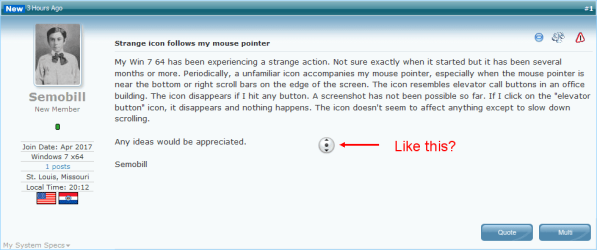
My Win 7 64 has been experiencing a strange action. Not sure exactly when it started but it has been several months or more. Periodically, a unfamiliar icon accompanies my mouse pointer, especially when the mouse pointer is near the bottom or right scroll bars on the edge of the screen. The icon resembles elevator call buttons in an office building. The icon disappears if I hit any button. A screenshot has not been possible so far. If I click on the "elevator button" icon, it disappears and nothing happens. The icon doesn't seem to affect anything except to slow down scrolling.

Any ideas would be appreciated.

Semobill
 

My Computer My Computer

Computer type
Laptop
Computer Manufacturer/Model Number
Dell 4110
OS
Windows 7 x64
Antivirus
AVG
Browser
Firefox
Hi Semobill, welcome to the Forum.

Is this button you refer to the same as the circular Windows search circle that appears when the computer is searching or working on opening a program.
 

My Computer My Computer

Computer type
PC/Desktop
Computer Manufacturer/Model Number
Self built using existing case
OS
Windows 7 Home Premium 64 bit sp1
CPU
Intel i5 3570 3.4Ghz Ivy Bridge SKT 1155 quad core
Motherboard
Gigabyte Z77-HD3 SKT 1155 2xSata 3, 4x USB 3.0
Memory
G-Skill Rip Jaws 16Gb (8x2) DDR3 -1600 PC3 12800 CL 10 red
Graphics Card(s)
Gigabyte NVIDIA GT610 1Gb DDR3 810/1200 PCI-E 2.0 Silent
Sound Card
NVIDIA High Definition & Realtech High Definition Audio
Monitor(s) Displays
2 x Philips 226V4L 16:9 aspect ratio
Screen Resolution
1920 x 1080 HD
Hard Drives
Samsung 840 Pro 256gb SSD, SATA 3.
Hitachi Touro Portable 1tb, USB 3.0 HDD used for image b/ups.
PSU
Corsair VS450
Case
Codeng
Cooling
PSU fan & CPU fan
Keyboard
Logitech
Mouse
Logitech Wireless trackball M570
Internet Speed
Wireless 3G. 3mg down & 550kb up.
Antivirus
Bitdefender Internet Security 2020
Browser
Opera (Current Version) & Firefox
Other Info
MS Office 2013 Pro. Davis weather station software. MGE Nova 600 avr UPS.
Thank you for responding, Ranger. No, I have never seen this icon before it showed up a few months ago.
 

My Computer My Computer

Computer type
Laptop
Computer Manufacturer/Model Number
Dell 4110
OS
Windows 7 x64
Antivirus
AVG
Browser
Firefox
Auto-Scroll?

Does it look (roughly) like this?
Mouse Pointer Auto-Scroll.png
Word and Internet browsers (probably other programs as well) have a feature that I call "auto-scroll".
You can click the mouse wheel button and then you can scroll by moving the mouse.

The scrolling speed is related to the distance between the mouse pointer (arrow) and the auto-scroll indicator.
The direction is controlled by which side of the auto-scroll indicator the mouse pointer is on.
 

My Computer My Computer

Computer type
PC/Desktop
Computer Manufacturer/Model Number
n/a
OS
W7 Ultimate SP1, LM19.2 MATE, W10 Home 1703, W10 Pro 1703 VM, #All 64 bit
CPU
AMD Phenom II x6 1100T, 3.3 GHz
Motherboard
ASUS M4A88T-M/USB3 (AM3)
Memory
12GB DDR3 1333 G-Skill (4GB x 2), G-Skill (2GB x 2)
Graphics Card(s)
NVIDIA GeForce GTX 660
Sound Card
Realtek?
Monitor(s) Displays
Samsung S23B350
Screen Resolution
1920x1080
Hard Drives
WD Green 2TB (SATA), WD Green 3TB (SATA), WD Blue 4TB (SATA), WD Blue 6TB (SATA)
PSU
Cooler Master
Case
Antec GX300 Tower
Cooling
3x Antec TRICOOL 120mm Fans
Mouse
Wired Optical
Internet Speed
DSL
Antivirus
Avast
Browser
Pale Moon (64 bit)
Other Info
2018-12-27 Upgraded HDDs
2015-12-10 Upgraded case, graphics card, storage
2015-08-15 Upgraded motherboard & RAM
2015-07-15 Upgraded LM17.1 to LM17.2
That button is caused by (pushing down on the scroll wheel).
Push down on it again and it should go away if the mouse wheel is working properly.

Jack
 

My Computer My Computer

Computer type
PC/Desktop
Computer Manufacturer/Model Number
Home made Desktop
OS
Windows 10 Pro. 64/ version 1709 Windows 7 Pro/64
CPU
Intel i7-6800K @ 4.3
Motherboard
ASUS X-99 Deluxe II
Memory
Corsair Platinum 16 gig @2400
Graphics Card(s)
EVGA GTX 1070 OC
Monitor(s) Displays
Asus 27" LED LCD/VE278Q
Screen Resolution
1920-1080 or 1280-720 HDMI
Hard Drives
INTEL SSD 730-240 Gb Sata 3.0/
PSU
EVGA Platium 1200W
Case
Phanteks Luxe Tempered Glass 8 fans/ one radiator
Cooling
XSPC/ Water Cooled CPU
Keyboard
Das 4 Professional
Mouse
Logitech M705/MX Anywhere 2-S
Internet Speed
100 mbits
Antivirus
Microsoft Security Essentials/ Malwarebytes Premium 3.0/ SAS
Browser
I.E. 11 default/Firefox/ ISP Time Warner Cable/Spectrum
Other Info
LG BluRay Burner/
Sound system-KLipsch-THX/
Icy Dock ssd Hot Swap bays.
lehnerus2000
You may have solved the problem for me. Firefox indeed has an autoscroll option. I have unchecked that box and rebooted the laptop. So far it is good. I will watch it for a couple of days. If it holds up, I will close out this thread as solved.

Thanks so much. It was a maddening glitch!

Semobill
 

My Computer My Computer

Computer type
Laptop
Computer Manufacturer/Model Number
Dell 4110
OS
Windows 7 x64
Antivirus
AVG
Browser
Firefox
Back
Top