
Strange Issue with Media Player

Mark

AKA Mr GRiM
Guru
Gold Member
VIP
Local time
8:35 PM
Messages
4,282
Location
QLD, Cairns
For some reason at random times my music stops and I get this error message pop up "An audio device was disconnected or reconfigured. Verify that the audio device is connected, and then try to play the item again." So I close that window and when I try to resume it goes to a new track, sometimes it will happen allot and sometimes it doesn't happen for a day or 2.
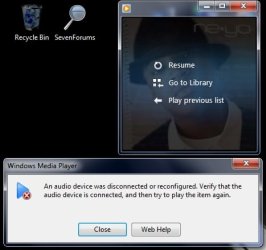
2009-05-11_020638.jpg

I didn't have the problem on build 7068 but with the last two builds including the RC, I have and wanted to know if it was just me or has anyone else seen this problem and maybe a reason for this.
 

My Computer

Computer Manufacturer/Model Number
Home Brew
OS
Windows 7 Ultimate Vista Ultimate x64
CPU
Core 2 Duo E8500 3.16Ghz @ 3.8Ghz
Motherboard
eVGA 750i FTW
Memory
2x2Gigs Patriot PC2-6400 LL
Graphics Card(s)
Inno3D GeForce GTX260 216 SP
Monitor(s) Displays
ASUS VW222U 22" 2ms Response time
Screen Resolution
1680x1050
Hard Drives
SATA 150GB
SATA II 250GB
USB IDE 750GB Ext.
PSU
HYTEC 600W & Thermaltake 650W Toughpower Power Exp
Case
Thermaltake Armor LCS (Liquid Cooling System)
Cooling
Liquid Cooling System
Keyboard
Logitech G15 Gaming Keyboard
Mouse
Logitech G9 Gaming Mouse
I haven't had any issues with Media Player, and I usually have it playing constantly all night.

I'm guessing you already made sure you had the latest driver for your sound card?
 

My Computer

Computer Manufacturer/Model Number
HP Pavillion dv2550se
OS
Windows 7 Build 7229 x64
CPU
Intel Core2 Duo T5250 @ 1.50GHz
Memory
2GB DDR2
Graphics Card(s)
Moble Intel 965 Express
Screen Resolution
1280x800
Hard Drives
160GB
750GB External
That generally happens when the file becomes inaccessible, even temporarily. Happens to me when my lan connection resets for instance. Where are the music files you're playing?
 

My Computer

OS
Windows 7077
You may be on to something there 12eason, I used the library function to include my external HDD storage, so I didn't have to keep adding it to my music folder every time I did a new install. I do have a second internal one with Vista on it and the library there is complete as well so maybe I will start using that and see if it happens again.

+Rep
 

My Computer

Computer Manufacturer/Model Number
Home Brew
OS
Windows 7 Ultimate Vista Ultimate x64
CPU
Core 2 Duo E8500 3.16Ghz @ 3.8Ghz
Motherboard
eVGA 750i FTW
Memory
2x2Gigs Patriot PC2-6400 LL
Graphics Card(s)
Inno3D GeForce GTX260 216 SP
Monitor(s) Displays
ASUS VW222U 22" 2ms Response time
Screen Resolution
1680x1050
Hard Drives
SATA 150GB
SATA II 250GB
USB IDE 750GB Ext.
PSU
HYTEC 600W & Thermaltake 650W Toughpower Power Exp
Case
Thermaltake Armor LCS (Liquid Cooling System)
Cooling
Liquid Cooling System
Keyboard
Logitech G15 Gaming Keyboard
Mouse
Logitech G9 Gaming Mouse
Well that was not the problem, I started using the Vista Partition to play my music from but it still randomly stops for no good reason, can anyone else come up with anything that might point me in the right direction.
 

My Computer

Computer Manufacturer/Model Number
Home Brew
OS
Windows 7 Ultimate Vista Ultimate x64
CPU
Core 2 Duo E8500 3.16Ghz @ 3.8Ghz
Motherboard
eVGA 750i FTW
Memory
2x2Gigs Patriot PC2-6400 LL
Graphics Card(s)
Inno3D GeForce GTX260 216 SP
Monitor(s) Displays
ASUS VW222U 22" 2ms Response time
Screen Resolution
1680x1050
Hard Drives
SATA 150GB
SATA II 250GB
USB IDE 750GB Ext.
PSU
HYTEC 600W & Thermaltake 650W Toughpower Power Exp
Case
Thermaltake Armor LCS (Liquid Cooling System)
Cooling
Liquid Cooling System
Keyboard
Logitech G15 Gaming Keyboard
Mouse
Logitech G9 Gaming Mouse
Back
Top