Solved Strange keyboard disconnecting

If your keyboard is lighted then power draw is what differentiates those items from your others. Theoretically your motherboard should be able to handle the power requirements if you used all your usb ports at once, but then again nobody does that and in fact you are putting a higher power strain on your usb ports than most people. If nothing else solves this after trying everything like drivers and power settings, a pci-e usb card that has an external power cord for extra amps may be the way to go...

Amazon.com: Feb Smart PCI Express(PCIe) 4 Ports USB 3.0 Expansion Card for Windows XP,7,Vista,8,8.1,10 Desktop Computer- Super Fast 5Gbps Data Speed-2Ampere on Board Power and 10A Max SATA Power Supply (FS-U4): Gateway

I've seen a lot of coming-out-of-hibernation problems that had to do with the simultaneous windows requirement of being able to reload the driver out of memory AND powering up the device immediately, both at the same time. I would bet that if windows had a coming-out-of-hibernation option (it doesn't) of sending power to all devices for 3 seconds PRIOR to reloading memory from disk, problems like yours would go away. But right now windows is sometimes trying to load a driver to a device that is not yet electrically stabilized. That's my theory anyway.
I think you've just solved this mystery.
My keyboard does is indeed a lighted one, and additionally, my USB headset has an external sound card, both of which I assume would require high amounts of power and would need time to power up before any drivers could be loaded. Those devices are the only devices I experience this issue with, all other USB devices do not seem to be affected during the first few minutes after resuming from hibernation.


So it appears this is a Windows bug then. Unless we can get Microsoft to notice this issue and release and update, it doesn't look like there's anything I can do. I'll mark this as solved.
 

My Computer

Computer type
PC/Desktop
Computer Manufacturer/Model Number
Custom Build
OS
Windows 7 Home Premium
CPU
Intel Core i7-4790K
Motherboard
MSI
Memory
16 GB of RAM
Graphics Card(s)
nVidia GeForce GTX 970
Hard Drives
2 Terabytes of Storage
Antivirus
Kaspersky Internet Security
Browser
Firefox
with all those usb devices I'm guessing you are not on a laptop, so there is really no benefit to hibernate versus standby. In hibernate windows empties memory to disk and turns everything off, in standby windows keeps memory alive and turns everything else off. This means standby resumes more quickly AND the drivers are all in memory already so issues like yours tend not to happen. To swap in the standby function instead of hibernate simply disable hibernation by doing start > run > powercfg.exe /hibernate off > then press enter.
 

My Computer

Computer type
PC/Desktop
Computer Manufacturer/Model Number
diy
OS
Win7 pro x64
CPU
stock i7 7700k
Motherboard
Gigabyte Z270N-WIFI mini-ITX
Memory
Corsair Vengeance LPX 16GB (2x8GB) DDR4 @ 3200MHz
Graphics Card(s)
integrated Intel HD 630
Sound Card
onboard Realtek ALC1220
Monitor(s) Displays
two vertically mounted samsung 55" 4k un55mu8000
Screen Resolution
1920x1280
Hard Drives
256GB Samsung EVO 960 M.2 pci-e NVMe SSD
PSU
SilverStone Nightjar ST45NF 450Watt Fanless
Case
No case. Motherboard is mounted directly onto power supply
Cooling
Evercool low profile 815EP with Panaflow 12L fan at 7v
Keyboard
Ortek MCK-86 mini
Mouse
Belkin 5-button USB
Internet Speed
spectrum 400mbps
with all those usb devices I'm guessing you are not on a laptop, so there is really no benefit to hibernate versus standby. In hibernate windows empties memory to disk and turns everything off, in standby windows keeps memory alive and turns everything else off. This means standby resumes more quickly AND the drivers are all in memory already so issues like yours tend not to happen. To swap in the standby function instead of hibernate simply disable hibernation by doing start > run > powercfg.exe /hibernate off > then press enter.
Yes, I am using a desktop. There are multiple reasons why I choose to use Hibernate over Hyper Sleep or Standby despite using a desktop.
Also IIRC powercfg hibernate off actually just enables Hyper Sleep and hides the options for Standby and Hibernate.
 

My Computer

Computer type
PC/Desktop
Computer Manufacturer/Model Number
Custom Build
OS
Windows 7 Home Premium
CPU
Intel Core i7-4790K
Motherboard
MSI
Memory
16 GB of RAM
Graphics Card(s)
nVidia GeForce GTX 970
Hard Drives
2 Terabytes of Storage
Antivirus
Kaspersky Internet Security
Browser
Firefox
powercfg hibernate off disables both hibernate and hybrid sleep, leaving only standby.
 

My Computer

Computer type
PC/Desktop
Computer Manufacturer/Model Number
diy
OS
Win7 pro x64
CPU
stock i7 7700k
Motherboard
Gigabyte Z270N-WIFI mini-ITX
Memory
Corsair Vengeance LPX 16GB (2x8GB) DDR4 @ 3200MHz
Graphics Card(s)
integrated Intel HD 630
Sound Card
onboard Realtek ALC1220
Monitor(s) Displays
two vertically mounted samsung 55" 4k un55mu8000
Screen Resolution
1920x1280
Hard Drives
256GB Samsung EVO 960 M.2 pci-e NVMe SSD
PSU
SilverStone Nightjar ST45NF 450Watt Fanless
Case
No case. Motherboard is mounted directly onto power supply
Cooling
Evercool low profile 815EP with Panaflow 12L fan at 7v
Keyboard
Ortek MCK-86 mini
Mouse
Belkin 5-button USB
Internet Speed
spectrum 400mbps
powercfg hibernate off disables both hibernate and hybrid sleep, leaving only standby.
Nope, it disables Hibernate and Standby, but not Hyper Sleep. But for whatever reason, Windows 7 doesn't actually have a menu string for Hyper Sleep so it just calls it Standby. But if you click on the option, you can see by how long it takes that it is definitely Hyper Sleep.


I enabled Hibernate on this PC, and after doing that, clicking the Standby option puts the PC in standby almost immediately, compared to having turned off Hibernate.
 

My Computer

Computer type
PC/Desktop
Computer Manufacturer/Model Number
Custom Build
OS
Windows 7 Home Premium
CPU
Intel Core i7-4790K
Motherboard
MSI
Memory
16 GB of RAM
Graphics Card(s)
nVidia GeForce GTX 970
Hard Drives
2 Terabytes of Storage
Antivirus
Kaspersky Internet Security
Browser
Firefox
Nope, it disables Hibernate and Standby, but not Hyper Sleep. But for whatever reason, Windows 7 doesn't actually have a menu string for Hyper Sleep so it just calls it Standby. But if you click on the option, you can see by how long it takes that it is definitely Hyper Sleep. .
The write-up here by Brink is very helpful
Hibernate - Enable or Disable

Hyper Sleep is not a thing. There is Hybrid Sleep, which I assume you must have meant.

To summarize the relevant part of Brink's write-up, which restates my point that you are disagreeing with, disabling hibernation also disables hybrid sleep, which makes sense because hybrid sleep requires the same hiberfil.sys file that is needed for hibernation. Similarly enabling hibernate also creates the user options of hibernate and hybrid sleep. Standby, the fastest sleep state, is always available.

You must have your sleep button set to hibernate or hybrid sleep. So then when you disable hibernation the sleep button goes back to the default, which is standby, the only sleep state available when hibernate is disabled.

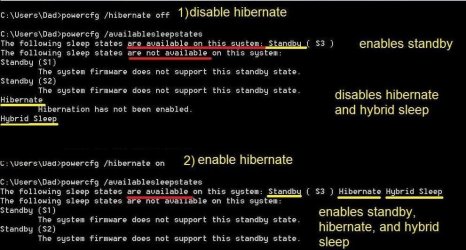
Another way to prove this same point is by using the CMD window commands for hibernate and available sleep states. I did it on my machine then made a couple notes in yellow to show what is going on. I could have done this by using the advanced power settings menu but it would have taken too many screenshots.
 

Attachments

  • Clipboard.jpg
    Clipboard.jpg
    75.4 KB · Views: 0

My Computer

Computer type
PC/Desktop
Computer Manufacturer/Model Number
diy
OS
Win7 pro x64
CPU
stock i7 7700k
Motherboard
Gigabyte Z270N-WIFI mini-ITX
Memory
Corsair Vengeance LPX 16GB (2x8GB) DDR4 @ 3200MHz
Graphics Card(s)
integrated Intel HD 630
Sound Card
onboard Realtek ALC1220
Monitor(s) Displays
two vertically mounted samsung 55" 4k un55mu8000
Screen Resolution
1920x1280
Hard Drives
256GB Samsung EVO 960 M.2 pci-e NVMe SSD
PSU
SilverStone Nightjar ST45NF 450Watt Fanless
Case
No case. Motherboard is mounted directly onto power supply
Cooling
Evercool low profile 815EP with Panaflow 12L fan at 7v
Keyboard
Ortek MCK-86 mini
Mouse
Belkin 5-button USB
Internet Speed
spectrum 400mbps
The write-up here by Brink is very helpful
Hibernate - Enable or Disable

Hyper Sleep is not a thing. There is Hybrid Sleep, which I assume you must have meant.

To summarize the relevant part of Brink's write-up, which restates my point that you are disagreeing with, disabling hibernation also disables hybrid sleep, which makes sense because hybrid sleep requires the same hiberfil.sys file that is needed for hibernation. Similarly enabling hibernate also creates the user options of hibernate and hybrid sleep. Standby, the fastest sleep state, is always available.

You must have your sleep button set to hibernate or hybrid sleep. So then when you disable hibernation the sleep button goes back to the default, which is standby, the only sleep state available when hibernate is disabled.

Another way to prove this same point is by using the CMD window commands for hibernate and available sleep states. I did it on my machine then made a couple notes in yellow to show what is going on. I could have done this by using the advanced power settings menu but it would have taken too many screenshots.
Huh... That's strange. My system has "Hibernate" and "Sleep" options when Hibernate is turned on, which initiate hibernation and stand-by respectively. When I turn Hibernation off, I have a single "Sleep" option that definitely initiates Hybrid Sleep. So I have no idea what's' going on with my system, could be another issue as I'm having a lot of weird things going on with my system lately (time for a re-install?)
 

My Computer

Computer type
PC/Desktop
Computer Manufacturer/Model Number
Custom Build
OS
Windows 7 Home Premium
CPU
Intel Core i7-4790K
Motherboard
MSI
Memory
16 GB of RAM
Graphics Card(s)
nVidia GeForce GTX 970
Hard Drives
2 Terabytes of Storage
Antivirus
Kaspersky Internet Security
Browser
Firefox
it sounds like your standby sleep option is just taking a long time for some reason, I do not think windows could possibly allow hybrid sleep to happen with hibernate off. Maybe you could try doing powercfg hibernate off and then powercfg availablesleepstates and see what it says, like the second half of my screesnhot from two posts ago.


Bonus points to you if you can post a screenshot that shows hybrid sleep ENabled while hibernate is DISabled!
 

My Computer

Computer type
PC/Desktop
Computer Manufacturer/Model Number
diy
OS
Win7 pro x64
CPU
stock i7 7700k
Motherboard
Gigabyte Z270N-WIFI mini-ITX
Memory
Corsair Vengeance LPX 16GB (2x8GB) DDR4 @ 3200MHz
Graphics Card(s)
integrated Intel HD 630
Sound Card
onboard Realtek ALC1220
Monitor(s) Displays
two vertically mounted samsung 55" 4k un55mu8000
Screen Resolution
1920x1280
Hard Drives
256GB Samsung EVO 960 M.2 pci-e NVMe SSD
PSU
SilverStone Nightjar ST45NF 450Watt Fanless
Case
No case. Motherboard is mounted directly onto power supply
Cooling
Evercool low profile 815EP with Panaflow 12L fan at 7v
Keyboard
Ortek MCK-86 mini
Mouse
Belkin 5-button USB
Internet Speed
spectrum 400mbps
it sounds like your standby sleep option is just taking a long time for some reason, I do not think windows could possibly allow hybrid sleep to happen with hibernate off. Maybe you could try doing powercfg hibernate off and then powercfg availablesleepstates and see what it says, like the second half of my screesnhot from two posts ago.


Bonus points to you if you can post a screenshot that shows hybrid sleep ENabled while hibernate is DISabled!
Defintely not, it takes about 10 seconds with hibernate on to enter standby, but with it off, it takes around a minute. Also, with Hibernate off & pressing Standby, I can unplug the PC from hybrid sleep and plug it back in and it will still resume, proving that Hybrid Sleep was on. This behavior is not shown with Hibernate on and pressing the Standby button, where my computer will just boot with a "Windows was not shut down correctly" message.


However, interestingly, my CMD results are the same as your screenshot. However, I don't remember toggling hibernate the same way as you did here when I first turned hibernate on a few years ago. I have a feeling that I only toggled the menu options for Hibernate and Hybrid Sleep, meaning Hibernate would have been already enabled but hidden, and toggling the Hibernate option also made the Standby button actually go into standby and not Hybrid Sleep for whatever reason.
 

My Computer

Computer type
PC/Desktop
Computer Manufacturer/Model Number
Custom Build
OS
Windows 7 Home Premium
CPU
Intel Core i7-4790K
Motherboard
MSI
Memory
16 GB of RAM
Graphics Card(s)
nVidia GeForce GTX 970
Hard Drives
2 Terabytes of Storage
Antivirus
Kaspersky Internet Security
Browser
Firefox
start > run > powercfg.cpl > select power plan > change advanced settings will take you to your current power option selections where you can see what you have currently selected for both Sleep Options and for the Sleep Button (which is listed under Power Buttons and Lid)
 

My Computer

Computer type
PC/Desktop
Computer Manufacturer/Model Number
diy
OS
Win7 pro x64
CPU
stock i7 7700k
Motherboard
Gigabyte Z270N-WIFI mini-ITX
Memory
Corsair Vengeance LPX 16GB (2x8GB) DDR4 @ 3200MHz
Graphics Card(s)
integrated Intel HD 630
Sound Card
onboard Realtek ALC1220
Monitor(s) Displays
two vertically mounted samsung 55" 4k un55mu8000
Screen Resolution
1920x1280
Hard Drives
256GB Samsung EVO 960 M.2 pci-e NVMe SSD
PSU
SilverStone Nightjar ST45NF 450Watt Fanless
Case
No case. Motherboard is mounted directly onto power supply
Cooling
Evercool low profile 815EP with Panaflow 12L fan at 7v
Keyboard
Ortek MCK-86 mini
Mouse
Belkin 5-button USB
Internet Speed
spectrum 400mbps
Back
Top