Solved Keyboard keeps disconnecting

BuliOracle

New member
Local time
9:12 PM
Messages
5
I have searched intesively for a solution to this problem, but no thread quite helped it. I have and older custom build gaming pc that has slowed down lately. I reinstalled windows (clean instalation) and it worked for a while and now it slows down again ( startup is really slow for the ammount of programs installed on the pc) . My problem is that sometimes my wired keyboard randomly disconnects, lagging my computer for a brief moment and then it reconnects. If i am in a game after the keyboard reconnects i have to pres the button i was pressing when it disconnected for it to register again ( button remains pressed after the disconnect). Could anyone help me with this.

I have already tried the following
-Change the usb ports to see if it is a usb power shortage ( mouse workes fine on any usb, the keyboard disconnects on any usb)
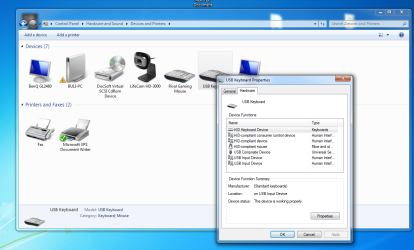
-Disable the disconnecting for power saving by windows ( in the devices->usb keyboard properties i have about 7 device functions: HID Keyboard device, HID compliant mouse, 2 identical USB Input devices with the exact same location "0000.001d.0000.001.006.000.000.000.000", a HID Compliant consumer control device and a USB Composite device so i do not really know wich one to disable or enable :shock:)


As i said the other devices are working properly and i really think this is a software issue because of the huge clog of functions each device has. I perofrmed the windows install under a month ago and everything is up to date. My keyboard is a NateC Genesis A33, with no driver or anything else for that matter. I wonder if it is not a problem from my SteelSeries Rival Gaming mouse as i started to get theese issues since i installed it's drivers. I would preffer to not uninstall the drivers for the mouse as there may be another quicker and easier fix.
 

My Computer

Computer type
PC/Desktop
Computer Manufacturer/Model Number
custom build
OS
windows 7 Ultimate x64
CPU
intel i3-4130
Memory
2x 4 gb Hyper x blue memory
Graphics Card(s)
Gigabyte gtx 650 2gb OC Edition
Hard Drives
1x HHD Seagate 600gb
Antivirus
Malwarebytes and Avast (both free)
Browser
Chrome, Mozilla
Can you try another USB keyboard to determine it is not at fault?

One cool thing to have in your toolbox is a copy of Tool/wiz TimeFreeze

It is free and is a good way to test things if you want to keep your system the same after the test. After install let is sit in the tray. When you need it, open the window from the Tray Icon and activate it. Install/Uninstall programs, drivers, whatever to see what happens. To undo all changes just reboot.
 

My Computer

Computer Manufacturer/Model Number
HP Media Center
OS
Windows 7 32 bit
CPU
AMD 5200+ dual core
Memory
2 GB
Graphics Card(s)
NVidia GeForce 6150SE 128 MB
Monitor(s) Displays
CRT
Screen Resolution
1280x1024
Hard Drives
500 GB Sata internal :

SIIG USB 3.0 docking stations w/WD Caviar Black 6 Gb/s drives
Keyboard
PS/2
Mouse
PS/2 Wheel Mouse
Other Info
SIIG USB 3.0 PCIexpress card.
The mouse and the keyboards both have numerous drivers in the device funcitons ( ctrl panel->Devices and printers->mouse/keyboard->hardware ). I have never seen this. Even with the steelseries engine being uninstalled ( mouse software) the peripherals still have an ungodly amount of device funcitons. HID's , USB Input device that repeat themselfes 4-5 times. When i uninstall 1 nothing happens, but when i remove all of them the keyboard/mouse doesn't work. I really don't know what to do with them. I want only the keyboard to work, no software, the original windows keyboard driver and that's all. Can someone help me and tell me wich of the drivers are ghosts?
 

My Computer

Computer type
PC/Desktop
Computer Manufacturer/Model Number
custom build
OS
windows 7 Ultimate x64
CPU
intel i3-4130
Memory
2x 4 gb Hyper x blue memory
Graphics Card(s)
Gigabyte gtx 650 2gb OC Edition
Hard Drives
1x HHD Seagate 600gb
Antivirus
Malwarebytes and Avast (both free)
Browser
Chrome, Mozilla
Try uninstalling them all in safe mode, then reboot. See if Windows will only install the basic driver then.
 

My Computer

Computer Manufacturer/Model Number
HP Media Center
OS
Windows 7 32 bit
CPU
AMD 5200+ dual core
Memory
2 GB
Graphics Card(s)
NVidia GeForce 6150SE 128 MB
Monitor(s) Displays
CRT
Screen Resolution
1280x1024
Hard Drives
500 GB Sata internal :

SIIG USB 3.0 docking stations w/WD Caviar Black 6 Gb/s drives
Keyboard
PS/2
Mouse
PS/2 Wheel Mouse
Other Info
SIIG USB 3.0 PCIexpress card.
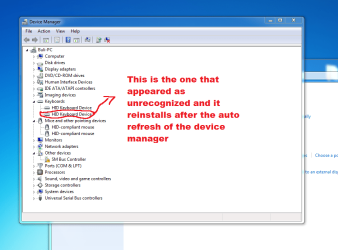
Yep, it installs the same. It installes 2 drivers for each peripheral ( mouse/keyboard). I have w HID-compliant mouse in mice and other pointing devices and 1 HID Keyboard and another Unknown device that was a HID keyboard too until i uninstalled the driver. Wich one is the unecessary one because i cannot see a difference between the 2


***UPDATE***
If i uninstall one of the HID Keyboard device drivers under keyboards section in device manager, it reapears after the device manager refreshes. If i uninstall the first one the keyboard doesnt work xD
 
Last edited:

My Computer

Computer type
PC/Desktop
Computer Manufacturer/Model Number
custom build
OS
windows 7 Ultimate x64
CPU
intel i3-4130
Memory
2x 4 gb Hyper x blue memory
Graphics Card(s)
Gigabyte gtx 650 2gb OC Edition
Hard Drives
1x HHD Seagate 600gb
Antivirus
Malwarebytes and Avast (both free)
Browser
Chrome, Mozilla
Please post a screen shot of Device Manager showing the duplicates.
 

My Computer

Computer Manufacturer/Model Number
HP Media Center
OS
Windows 7 32 bit
CPU
AMD 5200+ dual core
Memory
2 GB
Graphics Card(s)
NVidia GeForce 6150SE 128 MB
Monitor(s) Displays
CRT
Screen Resolution
1280x1024
Hard Drives
500 GB Sata internal :

SIIG USB 3.0 docking stations w/WD Caviar Black 6 Gb/s drives
Keyboard
PS/2
Mouse
PS/2 Wheel Mouse
Other Info
SIIG USB 3.0 PCIexpress card.
Here is the device manager and how the properties for the keyboard look. It's the same ( if even more drivers) for the mouse
 

Attachments

  • dev mgr.png
    dev mgr.png
    50.5 KB · Views: 1
  • drivers.png
    drivers.png
    96 KB · Views: 2

My Computer

Computer type
PC/Desktop
Computer Manufacturer/Model Number
custom build
OS
windows 7 Ultimate x64
CPU
intel i3-4130
Memory
2x 4 gb Hyper x blue memory
Graphics Card(s)
Gigabyte gtx 650 2gb OC Edition
Hard Drives
1x HHD Seagate 600gb
Antivirus
Malwarebytes and Avast (both free)
Browser
Chrome, Mozilla

My Computer

Computer Manufacturer/Model Number
HP Media Center
OS
Windows 7 32 bit
CPU
AMD 5200+ dual core
Memory
2 GB
Graphics Card(s)
NVidia GeForce 6150SE 128 MB
Monitor(s) Displays
CRT
Screen Resolution
1280x1024
Hard Drives
500 GB Sata internal :

SIIG USB 3.0 docking stations w/WD Caviar Black 6 Gb/s drives
Keyboard
PS/2
Mouse
PS/2 Wheel Mouse
Other Info
SIIG USB 3.0 PCIexpress card.
I think i just fixed my problem. The usb was turning off because of a software problem and the mouse did not dissconnect because it uses less power than the keyboard. Thank you for the help ^^
 

My Computer

Computer type
PC/Desktop
Computer Manufacturer/Model Number
custom build
OS
windows 7 Ultimate x64
CPU
intel i3-4130
Memory
2x 4 gb Hyper x blue memory
Graphics Card(s)
Gigabyte gtx 650 2gb OC Edition
Hard Drives
1x HHD Seagate 600gb
Antivirus
Malwarebytes and Avast (both free)
Browser
Chrome, Mozilla
Ok, glad it is resolved. :)
 

My Computer

Computer Manufacturer/Model Number
HP Media Center
OS
Windows 7 32 bit
CPU
AMD 5200+ dual core
Memory
2 GB
Graphics Card(s)
NVidia GeForce 6150SE 128 MB
Monitor(s) Displays
CRT
Screen Resolution
1280x1024
Hard Drives
500 GB Sata internal :

SIIG USB 3.0 docking stations w/WD Caviar Black 6 Gb/s drives
Keyboard
PS/2
Mouse
PS/2 Wheel Mouse
Other Info
SIIG USB 3.0 PCIexpress card.
I think i just fixed my problem. The usb was turning off because of a software problem and the mouse did not dissconnect because it uses less power than the keyboard. Thank you for the help ^^
So, how exactly did you fix your problem?
 

My Computer

Computer type
PC/Desktop
OS
Windows 7 x64
I have had USB fail on two computers in the past 10 years. This caused the keyboard and mouse to quit working. Fortunately both computers had PS/2 keyboard and mouse ports, so I scrounged up a PS/2 keyboard and mouse, powered down, plugged them in, and powered up. The PS/2 keyboard and mouse worked perfectly.

In both cases, having a working keyboard and mouse allowed me to easily troubleshoot and fix the USB problem. I didn't have a good backup in either case, so I would have had a serious problem had I not had PS/2 ports on the computers.

If by chance your computer has a PCI slot (it might, because it is "older"), you could get something like this to add PS/2 keyboard and mouse ports:

http://www.ebay.com/itm/PCI-32bit-D...use-PCI-2Ports-PS-2-without-USB-/181671723885

I have heard that gamers prefer PS/2 keyboards, because there is less latency with them than with USB keyboards.
 

My Computer

Computer type
PC/Desktop
Computer Manufacturer/Model Number
Dell
OS
Linux Mint 18.2 xfce 64-bit (VMWare host) / Windows 8.1 Pro 32-bit (VMWare guest)
CPU
Haswell
Memory
4 GB
Monitor(s) Displays
Acer 23"
Screen Resolution
1920 x 1080
Hard Drives
Two hard drives, 1TB each: One for Linux, one for my data.
Keyboard
IBM Model M
Antivirus
Sophos (Linux), Trend Micro (Windows)
Browser
Firefox, Opera
Other Info
I use Samba to share my data drive with the other computers at my house and with my guest session in VMWare Workstation Player.
Back
Top