
Hello, I wonder if somebody could help me.
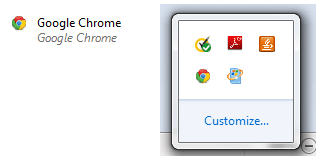
Yesterday my laptop sort of crashed as it does sometimes, I forced a reboot and when I got it back on noticed there was an odd looking Chrome logo in my icon tray. It may have been there before but this is when I noticed it. I also noticed my Norton was turned off, as I went to do a scan, and couldn't turn on Norton nor Windows Defender.
I decided to see if I could uninstall Chrome but it had disappeared from the control panel, I also noticed Norton had vanished too. I downloaded Avast to scan the laptop and no problems were found. This also downloaded Chrome apparently, which then appeared in the control panel. I uninstalled Avast and then the Chrome which had appeared. I went through my program files and users folder to delete what I could find of Google Chrome. I ran Norton Removal Tool and then reinstalled my AV along with reinstalling Chrome.
Prior to this, I had also noticed that the Chrome logo had been appearing next to something else in the icon tray, same with Skype. I searched for how to reset this? I think I found the solution to that on this forum somewhere in fact. Anyway, it fixed it then I did the whole reinstalling Norton and Chrome bit.
Well, I'm troubled by all this as well as the fact the weird Chrome logo is back. The one on my desktop and start menu looks like the real one, but not in the icon tray. I've also had a pop up that says 'catalyst control center has stopped working'. I believe that's linked to AMD? Anyway, before I go ahead and try to sort that, I wanted to ask opinions on what might be going on with my laptop. I've added a screenshot of the odd Chrome logo.
Thank you and apologies for the long post.
Yesterday my laptop sort of crashed as it does sometimes, I forced a reboot and when I got it back on noticed there was an odd looking Chrome logo in my icon tray. It may have been there before but this is when I noticed it. I also noticed my Norton was turned off, as I went to do a scan, and couldn't turn on Norton nor Windows Defender.
I decided to see if I could uninstall Chrome but it had disappeared from the control panel, I also noticed Norton had vanished too. I downloaded Avast to scan the laptop and no problems were found. This also downloaded Chrome apparently, which then appeared in the control panel. I uninstalled Avast and then the Chrome which had appeared. I went through my program files and users folder to delete what I could find of Google Chrome. I ran Norton Removal Tool and then reinstalled my AV along with reinstalling Chrome.
Prior to this, I had also noticed that the Chrome logo had been appearing next to something else in the icon tray, same with Skype. I searched for how to reset this? I think I found the solution to that on this forum somewhere in fact. Anyway, it fixed it then I did the whole reinstalling Norton and Chrome bit.
Well, I'm troubled by all this as well as the fact the weird Chrome logo is back. The one on my desktop and start menu looks like the real one, but not in the icon tray. I've also had a pop up that says 'catalyst control center has stopped working'. I believe that's linked to AMD? Anyway, before I go ahead and try to sort that, I wanted to ask opinions on what might be going on with my laptop. I've added a screenshot of the odd Chrome logo.
Thank you and apologies for the long post.
Attachments
My Computer
At a glance
Windows 7AMD
- Computer type
- Laptop
- Computer Manufacturer/Model Number
- HP Pavilion g series
- OS
- Windows 7
- CPU
- AMD
- Mouse
- Logitech
- Antivirus
- Norton Security
- Browser
- Chrome & Firefox


