Solved strange problem in notification area icons?

prukeyhi

New member
Power User
VIP
Local time
4:14 AM
Messages
224
Location
Haifa-IL
Hi all :D
I noticed on my laptop if i add more then 4 icons to notification area (show icons and notifications),
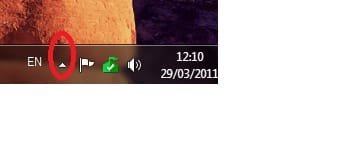
when adding the 5th icon ->the "show hidden icons" icon (the small up arrow like in the photo ) disappear ! .
when i remove the 5th icon from notification area,
then the "show hidden icons" icon appears back.
-i tried to lock/unlock the task bar it did not help.
-i noticed on my other PC ->same happens but with the 6th icon...
1-is it a known issue?
2-is there a tweak to increase numbers (more then 5) on notification area without loosing the "show hidden icons" icon?
Thanks!
 

Attachments
  • Untitled.jpg
    Untitled.jpg
    5 KB · Views: 19

My Computer

Computer type
PC/Desktop
OS
98SE/XP/windows7 32bit/ win10

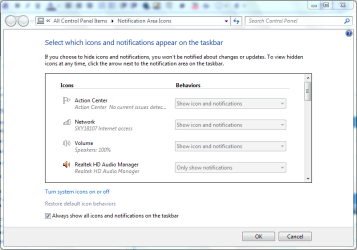
In the taskbar properties, (I always unlock the taskbar when customising it), Customize... (or Control Panel\All Control Panel Items\Notification Area Icons), you can check the box by "Always show all icons and notifications on the taskbar", or select which ones you want to show or hide from the options for each icon above. Mine shows 8 icons and the time at the moment, but no little chevron, because none are hidden.

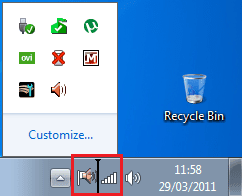
Yet another way to customize the notification area is by clicking on the "hidden" "<" chevron and selecting "customize" at the bottom of the icon selection box. No doubt there's a group policy and registry hack too :)
 
Last edited:

My Computer

Computer Manufacturer/Model Number
Acer 7520, Packard Bell dot se, Acer travelmate 2423
OS
Win 7 Ult + Starter, XP Pro +Home, 2kAS, Linux Mint 8, SuperOS
CPU
AMD 64 Athlon X2 , Intel Atom N450, Intel Celeron M 1.50 Ghz
Motherboard
Acer Fuquene
Memory
2.5GB ; 1GB; 2GB
Graphics Card(s)
Nvidia GeForce7000m; Intel; Intel
Sound Card
Realtek AC57
Monitor(s) Displays
17" ;10.1"; 19"
Screen Resolution
1440x900;1024x600;1440x900;
Hard Drives
WD 80, WD 320;
PSU
19v
Case
Laptop
Cooling
Air
Internet Speed
9.7Mb/s down 0.99Mb/s up
Other Info
ISP VIRGINMEDIA 10M cable broadband - D-Link DIR615 wireless router, 3Com OfficeConnect ASDL router used as wireless extender switch
Last edited by a moderator:

My Computer

OS
Several, including Windows 7 x64 Ultimate
Hi fafhrd,
if i check the box by "Always show all icons and notifications on the taskbar" i do not see the "show hidden icons" icon
since there are more then 4 notification area icons ....
 

My Computer

Computer type
PC/Desktop
OS
98SE/XP/windows7 32bit/ win10
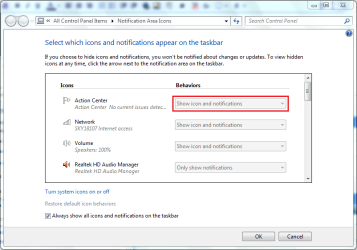
There are some odd issues with the notification area. Use CCleaner and tick the box "Tray Notifications Cache"


Run cleaner and this will clear and reinitialise the notifications/icon cache. You have to restart explorer after doing this, or it wont work.

This utility is very convenient for that;

http://www.sevenforums.com/tutorials/179436-explorer-add-restart-explorer-desktop-context-menu.html


Regards....Mike Connor
Hi Mike,
i tried ccleaner before (i like it and use it for years) but no good...
Also tried now your suggested tweak -unfortunately it did not help...
 
Last edited by a moderator:

My Computer

Computer type
PC/Desktop
OS
98SE/XP/windows7 32bit/ win10
Try leaving your taskbar "unlocked", and things may rearrange themselves differently - just a suggestion.
 

My Computer

Computer Manufacturer/Model Number
Acer 7520, Packard Bell dot se, Acer travelmate 2423
OS
Win 7 Ult + Starter, XP Pro +Home, 2kAS, Linux Mint 8, SuperOS
CPU
AMD 64 Athlon X2 , Intel Atom N450, Intel Celeron M 1.50 Ghz
Motherboard
Acer Fuquene
Memory
2.5GB ; 1GB; 2GB
Graphics Card(s)
Nvidia GeForce7000m; Intel; Intel
Sound Card
Realtek AC57
Monitor(s) Displays
17" ;10.1"; 19"
Screen Resolution
1440x900;1024x600;1440x900;
Hard Drives
WD 80, WD 320;
PSU
19v
Case
Laptop
Cooling
Air
Internet Speed
9.7Mb/s down 0.99Mb/s up
Other Info
ISP VIRGINMEDIA 10M cable broadband - D-Link DIR615 wireless router, 3Com OfficeConnect ASDL router used as wireless extender switch
Try leaving your taskbar "unlocked", and things may rearrange themselves differently - just a suggestion.
OK i'll try, but as i wrote in my question i tried it allready:geek:

No doubt there's a group policy and registry hack too
smile.gif
well that may be the thing i need...
 

My Computer

Computer type
PC/Desktop
OS
98SE/XP/windows7 32bit/ win10

Hi,

You'll find that the default is 3 icons plus the Expand icon...
Notification Area (Default).PNG
By following the instructions in post 2 you can set to show all notification icons...
Notification Area (Customize).PNG

Notification Area (New).PNG
You can also customize the amount of icons above 3 by doing the following...

1, click the Expand icon
Notification Area (Expand).PNG
2, click & drag the icon(s) you wish to have permanently on display to where you wish them to sit
Notification Area (Click & Drag).PNG
   Note
Theme changed manually to Basic to highlight placement markers for purpose of instruction

You'll notice that 4 icons now show on your notification bar and you can add as many as you like.
Notification Area (New Icon).PNG
To reverse the process just click the Expand icon then drag the icon back to the grid.
   Note
The Lock Taskbar setting has no effect on moving the notification icons


OS
 

My Computer

Computer Manufacturer/Model Number
Compaq Desktop
OS
Windows 7 Ultimate x64
CPU
AMD Sempron Dual Core
Memory
3GB
Graphics Card(s)
NVIDIA GeForce 6150SE nForce 430
Screen Resolution
1024x768
Hard Drives
150GB Sata
You'll also find that by dragging the icons to the notification bar set the Show Icon and Notification setting in the Customize settings screen.

Notification Area (Customize Settings).PNG
 

My Computer

Computer Manufacturer/Model Number
Compaq Desktop
OS
Windows 7 Ultimate x64
CPU
AMD Sempron Dual Core
Memory
3GB
Graphics Card(s)
NVIDIA GeForce 6150SE nForce 430
Screen Resolution
1024x768
Hard Drives
150GB Sata
Thank you Orbital Shark for your detailed answer!
But after i click & drag the 5th icon->i do not see the Expand icon :(
Please try to add a 5th icon and see if you'll have the Expand icon as well...
Thanks
 

My Computer

Computer type
PC/Desktop
OS
98SE/XP/windows7 32bit/ win10
Here's mine after having 7 icons showing...

Expand.PNG

How many Icons do you have available to show? (a snip of your expanded grid would be handy ;))
 

My Computer

Computer Manufacturer/Model Number
Compaq Desktop
OS
Windows 7 Ultimate x64
CPU
AMD Sempron Dual Core
Memory
3GB
Graphics Card(s)
NVIDIA GeForce 6150SE nForce 430
Screen Resolution
1024x768
Hard Drives
150GB Sata
well here are my 5 icons -the Expand icon is not there, it will appear only if i remove 1 icon out of the 5
 

Attachments

  • Untitled.jpg
    Untitled.jpg
    58 KB · Views: 13

My Computer

Computer type
PC/Desktop
OS
98SE/XP/windows7 32bit/ win10
That would indicate that you have all available icons on display already. To get the expand icon back you will need to set 1 of your notifications to only show notifications thus hiding it.

You'll notice that there are several icons that only show when a particular software (Task Manager) or Hardware (Safely Remove Hardware) is active and as such will not show at all times.
 

My Computer

Computer Manufacturer/Model Number
Compaq Desktop
OS
Windows 7 Ultimate x64
CPU
AMD Sempron Dual Core
Memory
3GB
Graphics Card(s)
NVIDIA GeForce 6150SE nForce 430
Screen Resolution
1024x768
Hard Drives
150GB Sata
That would indicate that you have all available icons on display already. To get the expand icon back you will need to set 1 of your notifications to only show notifications thus hiding it.
You are right!
and that's what i wrote as well: if i hide one of the five icons i get the expand icon back.

Just to make things clearer- you say that there is no way to get my current 5 icons and the expand icon as well?
 

My Computer

Computer type
PC/Desktop
OS
98SE/XP/windows7 32bit/ win10
No there isn't as there are no more icons remaining. If you had a USB device plugged in you'd have a 6th icon available but as there is nothing left to pull from the grid to the notification area, Windows deems the icon useless unless certain criteria (software/hardware) are met.
 

My Computer

Computer Manufacturer/Model Number
Compaq Desktop
OS
Windows 7 Ultimate x64
CPU
AMD Sempron Dual Core
Memory
3GB
Graphics Card(s)
NVIDIA GeForce 6150SE nForce 430
Screen Resolution
1024x768
Hard Drives
150GB Sata
No there isn't as there are no more icons remaining. If you had a USB device plugged in you'd have a 6th icon available but as there is nothing left to pull from the grid to the notification area, Windows deems the icon useless unless certain criteria (software/hardware) are met.
I understood -thank you very much Orbital Shark for your detailed support and Patience :cool:
Thanks for other friends who try to help as well!
I'll mark it as solved.
 

My Computer

Computer type
PC/Desktop
OS
98SE/XP/windows7 32bit/ win10
You're welcome :)

It's a pity we can't achieve what you want.
 

My Computer

Computer Manufacturer/Model Number
Compaq Desktop
OS
Windows 7 Ultimate x64
CPU
AMD Sempron Dual Core
Memory
3GB
Graphics Card(s)
NVIDIA GeForce 6150SE nForce 430
Screen Resolution
1024x768
Hard Drives
150GB Sata
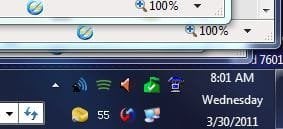
If you drag your toolbar up to make the tray's clock area 3 lines, you can add many icons in the system tray - and have the advantage of a 3-line date and time - great for people like me that work out of the home (if you call "working the forums", work!) so every day of the week seems the same - I can just look down and see today is Wednesday. 3 lines in the tray clock area gives 2 lines for the tray icons. And it gives room for Quicklaunch to sit under the Task Bar, before the Address Bar, the end of which you see in the lower left.
 

Attachments

  • SystemTray.JPG
    SystemTray.JPG
    14.9 KB · Views: 238

My Computer

Computer Manufacturer/Model Number
BrightWorks Systems B4
OS
Windows 7 Profession 64-bit
CPU
Intel Core i7-860 Quad
Motherboard
Gigabyte P55-UD4P
Memory
Mushkin 4x2Gb PC12800
Graphics Card(s)
Gigabyte GTX260 896Mb
Sound Card
Integrated 7.1 HD Dolby
Monitor(s) Displays
2 Samsung 2220wm-HAS 22"
Screen Resolution
1680 x 1050 | 1680 x 1050
Hard Drives
WD HE 1Tb
PSU
Corsair TX-750W
Case
Ultra M998
Cooling
OEM
Keyboard
MS Wireless Comfort 5000
Mouse
MS Wireless 5000
Internet Speed
Cable and pretty darn fast
If you drag your toolbar up to make the tray's clock area 3 lines, you can add many icons in the system tray - and have the advantage of a 3-line date and time - great for people like me that work out of the home (if you call "working the forums", work!) so every day of the week seems the same - I can just look down and see today is Wednesday. 3 lines in the tray clock area gives 2 lines for the tray icons. And it gives room for Quicklaunch to sit under the Task Bar, before the Address Bar, the end of which you see in the lower left.
Thanks Digerati,
2 lines for the tray icons is a brilliant idea :thumbsup:
 

My Computer

Computer type
PC/Desktop
OS
98SE/XP/windows7 32bit/ win10
Back
Top