Strange problem with pinning an icon to taskbar

nikosawolfie

New member
Local time
9:37 PM
Messages
48
Something weird has happened to my taskbar. I have a few programs pinned there and everything was okay. Then today I unpinned Firefox from there because I wanted to change the icon I was using. After deciding I didn't like it I tried to go back to the one I was using but when I pinned it back to the task bar this problem occurred:

BSjf8.jpg


As you can see when I click on the silver Firefox icon, it opens up a new firefox icon (default icon) in a separate place, taking up unnecessary space. I can't figure out how to make it go back to the way it was where everything stayed within the silver icon.
 

My Computer My Computer

OS
Windows 7 Home Premium x64
It is indeed the browser being opened but the problem is it used to open up within the silver icon (the default firefox icon you see to the right has basically taken its place). It's a bit of an annoyance because it takes up the little space I have on my taskbar before things start getting combined and messy.

Sorry if what I'm explaining is confusing, it would probably be easier to show with a video or something.
 

My Computer My Computer

OS
Windows 7 Home Premium x64
Ok maybe this will help explain my situation a bit better

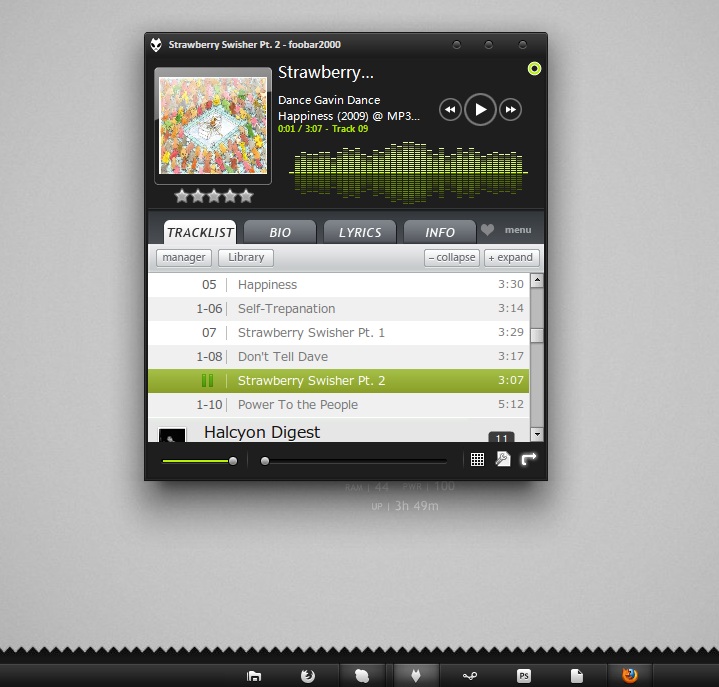
in this screenshot:

Dh8gp.jpg


You can see I have foobar opened up and when you look at the taskbar you can see that the silver foobar icon is in use and there is no default foobar icon off to the right somewhere. But when you look at the silver firefox icon you can see that it is not in use and that the default icon to the right is the one that contains all my open tabs and what not. I have been trying forever to make it go back to the way it was where my silver FF icon was the only one in use and not the default one but I just can't seem to make it happen. Funny thing is that i have had this problem in the past but for the life of me cannot remember how I fixed it.
 

My Computer My Computer

OS
Windows 7 Home Premium x64

My Computer My Computer

Computer Manufacturer/Model Number
acer aspire 5935g
OS
Windows 7 Home Premium x64 SP1
CPU
intel(R)core(TM)2 duo CPU T6600 @ 2.20GHz
Motherboard
intel gm45/gm47 revision 07
Memory
3 gb ddr3
Graphics Card(s)
ati radeon hd4570/512mb
Monitor(s) Displays
lop156wh2-tle1 15.3 flat
Screen Resolution
1366x768
Hard Drives
OCZ-Agility3 60gig ssd
320gig external hdd
500gig external hdd
Mouse
Optical
Internet Speed
30Mbps Down/30Mbps Up
Are you using Firefox 6 beta? I noticed this behavior on my machine after installing FF6 beta. I thought it was strange also. Normally if you have an app pinned in the taskbar, it won't show in recent opened programs list in start menu. But now FF6 beta does. It seems to have 2 "shortcuts" They both point to the same exe, but can be pinned seperately from each other. You can pin the FF that is running with the default icon, remove the other pinned icon, then change the icon for the newly pinned FF.
 

My Computer My Computer

Computer Manufacturer/Model Number
Toshiba Satellite A135S4487
OS
Windows 7 Ultimate (32-bit)
CPU
Intel Mobile Core 2 Duo T5500 @ 1.66 GHz
Motherboard
Intel i945GM Chipset
Memory
2.0GB Dual Channel DDR2 @ 266 MHz 4-4-4-12
Graphics Card(s)
Mobile Intel 945 Express Chipset Family
Sound Card
Realtek High Definition Audio
Monitor(s) Displays
Generic PnP Monitor, Samsung 46" LCD
Screen Resolution
1280 x 800, 1920 x 1080
Hard Drives
100GB Hitachi ATA Device (IDE)
120GB Western Digital USB
250GB External USB
Keyboard
Microsoft Wireless Comfort Keyboard 5000
Mouse
Microsoft Wireless Mouse 5000
Internet Speed
DSL
Well it looks like a simple reinstall of Firefox did the trick. I noticed this wasn't happening with any other programs so it had to be a quick fix.
 

My Computer My Computer

OS
Windows 7 Home Premium x64
Back
Top