Streaming audio/video is laggy after computer is on for a few hours

sefirosu

New member
Local time
8:28 AM
Messages
11
Hi everyone,

As the title says, my computer just slows down when it comes streaming videos and audio. When I first turn on my computer, everything runs smooth. About two or three hours later, forget it. Everything sounds horrible. The audio skips, video skips. I don't know if it's a driver issue or not. It looks like everything is up to date. Below is some information about my computer. I'm open to any suggestions.

HP Pavilion a6700y
BIOS= Phoenix - AwardBIOS v6.00PG
Processor= AMD Phenom 9150e Quad-Core (4CPUS) 1.8GHz.
Memory= 4096
Page File = 3784MB used, 4402MB available
DirectX 11

Video card is NVIDIA GeForce 210
Sound card is Rocketfish 7.1

I know the computer is a bit old. This just started happening about a month or so ago. Again, any advice is welcome. Thanks for your time.
 

My Computer My Computer

At a glance

Windows 7 Enterprise 64bitAMD Phenom 9150e quad-core 9150e / 1.8 GHz4.00GB DDR-2 SDRAMNVIDIA GeForce 210
Computer type
PC/Desktop
Computer Manufacturer/Model Number
HP a6700y
OS
Windows 7 Enterprise 64bit
CPU
AMD Phenom 9150e quad-core 9150e / 1.8 GHz
Motherboard
MCP61PM-HM (Nettle3)
Memory
4.00GB DDR-2 SDRAM
Graphics Card(s)
NVIDIA GeForce 210
Hard Drives
Western Digital WD AV-GP WD20EVDS 2TB 32MB x2
Antivirus
Avast
Browser
Chrome, Firefox, IE

My Computer My Computer

At a glance

Desk1 7 Home Prem / Desk2 10 Pro / Main lap A...Desk1 i5 3750K / Laptop i7 GTX 860M / Desk2 i...Desk1 8GB (1866) / Desk2 16GB (1333) / Laptop...Desk 1& 2NVidia GTX 650 & Laptops on board Intel
Computer type
PC/Desktop
Computer Manufacturer/Model Number
Own build (new) Desk1 / Asus ROG Win 7 / Desk2 1st build
OS
Desk1 7 Home Prem / Desk2 10 Pro / Main lap Asus ROG 10 Pro 2 laptop Toshiba 7 Pro Asus P2520 7 & 10
CPU
Desk1 i5 3750K / Laptop i7 GTX 860M / Desk2 i5 2500
Motherboard
Desk1 Asus P877-V / Desk2 Gigabyte H67 UD3H / Laptop ?
Memory
Desk1 8GB (1866) / Desk2 16GB (1333) / Laptop 8Gb DDR3
Graphics Card(s)
Desk 1& 2NVidia GTX 650 & Laptops on board Intel
Sound Card
Desk 1 & 2 -XONAR DG Realtek High Def audio Laptop
Monitor(s) Displays
Desk 1 Benq HD 2450 / Desk2 Philips 24" / Laptop 17.5"
Screen Resolution
1920x1080 D1 & D2 & Laptop 1
Hard Drives
Desk1 Samsung 120GB 830 SSD
Asus ROG 256GB 850 Pro SSD
Desk2 Samsung 840 256 SSD
Toshiba 120GB EVO
PSU
Desk 1 Corsair HX 1050/ Laptop ? / Desk 2 Corsair HX 650
Case
Desk 1 Cooler HAF XM ? Toshiba laptop / Desk2 Coolermaster
Cooling
Fans on all Desk1 -2 Desk2 - all Coolermasters 5 Laptop ?
Keyboard
Desk 1 MS Sidewinder X6 Desk 2 MS Sidewinder X 4
Mouse
Desk 1&2 - Gigabyte MS 900 gamer - laptop - Logitec wireless
Internet Speed
ADSL2+
Other Info
One other Desktop (tester) and spare Toshba laptop both with SSD's
Running Kaspersky 2016 ISS on all machines config'd identically
Logitec audio stereo systems on each machine (x3)
Canon MG5250MFC
Router/modem TP-Link running WPA2SK
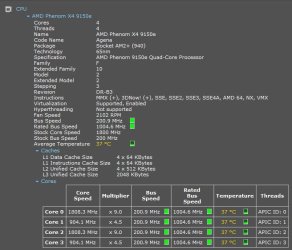
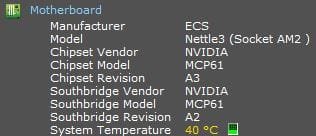
Thanks for the reply. I just turned the computer on. Attached are some screenshots. Let me know if you need anything else. It's 10AM EST where I am. I'll log on in 4 hours and see what the temperatures are. Not sure if you can double post here or not. But if I don't see a reply, I'm sure I can just edit the post.

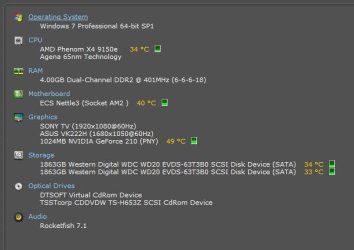
There are two hard drives. Both are identical 2TB HD's.
 

Attachments

  • CPU Temp.JPG
    CPU Temp.JPG
    50.1 KB · Views: 11
  • Motherboard Temp.JPG
    Motherboard Temp.JPG
    15.4 KB · Views: 11
  • Video Card Temp.JPG
    Video Card Temp.JPG
    21.5 KB · Views: 11
  • Hard Drive Temps.JPG
    Hard Drive Temps.JPG
    10.6 KB · Views: 11

My Computer My Computer

At a glance

Windows 7 Enterprise 64bitAMD Phenom 9150e quad-core 9150e / 1.8 GHz4.00GB DDR-2 SDRAMNVIDIA GeForce 210
Computer type
PC/Desktop
Computer Manufacturer/Model Number
HP a6700y
OS
Windows 7 Enterprise 64bit
CPU
AMD Phenom 9150e quad-core 9150e / 1.8 GHz
Motherboard
MCP61PM-HM (Nettle3)
Memory
4.00GB DDR-2 SDRAM
Graphics Card(s)
NVIDIA GeForce 210
Hard Drives
Western Digital WD AV-GP WD20EVDS 2TB 32MB x2
Antivirus
Avast
Browser
Chrome, Firefox, IE
Ok well the hard drives is not a concern it is more the CPU and GPU and some motherboard stuff that is the worry. Yours look ok to me but what I might suggest is to run the machine flat chat as you would normally do and get the CPU and GPU working a bit harder.

Before that though it may be worth a look inside the case and see if there is a large build up of dust and crud ie animal hairs etc on the heatsinks of the CPU and GPU and for that matter on any part really - fans motherboard, and in general.

How you clean that out is up to you I vacuum my desktops and laptop - if opened up - if just doing the intake on them I use compressed air (laptops) some like to blow it out with a compressed air can but whatever you do make sure you do not spin any fans with the vacuum or the air as it will make them spin faster than they are designed to spin at and may probably wreck the bearings - particularly important with laptops which I know yours is not but something to keep in mind for the future.
 

My Computer My Computer

At a glance

Desk1 7 Home Prem / Desk2 10 Pro / Main lap A...Desk1 i5 3750K / Laptop i7 GTX 860M / Desk2 i...Desk1 8GB (1866) / Desk2 16GB (1333) / Laptop...Desk 1& 2NVidia GTX 650 & Laptops on board Intel
Computer type
PC/Desktop
Computer Manufacturer/Model Number
Own build (new) Desk1 / Asus ROG Win 7 / Desk2 1st build
OS
Desk1 7 Home Prem / Desk2 10 Pro / Main lap Asus ROG 10 Pro 2 laptop Toshiba 7 Pro Asus P2520 7 & 10
CPU
Desk1 i5 3750K / Laptop i7 GTX 860M / Desk2 i5 2500
Motherboard
Desk1 Asus P877-V / Desk2 Gigabyte H67 UD3H / Laptop ?
Memory
Desk1 8GB (1866) / Desk2 16GB (1333) / Laptop 8Gb DDR3
Graphics Card(s)
Desk 1& 2NVidia GTX 650 & Laptops on board Intel
Sound Card
Desk 1 & 2 -XONAR DG Realtek High Def audio Laptop
Monitor(s) Displays
Desk 1 Benq HD 2450 / Desk2 Philips 24" / Laptop 17.5"
Screen Resolution
1920x1080 D1 & D2 & Laptop 1
Hard Drives
Desk1 Samsung 120GB 830 SSD
Asus ROG 256GB 850 Pro SSD
Desk2 Samsung 840 256 SSD
Toshiba 120GB EVO
PSU
Desk 1 Corsair HX 1050/ Laptop ? / Desk 2 Corsair HX 650
Case
Desk 1 Cooler HAF XM ? Toshiba laptop / Desk2 Coolermaster
Cooling
Fans on all Desk1 -2 Desk2 - all Coolermasters 5 Laptop ?
Keyboard
Desk 1 MS Sidewinder X6 Desk 2 MS Sidewinder X 4
Mouse
Desk 1&2 - Gigabyte MS 900 gamer - laptop - Logitec wireless
Internet Speed
ADSL2+
Other Info
One other Desktop (tester) and spare Toshba laptop both with SSD's
Running Kaspersky 2016 ISS on all machines config'd identically
Logitec audio stereo systems on each machine (x3)
Canon MG5250MFC
Router/modem TP-Link running WPA2SK
Thanks again. I actually open the computer every 2 to 3 months and clean it out. I actually did this last about 4 or 5 days ago. I've never gone with the vacuum method. I always use a can of compressed air. I also remove the fans and clean them with rubbing alcohol and a q tip. I did not know about not spinning the fans with compressed air and unfortunately, I have done that in the past to get the dust to blow out.

When I check back on the PC, I'll try streaming a YouTube video and see what it does. Should I have speccy running as I do this?

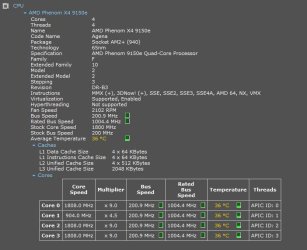
EDIT: Started streaming a video about 5 minutes ago. Doing this remotely using TeamViewer. I couldn't get audio lag but I could tell watching the video, how bad it was skipping. I attached some screenshots.
 

Attachments

  • graphics249pm.JPG
    graphics249pm.JPG
    9.5 KB · Views: 9
  • 249pm2.JPG
    249pm2.JPG
    50.8 KB · Views: 0
  • 249pm.JPG
    249pm.JPG
    32.2 KB · Views: 9
Last edited:

My Computer My Computer

At a glance

Windows 7 Enterprise 64bitAMD Phenom 9150e quad-core 9150e / 1.8 GHz4.00GB DDR-2 SDRAMNVIDIA GeForce 210
Computer type
PC/Desktop
Computer Manufacturer/Model Number
HP a6700y
OS
Windows 7 Enterprise 64bit
CPU
AMD Phenom 9150e quad-core 9150e / 1.8 GHz
Motherboard
MCP61PM-HM (Nettle3)
Memory
4.00GB DDR-2 SDRAM
Graphics Card(s)
NVIDIA GeForce 210
Hard Drives
Western Digital WD AV-GP WD20EVDS 2TB 32MB x2
Antivirus
Avast
Browser
Chrome, Firefox, IE
Ok mate sorry late reply was at work and didn't get chance to post back. Yes keep the Speccy running it will do no harm and is very light on for machine usage.

The cleaning is good and the temps that you posted look ok for idling and that is why I asked to run something a little more taxing on the CPU and GPU. If those are the temps when they are pushed then I think your problem may be the GPU especially if the videos are skipping. Have you updated the drivers lately?
This is it Drivers | GeForce if you haven't try that - and it does seem like it is a fairly old model too just maybe it has had it's day :(
 

My Computer My Computer

At a glance

Desk1 7 Home Prem / Desk2 10 Pro / Main lap A...Desk1 i5 3750K / Laptop i7 GTX 860M / Desk2 i...Desk1 8GB (1866) / Desk2 16GB (1333) / Laptop...Desk 1& 2NVidia GTX 650 & Laptops on board Intel
Computer type
PC/Desktop
Computer Manufacturer/Model Number
Own build (new) Desk1 / Asus ROG Win 7 / Desk2 1st build
OS
Desk1 7 Home Prem / Desk2 10 Pro / Main lap Asus ROG 10 Pro 2 laptop Toshiba 7 Pro Asus P2520 7 & 10
CPU
Desk1 i5 3750K / Laptop i7 GTX 860M / Desk2 i5 2500
Motherboard
Desk1 Asus P877-V / Desk2 Gigabyte H67 UD3H / Laptop ?
Memory
Desk1 8GB (1866) / Desk2 16GB (1333) / Laptop 8Gb DDR3
Graphics Card(s)
Desk 1& 2NVidia GTX 650 & Laptops on board Intel
Sound Card
Desk 1 & 2 -XONAR DG Realtek High Def audio Laptop
Monitor(s) Displays
Desk 1 Benq HD 2450 / Desk2 Philips 24" / Laptop 17.5"
Screen Resolution
1920x1080 D1 & D2 & Laptop 1
Hard Drives
Desk1 Samsung 120GB 830 SSD
Asus ROG 256GB 850 Pro SSD
Desk2 Samsung 840 256 SSD
Toshiba 120GB EVO
PSU
Desk 1 Corsair HX 1050/ Laptop ? / Desk 2 Corsair HX 650
Case
Desk 1 Cooler HAF XM ? Toshiba laptop / Desk2 Coolermaster
Cooling
Fans on all Desk1 -2 Desk2 - all Coolermasters 5 Laptop ?
Keyboard
Desk 1 MS Sidewinder X6 Desk 2 MS Sidewinder X 4
Mouse
Desk 1&2 - Gigabyte MS 900 gamer - laptop - Logitec wireless
Internet Speed
ADSL2+
Other Info
One other Desktop (tester) and spare Toshba laptop both with SSD's
Running Kaspersky 2016 ISS on all machines config'd identically
Logitec audio stereo systems on each machine (x3)
Canon MG5250MFC
Router/modem TP-Link running WPA2SK
Well according to NVIDIA's site, I have the most current driver installed. I want to buy a new computer but am kind of waiting for Windows 10. Tried 8 and 8.1. Wasn't a fan. Maybe I'll try a new video card. Thanks a ton for all the help with this!
 

My Computer My Computer

At a glance

Windows 7 Enterprise 64bitAMD Phenom 9150e quad-core 9150e / 1.8 GHz4.00GB DDR-2 SDRAMNVIDIA GeForce 210
Computer type
PC/Desktop
Computer Manufacturer/Model Number
HP a6700y
OS
Windows 7 Enterprise 64bit
CPU
AMD Phenom 9150e quad-core 9150e / 1.8 GHz
Motherboard
MCP61PM-HM (Nettle3)
Memory
4.00GB DDR-2 SDRAM
Graphics Card(s)
NVIDIA GeForce 210
Hard Drives
Western Digital WD AV-GP WD20EVDS 2TB 32MB x2
Antivirus
Avast
Browser
Chrome, Firefox, IE
Ok mate well the machine is getting on and I have just bought this new Asus gaming laptop and it came with 8 but although you can run it in 7 style it really has little changes that annoy me although I found it runs faster.

I had it downgraded to 7 as I still think it is the best. From what I have seen of 10 I am not that impressed as it seems to be sticking with those wretched Metro panels and to me having to type in Control Panel into Start to get to it is ridiculous as it is one of those things - well I do access frequently enough for it to be sitting there above Start.

Have you thought of actually building a machine it really is not that hard because if I can do it anyone can, and the satisfaction from doing that is just awesome. If you do you will get more than your fair share of help from members here - most of us have built more than a few;)
 

My Computer My Computer

At a glance

Desk1 7 Home Prem / Desk2 10 Pro / Main lap A...Desk1 i5 3750K / Laptop i7 GTX 860M / Desk2 i...Desk1 8GB (1866) / Desk2 16GB (1333) / Laptop...Desk 1& 2NVidia GTX 650 & Laptops on board Intel
Computer type
PC/Desktop
Computer Manufacturer/Model Number
Own build (new) Desk1 / Asus ROG Win 7 / Desk2 1st build
OS
Desk1 7 Home Prem / Desk2 10 Pro / Main lap Asus ROG 10 Pro 2 laptop Toshiba 7 Pro Asus P2520 7 & 10
CPU
Desk1 i5 3750K / Laptop i7 GTX 860M / Desk2 i5 2500
Motherboard
Desk1 Asus P877-V / Desk2 Gigabyte H67 UD3H / Laptop ?
Memory
Desk1 8GB (1866) / Desk2 16GB (1333) / Laptop 8Gb DDR3
Graphics Card(s)
Desk 1& 2NVidia GTX 650 & Laptops on board Intel
Sound Card
Desk 1 & 2 -XONAR DG Realtek High Def audio Laptop
Monitor(s) Displays
Desk 1 Benq HD 2450 / Desk2 Philips 24" / Laptop 17.5"
Screen Resolution
1920x1080 D1 & D2 & Laptop 1
Hard Drives
Desk1 Samsung 120GB 830 SSD
Asus ROG 256GB 850 Pro SSD
Desk2 Samsung 840 256 SSD
Toshiba 120GB EVO
PSU
Desk 1 Corsair HX 1050/ Laptop ? / Desk 2 Corsair HX 650
Case
Desk 1 Cooler HAF XM ? Toshiba laptop / Desk2 Coolermaster
Cooling
Fans on all Desk1 -2 Desk2 - all Coolermasters 5 Laptop ?
Keyboard
Desk 1 MS Sidewinder X6 Desk 2 MS Sidewinder X 4
Mouse
Desk 1&2 - Gigabyte MS 900 gamer - laptop - Logitec wireless
Internet Speed
ADSL2+
Other Info
One other Desktop (tester) and spare Toshba laptop both with SSD's
Running Kaspersky 2016 ISS on all machines config'd identically
Logitec audio stereo systems on each machine (x3)
Canon MG5250MFC
Router/modem TP-Link running WPA2SK
I've actually built two machines but this was like 12 years ago. I don't have the time for it anymore. Might just cave in and buy something new.
 

My Computer My Computer

At a glance

Windows 7 Enterprise 64bitAMD Phenom 9150e quad-core 9150e / 1.8 GHz4.00GB DDR-2 SDRAMNVIDIA GeForce 210
Computer type
PC/Desktop
Computer Manufacturer/Model Number
HP a6700y
OS
Windows 7 Enterprise 64bit
CPU
AMD Phenom 9150e quad-core 9150e / 1.8 GHz
Motherboard
MCP61PM-HM (Nettle3)
Memory
4.00GB DDR-2 SDRAM
Graphics Card(s)
NVIDIA GeForce 210
Hard Drives
Western Digital WD AV-GP WD20EVDS 2TB 32MB x2
Antivirus
Avast
Browser
Chrome, Firefox, IE
That is a shame mate but if you don't have the time then do some good research for a new machine.

I say this because I just bought a high end Asus ROG laptop and thought it would be simple to "downgrade" to 7 by installing anew SSD and an OEM but boy was I wrong and three months down the track am still trying to get it right:(
 

My Computer My Computer

At a glance

Desk1 7 Home Prem / Desk2 10 Pro / Main lap A...Desk1 i5 3750K / Laptop i7 GTX 860M / Desk2 i...Desk1 8GB (1866) / Desk2 16GB (1333) / Laptop...Desk 1& 2NVidia GTX 650 & Laptops on board Intel
Computer type
PC/Desktop
Computer Manufacturer/Model Number
Own build (new) Desk1 / Asus ROG Win 7 / Desk2 1st build
OS
Desk1 7 Home Prem / Desk2 10 Pro / Main lap Asus ROG 10 Pro 2 laptop Toshiba 7 Pro Asus P2520 7 & 10
CPU
Desk1 i5 3750K / Laptop i7 GTX 860M / Desk2 i5 2500
Motherboard
Desk1 Asus P877-V / Desk2 Gigabyte H67 UD3H / Laptop ?
Memory
Desk1 8GB (1866) / Desk2 16GB (1333) / Laptop 8Gb DDR3
Graphics Card(s)
Desk 1& 2NVidia GTX 650 & Laptops on board Intel
Sound Card
Desk 1 & 2 -XONAR DG Realtek High Def audio Laptop
Monitor(s) Displays
Desk 1 Benq HD 2450 / Desk2 Philips 24" / Laptop 17.5"
Screen Resolution
1920x1080 D1 & D2 & Laptop 1
Hard Drives
Desk1 Samsung 120GB 830 SSD
Asus ROG 256GB 850 Pro SSD
Desk2 Samsung 840 256 SSD
Toshiba 120GB EVO
PSU
Desk 1 Corsair HX 1050/ Laptop ? / Desk 2 Corsair HX 650
Case
Desk 1 Cooler HAF XM ? Toshiba laptop / Desk2 Coolermaster
Cooling
Fans on all Desk1 -2 Desk2 - all Coolermasters 5 Laptop ?
Keyboard
Desk 1 MS Sidewinder X6 Desk 2 MS Sidewinder X 4
Mouse
Desk 1&2 - Gigabyte MS 900 gamer - laptop - Logitec wireless
Internet Speed
ADSL2+
Other Info
One other Desktop (tester) and spare Toshba laptop both with SSD's
Running Kaspersky 2016 ISS on all machines config'd identically
Logitec audio stereo systems on each machine (x3)
Canon MG5250MFC
Router/modem TP-Link running WPA2SK
Back
Top