
I am not sure how to begin to describe my problem, so I will recount my experience in chronological order and describe the problem as I go. I have provided a couple of images for reference as well.
Last night, I only had one hard disk in my computer, a Seagate. It is Disk 0 in the Disk Management screenshot below. I installed two more hard disks (both Western Digital), converted them to dynamic, striped them, and created a volume (G . I moved some data to the new G: volume. If it's relevant, then it may help you to know that one of them already had a Windows installation of its own. Reformatting it should have deleted all that information, though. Then I went to bed.
When I woke up, my computer had restarted because Windows had automatically updated. This is where things start to go wrong. My computer was stuck at boot-up on a blank screen with a flashing underscore. I restarted a couple of times, and Windows would try to boot but fail and stop at the same screen. I went into the BIOS, and while I could manually select my Seagate from a boot list, it was not showing up in my BIOS' boot order settings. I removed every other device from the boot order, and my computer will now boot normally. So, I have actually resolved this issue but am telling you about it in case it may be relevant to my current problem.
Afterward, I noticed that my G: volume was not appearing in Explorer. I checked Disk Management and discovered that one of my disks has failed (screenshot below). Here is what is perplexing me: I only have three hard disks in my computer, and last night, I had striped Disk 1 and Disk 2. Now, with no other hardware changes, Disk 1 is displaying as a basic disk while Disk 2 is online but failing, and there is another disk listed as Missing. I'm not sure what went wrong or why my disks are displaying this way. Disk 2 and Missing would have to be the same disk, but is it normal for a failed disk to be displayed twice like that? And why would disk 1 have reverted to a basic disk, and a recovery partition no less?
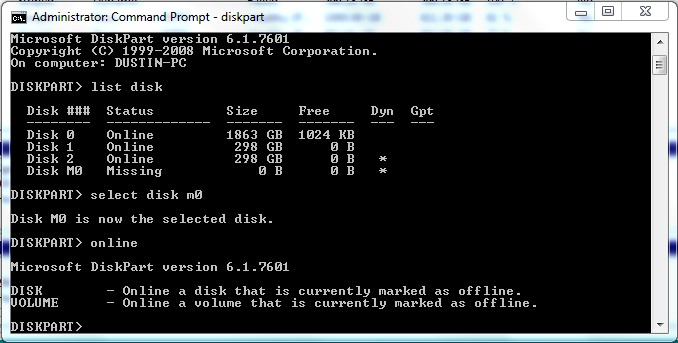
Right-clicking and selecting "Reactive disk" accomplishes nothing. Diskpart isn't helping either (screenshot also provided). I feel like the only thing left that I can do is reformatting the two Western Digitals again and starting over, but if it's possible, I would really like to not lose the data that I put onto the G: drive.
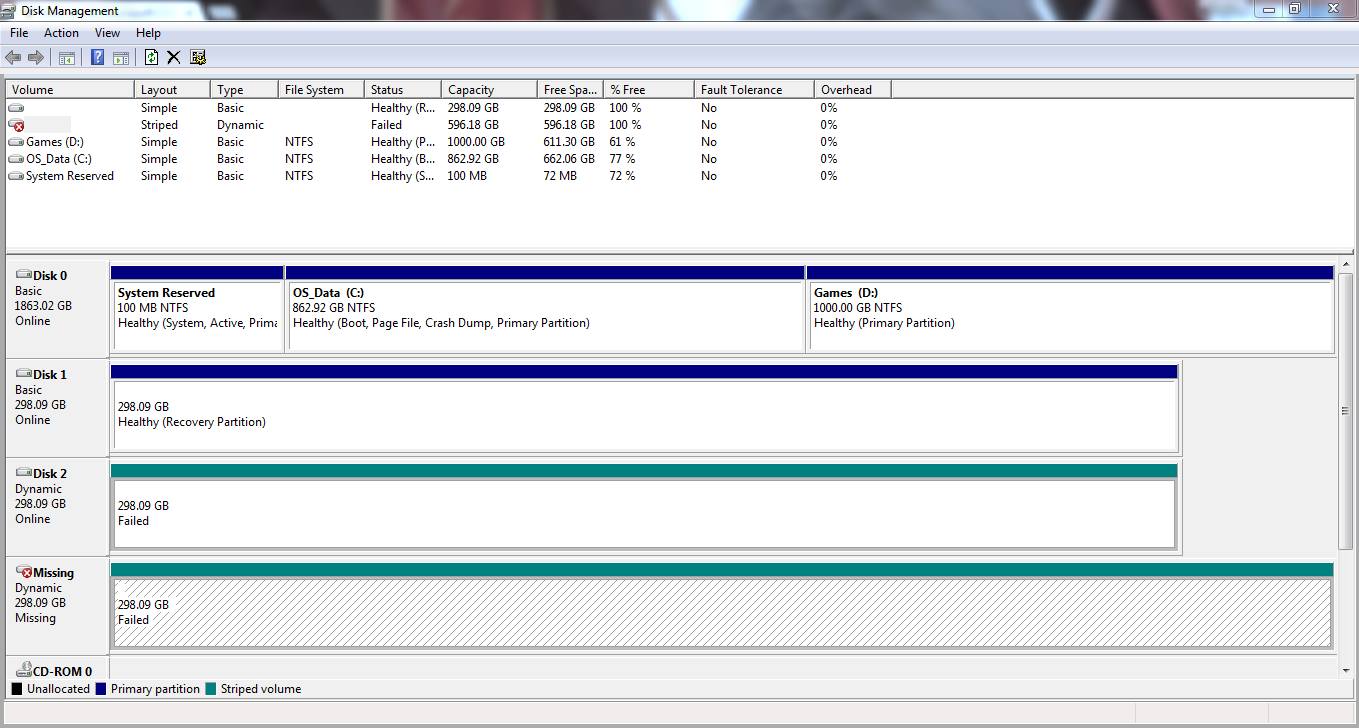
Last night, I only had one hard disk in my computer, a Seagate. It is Disk 0 in the Disk Management screenshot below. I installed two more hard disks (both Western Digital), converted them to dynamic, striped them, and created a volume (G
. I moved some data to the new G: volume. If it's relevant, then it may help you to know that one of them already had a Windows installation of its own. Reformatting it should have deleted all that information, though. Then I went to bed.When I woke up, my computer had restarted because Windows had automatically updated. This is where things start to go wrong. My computer was stuck at boot-up on a blank screen with a flashing underscore. I restarted a couple of times, and Windows would try to boot but fail and stop at the same screen. I went into the BIOS, and while I could manually select my Seagate from a boot list, it was not showing up in my BIOS' boot order settings. I removed every other device from the boot order, and my computer will now boot normally. So, I have actually resolved this issue but am telling you about it in case it may be relevant to my current problem.
Afterward, I noticed that my G: volume was not appearing in Explorer. I checked Disk Management and discovered that one of my disks has failed (screenshot below). Here is what is perplexing me: I only have three hard disks in my computer, and last night, I had striped Disk 1 and Disk 2. Now, with no other hardware changes, Disk 1 is displaying as a basic disk while Disk 2 is online but failing, and there is another disk listed as Missing. I'm not sure what went wrong or why my disks are displaying this way. Disk 2 and Missing would have to be the same disk, but is it normal for a failed disk to be displayed twice like that? And why would disk 1 have reverted to a basic disk, and a recovery partition no less?
Right-clicking and selecting "Reactive disk" accomplishes nothing. Diskpart isn't helping either (screenshot also provided). I feel like the only thing left that I can do is reformatting the two Western Digitals again and starting over, but if it's possible, I would really like to not lose the data that I put onto the G: drive.
My Computer
At a glance
Windows 7 Professional x64AMD FX-3600 6-core 3.5 GHz16 Gb Dual-channel DDR3ATI AMD Radeon 7800 2Mb
- Computer type
- PC/Desktop
- Computer Manufacturer/Model Number
- Custom
- OS
- Windows 7 Professional x64
- CPU
- AMD FX-3600 6-core 3.5 GHz
- Motherboard
- MSI 970A-G46
- Memory
- 16 Gb Dual-channel DDR3
- Graphics Card(s)
- ATI AMD Radeon 7800 2Mb
- Hard Drives
- 1x Seagate 2 Tb
2x Western Digital 320 Gb
- Antivirus
- Windows Security Essentials
- Browser
- Google Chrome


