Solved Stuck in a failed update loop.

Hope this goes better than the kitchen I'm designing, stupid program just put an island right in the middle of the kitchen sink:mad:
 

My Computer

Computer type
PC/Desktop
Computer Manufacturer/Model Number
Acer Aspire E700 dsktop
OS
Windows 7 Pro
CPU
Intel 2 quad Q6600
Motherboard
Acer fg965M
Memory
4 GB
Graphics Card(s)
Nvidia GeForce GTS 450 1TB
Sound Card
RealTek
Monitor(s) Displays
Acer 22" X223w
Hard Drives
1TB WD Caviar Black (internal)
1TB WD My Book Essential

PSU
500W coolmaster Extreme Power Plus
Case
Acer
Cooling
case fan
Keyboard
acer
Mouse
acer
Internet Speed
56k
Antivirus
Microsoft Security Essentials
Browser
IE 8
Other Info
I hate IE 9 10 & 11
At least you caught it in the design stage and not after some idiot chippy had built it that way! :)
 

My Computer

Computer type
Laptop
Computer Manufacturer/Model Number
Asus K52F or Lenovo B51-80
OS
Win 7 x64 Home Premium (and x86 VirtualBox VM)/Win10
CPU
i3 370M/i7 6500U
Motherboard
Asus/Lenovo
Memory
8GB - finally :)/8GB
Graphics Card(s)
it's an i3, dude!/dual Intel&nVidia
Sound Card
onboard
Monitor(s) Displays
15.6" built-in
Screen Resolution
1366x768/1920x1080
Hard Drives
750GB Seagate internal
Sundry external drives attached to other computers on the local network
1TB SSD on the Lenovo
PSU
n/a
Internet Speed
as much as I can get - usually on a dongle/phone, so <1MB/s
Antivirus
MSE/Defender
Browser
IE11/12/Edge/Chrome/FF(if I must)
Yeah, cause I'm the idiot who is going to be building it:D
 

My Computer

Computer type
PC/Desktop
Computer Manufacturer/Model Number
Acer Aspire E700 dsktop
OS
Windows 7 Pro
CPU
Intel 2 quad Q6600
Motherboard
Acer fg965M
Memory
4 GB
Graphics Card(s)
Nvidia GeForce GTS 450 1TB
Sound Card
RealTek
Monitor(s) Displays
Acer 22" X223w
Hard Drives
1TB WD Caviar Black (internal)
1TB WD My Book Essential
PSU
500W coolmaster Extreme Power Plus
Case
Acer
Cooling
case fan
Keyboard
acer
Mouse
acer
Internet Speed
56k
Antivirus
Microsoft Security Essentials
Browser
IE 8
Other Info
I hate IE 9 10 & 11
OK I've had a look at the files, and it seems to me that the problem is simply a case of missing data, rather than corruptions.

Paradoxically, that makes a repair harder rather than easier, as the usual corruption is only a single bitflip, which allows a quick repair. Missing data has to be built up from scratch - or the detection system fooled.

All of the affected registry entries are for SP1 rather than an ordinary patch.


I suspect that your best (and safest) option is going to be a repair install of Windows, and then updating again.

See the instructions here..


http://www.sevenforums.com/tutorials/3413-repair-install.html
 
Last edited:

My Computer

Computer type
Laptop
Computer Manufacturer/Model Number
Asus K52F or Lenovo B51-80
OS
Win 7 x64 Home Premium (and x86 VirtualBox VM)/Win10
CPU
i3 370M/i7 6500U
Motherboard
Asus/Lenovo
Memory
8GB - finally :)/8GB
Graphics Card(s)
it's an i3, dude!/dual Intel&nVidia
Sound Card
onboard
Monitor(s) Displays
15.6" built-in
Screen Resolution
1366x768/1920x1080
Hard Drives
750GB Seagate internal
Sundry external drives attached to other computers on the local network
1TB SSD on the Lenovo
PSU
n/a
Internet Speed
as much as I can get - usually on a dongle/phone, so <1MB/s
Antivirus
MSE/Defender
Browser
IE11/12/Edge/Chrome/FF(if I must)
Thanks for all of your efforts Noel. I've dreaded doing that. Question: If I do a repair install do I lose all of my personal files?
 

My Computer

Computer type
PC/Desktop
Computer Manufacturer/Model Number
Acer Aspire E700 dsktop
OS
Windows 7 Pro
CPU
Intel 2 quad Q6600
Motherboard
Acer fg965M
Memory
4 GB
Graphics Card(s)
Nvidia GeForce GTS 450 1TB
Sound Card
RealTek
Monitor(s) Displays
Acer 22" X223w
Hard Drives
1TB WD Caviar Black (internal)
1TB WD My Book Essential
PSU
500W coolmaster Extreme Power Plus
Case
Acer
Cooling
case fan
Keyboard
acer
Mouse
acer
Internet Speed
56k
Antivirus
Microsoft Security Essentials
Browser
IE 8
Other Info
I hate IE 9 10 & 11
A repair install should keep all your data intact, although you will lose a few system settings as they are restored to default.

As always -- back up to external media first, just incase....
 

My Computer

Computer type
Laptop
Computer Manufacturer/Model Number
Asus K52F or Lenovo B51-80
OS
Win 7 x64 Home Premium (and x86 VirtualBox VM)/Win10
CPU
i3 370M/i7 6500U
Motherboard
Asus/Lenovo
Memory
8GB - finally :)/8GB
Graphics Card(s)
it's an i3, dude!/dual Intel&nVidia
Sound Card
onboard
Monitor(s) Displays
15.6" built-in
Screen Resolution
1366x768/1920x1080
Hard Drives
750GB Seagate internal
Sundry external drives attached to other computers on the local network
1TB SSD on the Lenovo
PSU
n/a
Internet Speed
as much as I can get - usually on a dongle/phone, so <1MB/s
Antivirus
MSE/Defender
Browser
IE11/12/Edge/Chrome/FF(if I must)
Thanks Noel
I just read all of those instructions for creating a useable ISO DVD repair disk. Sounds easy enough (then why is my gut tied in a knot):confused:. Sure wish there was an easier way.
I made a repair disk (SP 1) from digital rivers before. Am I to understand that this would be a different one that includes the updates or am I just praying out loud?
 

My Computer

Computer type
PC/Desktop
Computer Manufacturer/Model Number
Acer Aspire E700 dsktop
OS
Windows 7 Pro
CPU
Intel 2 quad Q6600
Motherboard
Acer fg965M
Memory
4 GB
Graphics Card(s)
Nvidia GeForce GTS 450 1TB
Sound Card
RealTek
Monitor(s) Displays
Acer 22" X223w
Hard Drives
1TB WD Caviar Black (internal)
1TB WD My Book Essential
PSU
500W coolmaster Extreme Power Plus
Case
Acer
Cooling
case fan
Keyboard
acer
Mouse
acer
Internet Speed
56k
Antivirus
Microsoft Security Essentials
Browser
IE 8
Other Info
I hate IE 9 10 & 11
Repair disks are a whole different ball-game to install disks. - and usually contain a minimum number of files, just sufficient to gain access and control of a dead installation so you an find out what's wrong and put it right. I prefer to use full install disks for that purpose anyhow.
Unfortunately there's no such thing as a downloadable disk that's been updated past the basic SP1 install.
 

My Computer

Computer type
Laptop
Computer Manufacturer/Model Number
Asus K52F or Lenovo B51-80
OS
Win 7 x64 Home Premium (and x86 VirtualBox VM)/Win10
CPU
i3 370M/i7 6500U
Motherboard
Asus/Lenovo
Memory
8GB - finally :)/8GB
Graphics Card(s)
it's an i3, dude!/dual Intel&nVidia
Sound Card
onboard
Monitor(s) Displays
15.6" built-in
Screen Resolution
1366x768/1920x1080
Hard Drives
750GB Seagate internal
Sundry external drives attached to other computers on the local network
1TB SSD on the Lenovo
PSU
n/a
Internet Speed
as much as I can get - usually on a dongle/phone, so <1MB/s
Antivirus
MSE/Defender
Browser
IE11/12/Edge/Chrome/FF(if I must)
So the ISO image I got of the 7 Pro with SP1 before will be the same one as the one I just downloaded??? If it is then I should just be able to back everything up and run that. I don't need to make another one Yes, no?
 

My Computer

Computer type
PC/Desktop
Computer Manufacturer/Model Number
Acer Aspire E700 dsktop
OS
Windows 7 Pro
CPU
Intel 2 quad Q6600
Motherboard
Acer fg965M
Memory
4 GB
Graphics Card(s)
Nvidia GeForce GTS 450 1TB
Sound Card
RealTek
Monitor(s) Displays
Acer 22" X223w
Hard Drives
1TB WD Caviar Black (internal)
1TB WD My Book Essential
PSU
500W coolmaster Extreme Power Plus
Case
Acer
Cooling
case fan
Keyboard
acer
Mouse
acer
Internet Speed
56k
Antivirus
Microsoft Security Essentials
Browser
IE 8
Other Info
I hate IE 9 10 & 11
Assuming it's the full SP1 disk, yes, it'll be the same .

Good luck!
 

My Computer

Computer type
Laptop
Computer Manufacturer/Model Number
Asus K52F or Lenovo B51-80
OS
Win 7 x64 Home Premium (and x86 VirtualBox VM)/Win10
CPU
i3 370M/i7 6500U
Motherboard
Asus/Lenovo
Memory
8GB - finally :)/8GB
Graphics Card(s)
it's an i3, dude!/dual Intel&nVidia
Sound Card
onboard
Monitor(s) Displays
15.6" built-in
Screen Resolution
1366x768/1920x1080
Hard Drives
750GB Seagate internal
Sundry external drives attached to other computers on the local network
1TB SSD on the Lenovo
PSU
n/a
Internet Speed
as much as I can get - usually on a dongle/phone, so <1MB/s
Antivirus
MSE/Defender
Browser
IE11/12/Edge/Chrome/FF(if I must)
Now I know why I build cabinets for a living!!!
So a full SP1 disc will be the stand alone version? What is this ISO I just downloaded? It's what they said to download to a repair?
And how come the product ID and the product key on my PC aren't the same, isn't it the same thing?
 

My Computer

Computer type
PC/Desktop
Computer Manufacturer/Model Number
Acer Aspire E700 dsktop
OS
Windows 7 Pro
CPU
Intel 2 quad Q6600
Motherboard
Acer fg965M
Memory
4 GB
Graphics Card(s)
Nvidia GeForce GTS 450 1TB
Sound Card
RealTek
Monitor(s) Displays
Acer 22" X223w
Hard Drives
1TB WD Caviar Black (internal)
1TB WD My Book Essential
PSU
500W coolmaster Extreme Power Plus
Case
Acer
Cooling
case fan
Keyboard
acer
Mouse
acer
Internet Speed
56k
Antivirus
Microsoft Security Essentials
Browser
IE 8
Other Info
I hate IE 9 10 & 11
The Product ID is not a unique one- there are potentially many thousands of machines with the same one as yours.

The Product Key (except in the case of Volume Keys, and OEM_SLP Keys) are absolutely unique to each computer.

The ID is generated at activation by a built-in routine that takes into account the hardware installed and the Key.

You just downloaded the full standalone SP1 Refresh Windows 7 Installation ISO for your edition of Windows (Hopefully! :))
 

My Computer

Computer type
Laptop
Computer Manufacturer/Model Number
Asus K52F or Lenovo B51-80
OS
Win 7 x64 Home Premium (and x86 VirtualBox VM)/Win10
CPU
i3 370M/i7 6500U
Motherboard
Asus/Lenovo
Memory
8GB - finally :)/8GB
Graphics Card(s)
it's an i3, dude!/dual Intel&nVidia
Sound Card
onboard
Monitor(s) Displays
15.6" built-in
Screen Resolution
1366x768/1920x1080
Hard Drives
750GB Seagate internal
Sundry external drives attached to other computers on the local network
1TB SSD on the Lenovo
PSU
n/a
Internet Speed
as much as I can get - usually on a dongle/phone, so <1MB/s
Antivirus
MSE/Defender
Browser
IE11/12/Edge/Chrome/FF(if I must)
Ok I'm backing stuff up right now. I assume I should disconect my external HD or isn't that necessary?
 

My Computer

Computer type
PC/Desktop
Computer Manufacturer/Model Number
Acer Aspire E700 dsktop
OS
Windows 7 Pro
CPU
Intel 2 quad Q6600
Motherboard
Acer fg965M
Memory
4 GB
Graphics Card(s)
Nvidia GeForce GTS 450 1TB
Sound Card
RealTek
Monitor(s) Displays
Acer 22" X223w
Hard Drives
1TB WD Caviar Black (internal)
1TB WD My Book Essential
PSU
500W coolmaster Extreme Power Plus
Case
Acer
Cooling
case fan
Keyboard
acer
Mouse
acer
Internet Speed
56k
Antivirus
Microsoft Security Essentials
Browser
IE 8
Other Info
I hate IE 9 10 & 11
It's always a good idea when installing to have the minimum possible conflicts - so unhook all non-essential USB devices, eSATA devices and second monitors - disconnect local printers if any.
 

My Computer

Computer type
Laptop
Computer Manufacturer/Model Number
Asus K52F or Lenovo B51-80
OS
Win 7 x64 Home Premium (and x86 VirtualBox VM)/Win10
CPU
i3 370M/i7 6500U
Motherboard
Asus/Lenovo
Memory
8GB - finally :)/8GB
Graphics Card(s)
it's an i3, dude!/dual Intel&nVidia
Sound Card
onboard
Monitor(s) Displays
15.6" built-in
Screen Resolution
1366x768/1920x1080
Hard Drives
750GB Seagate internal
Sundry external drives attached to other computers on the local network
1TB SSD on the Lenovo
PSU
n/a
Internet Speed
as much as I can get - usually on a dongle/phone, so <1MB/s
Antivirus
MSE/Defender
Browser
IE11/12/Edge/Chrome/FF(if I must)
WOW never thought about that stuff. More drivers to reinstall and update. Yippee
Where do these Windows files disappear to anyway???
 

My Computer

Computer type
PC/Desktop
Computer Manufacturer/Model Number
Acer Aspire E700 dsktop
OS
Windows 7 Pro
CPU
Intel 2 quad Q6600
Motherboard
Acer fg965M
Memory
4 GB
Graphics Card(s)
Nvidia GeForce GTS 450 1TB
Sound Card
RealTek
Monitor(s) Displays
Acer 22" X223w
Hard Drives
1TB WD Caviar Black (internal)
1TB WD My Book Essential
PSU
500W coolmaster Extreme Power Plus
Case
Acer
Cooling
case fan
Keyboard
acer
Mouse
acer
Internet Speed
56k
Antivirus
Microsoft Security Essentials
Browser
IE 8
Other Info
I hate IE 9 10 & 11
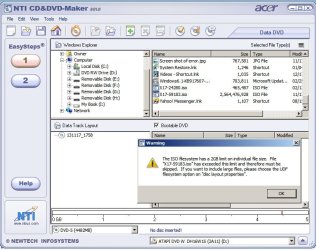
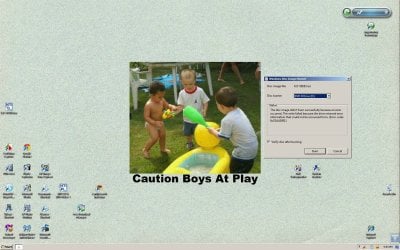
Well I'm at a loss of what to do now. I'm including 2 screen shots. Notice in the NOW WHAT shot there is an ISO file. That is the ISO I downloaded back in Feb of 2012. The one below it is from the link in the repair tutorial. That is one heck of a difference in size. I tried using the Windows burner in the second shot. The first I used the NTI burner.
What am I doing????
 

Attachments

  • NOW WHAT.jpg
    NOW WHAT.jpg
    80.5 KB · Views: 1
  • Screen shot of error.jpg
    Screen shot of error.jpg
    388.8 KB · Views: 2

My Computer

Computer type
PC/Desktop
Computer Manufacturer/Model Number
Acer Aspire E700 dsktop
OS
Windows 7 Pro
CPU
Intel 2 quad Q6600
Motherboard
Acer fg965M
Memory
4 GB
Graphics Card(s)
Nvidia GeForce GTS 450 1TB
Sound Card
RealTek
Monitor(s) Displays
Acer 22" X223w
Hard Drives
1TB WD Caviar Black (internal)
1TB WD My Book Essential
PSU
500W coolmaster Extreme Power Plus
Case
Acer
Cooling
case fan
Keyboard
acer
Mouse
acer
Internet Speed
56k
Antivirus
Microsoft Security Essentials
Browser
IE 8
Other Info
I hate IE 9 10 & 11
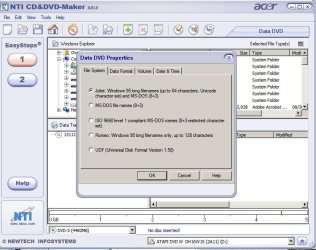
Forgot to add this one. Wouldn't it be one of it ISO options?? Isn't that what I'm trying to create? Will that UDF create a ISO image? Also I thought ISO images were supposed to be smaller in size?
 

Attachments

  • disc lay out..jpg
    disc lay out..jpg
    70.2 KB · Views: 1

My Computer

Computer type
PC/Desktop
Computer Manufacturer/Model Number
Acer Aspire E700 dsktop
OS
Windows 7 Pro
CPU
Intel 2 quad Q6600
Motherboard
Acer fg965M
Memory
4 GB
Graphics Card(s)
Nvidia GeForce GTS 450 1TB
Sound Card
RealTek
Monitor(s) Displays
Acer 22" X223w
Hard Drives
1TB WD Caviar Black (internal)
1TB WD My Book Essential
PSU
500W coolmaster Extreme Power Plus
Case
Acer
Cooling
case fan
Keyboard
acer
Mouse
acer
Internet Speed
56k
Antivirus
Microsoft Security Essentials
Browser
IE 8
Other Info
I hate IE 9 10 & 11
Looks like the old file was just the SP1 download, and not the full install disk
It's definitely the 2.5+GB one you want.

Try right-clicking on it and selecting 'Open with...' then 'Windows Disc Image Burner' - then it should work (I think - never tried it with 32-bit!)
 

My Computer

Computer type
Laptop
Computer Manufacturer/Model Number
Asus K52F or Lenovo B51-80
OS
Win 7 x64 Home Premium (and x86 VirtualBox VM)/Win10
CPU
i3 370M/i7 6500U
Motherboard
Asus/Lenovo
Memory
8GB - finally :)/8GB
Graphics Card(s)
it's an i3, dude!/dual Intel&nVidia
Sound Card
onboard
Monitor(s) Displays
15.6" built-in
Screen Resolution
1366x768/1920x1080
Hard Drives
750GB Seagate internal
Sundry external drives attached to other computers on the local network
1TB SSD on the Lenovo
PSU
n/a
Internet Speed
as much as I can get - usually on a dongle/phone, so <1MB/s
Antivirus
MSE/Defender
Browser
IE11/12/Edge/Chrome/FF(if I must)
Hi Noel
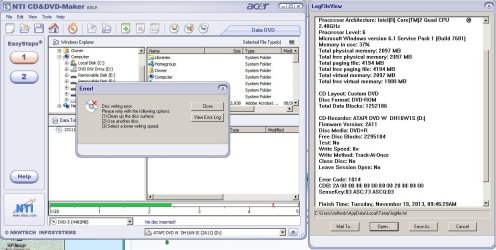
Nope that didn't one didn't work either. My NTI (burner software) says the file is too big and Windows says it's writing at the wrong speed. I changed the speed on the burner to 8, maybe that will work. It normally copies at 16x. Will this ruin the ISO and keep it from running properly?
 

My Computer

Computer type
PC/Desktop
Computer Manufacturer/Model Number
Acer Aspire E700 dsktop
OS
Windows 7 Pro
CPU
Intel 2 quad Q6600
Motherboard
Acer fg965M
Memory
4 GB
Graphics Card(s)
Nvidia GeForce GTS 450 1TB
Sound Card
RealTek
Monitor(s) Displays
Acer 22" X223w
Hard Drives
1TB WD Caviar Black (internal)
1TB WD My Book Essential
PSU
500W coolmaster Extreme Power Plus
Case
Acer
Cooling
case fan
Keyboard
acer
Mouse
acer
Internet Speed
56k
Antivirus
Microsoft Security Essentials
Browser
IE 8
Other Info
I hate IE 9 10 & 11
Well that didn't work either. I don't have trouble burning other data so this doesn't make sense. There is plenty of room on the disc, it's a Verbatim brand disc. (These aren't cheap) I've got to check my cabinet and see if I have any rewritable ones. This is the 3rd disc, it burns .036MB then quits. Just enough to ruin the disc.
 

Attachments

  • That didn't work either.jpg
    That didn't work either.jpg
    122.5 KB · Views: 3

My Computer

Computer type
PC/Desktop
Computer Manufacturer/Model Number
Acer Aspire E700 dsktop
OS
Windows 7 Pro
CPU
Intel 2 quad Q6600
Motherboard
Acer fg965M
Memory
4 GB
Graphics Card(s)
Nvidia GeForce GTS 450 1TB
Sound Card
RealTek
Monitor(s) Displays
Acer 22" X223w
Hard Drives
1TB WD Caviar Black (internal)
1TB WD My Book Essential
PSU
500W coolmaster Extreme Power Plus
Case
Acer
Cooling
case fan
Keyboard
acer
Mouse
acer
Internet Speed
56k
Antivirus
Microsoft Security Essentials
Browser
IE 8
Other Info
I hate IE 9 10 & 11
Back
Top