
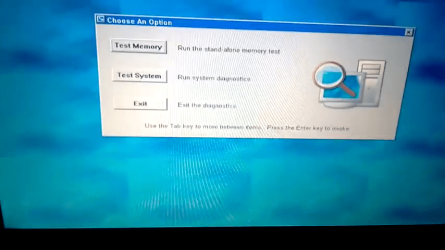
stuck in Choose an option "test memory - test system - exit" help plea

kennanhomidrawe

New member
Local time
1:05 PM
Messages
5
stuck in Choose an option "test memory - test system - exit" help plea

Hello, I need help since I can not solve this problem what happens is that when I start my laptop a menu opens that says "Choose An Option" and has three options "Test memory" - "Test System" - "Exit" already I tried the three options and when I restarted it sends me back to the same place the windows does not start at all and I do not know what to do, I already made a diagnosis and there is no error I need help please..

My pc is Dell inspiron 1525
 

Attachments
  • Screenshot_20201007-095805.png
    Screenshot_20201007-095805.png
    140 KB · Views: 0

My Computer My Computer

At a glance

Windows vista home premium
Computer type
Laptop
Computer Manufacturer/Model Number
Dell
OS
Windows vista home premium
This issue seem to be pretty prevalent. I have used nothing but Dell laptops and never had this issue, though, I don't install any of their bloatware crap so that could be why. I have always installed the OS from scratch and then the drivers, nothing more.

From this post taken from here: https://www.dell.com/community/Insp...p-to-diagnostic-boot-test/td-p/6195785/page/2

Please disable the following options in BIOS.

  1. SMART reporting under system configurations
  2. Adapter warnings under post behavior.
  3. Auto OS recovery threshold under Support Assist Resolution.
To get into BIOS, reboot the laptop and as it boots keep hitting the F2 key. Or hit the F2 key right at the BIOS loading screen. If it isn't F2 (which it should) on the bottom of the screen it should say what key to press.
 

My Computer My Computer

At a glance

Windows 7 Ultimate x64
Computer type
PC/Desktop
OS
Windows 7 Ultimate x64
Press F keys in about 1 second intervals, faster or slower usually doesn't work to well.

Windows vista home premium?
x32 or x64?
Do you have a DVD or ISO?
 

My Computer My Computer

At a glance

Win 10 x64, Linux Lite, Win 7 x64, BlackArch,...
Computer type
PC/Desktop
Computer Manufacturer/Model Number
HP Desktop & Compaq Laptop
OS
Win 10 x64, Linux Lite, Win 7 x64, BlackArch, & Kali
Hard Drives
Samsung 850 Pro 256Gb,
Hitachi HDD 1Tb,
Crucial MX SSD 250Gb
Segate 3Tb USB 3.0 Ext. Backup HDD
Internet Speed
150Mbps dn, 20Mbps up
Antivirus
Avast Free, Malwarebytes Anti-Exploit & Anti-Ransomware
Browser
Firefox, Chrome, Opera, & VPN
Thank you very much for answering..

I will try the two methods I hope and one of the two works for me ..

It's windows vista home premium, and I don't have a DVD or ISO
 

My Computer My Computer

At a glance

Windows vista home premium
Computer type
Laptop
Computer Manufacturer/Model Number
Dell
OS
Windows vista home premium

My Computers My Computers

  • At a glance

    7 X64i5 84002x8gb 3200mhz
    Computer type
    PC/Desktop
    OS
    7 X64
    CPU
    i5 8400
    Motherboard
    gigabyte b365m ds3h
    Memory
    2x8gb 3200mhz
    Hard Drives
    various
    PSU
    pure power 11 400w cm
    Case
    Coolermaster
    Cooling
    cryorig m9i
  • At a glance

    7x64g54008gb ddr4 2400
    Computer type
    PC/Desktop
    OS
    7x64
    CPU
    g5400
    Motherboard
    ga b365m ds3h
    Memory
    8gb ddr4 2400
    PSU
    xfx pro 450w
I have to reinstall windows from what I understand .. for that I need the DVD or the iso right?
 

My Computer My Computer

At a glance

Windows vista home premium
Computer type
Laptop
Computer Manufacturer/Model Number
Dell
OS
Windows vista home premium

My Computer My Computer

At a glance

Win 10 x64, Linux Lite, Win 7 x64, BlackArch,...
Computer type
PC/Desktop
Computer Manufacturer/Model Number
HP Desktop & Compaq Laptop
OS
Win 10 x64, Linux Lite, Win 7 x64, BlackArch, & Kali
Hard Drives
Samsung 850 Pro 256Gb,
Hitachi HDD 1Tb,
Crucial MX SSD 250Gb
Segate 3Tb USB 3.0 Ext. Backup HDD
Internet Speed
150Mbps dn, 20Mbps up
Antivirus
Avast Free, Malwarebytes Anti-Exploit & Anti-Ransomware
Browser
Firefox, Chrome, Opera, & VPN
I have to reinstall windows from what I understand .. for that I need the DVD or the iso right?


If there is a recovery partition on the machine, you can use that to restore to factory settings. Or you can install windows 10 on a separate partition. Then later , if you are happy with windows 10 you could buy a license for about $30.
 

My Computers My Computers

  • At a glance

    7 X64i5 84002x8gb 3200mhz
    Computer type
    PC/Desktop
    OS
    7 X64
    CPU
    i5 8400
    Motherboard
    gigabyte b365m ds3h
    Memory
    2x8gb 3200mhz
    Hard Drives
    various
    PSU
    pure power 11 400w cm
    Case
    Coolermaster
    Cooling
    cryorig m9i
  • At a glance

    7x64g54008gb ddr4 2400
    Computer type
    PC/Desktop
    OS
    7x64
    CPU
    g5400
    Motherboard
    ga b365m ds3h
    Memory
    8gb ddr4 2400
    PSU
    xfx pro 450w
Thank you very much I will try to install Windows 10 and see what happens, I tried the other things and it still does not work so I will try to install another operating system, thank you all!
 

My Computer My Computer

At a glance

Windows vista home premium
Computer type
Laptop
Computer Manufacturer/Model Number
Dell
OS
Windows vista home premium
If you are happy with win10 after trying it out, it can be purchased Creativemark Store
 

My Computers My Computers

  • At a glance

    7 X64i5 84002x8gb 3200mhz
    Computer type
    PC/Desktop
    OS
    7 X64
    CPU
    i5 8400
    Motherboard
    gigabyte b365m ds3h
    Memory
    2x8gb 3200mhz
    Hard Drives
    various
    PSU
    pure power 11 400w cm
    Case
    Coolermaster
    Cooling
    cryorig m9i
  • At a glance

    7x64g54008gb ddr4 2400
    Computer type
    PC/Desktop
    OS
    7x64
    CPU
    g5400
    Motherboard
    ga b365m ds3h
    Memory
    8gb ddr4 2400
    PSU
    xfx pro 450w
Hello again, I already tried to install the Windows ISO from a USB and I get an error, will anyone know why? I still have the blue screen and for the same reason it won't let me install it from the usb please help.
 

My Computer My Computer

At a glance

Windows vista home premium
Computer type
Laptop
Computer Manufacturer/Model Number
Dell
OS
Windows vista home premium
Please read post #2 again and disable those options in BIOS.
 

My Computer My Computer

At a glance

Windows 7 Ultimate x64
Computer type
PC/Desktop
OS
Windows 7 Ultimate x64
Back
Top