Stupid desktop question

esha

New member
Power User
Local time
11:04 PM
Messages
98
Ok, now this may sound pretty stupid, but old habits die hard...
I always have lots of icons on my desktop. Not files (I know exactly where to find my data) but programs. Some of them I use practically every day, so I find it handy when they are on my desktop. Some others I use very rarely and if I hadn't the icon sitting there I wouldn't remember that I have them, what they are called and where to find them :o

The result is a very full desktop. I find everything I need at a glance but it is ugly. Now I've started to put some programs into the quickstart list but I don't want to put too many there, there isn't room enough for all of them anyway.

In your screenshots I've seen beautifully clean desktops - which makes me wonder how you start your programs - going through the list of installed programs all the time?

It would be cool if there was a way to keep them somehow organized in groups. Is there perhaps a tool for that?
 

My Computer

OS
Win 7 Professional 64bit
CPU
Intel i7-3930K @ 3.2GHz
Memory
16 GB
Graphics Card(s)
NVIDIA GeForce GTX 650
Monitor(s) Displays
1 CRT, 1 LCD
Hard Drives
3 hard drives
Make a folder for programs that you use the most, then another one for miscellaneous, etc ...
That way you could have maybe three (named) folders on your desktop instead of a mess :)

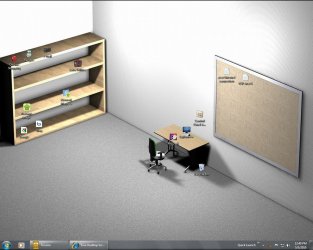
This is my 'organized' desktop
 

Attachments

  • desk.jpg
    desk.jpg
    313.3 KB · Views: 39

My Computer

Computer type
PC/Desktop
Computer Manufacturer/Model Number
Bruce ... somewhere in his 40's
OS
Windows 7 Ultimate 32bit SP1
CPU
Intel(R) Core(TM)2 Quad CPU @ 2.40GHz, 2400 MHz
Motherboard
INTEL/D975XBX2
Memory
4 GB
Graphics Card(s)
ATI Radeon HD 2600 Pro
Monitor(s) Displays
Samsung SyncMaster 914v
Screen Resolution
1280 x 1024
Hard Drives
2/500GB each ... ST3500630AS ATA Device.
One is not connected
PSU
Rocketfish 700 W
Case
G.Skill Gigabyte Chassis
Keyboard
Standard PS/2 Keyboard
Mouse
Microsoft PS/2 Mouse
Internet Speed
DSL
Antivirus
Avira Internet Security
Browser
IE 11
Other Info
ATI HDMI Audio
Stardock ObjectDock

There are two versions ; one is free - with that you may get a cool dock , that may contain a guge number of icons .

But there is another, Plus version, costa 19.95 dollars . It gives you a scope of using multiple docks, as drawers . Like the screenshots of this link New Page 1 .
 

My Computer

Computer type
PC/Desktop
Computer Manufacturer/Model Number
Self Assembled
OS
Microsoft Windows 10 Pro Insider Preview 64-bit
CPU
Intel(R) Core(TM) i3-4130 CPU @ 3.40GHz
Motherboard
Gigabyte Technology Co., Ltd. B85M-D3H
Memory
Corsair Vengence 4GB x2 (8.00GB Dual-Channel DDR3 @ 798MHz)
Graphics Card(s)
2047MB GeForce GTS 450 (ZOTAC International)
Sound Card
Onboard (Realtek High Definition Audio)
Monitor(s) Displays
LG Flatron E2040T
Screen Resolution
1600x900
Hard Drives
Western Digital 1 TB
Seagate 500 GB
PSU
Corsair VS550
Case
Cooler Master K380
Cooling
Cooler Master Seidon 120V Plus
Keyboard
Logitech MK260r
Mouse
Logitech MK260r
Internet Speed
PMPL Broadband
Antivirus
Windows Defender + MBAM
Browser
Firefox
Other Info
Dell Studio 15" Laptop
You can organize all your programs in folders on the start menu, and then delete the desktop icons. Note that contents of the start menu are stored in two locations, see this prior thread for more info.
 

My Computer

Computer Manufacturer/Model Number
Toshiba Satellite A505-S6005 laptop
OS
Win 7 Home Premium x64
CPU
Intel Core i3-330M
Memory
4GB DDR3 1066MHz
Graphics Card(s)
Intel Graphics Media Accelerator HD
Monitor(s) Displays
16" LCD laptop display
Screen Resolution
1366x768
Hard Drives
500GB (5400rpm)
Mouse
Microsoft 3000
Internet Speed
not fast enough
Hi,

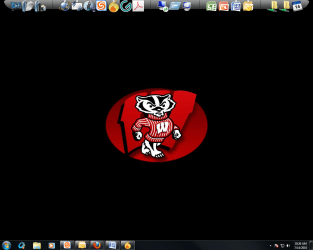
Another option is to use a program like Winstep nexus or Rocketdock.
You can put all of your icons on it and even organize them in groups with deviders.
I myself use winstep nexus: Winstep Nexus Dock - The Advanced Docking System for Windows
It is higly customizable and you can auto hide it.

MK2
 

Attachments

  • Desktop.jpg
    Desktop.jpg
    792.9 KB · Views: 34

My Computer

OS
7
I use Objectdock from Stardock, free and easy to use! (you can also set it to auto-hide).

Then, I right click my desktop and hide the icons.
 

Attachments

  • Desktop10.PNG
    Desktop10.PNG
    349 KB · Views: 14

My Computer

Computer Manufacturer/Model Number
Custom Built
OS
Windows 7 Ultimate
CPU
AMD Athlon II X2 245 2.90Ghz
Motherboard
Some Gigabyte one, dont remember model
Memory
3.00 GB
Graphics Card(s)
8800GTS 512MB
Sound Card
Sound Blaster X-Fi Titanium Fatal1ty
Monitor(s) Displays
Dual 22" widescreen
Hard Drives
250GB internal, 500GB internal
PSU
CORSAIR CMPSU-850TX 850W Power Supply
Case
Thermalkake Tsunami Dream
Cooling
Thermaltake Golden Orb II
Keyboard
Saitek Eclipse 2
Mouse
Logitech MX518
I make an extra folder on the desktop called DeskTop Extras ;)
 

My Computer

Computer type
PC/Desktop
Computer Manufacturer/Model Number
Built them myself, Science Experiments !
OS
Win7 Enterprise, Win7 x86 (Ult 7600), Win7 x64 Ult 7600, TechNet RTM on AMD x64 (2.8Ghz)
CPU
AMD fx8350 4ghz, AMD-32 2400mhz, AMD-64 3200mhz, AMDx64 2.8G
Motherboard
SIS 755, ECS-K8M890M-M (Ult 7600), GigaByte & others
Memory
2gb, 4gb on the Ult 7600, 4gb on Technet RTM, 32gb on FX8350
Graphics Card(s)
Draw my own Graphics, several nVidia cards
Sound Card
on motherboard
Monitor(s) Displays
19" flat scr, 28" I-Inc widescr,22" Emprex Widescr, 23" Acer
Screen Resolution
1280 x 1024, 1440 x 900, 1920 x 1080
Hard Drives
6 pata Ide HD's & 2 Sata HD's
added 80gb external on Ult 7600 computer,
numerous extra 1tb, 2TB, 3Tb SATA HD's
A collection of ext HD Docks w/ HDs
PSU
430w, 550w, 600w, 700, 800, etc
Case
All Generic Full Towers
Cooling
Open Air & a few fans, some w/ colored LEDs
Keyboard
Compaq & Dell recycled from GoodWill
Mouse
Made in China Optical Wired Mouse
Internet Speed
Fast Cable InterNet
Antivirus
AVG Free on 24 different Desktops, NO Problems!
Browser
IE 8 is preferred, but use FireFox sometimes
Other Info
Linksys Routers, switches, & Hubs
Too Many USB Flash Drives to count, Biggest is 64GB !
Eight computers in my home network.
Sixteen computers at my business network.
Linked via TeamViewer !
Lots of old used spare computer parts everywhere!

My Computer

Computer type
PC/Desktop
Computer Manufacturer/Model Number
Self Built
OS
Win 10 Pro x64
CPU
Intel I5-2500K @3.3GHz
Motherboard
Asrock P67 Extreme4
Memory
16GB G.Skill Ripjaws X (4x4GB)
Graphics Card(s)
EVGA GeForce 750 Ti SC 2GB
Sound Card
ASUS Xonar DG 5.1 Channels 24-bit 96KHz PCI Interface Sound
Monitor(s) Displays
auria eq2367
Screen Resolution
1920 x 1080
Hard Drives
250GB Samsung 850 EVO SSD
1TB WD Blue
1TB Hitachi
PSU
SeaSonic X 650W 80 Plus Gold
Case
Corsair Obsidian 750D
Cooling
Corsair H60, Three 140mm case fans
Keyboard
Logitech Wireless Keyboard K520
Mouse
Logitech Wireless Mouse M310
Internet Speed
Wave Broadband ~ 100 dn 5 up
Antivirus
Windows Defender, Malwarebytes Premium
Browser
Edge, IE11, Chrome
Other Info
Laptop specs: HP g7-1365dx /
CPU: AMD A6-3420M APU with Radeon(tm) HD Graphics /
RAM: Crucial 8Gb (2x4Gb) /
SSD: Crucial M4-CT128M4SSD2 ATA Device/ FW 000F /
GFX: AMD Radeon HD 6520G /
OS: Windows 10 Pro x64
Thank you :D
 

My Computer

OS
Win 7 Professional 64bit
CPU
Intel i7-3930K @ 3.2GHz
Memory
16 GB
Graphics Card(s)
NVIDIA GeForce GTX 650
Monitor(s) Displays
1 CRT, 1 LCD
Hard Drives
3 hard drives
If you really want all the icon on the desktop itself, then you can try Fences
 

My Computer

Computer type
Laptop
Computer Manufacturer/Model Number
HP EliteBook 8530w Mobile Workstation
OS
Windows 7 Ultimate x64 (XP, 98SE, 95, 3.11, DOS 7.10 on VM) + Ubuntu 10.04 LTS Lucid Lynx
CPU
Intel Core 2 Duo Processor P8600 (2.40 GHz, 3 MB L2 cache)
Motherboard
Mobile Intel PM45 Express Chipset ICH9M-Enhanced
Memory
4GB 800 MHz DDR2 SDRAM
Graphics Card(s)
ATI Mobility FireGL V5700 with 256 MB
Sound Card
SoundMAX Integrated Digital HD Audio
Monitor(s) Displays
15.4-inch WXGA anti-glare (1280 x 800 resolution)
Screen Resolution
1280 x 800
Hard Drives
500GB + 1TB
Mouse
Synaptics PS/2 Port Touchpad, USB Mouse
Internet Speed
4 Mbps
Antivirus
MSE
Browser
Firefox, Chrome, IE
Other Info
Authentec AES2810 Fingerprint Reader
Ok... after some experimentation, I found that for now the simple Win 7 Toolbars work best for me.

BUT: after rebooting the toolbar isn't there anymore. I have to add the folder again as a toolbar. Any idea why it doesn't stay there?
 

My Computer

OS
Win 7 Professional 64bit
CPU
Intel i7-3930K @ 3.2GHz
Memory
16 GB
Graphics Card(s)
NVIDIA GeForce GTX 650
Monitor(s) Displays
1 CRT, 1 LCD
Hard Drives
3 hard drives
Here is what I used to do.

Make one folder called My stuff.

Put all app shortcuts etc in there. All files. .txt .exe etc.

Go there and get them. I have them sorted alphabetically and by type so therefore it's easy to find stuff.
 

My Computer

Computer Manufacturer/Model Number
Gateway
OS
Windows 7
CPU
Intel dual core 2.8GHZ
Motherboard
Intel Corporation OEMD975XLAG1 (J3E1)
Memory
3.0GB Single-Channel DDR2 @ 266MHz (4-4-4-12)
Graphics Card(s)
AL1916 @ 1280x1024 256MB GeForce 6800 (nVidia)
Sound Card
SigmaTel High Definition Audio CODEC
Monitor(s) Displays
Acer AL1916 19inch.
Screen Resolution
1280x1024. My screen goes up another step but my card doesnt
Hard Drives
Hitachi 79GIG Main C: OS
Barricuda 39GIG Storage D:
Case
Gateway GT5448E
Cooling
Fan on CPU, GPU. There is no extra case fans. Runs a bit hot
Keyboard
Logitech basic keyboard. With gaming/audio controls.
Mouse
Microsoft Sidewinder x8. - Got 4 free.
Internet Speed
3,552KBPS Download - 384KBPS Upload. Sucks, I know.
Other Info
I have Logitech Z323 speakers.
Logitech Webcam.
Logitech Headset.
Ok... after some experimentation, I found that for now the simple Win 7 Toolbars work best for me.

BUT: after rebooting the toolbar isn't there anymore. I have to add the folder again as a toolbar. Any idea why it doesn't stay there?

Where is the folder stored that you use to make the toolbar? I use 2 hidden toolbars to center my taskbar, and they have never disappeared.

A Guy
 

My Computer

Computer type
PC/Desktop
OS
Windows 10 Home x64
CPU
INTEL Core i5-750 Quad-Core 3.37GHz
Motherboard
ASUS P7P55D
Memory
HyperX Fury Black Series 8GB (2 x 4GB) 1866Mhz
Graphics Card(s)
EVGA GeForce GTX 750 Superclocked 1GB 128-Bit GDDR5
Monitor(s) Displays
LG 32MA68HY 32" IPS
Screen Resolution
1920 x 1080
Hard Drives
Samsung 840 Evo 120GB, SEAGATE 500GB Barracuda® 7200.12, SATA 3 Gb/s, 7200 RPM, 16MB cache
PSU
ANTEC TruePower New TP-550, 80 PLUS, 550W
Case
ANTEC Three Hundred Illusion
Cooling
COOLER MASTER Hyper 212 Plus, 4 x 120mm 1 x 140mm Noctua's
Internet Speed
85 + Mbps
Antivirus
Avast
Browser
Vivaldi
Maybe you might be interested in Launchy......you can access any program or file with just a few buttons
 

My Computer

Computer Manufacturer/Model Number
Dell
OS
Windows 7
CPU
Intel Pentuim Dual Core
Motherboard
0G848F
Memory
3034
Graphics Card(s)
Mobile Intel 4 Series Express chipset family
Sound Card
IDT
Monitor(s) Displays
Generic PNP Monitor
Hard Drives
Hitachi HTS543216L9A300 ATA Device
Back
Top