Sub-folders in Libraries- get rid of- without deleting files

gerribol

New member
Local time
4:37 PM
Messages
22
Location
Australia
I have a new computer and would like to set it up as my previous computer was set-up. A computer tech set it up.

Previously I could click on the documents library and all my documents would show up. Now I have sub-folders and I have to click through about 3 sub-folders to come to my documents.

I am the only person using the computer.

I would also like to computer to go to the desktop on start up rather than for me to have to click my name to get to the desktop.

I hope I am making myself clear.

I will post this in general discussion. i think this is the wrong thread.

Thanks
 
Last edited:

My Computer My Computer

At a glance

Microsoft Windows 7 Home Premium 64-bit 7601 ...Intel(R) Core(TM) i5-2450M CPU @ 2.50GHz4.00 GBAMD Radeon HD 7610M
Computer type
Laptop
Computer Manufacturer/Model Number
Toshiba Sattelite C850/02D
OS
Microsoft Windows 7 Home Premium 64-bit 7601 Multiprocessor Free Service Pack 1
CPU
Intel(R) Core(TM) i5-2450M CPU @ 2.50GHz
Motherboard
Type2 - Board Vendor Name1 Type2 - Board Product Name1
Memory
4.00 GB
Graphics Card(s)
AMD Radeon HD 7610M
Sound Card
(1) AMD High Definition Audio Device (2) Realtek High Defi
Hard Drives
TOSHIBA MK5075GSX
Why on earth would you like to have all your documents in the same main level folder? That is a very bad solution; subfolders are thre precisely for that, to keep your files organized.

That being said, open the Documents Library and your Documents folder in C:\Users\Your_Username\ in two separate Explorer Windows. Copy all files from various folders and subfolders in Documents Library (except of course files in My Documents and Public Documents), paste them to My Documents folder.

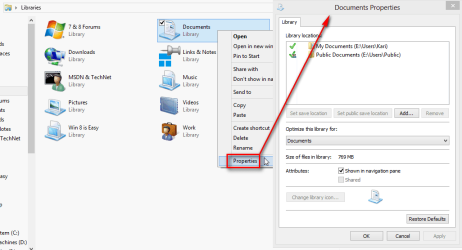
When done, open the Properties of Documents Library, select the folders you want to remove from the Library and click the remove button. See the tutorial: http://www.sevenforums.com/tutorials/586-library-remove-included-folder.html

2013-04-06_125813.png

For the login issue, see this tutorial: Log On Automatically at Startup - Bypass in Windows

Kari
 

My Computer My Computer

At a glance

Windows 10 Pro x64 EN-GB1.6 GHz Intel Core i7-720QM Processor6 GBATI Mobility Radeon HD 5850 Graphics
Computer type
Laptop
Computer Manufacturer/Model Number
HP ENVY 17-1150eg
OS
Windows 10 Pro x64 EN-GB
CPU
1.6 GHz Intel Core i7-720QM Processor
Memory
6 GB
Graphics Card(s)
ATI Mobility Radeon HD 5850 Graphics
Sound Card
Beats sound system with integrated subwoofer
Monitor(s) Displays
17" laptop display, 22" LED and 32" Full HD TV through HDMI
Screen Resolution
1600*900 (1), 1920*1080 (2&3)
Hard Drives
Internal: 2 x 500 GB SATA Hard Disk Drive 7200 rpm
External: 2TB for backups, 3TB USB3 network drive for media
Cooling
As Envy runs a bit warm, I have it on a Cooler Master pad
Keyboard
Logitech diNovo Media Desktop Laser (bluetooth)
Mouse
Logitech Performance Mouse MX
Internet Speed
50/10 Mbps VDSL
Antivirus
Windows Defender 4.3.9431.0
Browser
Maxthon 3.5.2., IE11

My Computer My Computer

At a glance

Microsoft Windows 7 Home Premium 64-bit Servi...Intel(R) Core(TM) i3 CPU M 330 @ 2.13GHz8 GB DDR3Intel(R) HD Graphics
Computer type
Laptop
Computer Manufacturer/Model Number
Hewlett-Packard/G62-107SA Notebook
OS
Microsoft Windows 7 Home Premium 64-bit Service Pack 1
CPU
Intel(R) Core(TM) i3 CPU M 330 @ 2.13GHz
Motherboard
Hewlett-Packard 1425
Memory
8 GB DDR3
Graphics Card(s)
Intel(R) HD Graphics
Sound Card
Realtek High Definition Audio
Monitor(s) Displays
Builtin
Screen Resolution
1366 x 768 x 32 bits (4294967296 colors) @ 60 Hz
Hard Drives
250 GB SATA Hard Disk Drive 7200 rpm
2TB Seagate GoFlex USB 2 Drive
1TB Iomega Prestige USB 2 Drive
1.5TB Iomega Prestige USB 2 Drive (Samsung)
2TB WD MyBook Live NAS.
Mouse
Logitech Anywhere MX
Internet Speed
152 Mbs download 10 Mbs upload
Antivirus
Norton 360
Browser
Chrome
Back
Top