
Can I change my boot drive to an SSD without deleting HDD files?

Bassking31

New member
Local time
6:33 PM
Messages
3
Hey, I have a 2TB HDD hard drive with windows and all of my files installed on it. Is there any way that I can install windows on my SSD and use that as the boot drive while keeping all of my files on the HDD? Would I be fine keeping windows installed on the HDD, or would I have to remove everything on it to do so. Basically, how do I set up my computer so the SSD is the boot drive and the HDD is the storage drive, and is there any way I can keep the files that are currently on my HDD?
 

My Computer My Computer

At a glance

Windows 7 Home Premium 64-bitIntel i5-4690 3.5GHzTeam Xtreem Dark Series 8GB DDR3-1600Gigabyte Radeon R9 290 4GB Windforce
Computer type
PC/Desktop
Computer Manufacturer/Model Number
Custom Build
OS
Windows 7 Home Premium 64-bit
CPU
Intel i5-4690 3.5GHz
Motherboard
ASRock H97 Pro4 ATX LGA1150
Memory
Team Xtreem Dark Series 8GB DDR3-1600
Graphics Card(s)
Gigabyte Radeon R9 290 4GB Windforce
Hard Drives
Seagate Barracuda 2TB HDD
Crucial MX100 256GB SSD
Hey, I have a 2TB HDD hard drive with windows and all of my files installed on it. Is there any way that I can install windows on my SSD and use that as the boot drive while keeping all of my files on the HDD? Would I be fine keeping windows installed on the HDD, or would I have to remove everything on it to do so. Basically, how do I set up my computer so the SSD is the boot drive and the HDD is the storage drive, and is there any way I can keep the files that are currently on my HDD?

Why did you buy the SSD if not to run Windows on it?

If I had an SSD, I certainly would NOT want to have Windows on an HDD.

Here's a couple of things you could do:

1: start over. Do a clean install of Windows to the SSD and reinstall your programs to the SSD. Doable easily enough and preferable-----except for the time it requires.

2: I'm guessing you have your personal data and Windows on the same C partition on the HDD. If so, you could shrink C, make a D, put your data on D, and then make an image of C (and System Reserved if you have it) and restore that image to the SSD.

The safe way to do the second choice is to first copy your personal files to some other drive entirely as a backup precaution.

Post a screen shot of Windows Disk Management showing the HDD partitions so we can get a better idea.

Do you have a 25 character Windows Product Key?

Do you have an external drive or anywhere at all to which you can temporarily copy your data?
 

My Computer My Computer

At a glance

Windows 7 Home Premium SP1, 64-bitIntel Skylake i5-6600K, not overclocked8 GB HyperX DDR4-2666 (2 x 4 GB)none; graphics are integrated on CPU
Computer type
PC/Desktop
Computer Manufacturer/Model Number
Ignatz Special; 4 speed manual gearbox; factory air conditioning; one of one
OS
Windows 7 Home Premium SP1, 64-bit
CPU
Intel Skylake i5-6600K, not overclocked
Motherboard
AsRock Z170M Extreme 4, micro ATX
Memory
8 GB HyperX DDR4-2666 (2 x 4 GB)
Graphics Card(s)
none; graphics are integrated on CPU
Sound Card
onboard: Realtek ALC1150; external: USB Behringer UF0-202
Monitor(s) Displays
Dell S2340M 23 inch IPS
Screen Resolution
1600 x 900
Hard Drives
System: Crucial MX100 series SSD, 128 GB;
Data: Samsung Spinpoint 103SJ, 1 TB;
Backup: WD Caviar Green WD30EZRX-00D8PB0, 3 TB
PSU
Rosewill SilentNight 500 watt fanless, semi-modular
Case
Antec Solo II
Cooling
Noctua NH-U12S; Noctua F12 intake, Noctua S12A exhaust
Keyboard
Microsoft 200 6JH-00001 USB
Mouse
Dell or Microsoft optical wired; USB
Antivirus
Microsoft Security Essentials and Malwarebytes Premium
Browser
Pale Moon
Other Info
All fans PWM; speeds at idle: CPU circa 500 rpm; intake circa 600 rpm; exhaust circa 600 rpm; CPU temps 27 idle and 47 C load in a warm room (27 C/81 F) when running Intel Extreme Tuning Utility stress test.
Ok, if I did a clean install of windows, could I make SSD the boot drive but use the HDD for storage? If so, how?
 

My Computer My Computer

At a glance

Windows 7 Home Premium 64-bitIntel i5-4690 3.5GHzTeam Xtreem Dark Series 8GB DDR3-1600Gigabyte Radeon R9 290 4GB Windforce
Computer type
PC/Desktop
Computer Manufacturer/Model Number
Custom Build
OS
Windows 7 Home Premium 64-bit
CPU
Intel i5-4690 3.5GHz
Motherboard
ASRock H97 Pro4 ATX LGA1150
Memory
Team Xtreem Dark Series 8GB DDR3-1600
Graphics Card(s)
Gigabyte Radeon R9 290 4GB Windforce
Hard Drives
Seagate Barracuda 2TB HDD
Crucial MX100 256GB SSD
Ok, if I did a clean install of windows, could I make SSD the boot drive but use the HDD for storage? If so, how?

What are the answers to the last 2 questions I asked?

You install to the SSD with the HDD disconnected.

After Windows is installed, you reconnect the HDD and reboot to the SSD. The SSD will be C. The HDD partitions will be D, E, etc.

You'd then delete the old Windows partition from the HDD (the old C). You'd add that space to D.

If you have a System Reserved on the current HDD, you'd also delete it and add its space to D. So the HDD would have exactly one partition for all data.

If you currently keep your data under "C:\Users" somewhere, you could remap it to allow for the fact that your data is actually on D. There are tutorials on this site on how to do that.

Personally, I don't use C:\Users for my data. I save to D directly and don't remap the users folder.

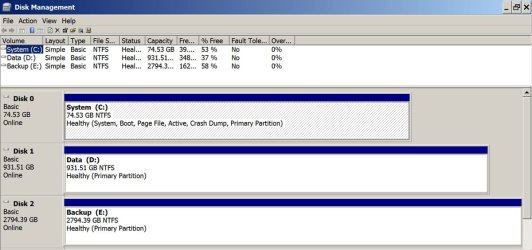
Here's what my drives look like.

C is an SSD with Windows.

D is my data only.

E is for backup only.

3 separate drives; one partition each; no System Reserved.
 

Attachments

  • Untitled-1.jpg
    Untitled-1.jpg
    105.9 KB · Views: 1

My Computer My Computer

At a glance

Windows 7 Home Premium SP1, 64-bitIntel Skylake i5-6600K, not overclocked8 GB HyperX DDR4-2666 (2 x 4 GB)none; graphics are integrated on CPU
Computer type
PC/Desktop
Computer Manufacturer/Model Number
Ignatz Special; 4 speed manual gearbox; factory air conditioning; one of one
OS
Windows 7 Home Premium SP1, 64-bit
CPU
Intel Skylake i5-6600K, not overclocked
Motherboard
AsRock Z170M Extreme 4, micro ATX
Memory
8 GB HyperX DDR4-2666 (2 x 4 GB)
Graphics Card(s)
none; graphics are integrated on CPU
Sound Card
onboard: Realtek ALC1150; external: USB Behringer UF0-202
Monitor(s) Displays
Dell S2340M 23 inch IPS
Screen Resolution
1600 x 900
Hard Drives
System: Crucial MX100 series SSD, 128 GB;
Data: Samsung Spinpoint 103SJ, 1 TB;
Backup: WD Caviar Green WD30EZRX-00D8PB0, 3 TB
PSU
Rosewill SilentNight 500 watt fanless, semi-modular
Case
Antec Solo II
Cooling
Noctua NH-U12S; Noctua F12 intake, Noctua S12A exhaust
Keyboard
Microsoft 200 6JH-00001 USB
Mouse
Dell or Microsoft optical wired; USB
Antivirus
Microsoft Security Essentials and Malwarebytes Premium
Browser
Pale Moon
Other Info
All fans PWM; speeds at idle: CPU circa 500 rpm; intake circa 600 rpm; exhaust circa 600 rpm; CPU temps 27 idle and 47 C load in a warm room (27 C/81 F) when running Intel Extreme Tuning Utility stress test.
Yes I have my product key, and yes I have an external hard drive. Do you think a clean install would be best?
 

My Computer My Computer

At a glance

Windows 7 Home Premium 64-bitIntel i5-4690 3.5GHzTeam Xtreem Dark Series 8GB DDR3-1600Gigabyte Radeon R9 290 4GB Windforce
Computer type
PC/Desktop
Computer Manufacturer/Model Number
Custom Build
OS
Windows 7 Home Premium 64-bit
CPU
Intel i5-4690 3.5GHz
Motherboard
ASRock H97 Pro4 ATX LGA1150
Memory
Team Xtreem Dark Series 8GB DDR3-1600
Graphics Card(s)
Gigabyte Radeon R9 290 4GB Windforce
Hard Drives
Seagate Barracuda 2TB HDD
Crucial MX100 256GB SSD
Yes I have my product key, and yes I have an external hard drive. Do you think a clean install would be best?

Sure, if you have the time and don't mind doing it. It will take no more than a half hour to reinstall Windows once you get the SSD into the case. But it might take you 40 hours to reinstall your applications and configure them just the way you want.

Just leave the HDD disconnected. Install Windows to the SSD and get it fully updated from Windows Update. Then reconnect the HDD.

The other method I mentioned--shrinking C, making a new D, making an image of C, restoring the image to the SSD, might take only an hour or two, BUT----you'd have to learn how to do that and the restored installation would have the same exact problems (if you have any) that you have on the current HDD. An image restoration contains everything from C---including warts as well as the installed applications.

It's a personal choice. I do a clean install every time I change motherboards--every few years.

But if my SSD dropped dead tomorrow, I would restore the image of my current C rather than do a clean install. Why? Because my current installation is running very well and I have 55 applications installed on it---it would take me weeks to get that all reinstalled and configured if I did a clean install.

Do you have a known good Windows installation disc?
 

My Computer My Computer

At a glance

Windows 7 Home Premium SP1, 64-bitIntel Skylake i5-6600K, not overclocked8 GB HyperX DDR4-2666 (2 x 4 GB)none; graphics are integrated on CPU
Computer type
PC/Desktop
Computer Manufacturer/Model Number
Ignatz Special; 4 speed manual gearbox; factory air conditioning; one of one
OS
Windows 7 Home Premium SP1, 64-bit
CPU
Intel Skylake i5-6600K, not overclocked
Motherboard
AsRock Z170M Extreme 4, micro ATX
Memory
8 GB HyperX DDR4-2666 (2 x 4 GB)
Graphics Card(s)
none; graphics are integrated on CPU
Sound Card
onboard: Realtek ALC1150; external: USB Behringer UF0-202
Monitor(s) Displays
Dell S2340M 23 inch IPS
Screen Resolution
1600 x 900
Hard Drives
System: Crucial MX100 series SSD, 128 GB;
Data: Samsung Spinpoint 103SJ, 1 TB;
Backup: WD Caviar Green WD30EZRX-00D8PB0, 3 TB
PSU
Rosewill SilentNight 500 watt fanless, semi-modular
Case
Antec Solo II
Cooling
Noctua NH-U12S; Noctua F12 intake, Noctua S12A exhaust
Keyboard
Microsoft 200 6JH-00001 USB
Mouse
Dell or Microsoft optical wired; USB
Antivirus
Microsoft Security Essentials and Malwarebytes Premium
Browser
Pale Moon
Other Info
All fans PWM; speeds at idle: CPU circa 500 rpm; intake circa 600 rpm; exhaust circa 600 rpm; CPU temps 27 idle and 47 C load in a warm room (27 C/81 F) when running Intel Extreme Tuning Utility stress test.
Back
Top