Solved Sudden "Event 55 ntfs" on HDD

dorian hawkmoon

New member
Member
VIP
Local time
8:37 AM
Messages
398
This morning my pc startup ended in ' computer has rebooted from a bugcheck' . I subsequently found,later, after I had uninstalled my new BDIS 2015 install (I thought it was the culprit) that I had two Event 55 ntfs Errors ("The file system structure on the disk is corrupt and unusable. Please run the chkdsk utility on the volume \Device\HarddiskVolume3"). I ran complete Disk Doctor checkup on "C" after windows prompted, and it said "C" drive is clean. No bad sectors. I haven't run WD utility thorough check yet though. I'm a bit worried here.
 

Attachments
Last edited:

My Computer My Computer

Computer type
PC/Desktop
Computer Manufacturer/Model Number
Self built
OS
Windows 10 Pro (x64)
CPU
AMD RYZEN 7 1700+Stock Wraith Spire
Motherboard
ASUS PRIME B350M-A
Memory
Corsair 8GB (1 x 8 GB) DDR4 Vengeance LPX 2400Mhz
Graphics Card(s)
SAPPHIRE RX 470 4GB (Platinum Edition)
Monitor(s) Displays
BenQ VZ2250H
Screen Resolution
1920x1080
Hard Drives
120GB Samsung 750 Evo (OS/Programs)+1TB ST Firecuda (Games/Creative Applications)+1TB WD Green (Storage)
PSU
Antec VP650PM
Case
Coolermaster K380 Mid-Tower
Cooling
Side:Antec F19 120mm+Rear:Tt ISGC Fan12
Keyboard
Logitech K200
Mouse
Dragonwar Ele-G9 Thor
Internet Speed
Slow by 21st Century Standards :(
Antivirus
Bitdefender Internet Security and MBAM
Browser
Firefox
Other Info
Creative Inspire T3130

My Computer My Computer

Computer type
PC/Desktop
Computer Manufacturer/Model Number
Home made Desktop
OS
Windows 10 Pro. 64/ version 1709 Windows 7 Pro/64
CPU
Intel i7-6800K @ 4.3
Motherboard
ASUS X-99 Deluxe II
Memory
Corsair Platinum 16 gig @2400
Graphics Card(s)
EVGA GTX 1070 OC
Monitor(s) Displays
Asus 27" LED LCD/VE278Q
Screen Resolution
1920-1080 or 1280-720 HDMI
Hard Drives
INTEL SSD 730-240 Gb Sata 3.0/
PSU
EVGA Platium 1200W
Case
Phanteks Luxe Tempered Glass 8 fans/ one radiator
Cooling
XSPC/ Water Cooled CPU
Keyboard
Das 4 Professional
Mouse
Logitech M705/MX Anywhere 2-S
Internet Speed
100 mbits
Antivirus
Microsoft Security Essentials/ Malwarebytes Premium 3.0/ SAS
Browser
I.E. 11 default/Firefox/ ISP Time Warner Cable/Spectrum
Other Info
LG BluRay Burner/
Sound system-KLipsch-THX/
Icy Dock ssd Hot Swap bays.
Hello Layback Bear :)
"Bitdefender Internet Security 2015"

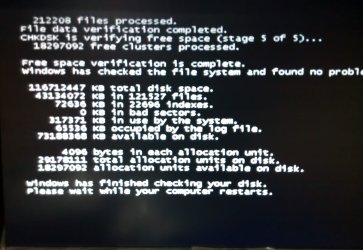
I ran check disk, it came out, as it said, "Clean". No bad sectors found there on chkdsk startup check.

(Btw, I have attached logs collected by Dm log collector in the first post, as it was instructed in this forum)
 

My Computer My Computer

Computer type
PC/Desktop
Computer Manufacturer/Model Number
Self built
OS
Windows 10 Pro (x64)
CPU
AMD RYZEN 7 1700+Stock Wraith Spire
Motherboard
ASUS PRIME B350M-A
Memory
Corsair 8GB (1 x 8 GB) DDR4 Vengeance LPX 2400Mhz
Graphics Card(s)
SAPPHIRE RX 470 4GB (Platinum Edition)
Monitor(s) Displays
BenQ VZ2250H
Screen Resolution
1920x1080
Hard Drives
120GB Samsung 750 Evo (OS/Programs)+1TB ST Firecuda (Games/Creative Applications)+1TB WD Green (Storage)
PSU
Antec VP650PM
Case
Coolermaster K380 Mid-Tower
Cooling
Side:Antec F19 120mm+Rear:Tt ISGC Fan12
Keyboard
Logitech K200
Mouse
Dragonwar Ele-G9 Thor
Internet Speed
Slow by 21st Century Standards :(
Antivirus
Bitdefender Internet Security and MBAM
Browser
Firefox
Other Info
Creative Inspire T3130
Your post said you run Norton Disk Doctor on a system with BitDefender installed.
Your post did not state you ran the checks in the fashion that the Microsoft instructions indicate in the hyperlink I posted.

Here is another option. A tutorial by Brink.

http://www.sevenforums.com/tutorials/433-disk-check.html

These are just suggestion for things to do. Of course it's your system so it's your choice.
 

My Computer My Computer

Computer type
PC/Desktop
Computer Manufacturer/Model Number
Home made Desktop
OS
Windows 10 Pro. 64/ version 1709 Windows 7 Pro/64
CPU
Intel i7-6800K @ 4.3
Motherboard
ASUS X-99 Deluxe II
Memory
Corsair Platinum 16 gig @2400
Graphics Card(s)
EVGA GTX 1070 OC
Monitor(s) Displays
Asus 27" LED LCD/VE278Q
Screen Resolution
1920-1080 or 1280-720 HDMI
Hard Drives
INTEL SSD 730-240 Gb Sata 3.0/
PSU
EVGA Platium 1200W
Case
Phanteks Luxe Tempered Glass 8 fans/ one radiator
Cooling
XSPC/ Water Cooled CPU
Keyboard
Das 4 Professional
Mouse
Logitech M705/MX Anywhere 2-S
Internet Speed
100 mbits
Antivirus
Microsoft Security Essentials/ Malwarebytes Premium 3.0/ SAS
Browser
I.E. 11 default/Firefox/ ISP Time Warner Cable/Spectrum
Other Info
LG BluRay Burner/
Sound system-KLipsch-THX/
Icy Dock ssd Hot Swap bays.
Sorry, my fault.
I should've said it was AVG disk doctor (not Antivirus, AVG Tuneup), I was trying one thing after another before I posted here! I guess, I'm a bit nervous trying to back up my numerous files and documents. I checked again like you instructed... posting screen.
 

Attachments

  • IMG_20150413_222054.jpg
    IMG_20150413_222054.jpg
    394.6 KB · Views: 0

My Computer My Computer

Computer type
PC/Desktop
Computer Manufacturer/Model Number
Self built
OS
Windows 10 Pro (x64)
CPU
AMD RYZEN 7 1700+Stock Wraith Spire
Motherboard
ASUS PRIME B350M-A
Memory
Corsair 8GB (1 x 8 GB) DDR4 Vengeance LPX 2400Mhz
Graphics Card(s)
SAPPHIRE RX 470 4GB (Platinum Edition)
Monitor(s) Displays
BenQ VZ2250H
Screen Resolution
1920x1080
Hard Drives
120GB Samsung 750 Evo (OS/Programs)+1TB ST Firecuda (Games/Creative Applications)+1TB WD Green (Storage)
PSU
Antec VP650PM
Case
Coolermaster K380 Mid-Tower
Cooling
Side:Antec F19 120mm+Rear:Tt ISGC Fan12
Keyboard
Logitech K200
Mouse
Dragonwar Ele-G9 Thor
Internet Speed
Slow by 21st Century Standards :(
Antivirus
Bitdefender Internet Security and MBAM
Browser
Firefox
Other Info
Creative Inspire T3130

My Computer My Computer

Computer type
PC/Desktop
Computer Manufacturer/Model Number
Home made Desktop
OS
Windows 10 Pro. 64/ version 1709 Windows 7 Pro/64
CPU
Intel i7-6800K @ 4.3
Motherboard
ASUS X-99 Deluxe II
Memory
Corsair Platinum 16 gig @2400
Graphics Card(s)
EVGA GTX 1070 OC
Monitor(s) Displays
Asus 27" LED LCD/VE278Q
Screen Resolution
1920-1080 or 1280-720 HDMI
Hard Drives
INTEL SSD 730-240 Gb Sata 3.0/
PSU
EVGA Platium 1200W
Case
Phanteks Luxe Tempered Glass 8 fans/ one radiator
Cooling
XSPC/ Water Cooled CPU
Keyboard
Das 4 Professional
Mouse
Logitech M705/MX Anywhere 2-S
Internet Speed
100 mbits
Antivirus
Microsoft Security Essentials/ Malwarebytes Premium 3.0/ SAS
Browser
I.E. 11 default/Firefox/ ISP Time Warner Cable/Spectrum
Other Info
LG BluRay Burner/
Sound system-KLipsch-THX/
Icy Dock ssd Hot Swap bays.
Done, as suggested. It checked out okay, no dialog about corrupt file.

On a side-note, how good is Display Driver Uninstaller for cleaning up leftover display driver files? Or else, are there better options, 'cause my CCC context menu option has vanished after a clean install.
 
Last edited:

My Computer My Computer

Computer type
PC/Desktop
Computer Manufacturer/Model Number
Self built
OS
Windows 10 Pro (x64)
CPU
AMD RYZEN 7 1700+Stock Wraith Spire
Motherboard
ASUS PRIME B350M-A
Memory
Corsair 8GB (1 x 8 GB) DDR4 Vengeance LPX 2400Mhz
Graphics Card(s)
SAPPHIRE RX 470 4GB (Platinum Edition)
Monitor(s) Displays
BenQ VZ2250H
Screen Resolution
1920x1080
Hard Drives
120GB Samsung 750 Evo (OS/Programs)+1TB ST Firecuda (Games/Creative Applications)+1TB WD Green (Storage)
PSU
Antec VP650PM
Case
Coolermaster K380 Mid-Tower
Cooling
Side:Antec F19 120mm+Rear:Tt ISGC Fan12
Keyboard
Logitech K200
Mouse
Dragonwar Ele-G9 Thor
Internet Speed
Slow by 21st Century Standards :(
Antivirus
Bitdefender Internet Security and MBAM
Browser
Firefox
Other Info
Creative Inspire T3130
Any further suggestions, on either matter?
 

My Computer My Computer

Computer type
PC/Desktop
Computer Manufacturer/Model Number
Self built
OS
Windows 10 Pro (x64)
CPU
AMD RYZEN 7 1700+Stock Wraith Spire
Motherboard
ASUS PRIME B350M-A
Memory
Corsair 8GB (1 x 8 GB) DDR4 Vengeance LPX 2400Mhz
Graphics Card(s)
SAPPHIRE RX 470 4GB (Platinum Edition)
Monitor(s) Displays
BenQ VZ2250H
Screen Resolution
1920x1080
Hard Drives
120GB Samsung 750 Evo (OS/Programs)+1TB ST Firecuda (Games/Creative Applications)+1TB WD Green (Storage)
PSU
Antec VP650PM
Case
Coolermaster K380 Mid-Tower
Cooling
Side:Antec F19 120mm+Rear:Tt ISGC Fan12
Keyboard
Logitech K200
Mouse
Dragonwar Ele-G9 Thor
Internet Speed
Slow by 21st Century Standards :(
Antivirus
Bitdefender Internet Security and MBAM
Browser
Firefox
Other Info
Creative Inspire T3130

My Computer My Computer

Computer type
PC/Desktop
Computer Manufacturer/Model Number
Golden Mk. I.4
OS
Windows 10 Pro x64 ; Xubuntu x64
CPU
Intel i7 860 @ 2.80 GHz O/C'ed to 4.0GHz
Motherboard
Gigabyte P55A-UD3R Rev.1. Award BIOS F13
Memory
16GB Corsair Vengance DDR3 @ 661 MHz Dual Channel (9-9-9-24)
Graphics Card(s)
EVGA NVidia GTX 560 1024MB
Sound Card
Realtek Integrated
Monitor(s) Displays
Dual Samsung SyncMaster 2494HS
Screen Resolution
1920*1080 and 1920*1080
Hard Drives
1*Samsung 840 EVO 120GB SSD;
1*OCZ Vertex 2 60GB SSD;
2*Samsung F3 SpinPoint 1TB in RAID0;
1*Samsung F1 SpinPoint 1TB;
2*Western Digital 1TB External USB 3.0
1*Western Digital 500GB External USB 3.0
1*Seagate 500GB External USB 2.0
PSU
Thermaltake ToughPower QFan 750W
Case
Thermaltake Element S VK60001W2Z
Cooling
Corsair H60 Water Cooling, 2*230mm and 2*80mm case fans
Keyboard
Logitech G110
Mouse
Logitech MX518
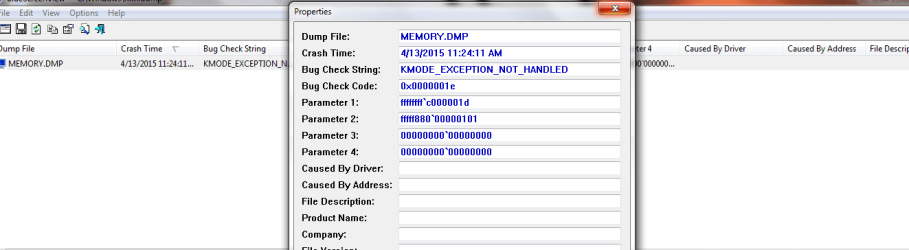
The previous one has vanished! Okay, I have made the settings for mini dump as shown in the tutorial.

Any thoughts on the missing context menu Catalyst Control Center entry? I tried googling suggestions, I failed to get it through AMD cleanup utility.
 

My Computer My Computer

Computer type
PC/Desktop
Computer Manufacturer/Model Number
Self built
OS
Windows 10 Pro (x64)
CPU
AMD RYZEN 7 1700+Stock Wraith Spire
Motherboard
ASUS PRIME B350M-A
Memory
Corsair 8GB (1 x 8 GB) DDR4 Vengeance LPX 2400Mhz
Graphics Card(s)
SAPPHIRE RX 470 4GB (Platinum Edition)
Monitor(s) Displays
BenQ VZ2250H
Screen Resolution
1920x1080
Hard Drives
120GB Samsung 750 Evo (OS/Programs)+1TB ST Firecuda (Games/Creative Applications)+1TB WD Green (Storage)
PSU
Antec VP650PM
Case
Coolermaster K380 Mid-Tower
Cooling
Side:Antec F19 120mm+Rear:Tt ISGC Fan12
Keyboard
Logitech K200
Mouse
Dragonwar Ele-G9 Thor
Internet Speed
Slow by 21st Century Standards :(
Antivirus
Bitdefender Internet Security and MBAM
Browser
Firefox
Other Info
Creative Inspire T3130
dorian hawkmoon

I would suggest at this point just to use your computer as you normally would.
Don't add or remove things as it could make it more difficult to troubleshoot.
Don't use any clean up programs like Ccleaner or Disk Clean built into Windows 7 because they will remove your logs.

If and or when you get a BSOD post the logs Golden requested. He will need those logs to continue.
 

My Computer My Computer

Computer type
PC/Desktop
Computer Manufacturer/Model Number
Home made Desktop
OS
Windows 10 Pro. 64/ version 1709 Windows 7 Pro/64
CPU
Intel i7-6800K @ 4.3
Motherboard
ASUS X-99 Deluxe II
Memory
Corsair Platinum 16 gig @2400
Graphics Card(s)
EVGA GTX 1070 OC
Monitor(s) Displays
Asus 27" LED LCD/VE278Q
Screen Resolution
1920-1080 or 1280-720 HDMI
Hard Drives
INTEL SSD 730-240 Gb Sata 3.0/
PSU
EVGA Platium 1200W
Case
Phanteks Luxe Tempered Glass 8 fans/ one radiator
Cooling
XSPC/ Water Cooled CPU
Keyboard
Das 4 Professional
Mouse
Logitech M705/MX Anywhere 2-S
Internet Speed
100 mbits
Antivirus
Microsoft Security Essentials/ Malwarebytes Premium 3.0/ SAS
Browser
I.E. 11 default/Firefox/ ISP Time Warner Cable/Spectrum
Other Info
LG BluRay Burner/
Sound system-KLipsch-THX/
Icy Dock ssd Hot Swap bays.
I've got rid of Tuneup. Got nothing else like that. No cleaning for a day or three, then- I'm hoping with intense use a BSOD will crop up in the meantime if there's something wrong with the hdd? I'll keep an eye out I guess for BSODs.

I was hoping to play GTAV in the meantime- even if to stress the pc, some are suggesting beta AMD display driver install.
 

My Computer My Computer

Computer type
PC/Desktop
Computer Manufacturer/Model Number
Self built
OS
Windows 10 Pro (x64)
CPU
AMD RYZEN 7 1700+Stock Wraith Spire
Motherboard
ASUS PRIME B350M-A
Memory
Corsair 8GB (1 x 8 GB) DDR4 Vengeance LPX 2400Mhz
Graphics Card(s)
SAPPHIRE RX 470 4GB (Platinum Edition)
Monitor(s) Displays
BenQ VZ2250H
Screen Resolution
1920x1080
Hard Drives
120GB Samsung 750 Evo (OS/Programs)+1TB ST Firecuda (Games/Creative Applications)+1TB WD Green (Storage)
PSU
Antec VP650PM
Case
Coolermaster K380 Mid-Tower
Cooling
Side:Antec F19 120mm+Rear:Tt ISGC Fan12
Keyboard
Logitech K200
Mouse
Dragonwar Ele-G9 Thor
Internet Speed
Slow by 21st Century Standards :(
Antivirus
Bitdefender Internet Security and MBAM
Browser
Firefox
Other Info
Creative Inspire T3130
If playing games in a normal thing, just play and have fun.
 

My Computer My Computer

Computer type
PC/Desktop
Computer Manufacturer/Model Number
Home made Desktop
OS
Windows 10 Pro. 64/ version 1709 Windows 7 Pro/64
CPU
Intel i7-6800K @ 4.3
Motherboard
ASUS X-99 Deluxe II
Memory
Corsair Platinum 16 gig @2400
Graphics Card(s)
EVGA GTX 1070 OC
Monitor(s) Displays
Asus 27" LED LCD/VE278Q
Screen Resolution
1920-1080 or 1280-720 HDMI
Hard Drives
INTEL SSD 730-240 Gb Sata 3.0/
PSU
EVGA Platium 1200W
Case
Phanteks Luxe Tempered Glass 8 fans/ one radiator
Cooling
XSPC/ Water Cooled CPU
Keyboard
Das 4 Professional
Mouse
Logitech M705/MX Anywhere 2-S
Internet Speed
100 mbits
Antivirus
Microsoft Security Essentials/ Malwarebytes Premium 3.0/ SAS
Browser
I.E. 11 default/Firefox/ ISP Time Warner Cable/Spectrum
Other Info
LG BluRay Burner/
Sound system-KLipsch-THX/
Icy Dock ssd Hot Swap bays.
Back
Top