Sudden fail to boot - possible partition issue? Win7 Ultimate 64bit

ChrisRobUK

New member
Local time
7:53 PM
Messages
11
Hi all,

First time here. I've been reading through lots of issues and resolutions of failed boots.
I think I have a slightly unusual problem because some items aren't working.:(

I've disconnected all other drives and just have the primary Win7 (ultimate 64bit) drive and DVD drive connected.

The main bootable drive is a GPT drive (3TB and boots).
Issues started when I did a normal restart after seeing RAM usage was high.
Suddenly no booting into Windows - 0xc0000225 - the boot selection failed because a required device is inaccessible.

The Win7 repair disc I attempted to create from my work PC (also 64bit, but not ultimate edition) didn't work at all.
The Win7 install disc I inserted works - but the system repair options are unavailable because apparently it's a different version (SP1 through years of updates maybe?) I dunno.

Using SHIFT + F10 I get to the console, from where I've been following other posts' guidance on what to do.

If I go to DISKPART, I can find the 3 partitions on my GPT drive
Partition 1 System 100MB
Partition 2 Reserved 128MB
Partition 3 Primary 2794GB

However, after selecting partition 1 I am unable to mark it active because: "The selected disk is not a fixed MBR disk"

If I list Vol, I can see that Vol0 is the Win7 CD, Vol 1 is drive C formatted as NTFS as one would expect, but Volume 2 (Now selected due to selecting the partition 1) is listed as FAT32? This seems weird. (Also has hidden attribute)

Using BootSect I can copy the boot files, only under force. (/nt60 /force /mbr)
But I am informed again it is a non mbr system.

Using Bootrec I can run fixmbr, fixboot and scanos, but when I try RebuildBCD it completes and is then unable to add the record to the boot list because:
"The requested system device cannot be found"

I've run CHKDSK /f on the drive.
I've also done SFC /Scannow - which eventually terminates with the message "there is a system repair pending which requires reboot to complete. Restart Windows and run sfc again."


Is it possible the FAT32 format is incorrect? It appears that the GPT disk is giving issues because of this?

I would really appreciate any help or insight as to what is going on and how to fix it.

(As an aside - I managed to get a USB repair 'disk' working to some degree - but the system repair could not find any entries of a windows installation - which I think points towards a partition issue? I ran the system repair utility form there about 20 times but to no avail - I read somewhere else that the USB could have driver issues and not work properly, and so that's why I've switched to the DVD.)

Thanks in advance for anything that would help - I really appreciate it!
 

My Computer My Computer

At a glance

Windows 7 Ultimate 64 biti5 2550k12GBNvidia gtx460
Computer type
PC/Desktop
Computer Manufacturer/Model Number
Custom build
OS
Windows 7 Ultimate 64 bit
CPU
i5 2550k
Memory
12GB
Graphics Card(s)
Nvidia gtx460
FAT32 is the EFI partition, no? I am no good with EFI BIOS though.
 

My Computer My Computer

At a glance

Windows 7 Ultimate x64 SP1AMD Phenom 2 1090T2x8GB Kingston HyperX Fury Black 1600Mhz Unga...MSI GTX 970 Gaming 4G
Computer type
PC/Desktop
Computer Manufacturer/Model Number
Custom Build
OS
Windows 7 Ultimate x64 SP1
CPU
AMD Phenom 2 1090T
Motherboard
Gigabyte GA-890FXA-UD5
Memory
2x8GB Kingston HyperX Fury Black 1600Mhz Unganged
Graphics Card(s)
MSI GTX 970 Gaming 4G
Sound Card
Realtek On-Board HD 7.1 Audio / Logitech G35
Monitor(s) Displays
3xAcer GD245HQ
Screen Resolution
1920x1080
Hard Drives
Samsung 850 Pro 512GB SSD - OS /
WD Caviar Black SATA 3 - 1 TBx2 - Dynamic RAID 0 /
WD Caviar Green SATA 2 - 640GBx2 - Dynamic RAID 0 /
WD Caviar Green SATA 2 - 640GB - Internal Backup /
Seagate Barracude SATA 3 - 3TB - External Backup/ Sync
PSU
HighPower 1000W
Case
Cooler Master HAF 932
Cooling
Noctua NH-D14
Keyboard
Logitech G19
Mouse
Logitech G500
Internet Speed
100/4 Mbit Cable (100GB quota)
Antivirus
ZoneAlarm Extreme Security / MBAM Pro / MBAE Free / SAS Free
Browser
IE 11 - Firefox - Chrome
Other Info
Logitech F710/ G27/ G940/ Z5500 // TrackIR 5 // Nvidia 3D Surround Vision
Hi GokAy, thanks for replying.

It possibly could be - In my BIOS I see that my boot options are, in order:
1) P0: (Primary Hard disk)
2) IBA GE Slot 00C8 v1365
3) Windows Boot Manager
4) UEFI: (Primary Hard disk)
5) P2: (DVD Drive)

So there is a UEFI option...
But sadly yields the same result.
I just downloaded and used Hiren's boot cd - nothing helped but what's interesting is that when trying to start Win7 from three, it noted that BOOTMGR couldn't be found, and the boot partition wasn't set.

So it seems for some reason the GPT disk doesn't know where to boot from.
Somehow I need to manually reset it - but I'm not sure what will actually work?
 

My Computer My Computer

At a glance

Windows 7 Ultimate 64 biti5 2550k12GBNvidia gtx460
Computer type
PC/Desktop
Computer Manufacturer/Model Number
Custom build
OS
Windows 7 Ultimate 64 bit
CPU
i5 2550k
Memory
12GB
Graphics Card(s)
Nvidia gtx460
Yes, you have a 100mb EFI System followed by a 128mb MSR partition which always means EFI install. There is no MBR or Active partition on EFI install.

Unfortunately there are also not much in the way of repair options we can offer except to reboot enough to get the Win7 disk to run Startup Repair.

Otherwise you can rescue your files to do a Clean Reinstall Windows 7 following those steps to get and keep a perfect install.
 
Hi Gregrocker, thanks for replying.
After searching more I definitely agree with you that its an EFI install on a GPT disk.

Is there any particular reason why the only real avenue is the startup repair? (I only ask as the startup repair disk I created from work is Win7 Enterprise, and that explains why it isn't allowing me the option) Does anyone have a link to a Win7 Ultimate 64 bit? I'm not sure if SP1/non-SP1.

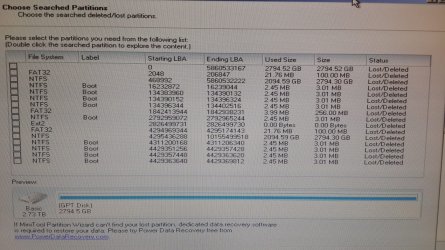
As an aside - I used Hiren's boot cd and left partition wizard scanning overnight on a full scan - this morning it shows the attached image as a result - two large 3TB portions, and a number of 3mb boot sections.


If I select the top 3TB section - everything below greys out.
If I select the lower 3TB section, a few of the others grey out including the top 3TB section.

So what I'm wondering is - if I manage to recover the correct partitions, I think I need 3 of them;
the correct 3TB section (my work and data), and the correct FAT32 section (I *think* the top one) and the right boot portion (probably the earliest one on disk, from the time I installed win7 originally)
- could it possibly resolve?

Otherwise - I'd really appreciate any links to a Win7 Ultimate (maybe without SP1, or with SP1) iso disk images so that I can burn a new disc and use the correct startup repair?
I tried to extract my Win7 key using an ProduKey in Hiren's boot cd but it won't detect the HardDrive from the Mini XP shell, and so I can't get the key out either.

Thanks
 

Attachments

  • 20150623_071106_s.jpg
    20150623_071106_s.jpg
    243.9 KB · Views: 0

My Computer My Computer

At a glance

Windows 7 Ultimate 64 biti5 2550k12GBNvidia gtx460
Computer type
PC/Desktop
Computer Manufacturer/Model Number
Custom build
OS
Windows 7 Ultimate 64 bit
CPU
i5 2550k
Memory
12GB
Graphics Card(s)
Nvidia gtx460
You can download the ISO from Microsoft Software Recovery (search google) and download with your retail key.
 

My Computer My Computer

At a glance

Windows 7 Ultimate x64 SP1AMD Phenom 2 1090T2x8GB Kingston HyperX Fury Black 1600Mhz Unga...MSI GTX 970 Gaming 4G
Computer type
PC/Desktop
Computer Manufacturer/Model Number
Custom Build
OS
Windows 7 Ultimate x64 SP1
CPU
AMD Phenom 2 1090T
Motherboard
Gigabyte GA-890FXA-UD5
Memory
2x8GB Kingston HyperX Fury Black 1600Mhz Unganged
Graphics Card(s)
MSI GTX 970 Gaming 4G
Sound Card
Realtek On-Board HD 7.1 Audio / Logitech G35
Monitor(s) Displays
3xAcer GD245HQ
Screen Resolution
1920x1080
Hard Drives
Samsung 850 Pro 512GB SSD - OS /
WD Caviar Black SATA 3 - 1 TBx2 - Dynamic RAID 0 /
WD Caviar Green SATA 2 - 640GBx2 - Dynamic RAID 0 /
WD Caviar Green SATA 2 - 640GB - Internal Backup /
Seagate Barracude SATA 3 - 3TB - External Backup/ Sync
PSU
HighPower 1000W
Case
Cooler Master HAF 932
Cooling
Noctua NH-D14
Keyboard
Logitech G19
Mouse
Logitech G500
Internet Speed
100/4 Mbit Cable (100GB quota)
Antivirus
ZoneAlarm Extreme Security / MBAM Pro / MBAE Free / SAS Free
Browser
IE 11 - Firefox - Chrome
Other Info
Logitech F710/ G27/ G940/ Z5500 // TrackIR 5 // Nvidia 3D Surround Vision
You can download the ISO from Microsoft Software Recovery (search google) and download with your retail key.

Thanks Gokay, I found the link - I will use ProduKey tonight after work and try extract the key by copying my config folder and running it on another pc (I saw this method could be used where the mini XP shell failed to access the disk)

Untested so far - but I found a utility to remove the editioning from the disc (so for example you can use an Ultimate disc to repair a home edition) over here:
winisoutils - Windows ISO Disc Image Utilities

I am yet to try it out but will burn the Ultimate ISO once downloaded and report back if it means I can finally get into the startup repair section.

Any thoughts on the numerous partitions and which ones I should recover?

Is it possible to recover partitions where LBA sections overlap?

Thanks!
 
Last edited:

My Computer My Computer

At a glance

Windows 7 Ultimate 64 biti5 2550k12GBNvidia gtx460
Computer type
PC/Desktop
Computer Manufacturer/Model Number
Custom build
OS
Windows 7 Ultimate 64 bit
CPU
i5 2550k
Memory
12GB
Graphics Card(s)
Nvidia gtx460

My Computer My Computer

At a glance

Windows 7 Ultimate x64 SP1AMD Phenom 2 1090T2x8GB Kingston HyperX Fury Black 1600Mhz Unga...MSI GTX 970 Gaming 4G
Computer type
PC/Desktop
Computer Manufacturer/Model Number
Custom Build
OS
Windows 7 Ultimate x64 SP1
CPU
AMD Phenom 2 1090T
Motherboard
Gigabyte GA-890FXA-UD5
Memory
2x8GB Kingston HyperX Fury Black 1600Mhz Unganged
Graphics Card(s)
MSI GTX 970 Gaming 4G
Sound Card
Realtek On-Board HD 7.1 Audio / Logitech G35
Monitor(s) Displays
3xAcer GD245HQ
Screen Resolution
1920x1080
Hard Drives
Samsung 850 Pro 512GB SSD - OS /
WD Caviar Black SATA 3 - 1 TBx2 - Dynamic RAID 0 /
WD Caviar Green SATA 2 - 640GBx2 - Dynamic RAID 0 /
WD Caviar Green SATA 2 - 640GB - Internal Backup /
Seagate Barracude SATA 3 - 3TB - External Backup/ Sync
PSU
HighPower 1000W
Case
Cooler Master HAF 932
Cooling
Noctua NH-D14
Keyboard
Logitech G19
Mouse
Logitech G500
Internet Speed
100/4 Mbit Cable (100GB quota)
Antivirus
ZoneAlarm Extreme Security / MBAM Pro / MBAE Free / SAS Free
Browser
IE 11 - Firefox - Chrome
Other Info
Logitech F710/ G27/ G940/ Z5500 // TrackIR 5 // Nvidia 3D Surround Vision
Thanks Gokay, I had no idea it was still possible to create one with both 32 and 64 bit.
I notice that the ISO image links are all dead - I'm assuming the only route is either the Microsoft Link or OEM for obtaining one through official channels?

I notice they were recently pulled from the link in that guide.
 

My Computer My Computer

At a glance

Windows 7 Ultimate 64 biti5 2550k12GBNvidia gtx460
Computer type
PC/Desktop
Computer Manufacturer/Model Number
Custom build
OS
Windows 7 Ultimate 64 bit
CPU
i5 2550k
Memory
12GB
Graphics Card(s)
Nvidia gtx460
They are not valid anymore. Only official way is to have a retail or system builder's product key. OEM doesn't work.
You can download both 32bit and 64bit ISOs from Microsoft Software Recovery
 

My Computer My Computer

At a glance

Windows 7 Ultimate x64 SP1AMD Phenom 2 1090T2x8GB Kingston HyperX Fury Black 1600Mhz Unga...MSI GTX 970 Gaming 4G
Computer type
PC/Desktop
Computer Manufacturer/Model Number
Custom Build
OS
Windows 7 Ultimate x64 SP1
CPU
AMD Phenom 2 1090T
Motherboard
Gigabyte GA-890FXA-UD5
Memory
2x8GB Kingston HyperX Fury Black 1600Mhz Unganged
Graphics Card(s)
MSI GTX 970 Gaming 4G
Sound Card
Realtek On-Board HD 7.1 Audio / Logitech G35
Monitor(s) Displays
3xAcer GD245HQ
Screen Resolution
1920x1080
Hard Drives
Samsung 850 Pro 512GB SSD - OS /
WD Caviar Black SATA 3 - 1 TBx2 - Dynamic RAID 0 /
WD Caviar Green SATA 2 - 640GBx2 - Dynamic RAID 0 /
WD Caviar Green SATA 2 - 640GB - Internal Backup /
Seagate Barracude SATA 3 - 3TB - External Backup/ Sync
PSU
HighPower 1000W
Case
Cooler Master HAF 932
Cooling
Noctua NH-D14
Keyboard
Logitech G19
Mouse
Logitech G500
Internet Speed
100/4 Mbit Cable (100GB quota)
Antivirus
ZoneAlarm Extreme Security / MBAM Pro / MBAE Free / SAS Free
Browser
IE 11 - Firefox - Chrome
Other Info
Logitech F710/ G27/ G940/ Z5500 // TrackIR 5 // Nvidia 3D Surround Vision
Thanks Gokay, much appreciated!
I'll use ProduKey to get my key and then download - will report back if I manage to get it working.

As an aside - any thoughts on those partitions from earlier?
I compared their sizes to the allocated space - they are imprecise due to rounding, but if I take byte size and divide it by LBAs in range they range from 476bytes to 488 bytes - this would suggest to me an LBA size of 512bytes, with some overheads accounting for the differences.

Utilising the first entry, the LBA of 5,860... * 512 = 3TB.
Whilst this is useful for me to see the effective ending point of these clusters, it confuses me with the one entry further down (5th from the bottom) where the ending LBA is 10,155,499,518 - this would suggest a disk size of 5.2TB, but the physical disk is only 3TB.
Is this an error of some kind or am I misunderstanding the LBA allocation and partition table (Quite likely as it's my first time dealing with GPT disks)

Thanks!
 

My Computer My Computer

At a glance

Windows 7 Ultimate 64 biti5 2550k12GBNvidia gtx460
Computer type
PC/Desktop
Computer Manufacturer/Model Number
Custom build
OS
Windows 7 Ultimate 64 bit
CPU
i5 2550k
Memory
12GB
Graphics Card(s)
Nvidia gtx460
If you have an EFI install then Windows Boot Manager must be set first to boot, not the hard drive.

Why are you running Partition Recovery Wizard? Who advised to do this, and why?

Please boot Partition Wizard CD and this time take a picture of the drive map showing all columns and listings. Since you have Hirens boot CD, also boot into XP Disk Mgmt to post its fully expanded picture to compare.

Everything is here for Troubleshooting Windows 7 Failure to Start

If you have a retail Win7 Product Key you should be able to download the ISO from Microsoft Software Recovery using Internet Explorer only.
 
If you have an EFI install then Windows Boot Manager must be set first to boot, not the hard drive.

Why are you running Partition Recovery Wizard? Who advised to do this, and why?

Please boot Partition Wizard CD and this time take a picture of the drive map showing all columns and listings. Since you have Hirens boot CD, also boot into XP Disk Mgmt to post its fully expanded picture to compare.

Everything is here for Troubleshooting Windows 7 Failure to Start

If you have a retail Win7 Product Key you should be able to download the ISO from Microsoft Software Recovery using Internet Explorer only.


Hi GregRocker, no one recommended it - I thought it might be a partition table issue so I did the scan, but I didn't click for any recovery.

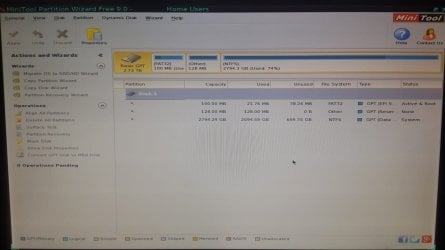
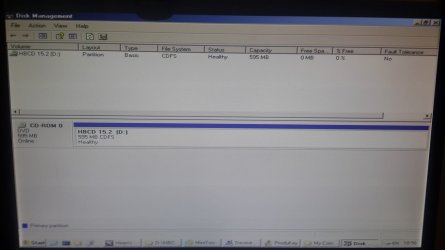
Please see below - I exited and used the PWCD and XP Disk Mgt, there are the two screen shots - I didn't do any partition recovery after the scan.
 

Attachments

  • 20150623_185944.jpg
    20150623_185944.jpg
    73.3 KB · Views: 0
  • 20150623_185633.jpg
    20150623_185633.jpg
    71.1 KB · Views: 0

My Computer My Computer

At a glance

Windows 7 Ultimate 64 biti5 2550k12GBNvidia gtx460
Computer type
PC/Desktop
Computer Manufacturer/Model Number
Custom build
OS
Windows 7 Ultimate 64 bit
CPU
i5 2550k
Memory
12GB
Graphics Card(s)
Nvidia gtx460
There is something seriously wrong if a GPT disk is marked Active.

Iwould rescue your files immediately, then test drive with the makers diagnostics CD scan followed by disk Check. This will determine the condition of the drive.

If disk fails replace it. If it passes then do the reinstall.

All links are in the troubleshooting and reinstall tutorials below.
 
There is something seriously wrong if a GPT disk is marked Active.

Iwould rescue your files immediately, then test drive with the makers diagnostics CD scan followed by disk Check. This will determine the condition of the drive.

If disk fails replace it. If it passes then do the reinstall.

All links are in the troubleshooting and reinstall tutorials below.

Thanks.
I'm busy copying now and will run them as you recommended.

I copied my Windows/system32/config folder, including all system and hidden files, and was unable to get the key.
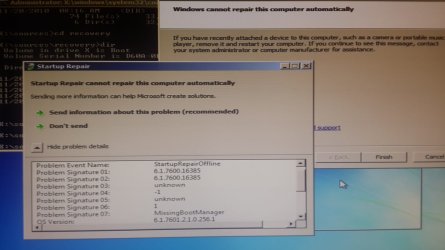
As a result, I couldn't get the windows ISO - so instead I used the dvd I was already using and ran StartRep.exe manually - the result was the below error attached.
 

Attachments

  • 20150623_194224.jpg
    20150623_194224.jpg
    96.8 KB · Views: 1

My Computer My Computer

At a glance

Windows 7 Ultimate 64 biti5 2550k12GBNvidia gtx460
Computer type
PC/Desktop
Computer Manufacturer/Model Number
Custom build
OS
Windows 7 Ultimate 64 bit
CPU
i5 2550k
Memory
12GB
Graphics Card(s)
Nvidia gtx460
Check the one-time Boot Menu during startup (should show which key in first screen when you start PC). And select UEFI DVD. Name may be your DVD drives name.
 

My Computer My Computer

At a glance

Windows 7 Ultimate x64 SP1AMD Phenom 2 1090T2x8GB Kingston HyperX Fury Black 1600Mhz Unga...MSI GTX 970 Gaming 4G
Computer type
PC/Desktop
Computer Manufacturer/Model Number
Custom Build
OS
Windows 7 Ultimate x64 SP1
CPU
AMD Phenom 2 1090T
Motherboard
Gigabyte GA-890FXA-UD5
Memory
2x8GB Kingston HyperX Fury Black 1600Mhz Unganged
Graphics Card(s)
MSI GTX 970 Gaming 4G
Sound Card
Realtek On-Board HD 7.1 Audio / Logitech G35
Monitor(s) Displays
3xAcer GD245HQ
Screen Resolution
1920x1080
Hard Drives
Samsung 850 Pro 512GB SSD - OS /
WD Caviar Black SATA 3 - 1 TBx2 - Dynamic RAID 0 /
WD Caviar Green SATA 2 - 640GBx2 - Dynamic RAID 0 /
WD Caviar Green SATA 2 - 640GB - Internal Backup /
Seagate Barracude SATA 3 - 3TB - External Backup/ Sync
PSU
HighPower 1000W
Case
Cooler Master HAF 932
Cooling
Noctua NH-D14
Keyboard
Logitech G19
Mouse
Logitech G500
Internet Speed
100/4 Mbit Cable (100GB quota)
Antivirus
ZoneAlarm Extreme Security / MBAM Pro / MBAE Free / SAS Free
Browser
IE 11 - Firefox - Chrome
Other Info
Logitech F710/ G27/ G940/ Z5500 // TrackIR 5 // Nvidia 3D Surround Vision
I checked the boot menu - weirdly it will allow my hard drive under UEFI but not my DVD drive - I might be wrong here, but it could be that the DVD drive is a little older and therefore not UEFI? I'll try check that.

I chatted to Microsoft support until the early hours, unfortunately they couldn't disclose my original key (from an earlier call a few years ago) - but they gave me a key to use with the MSDT application - doesn't seem to be working thus far.
Regarding getting my key from Produkey, using the PW disc I can see more folders so I'm trying to find a way to copy them now to run the application and recover the key.
None of the repair boot or edit boot options in PW tool seem to work - all of them say they cannot find the Windows directory on the boot sector - I shall post the directory and file listings in those two partitions later tonight.

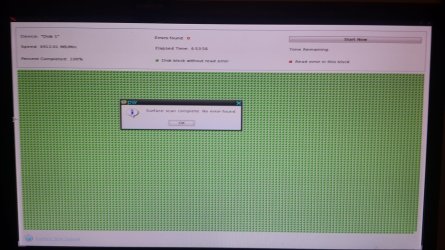
I ran a full scan on the disk overnight and its 100% good.
 

Attachments

  • 20150625_072837.jpg
    20150625_072837.jpg
    197.7 KB · Views: 0

My Computer My Computer

At a glance

Windows 7 Ultimate 64 biti5 2550k12GBNvidia gtx460
Computer type
PC/Desktop
Computer Manufacturer/Model Number
Custom build
OS
Windows 7 Ultimate 64 bit
CPU
i5 2550k
Memory
12GB
Graphics Card(s)
Nvidia gtx460

My Computer My Computer

At a glance

Windows 7 Ultimate x64 SP1AMD Phenom 2 1090T2x8GB Kingston HyperX Fury Black 1600Mhz Unga...MSI GTX 970 Gaming 4G
Computer type
PC/Desktop
Computer Manufacturer/Model Number
Custom Build
OS
Windows 7 Ultimate x64 SP1
CPU
AMD Phenom 2 1090T
Motherboard
Gigabyte GA-890FXA-UD5
Memory
2x8GB Kingston HyperX Fury Black 1600Mhz Unganged
Graphics Card(s)
MSI GTX 970 Gaming 4G
Sound Card
Realtek On-Board HD 7.1 Audio / Logitech G35
Monitor(s) Displays
3xAcer GD245HQ
Screen Resolution
1920x1080
Hard Drives
Samsung 850 Pro 512GB SSD - OS /
WD Caviar Black SATA 3 - 1 TBx2 - Dynamic RAID 0 /
WD Caviar Green SATA 2 - 640GBx2 - Dynamic RAID 0 /
WD Caviar Green SATA 2 - 640GB - Internal Backup /
Seagate Barracude SATA 3 - 3TB - External Backup/ Sync
PSU
HighPower 1000W
Case
Cooler Master HAF 932
Cooling
Noctua NH-D14
Keyboard
Logitech G19
Mouse
Logitech G500
Internet Speed
100/4 Mbit Cable (100GB quota)
Antivirus
ZoneAlarm Extreme Security / MBAM Pro / MBAE Free / SAS Free
Browser
IE 11 - Firefox - Chrome
Other Info
Logitech F710/ G27/ G940/ Z5500 // TrackIR 5 // Nvidia 3D Surround Vision

My Computer My Computer

At a glance

Windows 7 Ultimate 64 biti5 2550k12GBNvidia gtx460
Computer type
PC/Desktop
Computer Manufacturer/Model Number
Custom build
OS
Windows 7 Ultimate 64 bit
CPU
i5 2550k
Memory
12GB
Graphics Card(s)
Nvidia gtx460
Back
Top