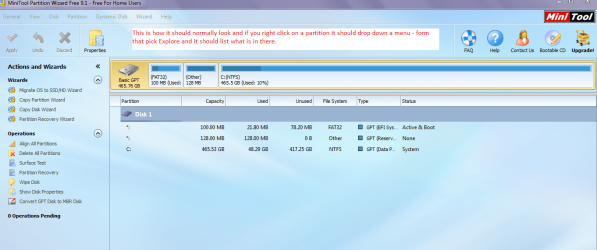
So I have a lot going on here, unfortunately. Im trying to work through the issues but I've found myself stuck. I THINK that the issue in the title is now my problem as I have been able to fix my EFI boot partition, and from my untrained eye things appear to be correct, but I've noticed that my windows partition shows as 'unknown' in disk part and perhaps that is why my win7 is now getting stuck forever at the windows boot logo.
My original issue was posted here (for background) -
https://answers.launchpad.net/ubuntu/+question/293607
Since then, I've done a number of things, such as running Easy Recovery Essentials from NeoSmart, and obviously the windows recovery boot repair, endlessly along with ubuntu boot-repair in 16.02 LTS. A quick note, 14.02 LTS i saw a EFI error on boot, so i was thinking maybe that boot-repair wouldn't be able to correctly repair things unless the live cd was correctly launched in EFI mode. The same with recovery essentials, when i boot the cd it doesn't give me the UEFI option for booting the cd, so perhaps that also wont work for my EFI situation? My windows 7 does show UEFI at the boot and I did attempt to do all of the bootrec.exe commands in windows recovery cmd. The only part I could not do was the bootsect.exe /nt60 SYS /mbr command from this guide -
https://neosmart.net/wiki/fix-uefi-boot/#Fix_UEFI_Boot_in_Windows_7
Because it complained that I had to be in bios mode/non EFI mode to do it. When i booted win7 without UEFI, then win7 complained I cannot enter recovery environment because it needs to be EFI. Damned if you do, damned if you dont But my understanding is that EFI does not use a MBR so im not sure how that is a relevant fix anyways?
I went from not being able to see the OS, to resolving that part by changing the ID of my windows partition located here -
Issue with a Windows 7 Boot issue - involving the BCD perhaps - Super User
Now the windows recovery environment see's my OS, but its location is "(Unknown)" at the first screen and "Unknown" in the 'type' column in disk part.
My most recent boot-repair attempt is located here -
Paste2.org - Viewing Paste 9Gb5sUWn
The boot summary info prior to that attempted repair is here -
Paste2.org - Viewing Paste 7Xt9jNFs
Im a little curious as to why my sda3 (windows install partition) was showing up as a EFI partition? In Gparted it shows as a ntfs partition, and I've of course ran all the chkdsk and other tools on it to ensure there's nothing wrong with it.
Im thinking changing the ID of the partition might have screwed with things, but when i ran bootrec /rebuildbcd I think it should have fixed it? When I first did it, it did see the os, but running bootrec /rebuildbcd it could not find the OS. Then I changed the ID on partition 3 and it found it.
I've also tried renaming bcd to bcd.old after changing attributes and then trying bootrec /rebuildbcd again, but it identifies "0" windows installations and I've noticed that there is no mounted windows OS during the windows recovery environment. Perhaps this is the issue? It see's the OS because at the very first screen after clicking 'repair windows' from the boot cd, it see's the OS (windows 7 professional) but just status location (Unknown).
I did all of that following this guide - How To Rebuild the BCD in Windows [10 to 20 Minutes]
Maybe it needs to be mounted before I can repair it? Not sure. Losing my mind over this
Here is a picture of what disk part shows currently -
Imgur: The most awesome images on the Internet
The last windows repair attempt I've tried says its unable to repair the system and under the diagnosis and repair details I see "A patch is preventing the system from starting." under the "Software installation log diagnosis" section (there's a lot more but they are all error 0x0 which seems like no issues found)
System Disk =\Device\Hardisk0
Windows directory = \\?\GLOBALROOT\Device\HardiskVolume3\Windows
If you guys need me to generate any information please just advise what to do and I will supply with as much diagnostic info as needed. And if anyone is wondering, the data is fine on the partition, I can mount and access my windows partition in ubuntu or other explorers and transfer the data etc.
THANK YOU!
My original issue was posted here (for background) -
https://answers.launchpad.net/ubuntu/+question/293607
Since then, I've done a number of things, such as running Easy Recovery Essentials from NeoSmart, and obviously the windows recovery boot repair, endlessly along with ubuntu boot-repair in 16.02 LTS. A quick note, 14.02 LTS i saw a EFI error on boot, so i was thinking maybe that boot-repair wouldn't be able to correctly repair things unless the live cd was correctly launched in EFI mode. The same with recovery essentials, when i boot the cd it doesn't give me the UEFI option for booting the cd, so perhaps that also wont work for my EFI situation? My windows 7 does show UEFI at the boot and I did attempt to do all of the bootrec.exe commands in windows recovery cmd. The only part I could not do was the bootsect.exe /nt60 SYS /mbr command from this guide -
https://neosmart.net/wiki/fix-uefi-boot/#Fix_UEFI_Boot_in_Windows_7
Because it complained that I had to be in bios mode/non EFI mode to do it. When i booted win7 without UEFI, then win7 complained I cannot enter recovery environment because it needs to be EFI. Damned if you do, damned if you dont
But my understanding is that EFI does not use a MBR so im not sure how that is a relevant fix anyways?I went from not being able to see the OS, to resolving that part by changing the ID of my windows partition located here -
Issue with a Windows 7 Boot issue - involving the BCD perhaps - Super User
Now the windows recovery environment see's my OS, but its location is "(Unknown)" at the first screen and "Unknown" in the 'type' column in disk part.
My most recent boot-repair attempt is located here -
Paste2.org - Viewing Paste 9Gb5sUWn
The boot summary info prior to that attempted repair is here -
Paste2.org - Viewing Paste 7Xt9jNFs
Im a little curious as to why my sda3 (windows install partition) was showing up as a EFI partition? In Gparted it shows as a ntfs partition, and I've of course ran all the chkdsk and other tools on it to ensure there's nothing wrong with it.
Im thinking changing the ID of the partition might have screwed with things, but when i ran bootrec /rebuildbcd I think it should have fixed it? When I first did it, it did see the os, but running bootrec /rebuildbcd it could not find the OS. Then I changed the ID on partition 3 and it found it.
I've also tried renaming bcd to bcd.old after changing attributes and then trying bootrec /rebuildbcd again, but it identifies "0" windows installations and I've noticed that there is no mounted windows OS during the windows recovery environment. Perhaps this is the issue? It see's the OS because at the very first screen after clicking 'repair windows' from the boot cd, it see's the OS (windows 7 professional) but just status location (Unknown).
I did all of that following this guide - How To Rebuild the BCD in Windows [10 to 20 Minutes]
Maybe it needs to be mounted before I can repair it? Not sure. Losing my mind over this
Here is a picture of what disk part shows currently -
Imgur: The most awesome images on the Internet
The last windows repair attempt I've tried says its unable to repair the system and under the diagnosis and repair details I see "A patch is preventing the system from starting." under the "Software installation log diagnosis" section (there's a lot more but they are all error 0x0 which seems like no issues found)
System Disk =\Device\Hardisk0
Windows directory = \\?\GLOBALROOT\Device\HardiskVolume3\Windows
If you guys need me to generate any information please just advise what to do and I will supply with as much diagnostic info as needed. And if anyone is wondering, the data is fine on the partition, I can mount and access my windows partition in ubuntu or other explorers and transfer the data etc.
THANK YOU!
My Computer
At a glance
windows 7 professional x64
- Computer type
- PC/Desktop
- OS
- windows 7 professional x64