- Local time
- 10:56 PM
- Messages
- 7,397
Hi Jim,
Was likely Tom Baker,
anyway back to Business,
1)
Avast should auto start, ~dont use it myself~ however all AV's have a Dashboard settings page
check there first, should have a tickbox - run on start-up, is it enabled?
if yes then go here
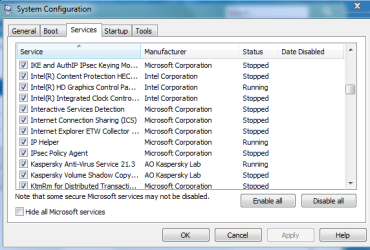
a) ControlPanel>>Administration Tools >>SystemConfiguration>> Services tab>>Avast(should be ticked)
2
Screen dimming is a standard MS feature, as i said previously it does it as a warning as part of UAC. as well as if your not using the comp or running on battery and its running low on charge
settings for these are in a) personalisation/screensaver b) power options
3
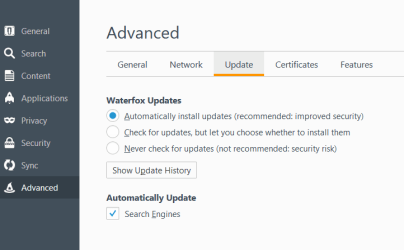
firefox, open tools >> Advanced >> Updates>> choose which option you want
NOT updating your browser is a serious security concern DEFINATELY not advised
4
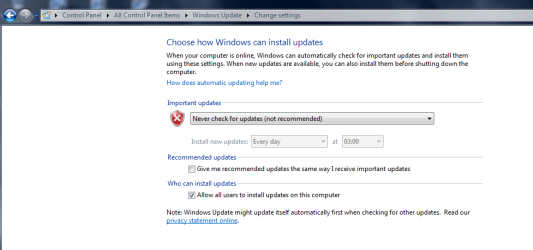
MS Updates unless your on the ESU, highly unlikely, the only update you will be offerred is MSRT - kb890830
KB890830 update Windows Malicious Software Removal Tool 5.90 - June 8 Windows Update - Windows 10 Forums
i dont bother with it my NO updates settings
have you run any of the tools yet
Was likely Tom Baker,
anyway back to Business,
1)
Avast should auto start, ~dont use it myself~ however all AV's have a Dashboard settings page
check there first, should have a tickbox - run on start-up, is it enabled?
if yes then go here
a) ControlPanel>>Administration Tools >>SystemConfiguration>> Services tab>>Avast(should be ticked)
2
Screen dimming is a standard MS feature, as i said previously it does it as a warning as part of UAC. as well as if your not using the comp or running on battery and its running low on charge
settings for these are in a) personalisation/screensaver b) power options
3
firefox, open tools >> Advanced >> Updates>> choose which option you want
NOT updating your browser is a serious security concern DEFINATELY not advised
4
MS Updates unless your on the ESU, highly unlikely, the only update you will be offerred is MSRT - kb890830
KB890830 update Windows Malicious Software Removal Tool 5.90 - June 8 Windows Update - Windows 10 Forums
i dont bother with it my NO updates settings
have you run any of the tools yet
Attachments
My Computer
At a glance
W7 home premium 32bit/W7HP 64bit/w10 tp insid...E5300 dual core3gbNvidia Geforce 7100 Nforce 630i
- Computer type
- PC/Desktop
- Computer Manufacturer/Model Number
- medionl/Aspire 6930G/acer x55a
- OS
- W7 home premium 32bit/W7HP 64bit/w10 tp insider ring
- CPU
- E5300 dual core
- Motherboard
- medion MS7366
- Memory
- 3gb
- Graphics Card(s)
- Nvidia Geforce 7100 Nforce 630i
- Monitor(s) Displays
- avixc
- Internet Speed
- n (isp resticted to 72)
- Antivirus
- mse/pands
- Browser
- palemoon
- Other Info
- Belkin Fd7050 n USB using Railink RT2870 drivers, more upto date


 icnic: