Sudden slowness for my main HDD (Samsung Spinpoint F4EG HD204UI)

angelbeats96

New member
Member
VIP
Local time
10:56 AM
Messages
101
Starting a week ago, I'm experiencing significant slow speed for my main HDD (Samsung Spinpoint F4EG 2TB) which I've been using it for more than two years without any problems. At first, when I encountered the slowness, I thought it has to do with my desktop as whole but after poking around little bit, the main source of the problem came from my main HDD. FYI, when I say slowness I mean as in every activities you do in that drive such as opening folders/files, moving, playing a video files etc.

I've tried SFC/SCANNOW and disk check (with both options ticked) however, it didn't report any problems or issues regarding to this HDD. I also scanned for any viruses/malwares but I couldn't find anything.
Moreover, please note:
- It's only partitioned as one (D drive)
- There are around 60% space left for this drive
- I only use this drive for storing files. No OS, programs or applications installed in this drive
- The only recent major activity I've done was changing my case
- My PC specs:
Operating System
Microsoft Windows 7 Ultimate 64-bit SP1
CPU
Intel Core i7 870 @ 2.93GHz
RAM
8.00 GB Dual-Channel DDR3 @ 666MHz
Motherboard
Gigabyte P55A-UD3
Graphics
AMD Radeon HD 7900 Series
Hard Drives
Main storage HDD:2TB SAMSUNG HD204UI (RAID)
Second storage: 500GB Western Digital WDC WD5001AALS-00L3B2 (SATA)
OS, apps: 180GB INTEL SS DSC2CT180A3 SCSI Disk Device (SSD)

Lastly, the slowness happens immediately when I try to move files to/from my main HDD. In addition, while the slowness is happening when I try to turn off my PC, it will hang on "shutting down" screen (you know the screen you see before the PC shuts down). As a result, I'll have to press reset button to shut down my PC.

Is there any ways to fix this problem? Or is it time to get a new HDD?

Thank you, help would be appreciate it.
 

My Computer My Computer

At a glance

Windows 7 Ultimate x64
OS
Windows 7 Ultimate x64
I would check the wiring. SATA cables don't like tight angles, make sure it's not doing more than 90° angles.
Other than that, you can try downloading the checking utility form the manufacturer's site and run it.

Also, you list it as RAID, is it a single drive of a raid or both?
 

My Computer My Computer

At a glance

Win 7 Pro 64-bit 7601AMD Phenom 9650 QuadCore, revision DR-B35 GB yes I run 2x 2GB and 1x 1GB, different b...NVIDIA GeForce 9800 GT 512 Mb, unknown manufa...
Computer type
PC/Desktop
Computer Manufacturer/Model Number
custom built
OS
Win 7 Pro 64-bit 7601
CPU
AMD Phenom 9650 QuadCore, revision DR-B3
Motherboard
ASUS M4A78
Memory
5 GB yes I run 2x 2GB and 1x 1GB, different brand, spank me.
Graphics Card(s)
NVIDIA GeForce 9800 GT 512 Mb, unknown manufacturer.
Sound Card
Crappy Realtek Integrated Audio
Monitor(s) Displays
Fujitsu Siemens P19-3P
Screen Resolution
1280 x 1024 x 32 bits @ 60 Hz Oh yeah, 4:3 rocks!
Hard Drives
(1) MAXTOR S TM3320613AS SATA Disk Device (2) STM35004 18AS SATA Disk Device (3) TOSHIBA USB 2.5"-HDD
PSU
whatever, around 450w
Case
Scavenged from old company PC, 10+ years old
Cooling
CPU fan, GPU fan, case fan, nothing fancy
Keyboard
Microsoft, PS/2, white.
Mouse
Optical, logitec.
Internet Speed
effective max speeds: 70-ish kB/s down 30-ish kB/s up
Antivirus
Avira, free edition.
Browser
Firefox with FXChrome to make it look like Google Chrome :P
Other Info
Was discarded by previous owner due to "horrible performance".
Was running Win Xp from a IDE drive. Yeah. Was a pain.
SATA II drive and Win7 and it zips away! Yay!
I would check the wiring. SATA cables don't like tight angles, make sure it's not doing more than 90° angles.
Other than that, you can try downloading the checking utility form the manufacturer's site and run it.

Also, you list it as RAID, is it a single drive of a raid or both?

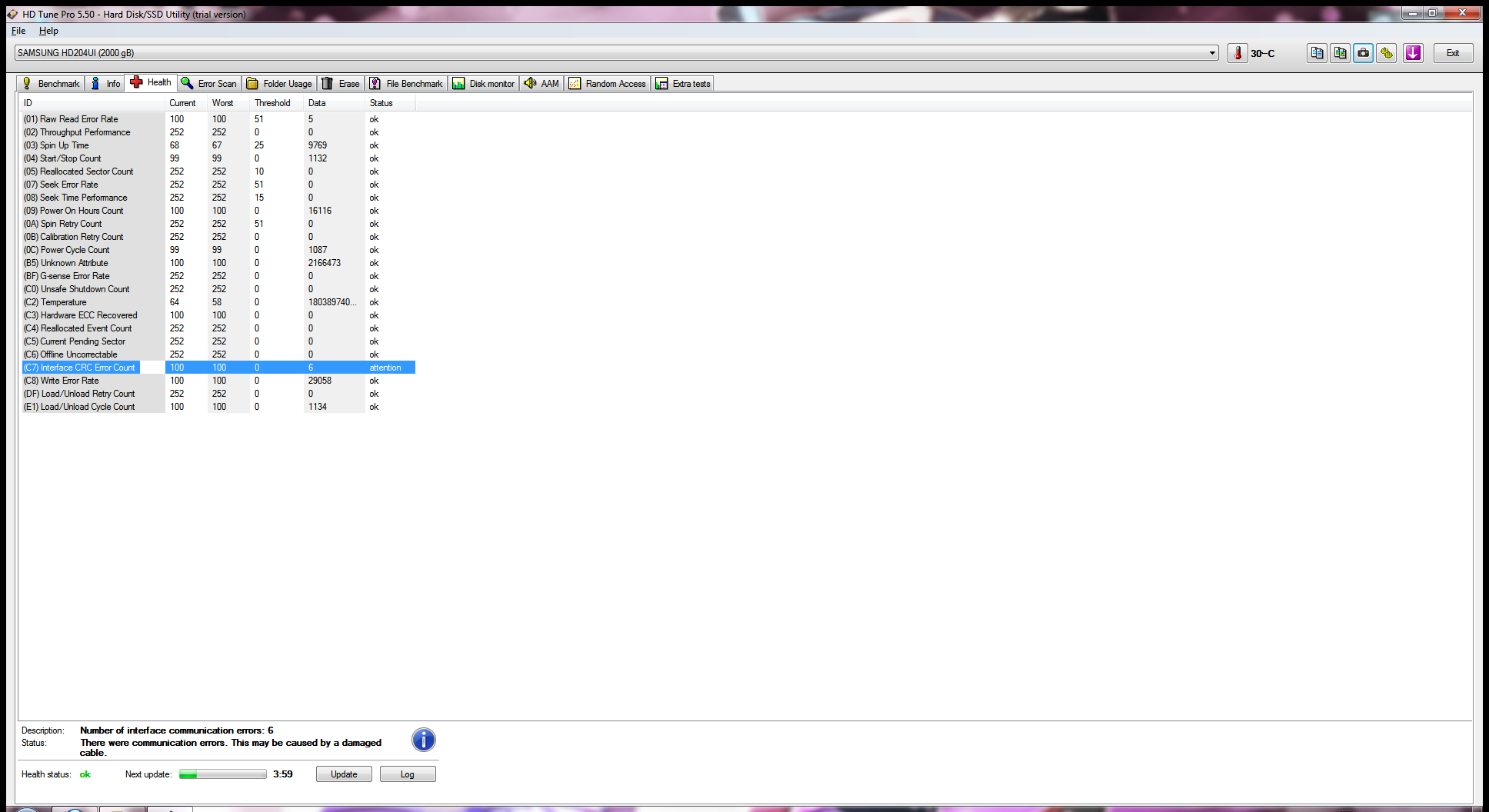
Uh oh, from HD Tune pro it's reporting that there is something wrong with the cable (Damaged?). Could this be the reason for the current issue?
Wfr8ybu.png


If this is true, then it must have been damaged during moving and installing to new case.

And yes, it is a single drive of RAID.
 

My Computer My Computer

At a glance

Windows 7 Ultimate x64
OS
Windows 7 Ultimate x64
Other evidence pointing in the same direction. As I said, move around the sata cable inside your case and make sure it does do only smooth curves (and that it is properly inserted at both ends). I doubt it is damaged, but it could be as well, so you can try changing it with another one (like say the one of your secondary data HDD) just to run some tests.

Also pulling it out and cleaning the sata connector on cable and mobo and HDD with compressed air (or your own breath if you are cheap)
 

My Computer My Computer

At a glance

Win 7 Pro 64-bit 7601AMD Phenom 9650 QuadCore, revision DR-B35 GB yes I run 2x 2GB and 1x 1GB, different b...NVIDIA GeForce 9800 GT 512 Mb, unknown manufa...
Computer type
PC/Desktop
Computer Manufacturer/Model Number
custom built
OS
Win 7 Pro 64-bit 7601
CPU
AMD Phenom 9650 QuadCore, revision DR-B3
Motherboard
ASUS M4A78
Memory
5 GB yes I run 2x 2GB and 1x 1GB, different brand, spank me.
Graphics Card(s)
NVIDIA GeForce 9800 GT 512 Mb, unknown manufacturer.
Sound Card
Crappy Realtek Integrated Audio
Monitor(s) Displays
Fujitsu Siemens P19-3P
Screen Resolution
1280 x 1024 x 32 bits @ 60 Hz Oh yeah, 4:3 rocks!
Hard Drives
(1) MAXTOR S TM3320613AS SATA Disk Device (2) STM35004 18AS SATA Disk Device (3) TOSHIBA USB 2.5"-HDD
PSU
whatever, around 450w
Case
Scavenged from old company PC, 10+ years old
Cooling
CPU fan, GPU fan, case fan, nothing fancy
Keyboard
Microsoft, PS/2, white.
Mouse
Optical, logitec.
Internet Speed
effective max speeds: 70-ish kB/s down 30-ish kB/s up
Antivirus
Avira, free edition.
Browser
Firefox with FXChrome to make it look like Google Chrome :P
Other Info
Was discarded by previous owner due to "horrible performance".
Was running Win Xp from a IDE drive. Yeah. Was a pain.
SATA II drive and Win7 and it zips away! Yay!
Other evidence pointing in the same direction. As I said, move around the sata cable inside your case and make sure it does do only smooth curves (and that it is properly inserted at both ends). I doubt it is damaged, but it could be as well, so you can try changing it with another one (like say the one of your secondary data HDD) just to run some tests.

Also pulling it out and cleaning the sata connector on cable and mobo and HDD with compressed air (or your own breath if you are cheap)

Alright, I've just confirmed that the cable is pretty bent. I'll move around it so that it's not having sharp curve.

I'll also test other cables as well as sockets on my mobo.

All of the components were dusted and cleaned before assembling in the new case. But just to make sure, I'll clean it again and see how it goes.

Will post back for update.
 

My Computer My Computer

At a glance

Windows 7 Ultimate x64
OS
Windows 7 Ultimate x64
Okay, I've replaced the SATA cable with a new one as well as inserted into different port.

I'll see and how it goes. If the problem still arises then, I'll get a new drive or something since I just can't take a risk to keep using this drive with this problem still floating around.
 

My Computer My Computer

At a glance

Windows 7 Ultimate x64
OS
Windows 7 Ultimate x64
Back
Top