
Solved Suddenly, no AV/malware program I tried will complete

tony22

New member
Member
VIP
Local time
9:45 PM
Messages
172
I started a previous thread when I thought the problem was only with MSE not completing a scheduled Full Scan, but now it seems bigger than that and I thought it would be better to start a more accurate thread.

I'd been running MSE and Antimalwarebytes Free version fine as scheduled (for MSE) or on demand (for both) programs. Up until 12/5. On 12/8 I did a Microsoft Update that installed a bunch of stuff (I say that as it seems very coincidental). I discovered a couple of days ago that the last time MSE ran to completion was 12/5.

I tried running MSE on demand in both normal and Safe modes. Multiple tries. In all cases it will hang at some random point (sometimes 5 minutes in, sometimes 80% of the way in) on some random file. Antimalwarebutes on demand does the same thing in normal mode; haven't tried Safe mode yet. Eset online, same thing. The stall is on a random file at some random point in the progress of the scan.

I even uninstalled and reinstalled MSE, updated it again, and ran it in normal mode. Stalled 5 minutes in.

What's interesting is that when I went to the Microsoft site to download the latest copy of MSE, it would download but wouldn't complete the virus scan. I went to Chrome. It downloaded but wouldn't execute from Chrome or even launch the file location window. I had to call up Windows File Explorer and go get it from there.

I haven't run CCleaner yet. That'll happen when I get home. What to do next? Should I try MAMB in Safe mode first or look at something I haven't checked out yet?
 
Last edited:

My Computer

Computer Manufacturer/Model Number
Custom
OS
Windows 7 Ultimate x64 SP1
CPU
E8400 E0 stepping @ 4.05GHz
Motherboard
Abit IP35-E, BIOS v.18b1
Memory
2x2GB + 2x1GB Mushkin
Graphics Card(s)
eVGA GTS 250SC
Sound Card
Onboard
Monitor(s) Displays
Sony FW900
Screen Resolution
1600x1024
Hard Drives
WD Black 1TB SATA
PSU
Corsair 550W
Case
CM Scout
Cooling
Scythe Mugen2
Keyboard
PS2
Mouse
PS2
Internet Speed
FiOS
I'm really unsure of what to do next. I tried running Antimalwarebytes in Safe Mode. Random hang. I went back to normal mode and ran the latest CCleaner. It found a ton of stuff, all of which I had it wipe (I saved the Registry .reg file just in case). Ran Antimalwarebytes. It finished a normal scan on my C: drive (I had it limited to C: ) - which I was relieved to see, but it seemed only to go through some 400,000+ files. But it did say it finished, and found nothing. Tried MSE again. Random hang.

I could really use a recommended course of action.
 

My Computer

Computer Manufacturer/Model Number
Custom
OS
Windows 7 Ultimate x64 SP1
CPU
E8400 E0 stepping @ 4.05GHz
Motherboard
Abit IP35-E, BIOS v.18b1
Memory
2x2GB + 2x1GB Mushkin
Graphics Card(s)
eVGA GTS 250SC
Sound Card
Onboard
Monitor(s) Displays
Sony FW900
Screen Resolution
1600x1024
Hard Drives
WD Black 1TB SATA
PSU
Corsair 550W
Case
CM Scout
Cooling
Scythe Mugen2
Keyboard
PS2
Mouse
PS2
Internet Speed
FiOS
Hi:

Is this the same computer as the one here: http://www.sevenforums.com/system-security/387994-mse-scheduled-runs-hang-after-recent-updates.html ?

A clean scan with one tool, e.g. Malwarebytes Anti-Malware (aka "MBAM", not "Antimalwarebytes";)), is a good sign, but it does not necessarily mean that you are clean.
Some malware requires the use of multiple tools for complete detection and removal.
Or you could have corrupt files, hardware issues, etc.

You might want to start with some routine diagnostics, such as a Check Disk, as explained in this tutorial: How to Run Disk Check in Windows 7

If that doesn't resolve your issues, then additional work will be needed, with diagnostic scans and, if needed, removal tools.
IMHO the sort of work to solve this is best conducted with a bit of expert guidance, as the powerful malware removal tools can cause damage when run in the wrong order or by an untrained user.
So, unless someone here with more expertise than I has specific suggestions, you might want to head over to one of several reputable computer disinfection fora. The trained helpers there will walk you through the scanning/cleanup/repair process.

Just a suggestion,
 

My Computer

Computer type
PC/Desktop
Computer Manufacturer/Model Number
Dell Studio XPS 8500
OS
OEM Windows 7 Ult (x64) SP1
CPU
Intel Core-i7 3770 @ 3.4 GHz
Motherboard
"Dell" branded
Memory
16 GB DDR3 SDRAM @ 1333 MHz
Graphics Card(s)
NVidia GeForce GT620 1 GB
Sound Card
THX TruStudio PC
Monitor(s) Displays
Dell U2410 Full HD
Hard Drives
2.0 TB SATA2 @ 7200 RPM
PSU
350W
Keyboard
MS 4000 Ergon - Wired
Mouse
Logitech Anywhere MX
Internet Speed
Cable HSI w/Turbo (router)
Antivirus
KIS-MBAM Premium-MBAE Premium
Browser
Fx (current version); IE
Other Info
And a Win7/64 Pro laptop; And a Win10/64 Pro desktop.
How much free space in on the drive you are scanning with your security programs?
 

My Computer

Computer type
PC/Desktop
Computer Manufacturer/Model Number
Home made Desktop
OS
Windows 10 Pro. 64/ version 1709 Windows 7 Pro/64
CPU
Intel i7-6800K @ 4.3
Motherboard
ASUS X-99 Deluxe II
Memory
Corsair Platinum 16 gig @2400
Graphics Card(s)
EVGA GTX 1070 OC
Monitor(s) Displays
Asus 27" LED LCD/VE278Q
Screen Resolution
1920-1080 or 1280-720 HDMI
Hard Drives
INTEL SSD 730-240 Gb Sata 3.0/
PSU
EVGA Platium 1200W
Case
Phanteks Luxe Tempered Glass 8 fans/ one radiator
Cooling
XSPC/ Water Cooled CPU
Keyboard
Das 4 Professional
Mouse
Logitech M705/MX Anywhere 2-S
Internet Speed
100 mbits
Antivirus
Microsoft Security Essentials/ Malwarebytes Premium 3.0/ SAS
Browser
I.E. 11 default/Firefox/ ISP Time Warner Cable/Spectrum
Other Info
LG BluRay Burner/
Sound system-KLipsch-THX/
Icy Dock ssd Hot Swap bays.
I was wondering about that, LB. At the time this trouble was starting I had only a little over 1GB left on my C: partition. After I ran CCleaner I recovered over 30GB, but even after that MSE still hung. More info:

Today when I got home I first ran TDSSKiller (it found nothing), then MBAM (I actually only started referring to it by a long name because someone asked what the letters stood for, which kind of surprised me), which successfully completed a quick scan. Then I ran HitmanPro, but it didn't find anything of note. When that was all done I ran Windows Defender Offline. For whatever reason as soon as that program loaded off the self-boot CD I lost my keyboard and mouse. I've had problems like that before but I know it's a BIOS setting I need to figure out. In any event because of that MDO was only able to run in its default "Quick" mode. It found nothing. I restarted Windows and ran MSE also in Quick mode. It ran to completion with nothing found. At this point I think I might run a disk integrity check, but the reason I'm not so much in a rush to do that is I was able to successfully clone this entire drive with TrueImage just a few days ago just to be safe, and Hard Disk Sentinel reports no problems with the drive. Is that enough for a reasonable level of confidence in the integrity of the drive?

I either do the integrity check or try a MSE Full Scan. Probably a smart idea to do the disk check first. Guess I'll give it a run.
 

My Computer

Computer Manufacturer/Model Number
Custom
OS
Windows 7 Ultimate x64 SP1
CPU
E8400 E0 stepping @ 4.05GHz
Motherboard
Abit IP35-E, BIOS v.18b1
Memory
2x2GB + 2x1GB Mushkin
Graphics Card(s)
eVGA GTS 250SC
Sound Card
Onboard
Monitor(s) Displays
Sony FW900
Screen Resolution
1600x1024
Hard Drives
WD Black 1TB SATA
PSU
Corsair 550W
Case
CM Scout
Cooling
Scythe Mugen2
Keyboard
PS2
Mouse
PS2
Internet Speed
FiOS
Chkdsk ran to completion with no errors. I'm afraid to try a Full Scan again, but I guess it's reasonable to try again.
 

My Computer

Computer Manufacturer/Model Number
Custom
OS
Windows 7 Ultimate x64 SP1
CPU
E8400 E0 stepping @ 4.05GHz
Motherboard
Abit IP35-E, BIOS v.18b1
Memory
2x2GB + 2x1GB Mushkin
Graphics Card(s)
eVGA GTS 250SC
Sound Card
Onboard
Monitor(s) Displays
Sony FW900
Screen Resolution
1600x1024
Hard Drives
WD Black 1TB SATA
PSU
Corsair 550W
Case
CM Scout
Cooling
Scythe Mugen2
Keyboard
PS2
Mouse
PS2
Internet Speed
FiOS
Could you complete this tutorial by Golden so we can have a look.

http://www.sevenforums.com/tutorials/274797-disk-management-post-screen-capture-image.html

Nothing works properly with Windows 7 if it doesn't have a least 10% free space.
Windows 7 need elbow room to work properly.

You could also check and see how much of your hard drive is fragmented.
I suggest using the Windows 7 build in defrag program.

A tutorial by Brink:

http://www.sevenforums.com/tutorials/11733-disk-defragmenter-open-use.html
 

My Computer

Computer type
PC/Desktop
Computer Manufacturer/Model Number
Home made Desktop
OS
Windows 10 Pro. 64/ version 1709 Windows 7 Pro/64
CPU
Intel i7-6800K @ 4.3
Motherboard
ASUS X-99 Deluxe II
Memory
Corsair Platinum 16 gig @2400
Graphics Card(s)
EVGA GTX 1070 OC
Monitor(s) Displays
Asus 27" LED LCD/VE278Q
Screen Resolution
1920-1080 or 1280-720 HDMI
Hard Drives
INTEL SSD 730-240 Gb Sata 3.0/
PSU
EVGA Platium 1200W
Case
Phanteks Luxe Tempered Glass 8 fans/ one radiator
Cooling
XSPC/ Water Cooled CPU
Keyboard
Das 4 Professional
Mouse
Logitech M705/MX Anywhere 2-S
Internet Speed
100 mbits
Antivirus
Microsoft Security Essentials/ Malwarebytes Premium 3.0/ SAS
Browser
I.E. 11 default/Firefox/ ISP Time Warner Cable/Spectrum
Other Info
LG BluRay Burner/
Sound system-KLipsch-THX/
Icy Dock ssd Hot Swap bays.
I'll be posting that a bit later, LB, after I get through what I'm doing now. I'm currently running the BitDefender Rescue CD. I kept thinking (or I'm convincing myself) this has something to do with a recent Windows Update. Unfortunately in the cleanup attempts made so far my Restore Points were wiped. So I manually uninstalled MSE in Safe Mode (the Registry and I are very familiar with each other), but before I start Normal mode to reinstall I reran Eset Online. This time it ran (happy about that) and found nothing, which I expected. My computer has a very narrow range of operation. Very narrow use online, no social media sites etc. No kids doing who knows what on it. So now I'm running BitDefender. If that runs clean I'm going to try reinstalling MSE.

Since Eset ran after I uninstalled MSE it keeps me going down the path of maybe something messed it up and it was bad enough to affect other AV programs. I realize I could be barking up a wrong tree, but I want to get through this part first.

Been running Windows 7 a long time. I'm familiar with a lot of its behavior when it goes past the knee of expected operation. There's something different about this. Stand by.
 

My Computer

Computer Manufacturer/Model Number
Custom
OS
Windows 7 Ultimate x64 SP1
CPU
E8400 E0 stepping @ 4.05GHz
Motherboard
Abit IP35-E, BIOS v.18b1
Memory
2x2GB + 2x1GB Mushkin
Graphics Card(s)
eVGA GTS 250SC
Sound Card
Onboard
Monitor(s) Displays
Sony FW900
Screen Resolution
1600x1024
Hard Drives
WD Black 1TB SATA
PSU
Corsair 550W
Case
CM Scout
Cooling
Scythe Mugen2
Keyboard
PS2
Mouse
PS2
Internet Speed
FiOS
Defender Offline ran again and found nothing. BitDefender Rescue CD ran offline and found nothing. Kapersky Rescue Disc ran offline and found nothing. I restarted Windows in Normal mode and reinstalled MSE after making sure I had uninstalled any other AV I had (Eset Online and MAMB). Running Full Scan with MSE again. Maybe the 12th time is the charm.
 

My Computer

Computer Manufacturer/Model Number
Custom
OS
Windows 7 Ultimate x64 SP1
CPU
E8400 E0 stepping @ 4.05GHz
Motherboard
Abit IP35-E, BIOS v.18b1
Memory
2x2GB + 2x1GB Mushkin
Graphics Card(s)
eVGA GTS 250SC
Sound Card
Onboard
Monitor(s) Displays
Sony FW900
Screen Resolution
1600x1024
Hard Drives
WD Black 1TB SATA
PSU
Corsair 550W
Case
CM Scout
Cooling
Scythe Mugen2
Keyboard
PS2
Mouse
PS2
Internet Speed
FiOS
Defender Offline ran again and found nothing. BitDefender Rescue CD ran offline and found nothing. Kapersky Rescue Disc ran offline and found nothing.

That's very good news.

There are many reasons for stalled and slow scans, not just malware.
These include corrupt files, bad disk blocks, software conflicts, lack of free space, broken system configurations, etc, etc. etc..
Without more concrete data, such as diagnostic logs, it's hard to say for sure what the problem was.

Having said all that, you wrote:

I restarted Windows in Normal mode and reinstalled MSE after making sure I had uninstalled any other AV I had (Eset Online and MAMB).
Please be aware that Malwarebytes Anti-Malware ("MBAM") is NOT an antivirus, nor does it replace an antivirus.
To the contrary, MBAM is specifically designed to run alongside your AV to provide layered protection against zero-hour and zero-day, non-viral malware threats.
If you rely on MSE for your AV protection, it would probably be a good idea to add anti-malware protection, either MBAM or another robust program.
Millions of folks run MBAM Premium alongside MSE (or another AV (both free and paid)), without issues.

So, if you run into problems with MBAM + MSE on your system, then it might be prudent to determine what might be causing the issue (we can assist you over at the MBAM forums, if you wish), so that it can be resolved.

{For the record, ESET Online Scanner is not an AV (in the standard sense of the word), either, and it's not installed on your computer. It's an online scanner.}

Cheers,

MM
 
Last edited:

My Computer

Computer type
PC/Desktop
Computer Manufacturer/Model Number
Dell Studio XPS 8500
OS
OEM Windows 7 Ult (x64) SP1
CPU
Intel Core-i7 3770 @ 3.4 GHz
Motherboard
"Dell" branded
Memory
16 GB DDR3 SDRAM @ 1333 MHz
Graphics Card(s)
NVidia GeForce GT620 1 GB
Sound Card
THX TruStudio PC
Monitor(s) Displays
Dell U2410 Full HD
Hard Drives
2.0 TB SATA2 @ 7200 RPM
PSU
350W
Keyboard
MS 4000 Ergon - Wired
Mouse
Logitech Anywhere MX
Internet Speed
Cable HSI w/Turbo (router)
Antivirus
KIS-MBAM Premium-MBAE Premium
Browser
Fx (current version); IE
Other Info
And a Win7/64 Pro laptop; And a Win10/64 Pro desktop.
Understood, Moxie. I just wanted to remove anything that even remotely suggested trying to save my computer from anything bad. :) The moment MSE completes, or not, Malwarebytes will be reinstalled.
 

My Computer

Computer Manufacturer/Model Number
Custom
OS
Windows 7 Ultimate x64 SP1
CPU
E8400 E0 stepping @ 4.05GHz
Motherboard
Abit IP35-E, BIOS v.18b1
Memory
2x2GB + 2x1GB Mushkin
Graphics Card(s)
eVGA GTS 250SC
Sound Card
Onboard
Monitor(s) Displays
Sony FW900
Screen Resolution
1600x1024
Hard Drives
WD Black 1TB SATA
PSU
Corsair 550W
Case
CM Scout
Cooling
Scythe Mugen2
Keyboard
PS2
Mouse
PS2
Internet Speed
FiOS
Hung up in a little over an hour.

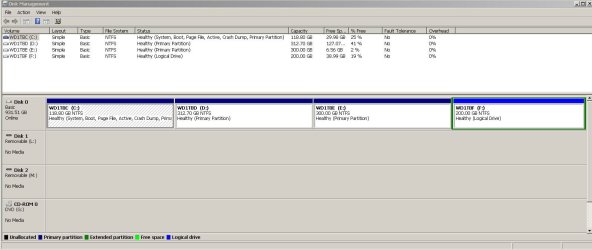
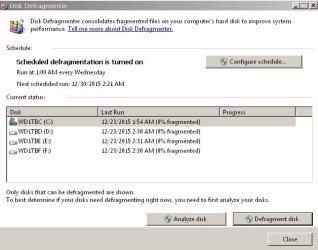
Here's Disk management and what the Defragmenter indicated when I first launched it.
 

Attachments

  • Capture.JPG
    Capture.JPG
    93.5 KB · Views: 3
  • Capture1.JPG
    Capture1.JPG
    41.7 KB · Views: 16

My Computer

Computer Manufacturer/Model Number
Custom
OS
Windows 7 Ultimate x64 SP1
CPU
E8400 E0 stepping @ 4.05GHz
Motherboard
Abit IP35-E, BIOS v.18b1
Memory
2x2GB + 2x1GB Mushkin
Graphics Card(s)
eVGA GTS 250SC
Sound Card
Onboard
Monitor(s) Displays
Sony FW900
Screen Resolution
1600x1024
Hard Drives
WD Black 1TB SATA
PSU
Corsair 550W
Case
CM Scout
Cooling
Scythe Mugen2
Keyboard
PS2
Mouse
PS2
Internet Speed
FiOS
Thanks Tony for the pictures.

Did you select Analyze disk? Are those 0% after analyzing the disk?
If so that is great.

I would recommend trying to get a little more free space on Partition (E) just in case you ever want to do things with that partition.

I'm not sure why Partition (F) is logical. Your should be able to have (4) Primary partitions on one drive.
If your not having problems I wouldn't worry about it. Just curiosity on my part.
 

My Computer

Computer type
PC/Desktop
Computer Manufacturer/Model Number
Home made Desktop
OS
Windows 10 Pro. 64/ version 1709 Windows 7 Pro/64
CPU
Intel i7-6800K @ 4.3
Motherboard
ASUS X-99 Deluxe II
Memory
Corsair Platinum 16 gig @2400
Graphics Card(s)
EVGA GTX 1070 OC
Monitor(s) Displays
Asus 27" LED LCD/VE278Q
Screen Resolution
1920-1080 or 1280-720 HDMI
Hard Drives
INTEL SSD 730-240 Gb Sata 3.0/
PSU
EVGA Platium 1200W
Case
Phanteks Luxe Tempered Glass 8 fans/ one radiator
Cooling
XSPC/ Water Cooled CPU
Keyboard
Das 4 Professional
Mouse
Logitech M705/MX Anywhere 2-S
Internet Speed
100 mbits
Antivirus
Microsoft Security Essentials/ Malwarebytes Premium 3.0/ SAS
Browser
I.E. 11 default/Firefox/ ISP Time Warner Cable/Spectrum
Other Info
LG BluRay Burner/
Sound system-KLipsch-THX/
Icy Dock ssd Hot Swap bays.
We may have a winner. Some more digging on the Microsoft forums yielded at least one other person who seems to have had the same thing happen recently. Apparently it is a known problem, but Microsoft's patch is not tagged as a required update! Windows update / patch KB3092627 fixes the problem, assuming it's what I have. It apparently might be, as after I applied it I got through a Full Scan with no issues (it passed as I expected). I'm going to guess something in the Updates that I installed on 12/8 messed up MSE and this patch fixes it. I don't want to speak too soon. It worked once; I'm going to wait until my normal weekend scheduled scan. If that passes I'll mark this as solved.
 

My Computer

Computer Manufacturer/Model Number
Custom
OS
Windows 7 Ultimate x64 SP1
CPU
E8400 E0 stepping @ 4.05GHz
Motherboard
Abit IP35-E, BIOS v.18b1
Memory
2x2GB + 2x1GB Mushkin
Graphics Card(s)
eVGA GTS 250SC
Sound Card
Onboard
Monitor(s) Displays
Sony FW900
Screen Resolution
1600x1024
Hard Drives
WD Black 1TB SATA
PSU
Corsair 550W
Case
CM Scout
Cooling
Scythe Mugen2
Keyboard
PS2
Mouse
PS2
Internet Speed
FiOS
Good news is I have had KB3092627 installed for some time and haven't noticed any problems.

I'm thinking that you had more than one problem and slowly but surly you are getting them fixed.

Please keep us informed.
 

My Computer

Computer type
PC/Desktop
Computer Manufacturer/Model Number
Home made Desktop
OS
Windows 10 Pro. 64/ version 1709 Windows 7 Pro/64
CPU
Intel i7-6800K @ 4.3
Motherboard
ASUS X-99 Deluxe II
Memory
Corsair Platinum 16 gig @2400
Graphics Card(s)
EVGA GTX 1070 OC
Monitor(s) Displays
Asus 27" LED LCD/VE278Q
Screen Resolution
1920-1080 or 1280-720 HDMI
Hard Drives
INTEL SSD 730-240 Gb Sata 3.0/
PSU
EVGA Platium 1200W
Case
Phanteks Luxe Tempered Glass 8 fans/ one radiator
Cooling
XSPC/ Water Cooled CPU
Keyboard
Das 4 Professional
Mouse
Logitech M705/MX Anywhere 2-S
Internet Speed
100 mbits
Antivirus
Microsoft Security Essentials/ Malwarebytes Premium 3.0/ SAS
Browser
I.E. 11 default/Firefox/ ISP Time Warner Cable/Spectrum
Other Info
LG BluRay Burner/
Sound system-KLipsch-THX/
Icy Dock ssd Hot Swap bays.
That patch did the trick. My scheduled scan ran fine with no hang up. I'm marking this one as solved. Thanks for all the help. As none of the scans I did run identified anything after this was observed, I'm chalking this one up to some breakage that occurred likely from the last set of Windows Updates I had installed.
 

My Computer

Computer Manufacturer/Model Number
Custom
OS
Windows 7 Ultimate x64 SP1
CPU
E8400 E0 stepping @ 4.05GHz
Motherboard
Abit IP35-E, BIOS v.18b1
Memory
2x2GB + 2x1GB Mushkin
Graphics Card(s)
eVGA GTS 250SC
Sound Card
Onboard
Monitor(s) Displays
Sony FW900
Screen Resolution
1600x1024
Hard Drives
WD Black 1TB SATA
PSU
Corsair 550W
Case
CM Scout
Cooling
Scythe Mugen2
Keyboard
PS2
Mouse
PS2
Internet Speed
FiOS
Back
Top