Solved Suggestion for LAN IP address

macnab

New member
Member
VIP
Local time
11:26 PM
Messages
158
Location
Roodepoort
I have ADSL with WiFi. This uses 192.168.x.x.
I want to connect my home theater to my PC via LAN. If I plug an Ethernet router in, it uses IP 169.254.x.x
So of course Firefox and Thunderbird try to use this for Internet access.
So I need to change the LAN router to a higher IP metric. Any suggestions, or does it not really matter?
Currently I am not sharing my media files via the Internet.

EDIT: I think this info is more correct:
ADSL modem:
Gateway 192.168.1.1
Subnet 255.255.255.0
Wireless Network Connection
Internet

LAN modem:
Gateway 192.168.2.1
Subnet 255.255.0.0
Local area connection
No Internet

If I plug the LAN modem in Windows uses it for Internet, even though it has a higher metric than the ADSL modem. So no Internet.

Isn't this the opposite of what is supposed to happen? How can I fix it?
 

My Computer My Computer

At a glance

Windows 7 Professional SP1 64-bitIntel i3-3220 3.3GHz4GBNVIDIA GeForce GTX650 1GB
Computer type
PC/Desktop
Computer Manufacturer/Model Number
Built-up
OS
Windows 7 Professional SP1 64-bit
CPU
Intel i3-3220 3.3GHz
Motherboard
Gigabyte
Memory
4GB
Graphics Card(s)
NVIDIA GeForce GTX650 1GB
Sound Card
On-board Realtek
Monitor(s) Displays
LGL1719S
Screen Resolution
1280 x 1024
Hard Drives
Samsung HD321HJ, Samsung HD103SI, Seagate ST2000DL, Seagate ST3100524AS
PSU
450W
Case
AOpen
Cooling
Case fan, CPU fan, PSU fanf.
Keyboard
Microsoft
Mouse
AOpen
Internet Speed
1Mb/s
Antivirus
MSSE
Browser
Firefox
If you are getting 169.254.x.x with your router I believe its DHCP server was stopped. Go into its management interface and enable it.

Also plug the Ethernet cable to one of your ADSL modem/router's normal ports (if there are 4), then plug the other end to LAN router's WAN port (usually different color).

Then plug your PCs to the LAN router's normal ports.
 

My Computer My Computer

At a glance

Windows 7 Ultimate x64 SP1AMD Phenom 2 1090T2x8GB Kingston HyperX Fury Black 1600Mhz Unga...MSI GTX 970 Gaming 4G
Computer type
PC/Desktop
Computer Manufacturer/Model Number
Custom Build
OS
Windows 7 Ultimate x64 SP1
CPU
AMD Phenom 2 1090T
Motherboard
Gigabyte GA-890FXA-UD5
Memory
2x8GB Kingston HyperX Fury Black 1600Mhz Unganged
Graphics Card(s)
MSI GTX 970 Gaming 4G
Sound Card
Realtek On-Board HD 7.1 Audio / Logitech G35
Monitor(s) Displays
3xAcer GD245HQ
Screen Resolution
1920x1080
Hard Drives
Samsung 850 Pro 512GB SSD - OS /
WD Caviar Black SATA 3 - 1 TBx2 - Dynamic RAID 0 /
WD Caviar Green SATA 2 - 640GBx2 - Dynamic RAID 0 /
WD Caviar Green SATA 2 - 640GB - Internal Backup /
Seagate Barracude SATA 3 - 3TB - External Backup/ Sync
PSU
HighPower 1000W
Case
Cooler Master HAF 932
Cooling
Noctua NH-D14
Keyboard
Logitech G19
Mouse
Logitech G500
Internet Speed
100/4 Mbit Cable (100GB quota)
Antivirus
ZoneAlarm Extreme Security / MBAM Pro / MBAE Free / SAS Free
Browser
IE 11 - Firefox - Chrome
Other Info
Logitech F710/ G27/ G940/ Z5500 // TrackIR 5 // Nvidia 3D Surround Vision
@GokAy The problem with this solution is that there is a passage between my PC and the ADSL cable point. That is why the PC is connected to the ADSL modem via WiFi.
I used to be able to do this when I had a wireless Internet connection (iBurst.) Different IP range, of course.
 

My Computer My Computer

At a glance

Windows 7 Professional SP1 64-bitIntel i3-3220 3.3GHz4GBNVIDIA GeForce GTX650 1GB
Computer type
PC/Desktop
Computer Manufacturer/Model Number
Built-up
OS
Windows 7 Professional SP1 64-bit
CPU
Intel i3-3220 3.3GHz
Motherboard
Gigabyte
Memory
4GB
Graphics Card(s)
NVIDIA GeForce GTX650 1GB
Sound Card
On-board Realtek
Monitor(s) Displays
LGL1719S
Screen Resolution
1280 x 1024
Hard Drives
Samsung HD321HJ, Samsung HD103SI, Seagate ST2000DL, Seagate ST3100524AS
PSU
450W
Case
AOpen
Cooling
Case fan, CPU fan, PSU fanf.
Keyboard
Microsoft
Mouse
AOpen
Internet Speed
1Mb/s
Antivirus
MSSE
Browser
Firefox
What I said doesn't interfere with any WiFi.

Perhaps a bit more info is needed. Anyway, is the following true?

Your PC is connected to ADSL modem/router with Wireless.
Your Home Theater is connected to LAN router with a cable.
And they don't see each other?

Do you need a second router in the LAN? What happens when you disable DHCP on LAN router (I guess this is the case now) and connect the ADSL cable to a normal port on the LAN router, and other PCs connected should get an IP from the ADSL that way (using the router only as a switch)

I hope I was clear. If not, please describe each port of your ADSL and LAN modem/routers, where they are connected to and what IP they get.
 

My Computer My Computer

At a glance

Windows 7 Ultimate x64 SP1AMD Phenom 2 1090T2x8GB Kingston HyperX Fury Black 1600Mhz Unga...MSI GTX 970 Gaming 4G
Computer type
PC/Desktop
Computer Manufacturer/Model Number
Custom Build
OS
Windows 7 Ultimate x64 SP1
CPU
AMD Phenom 2 1090T
Motherboard
Gigabyte GA-890FXA-UD5
Memory
2x8GB Kingston HyperX Fury Black 1600Mhz Unganged
Graphics Card(s)
MSI GTX 970 Gaming 4G
Sound Card
Realtek On-Board HD 7.1 Audio / Logitech G35
Monitor(s) Displays
3xAcer GD245HQ
Screen Resolution
1920x1080
Hard Drives
Samsung 850 Pro 512GB SSD - OS /
WD Caviar Black SATA 3 - 1 TBx2 - Dynamic RAID 0 /
WD Caviar Green SATA 2 - 640GBx2 - Dynamic RAID 0 /
WD Caviar Green SATA 2 - 640GB - Internal Backup /
Seagate Barracude SATA 3 - 3TB - External Backup/ Sync
PSU
HighPower 1000W
Case
Cooler Master HAF 932
Cooling
Noctua NH-D14
Keyboard
Logitech G19
Mouse
Logitech G500
Internet Speed
100/4 Mbit Cable (100GB quota)
Antivirus
ZoneAlarm Extreme Security / MBAM Pro / MBAE Free / SAS Free
Browser
IE 11 - Firefox - Chrome
Other Info
Logitech F710/ G27/ G940/ Z5500 // TrackIR 5 // Nvidia 3D Surround Vision
You should never have to assign a pc an ip address, no way should it be grabbing a 169.254 etc, did you try ipconfig /renew
 

My Computer My Computer

At a glance

Windows 10 Pro x64Intel Core i7 6700KGSkill TridentZ RGB 16GB 3600 16-16-16-36EVGA GTX 980 Ti SC x2
Computer type
PC/Desktop
Computer Manufacturer/Model Number
Skylake Special #666
OS
Windows 10 Pro x64
CPU
Intel Core i7 6700K
Motherboard
Asus Sabertooth Z170 Mark 1
Memory
GSkill TridentZ RGB 16GB 3600 16-16-16-36
Graphics Card(s)
EVGA GTX 980 Ti SC x2
Sound Card
Realtek High Definition
Monitor(s) Displays
AOC G2460PG
Screen Resolution
1920 x 1080 144Hz
Hard Drives
Samsung 860 Pro 256GB, Seagate Barracuda 4TB x2
PSU
EVGA 1000 P2, EVGA White Custom Braided Cables
Case
Corsair Vengeance C70 Gunmetal Black
Cooling
Corsair H100i v2, Corsair ML120 x2, Thermal Grizzly Kryonaut
Keyboard
Logitech G910 Orion Spectrum
Mouse
Logitech G700s
Internet Speed
Verizon Fios Quantum Gateway 75/75
Antivirus
Windows Defender, Malwarebytes Free 3.8.3
Browser
Chrome
Other Info
Corsair SP120 x4, LG Blu-ray Drive, Durabrand HT-395 100 Watt Dolby Digital Amp, Corsair H2100 Wireless 7.1 Headset
@AddRAM I think that is Local Area Connection 2, which is the iBurst adapter. No longer used. Now unplugged. And that IP no longer comes up.

@GokAy

ADSL modem plugged into telephone socket. No LAN ports used at all. Gateway is 192.168.1.1. PC IP is 192.168.1.2.

The router that I last used about a year ago is a 3G USB wireless modem with 4 LAN sockets and a WAN socket. The 3G USB port has never been used. The wireless part is no longer used. Gateway is 192.168.2.1. DHCP for LAN enabled, range 192.168.2.100 to 192.168.2.255. The home theater is connected to a LAN port on this modem. If I check network status on the home theater I see that the router assigned 192.168.2.101 as the home theater IP.

If I plug a cable from the PC Ethernet port to the router, the router assigns 192.168.2.100 to it. Internet connection lost. If I map the networks, the Wireless Network Connection shows Internet access (although I do not have access.) The LOcal Area Connection mapping fails: "Responses from other devices on the network are delayed, or there is an incompatible router on the network."

I can ping the home theater. I can ping the LAN router gateway. I can ping the ADSL router. The home theater says the LAN is working. It does not offer the network as a source.
 

My Computer My Computer

At a glance

Windows 7 Professional SP1 64-bitIntel i3-3220 3.3GHz4GBNVIDIA GeForce GTX650 1GB
Computer type
PC/Desktop
Computer Manufacturer/Model Number
Built-up
OS
Windows 7 Professional SP1 64-bit
CPU
Intel i3-3220 3.3GHz
Motherboard
Gigabyte
Memory
4GB
Graphics Card(s)
NVIDIA GeForce GTX650 1GB
Sound Card
On-board Realtek
Monitor(s) Displays
LGL1719S
Screen Resolution
1280 x 1024
Hard Drives
Samsung HD321HJ, Samsung HD103SI, Seagate ST2000DL, Seagate ST3100524AS
PSU
450W
Case
AOpen
Cooling
Case fan, CPU fan, PSU fanf.
Keyboard
Microsoft
Mouse
AOpen
Internet Speed
1Mb/s
Antivirus
MSSE
Browser
Firefox
OK you have two devices, and you are using two routers and two subnets - this will not work

you need to have both devices connected to the same network segment, as you need to also connect to the internet you need to connect both devices to the ADSL modem. Does this modem have any free ports? or do you have a wireless adaptor on the Home theatre you need to either run an Ethernet cable from the ADSL modem to the Home theatre or if this is impractical you need to connect the Home theatre to the ADSL router by wireless, this may need you to use some form of add-on adaptor - USB wireless adaptor

Edit

The 169.254.x.x IP address is a standard fallback address assigned by the device itself when no other options are available - it is a basic flag that the device is NOT connected to a network ;)
 

My Computers My Computers

  • At a glance

    Windows 11 Pro x64 [Latest Release and Releas...Ryzen 9 5950X, 3.8 - 5.2 MHz64GB [2 x 32GB] DDR4 3200MHz4GB NVIDIA GEFORCE GTX 1650 Ti
    Computer type
    PC/Desktop
    Computer Manufacturer/Model Number
    ChillBlast - Custom to my design
    OS
    Windows 11 Pro x64 [Latest Release and Release Preview]
    CPU
    Ryzen 9 5950X, 3.8 - 5.2 MHz
    Motherboard
    Asus Prime X570-Pro
    Memory
    64GB [2 x 32GB] DDR4 3200MHz
    Graphics Card(s)
    4GB NVIDIA GEFORCE GTX 1650 Ti
    Sound Card
    On-board SPDIF to 5.1 System + HDMI [5.1 system]
    Monitor(s) Displays
    32" UHD 32 Bit HDR Monitor + 43" UHD 4K 32Bit HDR TV
    Screen Resolution
    2 x 3840 x 2160 @60Hz
    Hard Drives
    1TB M2 SSD OS, 500GB Fast Access SSD, 2 x 8TB Data + Various Externals from 1TB to 4TB, 10TB NAS
    PSU
    NZXT C750 80 PLUS Gold 750W Modular PSU
    Case
    Workstation Case [Matt Black]
    Cooling
    NZXT Kraken X63 280mm CPU Cooler +2x Quiet Case fans
    Keyboard
    Logitech Wireless MX Keys & K400 + others
    Mouse
    Logitech Wireless MX Master 3S
    Internet Speed
    920 MB Down 50 MB Up
    Antivirus
    BitDefender Total Security Pro
    Browser
    Chrome (always run latest Non-Beta)
    Other Info
    Also run ...
    Laptop - Quad 8GB - Windows 10 Pro x64
    Nexus 7 Android tablet x2
    Samsung 10.2" tablet
    Blackview TAB 8 4G Android Tablet c/w Keyboard
    Wacom Intuos Pro Medium Pen Pad
    Wacom Intuos Pro Small Pen Pad
    Wacom Expresskeys Remote
    Loopdeck+ Graphics Controller
    Shuttle Pro v2 Control
  • At a glance

    Windows 11 Pro x64 Latest RPIntel I7 10750H 5.0GHz32GB [2x16GB] DDR4 2933 MHznVidia GTX1650Ti 4 GB GDDR6
    Computer type
    Laptop
    System Manufacturer/Model Number
    Dell XPS 17 10750H
    OS
    Windows 11 Pro x64 Latest RP
    CPU
    Intel I7 10750H 5.0GHz
    Motherboard
    Dell XPS
    Memory
    32GB [2x16GB] DDR4 2933 MHz
    Graphics Card(s)
    nVidia GTX1650Ti 4 GB GDDR6
    Sound Card
    Stock [Realtek] 4 Speaker
    Monitor(s) Displays
    17" IPS UHD+ Infinity Edge Touchscreen
    Screen Resolution
    3840 x 2400
    Hard Drives
    2TB M2 NVMe, 4TB External + various 500GB & 1TB External NVMe (also have access to spinner HDD from
    PSU
    Stock
    Case
    Stock XPS Aluminium & Carbon Fibre
    Cooling
    Stock - Active Fan Control
    Keyboard
    Backlit + Various Logitech
    Mouse
    Stock Track Pad + Logitech MX Trackball
    Internet Speed
    72 MB Down 18MB Up
    Browser
    Chrome
    Other Info
    Also run ...
    Laptop - Quad 8GB - Windows 10 Pro x64
    Nexus 7 Android tablet x2
    10.2" tablet
    Sony Z3 Android Smartphone
    Wacom Intuos Pro Medium Pen Pad
    Wacom Intuos Pro Small Pen Pad
    Wacom Expresskeys Remote
    Loopdeck+ Graphics Controller
    Shuttle Pro v2 Control Pad
    10TB NAS
Ok, makes more sense now. Even though I would try other setups.

As I understand, your Home Theater doesn't access the Internet.

If you are only connecting PC and Home Theater and these are 1000Mbps Ethernet ports, you can just use one cable between them, no need for a router.

Or manually assign the LAN TCP/IPv4 properties on both computers, 192.168.2.0 network, 255.255.255.0 subnet but no gateway, gateway is only needed to reach foreign subnets.

If you configure the metric, smaller should be preferred (as far as I remember). It is possible cable has a higher metric than wireless.

---------
Everything's is possible if you configure them right :P

I used to have my laptop connected via cable to the 2nd port on my desktop. Gave them a second subnet manually and all was good.

It is the same as what OP is doing but without a DHCP assigning a second gateway.
 

My Computer My Computer

At a glance

Windows 7 Ultimate x64 SP1AMD Phenom 2 1090T2x8GB Kingston HyperX Fury Black 1600Mhz Unga...MSI GTX 970 Gaming 4G
Computer type
PC/Desktop
Computer Manufacturer/Model Number
Custom Build
OS
Windows 7 Ultimate x64 SP1
CPU
AMD Phenom 2 1090T
Motherboard
Gigabyte GA-890FXA-UD5
Memory
2x8GB Kingston HyperX Fury Black 1600Mhz Unganged
Graphics Card(s)
MSI GTX 970 Gaming 4G
Sound Card
Realtek On-Board HD 7.1 Audio / Logitech G35
Monitor(s) Displays
3xAcer GD245HQ
Screen Resolution
1920x1080
Hard Drives
Samsung 850 Pro 512GB SSD - OS /
WD Caviar Black SATA 3 - 1 TBx2 - Dynamic RAID 0 /
WD Caviar Green SATA 2 - 640GBx2 - Dynamic RAID 0 /
WD Caviar Green SATA 2 - 640GB - Internal Backup /
Seagate Barracude SATA 3 - 3TB - External Backup/ Sync
PSU
HighPower 1000W
Case
Cooler Master HAF 932
Cooling
Noctua NH-D14
Keyboard
Logitech G19
Mouse
Logitech G500
Internet Speed
100/4 Mbit Cable (100GB quota)
Antivirus
ZoneAlarm Extreme Security / MBAM Pro / MBAE Free / SAS Free
Browser
IE 11 - Firefox - Chrome
Other Info
Logitech F710/ G27/ G940/ Z5500 // TrackIR 5 // Nvidia 3D Surround Vision
~~~
If I plug the LAN modem in Windows uses it for Internet, even though it has a higher metric than the ADSL modem.
~~~
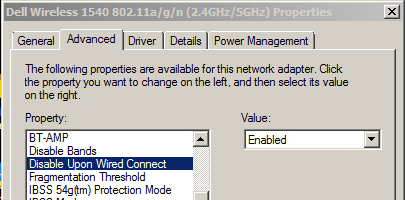
The metric won't matter if the Wireless network adapter disables itself when a wired connection is detected. The driver for your Wireless network adapter might not have this feature, but you might want to check:

Capture.PNG
 

My Computer My Computer

At a glance

W7 Pro SP1 64biti78GBIntel HD Graphics
Computer type
Laptop
Computer Manufacturer/Model Number
Employer provided Dell Latitude
OS
W7 Pro SP1 64bit
CPU
i7
Memory
8GB
Graphics Card(s)
Intel HD Graphics
Hard Drives
crappy SSD
Antivirus
Employer mandated Symantec Endpoint Protection
Browser
Pale Moon 64bit, IE11 64bit & Chrome 64bit
OP mentioned he could ping ADSL router (wireless connection) so most likely they work together (post #6 last paragraph). However, hmm, maybe an incorrect DNS entry coming from the DHCP of wired connection.

Can you "ping 8.8.8.8" for example?
 

My Computer My Computer

At a glance

Windows 7 Ultimate x64 SP1AMD Phenom 2 1090T2x8GB Kingston HyperX Fury Black 1600Mhz Unga...MSI GTX 970 Gaming 4G
Computer type
PC/Desktop
Computer Manufacturer/Model Number
Custom Build
OS
Windows 7 Ultimate x64 SP1
CPU
AMD Phenom 2 1090T
Motherboard
Gigabyte GA-890FXA-UD5
Memory
2x8GB Kingston HyperX Fury Black 1600Mhz Unganged
Graphics Card(s)
MSI GTX 970 Gaming 4G
Sound Card
Realtek On-Board HD 7.1 Audio / Logitech G35
Monitor(s) Displays
3xAcer GD245HQ
Screen Resolution
1920x1080
Hard Drives
Samsung 850 Pro 512GB SSD - OS /
WD Caviar Black SATA 3 - 1 TBx2 - Dynamic RAID 0 /
WD Caviar Green SATA 2 - 640GBx2 - Dynamic RAID 0 /
WD Caviar Green SATA 2 - 640GB - Internal Backup /
Seagate Barracude SATA 3 - 3TB - External Backup/ Sync
PSU
HighPower 1000W
Case
Cooler Master HAF 932
Cooling
Noctua NH-D14
Keyboard
Logitech G19
Mouse
Logitech G500
Internet Speed
100/4 Mbit Cable (100GB quota)
Antivirus
ZoneAlarm Extreme Security / MBAM Pro / MBAE Free / SAS Free
Browser
IE 11 - Firefox - Chrome
Other Info
Logitech F710/ G27/ G940/ Z5500 // TrackIR 5 // Nvidia 3D Surround Vision
Ok, got it working with just a cable between PC and home theater.
Having done that, wanting to experiment with manual IP settings, I can no longer get the PC to see the LAN router!!
My problem is solved for the moment. If I ever need more than 1 device I will just have to pull Ethernet cables through the roof-space.
Thanks for the help.
 

My Computer My Computer

At a glance

Windows 7 Professional SP1 64-bitIntel i3-3220 3.3GHz4GBNVIDIA GeForce GTX650 1GB
Computer type
PC/Desktop
Computer Manufacturer/Model Number
Built-up
OS
Windows 7 Professional SP1 64-bit
CPU
Intel i3-3220 3.3GHz
Motherboard
Gigabyte
Memory
4GB
Graphics Card(s)
NVIDIA GeForce GTX650 1GB
Sound Card
On-board Realtek
Monitor(s) Displays
LGL1719S
Screen Resolution
1280 x 1024
Hard Drives
Samsung HD321HJ, Samsung HD103SI, Seagate ST2000DL, Seagate ST3100524AS
PSU
450W
Case
AOpen
Cooling
Case fan, CPU fan, PSU fanf.
Keyboard
Microsoft
Mouse
AOpen
Internet Speed
1Mb/s
Antivirus
MSSE
Browser
Firefox
OP mentioned he could ping ADSL router (wireless connection) so most likely they work together (post #6 last paragraph). However, hmm, maybe an incorrect DNS entry coming from the DHCP of wired connection.

Can you "ping 8.8.8.8" for example?
Thanks. I did read that - but I did not do a good job of keeping the layout of things in my head. (e.g. ADSL = wireless).
 

My Computer My Computer

At a glance

W7 Pro SP1 64biti78GBIntel HD Graphics
Computer type
Laptop
Computer Manufacturer/Model Number
Employer provided Dell Latitude
OS
W7 Pro SP1 64bit
CPU
i7
Memory
8GB
Graphics Card(s)
Intel HD Graphics
Hard Drives
crappy SSD
Antivirus
Employer mandated Symantec Endpoint Protection
Browser
Pale Moon 64bit, IE11 64bit & Chrome 64bit
Macnab, good to hear that. If you don't mind working a bit more, we should be able to get your system working while having router in between, that would allow you to add additional devices if you so wish). I am with Barman here regarding how to setup the network but don't mind helping out with current situation.

I used a different network ID when giving you the example. Remember your LAN router has 192.168.0.0/16 (255.255.0.0), I told you to use 192.168.2.0/24 (255.255.255.0). The 16 and 24 are another method of showing subnet mask.

You can try:
- change PC cable IP (last number -10- is for the sake of example) to 192.168.2.10/255.255.0.0
- you should be able to open LAN router interface now
- if possible change LAN settings of the router and change it to 192.168.2.0/24 (255.255.255.0)
- if you can't change router LAN segment/IP etc, then change the IP of Home Theatre only (PC should be ok now)
- also disable DHCP of LAN router while you are in management interface (important step)

In short the idea is to disable DHCP on LAN router and have IPs from the same network ID/same subnet for the router and your two computers
 

My Computer My Computer

At a glance

Windows 7 Ultimate x64 SP1AMD Phenom 2 1090T2x8GB Kingston HyperX Fury Black 1600Mhz Unga...MSI GTX 970 Gaming 4G
Computer type
PC/Desktop
Computer Manufacturer/Model Number
Custom Build
OS
Windows 7 Ultimate x64 SP1
CPU
AMD Phenom 2 1090T
Motherboard
Gigabyte GA-890FXA-UD5
Memory
2x8GB Kingston HyperX Fury Black 1600Mhz Unganged
Graphics Card(s)
MSI GTX 970 Gaming 4G
Sound Card
Realtek On-Board HD 7.1 Audio / Logitech G35
Monitor(s) Displays
3xAcer GD245HQ
Screen Resolution
1920x1080
Hard Drives
Samsung 850 Pro 512GB SSD - OS /
WD Caviar Black SATA 3 - 1 TBx2 - Dynamic RAID 0 /
WD Caviar Green SATA 2 - 640GBx2 - Dynamic RAID 0 /
WD Caviar Green SATA 2 - 640GB - Internal Backup /
Seagate Barracude SATA 3 - 3TB - External Backup/ Sync
PSU
HighPower 1000W
Case
Cooler Master HAF 932
Cooling
Noctua NH-D14
Keyboard
Logitech G19
Mouse
Logitech G500
Internet Speed
100/4 Mbit Cable (100GB quota)
Antivirus
ZoneAlarm Extreme Security / MBAM Pro / MBAE Free / SAS Free
Browser
IE 11 - Firefox - Chrome
Other Info
Logitech F710/ G27/ G940/ Z5500 // TrackIR 5 // Nvidia 3D Surround Vision
I did experiment along those lines earlier. I have since done a lot of experimenting.
It is now working, DHCP off, router at 192.168.2.1/24, PC (static) at 192.168.2.100/24, home theater (static) at 192.168.2.101/24.

If I set the PC to 192.168.2.10, then streaming fails. I now realise that there is a limit with the router - if DHCP is switched on it only allocates from ...100 to...199.

So, problem solved, can add another 2 devices and have Internet. Thanks again.
 

My Computer My Computer

At a glance

Windows 7 Professional SP1 64-bitIntel i3-3220 3.3GHz4GBNVIDIA GeForce GTX650 1GB
Computer type
PC/Desktop
Computer Manufacturer/Model Number
Built-up
OS
Windows 7 Professional SP1 64-bit
CPU
Intel i3-3220 3.3GHz
Motherboard
Gigabyte
Memory
4GB
Graphics Card(s)
NVIDIA GeForce GTX650 1GB
Sound Card
On-board Realtek
Monitor(s) Displays
LGL1719S
Screen Resolution
1280 x 1024
Hard Drives
Samsung HD321HJ, Samsung HD103SI, Seagate ST2000DL, Seagate ST3100524AS
PSU
450W
Case
AOpen
Cooling
Case fan, CPU fan, PSU fanf.
Keyboard
Microsoft
Mouse
AOpen
Internet Speed
1Mb/s
Antivirus
MSSE
Browser
Firefox
Good job :) I am intrigued to learn why 2.10 fails but it would be a pain to troubleshoot without actually browsing the router management page.
 

My Computer My Computer

At a glance

Windows 7 Ultimate x64 SP1AMD Phenom 2 1090T2x8GB Kingston HyperX Fury Black 1600Mhz Unga...MSI GTX 970 Gaming 4G
Computer type
PC/Desktop
Computer Manufacturer/Model Number
Custom Build
OS
Windows 7 Ultimate x64 SP1
CPU
AMD Phenom 2 1090T
Motherboard
Gigabyte GA-890FXA-UD5
Memory
2x8GB Kingston HyperX Fury Black 1600Mhz Unganged
Graphics Card(s)
MSI GTX 970 Gaming 4G
Sound Card
Realtek On-Board HD 7.1 Audio / Logitech G35
Monitor(s) Displays
3xAcer GD245HQ
Screen Resolution
1920x1080
Hard Drives
Samsung 850 Pro 512GB SSD - OS /
WD Caviar Black SATA 3 - 1 TBx2 - Dynamic RAID 0 /
WD Caviar Green SATA 2 - 640GBx2 - Dynamic RAID 0 /
WD Caviar Green SATA 2 - 640GB - Internal Backup /
Seagate Barracude SATA 3 - 3TB - External Backup/ Sync
PSU
HighPower 1000W
Case
Cooler Master HAF 932
Cooling
Noctua NH-D14
Keyboard
Logitech G19
Mouse
Logitech G500
Internet Speed
100/4 Mbit Cable (100GB quota)
Antivirus
ZoneAlarm Extreme Security / MBAM Pro / MBAE Free / SAS Free
Browser
IE 11 - Firefox - Chrome
Other Info
Logitech F710/ G27/ G940/ Z5500 // TrackIR 5 // Nvidia 3D Surround Vision
I think the router is just designed that way: DHCP only allocates ...100 to ...199. Ignore the x.x.x.0 subnet. :) Has some sort of internal filter.:confused:

I'm a moron - the start end end DHCP range is a setting. Why it defaults to that range they don't say.
 

My Computer My Computer

At a glance

Windows 7 Professional SP1 64-bitIntel i3-3220 3.3GHz4GBNVIDIA GeForce GTX650 1GB
Computer type
PC/Desktop
Computer Manufacturer/Model Number
Built-up
OS
Windows 7 Professional SP1 64-bit
CPU
Intel i3-3220 3.3GHz
Motherboard
Gigabyte
Memory
4GB
Graphics Card(s)
NVIDIA GeForce GTX650 1GB
Sound Card
On-board Realtek
Monitor(s) Displays
LGL1719S
Screen Resolution
1280 x 1024
Hard Drives
Samsung HD321HJ, Samsung HD103SI, Seagate ST2000DL, Seagate ST3100524AS
PSU
450W
Case
AOpen
Cooling
Case fan, CPU fan, PSU fanf.
Keyboard
Microsoft
Mouse
AOpen
Internet Speed
1Mb/s
Antivirus
MSSE
Browser
Firefox
Back
Top