Suggestions on a GPU

Water cool only if you are overclocking to extreme levels.
No need for crossfire on 5850 or higher cards if you are only running 1680x1050 since that is a low resolution.
So one 6870 should suffice? I'm planning to run games on DirectX 11... will a single card handle the punishment?

Also, I'm water cooling the CPU to reduce the noise and the dust buildup... on my current system, liquid cooling the CPU helps with reducing dust and noise.
 

My Computer

Computer Manufacturer/Model Number
Custom
OS
Windows 8 Professional 64-bit
CPU
Intel Core i3-2100
Motherboard
ASRock Intel Z68M/USB3
Memory
4GB
Graphics Card(s)
GeForece GTX 550 Ti
Screen Resolution
1680 x 1050
PSU
750w
don't concern yourself with vram. i run 2 monitors at 1920 x1080 watch movies on one and get a steady 50fps on crysis 2 at the same time, and thats with an old 4870 1gb.

considering the 6 series can do max resolutions of 5760 x 1200 over 3 monitors before extending to other monitors as well and adapters are on the way to extend even further. It's a non issue.

i seriously doubt there is a game on the market that can really test the 6 series to any degree.

look for better value for money as all the cards from either ATI or Nvidia are more than enough to do anything you want with the current games, I lean toward ATI at the moment as they are just doing better cards not by much but enough and with the added value of eyefinity for future upgrades i can't see a reason to really go the Nvidia route right now.
 

My Computer

Computer Manufacturer/Model Number
.
OS
.
CPU
.
Motherboard
.
Memory
.
Graphics Card(s)
.
Monitor(s) Displays
.
Screen Resolution
.
Hard Drives
.
PSU
.
Case
.
Cooling
.
Keyboard
.
Mouse
.
Internet Speed
.
Other Info
.
Fascinating, I never realized this, then the lag that occurs when I play is due to my processor... absolutely fascinating.

So I'll just buy a single 6870 and see how it goes, I'm most curious.
 

My Computer

Computer Manufacturer/Model Number
Custom
OS
Windows 8 Professional 64-bit
CPU
Intel Core i3-2100
Motherboard
ASRock Intel Z68M/USB3
Memory
4GB
Graphics Card(s)
GeForece GTX 550 Ti
Screen Resolution
1680 x 1050
PSU
750w
So one 6870 should suffice? I'm planning to run games on DirectX 11... will a single card handle the punishment?
Two cards is always better than one, yes you'll get more horse power from two of those then say one 6970.

The question is do you want to put up with the hassles crossfire brings?

Also if you're going crossfire with 2 6870's but decide it's not worth it, a single 6970 would do just fine for today's game, maybe even a 6950 (which I have) depending on your resolution (mine is 1680x1050). And both cards are more powerful than a single 6870.

Personally I'd leave the hassle of crossfire alone and go a single 6970; the price should be about the same, or less.

My two cents.
 

My Computer

Computer type
PC/Desktop
Computer Manufacturer/Model Number
Custom built by me.
OS
Windows 10 Pro
CPU
Intel Core i7-4770K (3.5Ghz)
Motherboard
Gigabyte G1 Sniper 5 (F10 Bios)
Memory
32 gig Corsair Dominator Platinum (4x8Gig)
Graphics Card(s)
Sapphire Tri-X R9 Fury
Sound Card
Soundblaster ZXR
Monitor(s) Displays
NEC PA242W 24" LCD Monitor
Screen Resolution
1920 x 1200
Hard Drives
Primary - Samsung 850 Pro (512gig), Samsung 840 Pro (256gig), 2TB WD Caviar Black.
PSU
EVGA Supernova 1000 G2
Case
Cooler Master HAF X
Cooling
Corsair H100i with Corsair Air Series SP120 Quiet Fans
Keyboard
Logitech Wireless Wave
Mouse
Logitech Performance MX
Internet Speed
High Speed Cable
Antivirus
Norton Security
Browser
IE11
Other Info
Memory Timings - 1866MHz @ 9-9-9-27-1T @ 1.5 volts
  • Like
Reactions: JMH
Well, I've still have a few months, I'll think about it. Might just get a single card and not deal with Crossfire.
 

My Computer

Computer Manufacturer/Model Number
Custom
OS
Windows 8 Professional 64-bit
CPU
Intel Core i3-2100
Motherboard
ASRock Intel Z68M/USB3
Memory
4GB
Graphics Card(s)
GeForece GTX 550 Ti
Screen Resolution
1680 x 1050
PSU
750w
I agree.
I would much rather stick with a single card config. as well. Much less headache.

As far as temps go, shouldnt really be much of a issue. Most cards will be fine with the stock air cooling.
Unless, as already pointed out, you plan on doing some hefty Overclocking.


But yea, sinlge montior at 1080P or less ..
I honestly do not think youd gain all that much from Crossfire or SLI TBH. At least, not enough to make it worth it.


Those type of setups really shine though at much higher resolutions.
 

My Computer

Computer Manufacturer/Model Number
Custom (Self Build)
OS
Windows 7 Home Premium 64bit
CPU
Intel Core i7 2700k
Motherboard
eVGA P67 SLI
Memory
8GB Mushkin Redline Ridgebacks @1866
Graphics Card(s)
EVGA GTX570 SC
Sound Card
XiFi Titanium HD
Monitor(s) Displays
LG W2453V
Screen Resolution
1920x1080
Hard Drives
Intel 320 80GB -- Intel X25-V 40GB --WD Black 1TB x2 -- WD Blue 640GB
PSU
Seasonic x750
Case
Corsair 600T SE White
Cooling
eVGA Superclocked CPU Cooler
Keyboard
Saitek Cyborg
Antivirus
Kaspersky
Browser
IE
Other Info
LG BD/DVD
Fascinating, I never realized this, then the lag that occurs when I play is due to my processor... absolutely fascinating.

So I'll just buy a single 6870 and see how it goes, I'm most curious.

oh i dunno about that, part of the reason i'm able to do it is the small fact i have next to no data bottle neck on my system, every component was specificly chosen to reduce that.

i also set up process affinity mask, so games use core 3 and 4 the os gets core 1+2 and media stuff gets core 2, but i don't do that for everything.

lag can occur for different reasons it may be down to a mix of things.
 

My Computer

Computer Manufacturer/Model Number
.
OS
.
CPU
.
Motherboard
.
Memory
.
Graphics Card(s)
.
Monitor(s) Displays
.
Screen Resolution
.
Hard Drives
.
PSU
.
Case
.
Cooling
.
Keyboard
.
Mouse
.
Internet Speed
.
Other Info
.
Fascinating, I never realized this, then the lag that occurs when I play is due to my processor... absolutely fascinating.

So I'll just buy a single 6870 and see how it goes, I'm most curious.

oh i dunno about that, part of the reason i'm able to do it is the small fact i have next to no data bottle neck on my system, every component was specificly chosen to reduce that.

i also set up process affinity mask, so games use core 3 and 4 the os gets core 1+2 and media stuff gets core 2, but i don't do that for everything.

lag can occur for different reasons it may be down to a mix of things.

My processor is very old, also I have insufficient RAM, that is why I need to upgrade. Made a poor choice my first time and now paying for it.

I agree.
I would much rather stick with a single card config. as well. Much less headache.

As far as temps go, shouldnt really be much of a issue. Most cards will be fine with the stock air cooling.
Unless, as already pointed out, you plan on doing some hefty Overclocking.


But yea, sinlge montior at 1080P or less ..
I honestly do not think youd gain all that much from Crossfire or SLI TBH. At least, not enough to make it worth it.


Those type of setups really shine though at much higher resolutions.
I don't plan to overclock, I used to have a resolution of 1152 x 864 until I updated my drivers. I was forced to have 1680 x 1080 resolution, got used to it and noticed a significant impact on my gaming with this resolution.

Figured it's time for a major upgrade.
 

My Computer

Computer Manufacturer/Model Number
Custom
OS
Windows 8 Professional 64-bit
CPU
Intel Core i3-2100
Motherboard
ASRock Intel Z68M/USB3
Memory
4GB
Graphics Card(s)
GeForece GTX 550 Ti
Screen Resolution
1680 x 1050
PSU
750w
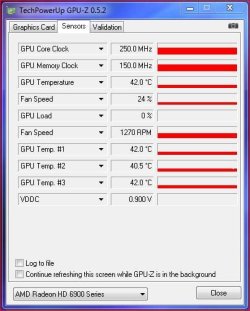
If you go with a 6950 I don't think you have to worry about temps as the card runs pretty cool on idle.....

GPUZ-20May2011.JPG

And doesn't get too hot on load either. Also price to performance is outstanding. Very nice card for the price.

6950 2gig - Newegg.com - 6950 2gb
 

My Computer

Computer type
PC/Desktop
Computer Manufacturer/Model Number
Custom built by me.
OS
Windows 10 Pro
CPU
Intel Core i7-4770K (3.5Ghz)
Motherboard
Gigabyte G1 Sniper 5 (F10 Bios)
Memory
32 gig Corsair Dominator Platinum (4x8Gig)
Graphics Card(s)
Sapphire Tri-X R9 Fury
Sound Card
Soundblaster ZXR
Monitor(s) Displays
NEC PA242W 24" LCD Monitor
Screen Resolution
1920 x 1200
Hard Drives
Primary - Samsung 850 Pro (512gig), Samsung 840 Pro (256gig), 2TB WD Caviar Black.
PSU
EVGA Supernova 1000 G2
Case
Cooler Master HAF X
Cooling
Corsair H100i with Corsair Air Series SP120 Quiet Fans
Keyboard
Logitech Wireless Wave
Mouse
Logitech Performance MX
Internet Speed
High Speed Cable
Antivirus
Norton Security
Browser
IE11
Other Info
Memory Timings - 1866MHz @ 9-9-9-27-1T @ 1.5 volts
If you go with a 6950 I don't think you have to worry about temps as the card runs pretty cool on idle.....

View attachment 155601

And doesn't get too hot on load either. Also price to performance is outstanding. Very nice card for the price.

6950 2gig - Newegg.com - 6950 2gb
How is the performance on that card? Have you run any games on DirectX 11 with maximum settings?
 

My Computer

Computer Manufacturer/Model Number
Custom
OS
Windows 8 Professional 64-bit
CPU
Intel Core i3-2100
Motherboard
ASRock Intel Z68M/USB3
Memory
4GB
Graphics Card(s)
GeForece GTX 550 Ti
Screen Resolution
1680 x 1050
PSU
750w
If you go with a 6950 I don't think you have to worry about temps as the card runs pretty cool on idle.....

View attachment 155601

And doesn't get too hot on load either. Also price to performance is outstanding. Very nice card for the price.

6950 2gig - Newegg.com - 6950 2gb
How is the performance on that card? Have you run any games on DirectX 11 with maximum settings?

I have the 5850 which is slightly slower than the 6950 and I play Battlefield Bad Company 2 at 1920x1080 with maximum graphic settings and 4x AA
Plays very smooth on my slow machine.

there are only 18 DX11 games and 1 of them doesn't have DX11 yet (Crysis 2) which means only 17 games right now are DX11.

there are currently 7 more listed coming out between now and the end of the year.
http://en.wikipedia.org/wiki/List_of_games_with_DirectX_11_support
 

My Computer

Computer Manufacturer/Model Number
HAL-9000
OS
Windows 7 Ultimate 64bit
CPU
Intel i7 3770K
Motherboard
Asus Sabertooth Z77
Memory
16GB DDR3 1333 Corsair XMS3
Graphics Card(s)
XFX HD6950 2GB EyeFinity
Sound Card
Logitech G35 & Sennheiser PC135 & VIA HD
Monitor(s) Displays
23" HP 2310e, 23" Samsung B2230, 21.5" Viewsonic
Screen Resolution
5760x1080
Hard Drives
16TB of Storage
128GB & 256GB Crucial M4 SSD's, 2X 1TB WD Black, 3x 2TB WD, 3x 2TB Samsung F4, 1.5TB Seagate, WD 500GB,
PSU
Antec True Power New 650watt
Case
Cooler Master HAF-932
Cooling
Corsair H60 Hydro Cooler, 3x 230mm Fans, 2x120mm Fan
Keyboard
Logitech G15 and G13
Mouse
Logitech G700 Gaming Mouse
Internet Speed
50/10 Mbit
Other Info
Speakers : Alesis M1 Active Mk2 Studio Monitors , APC RS 1200 UPS, HP 4500DN Color Laser, HP P1006 mono Laser, Kodak 8500 Dye-Sub, Epson 1280 inkjet, Epson Worforce 610 MFC
I've seen DirectX 11 textures and they're pretty... uh... very detailed. Technology is rapidly advancing...

I have Civilization V and tried DirectX 11 and it looked incredible but was impossible to play with my current configuration.
 

My Computer

Computer Manufacturer/Model Number
Custom
OS
Windows 8 Professional 64-bit
CPU
Intel Core i3-2100
Motherboard
ASRock Intel Z68M/USB3
Memory
4GB
Graphics Card(s)
GeForece GTX 550 Ti
Screen Resolution
1680 x 1050
PSU
750w
Looking over the thread, I see that no one has remarked:

A 990X for a gaming system? Waste of money. For most (not all) applications, an I7-2600k would give better performance, at 1/3 the CPU price.
 

My Computer

Computer Manufacturer/Model Number
homegrown
OS
Windows 7 Pro X64 SP1
CPU
Intel Core I7-3930k
Motherboard
Asus P9X79 Pro
Memory
16 GB Gskill DDR3-2133
Graphics Card(s)
eVGA GTX680
Sound Card
Creative X-Fi Titanium
Monitor(s) Displays
As PA246Q
Screen Resolution
1920 X 1200
Hard Drives
Corsair Force GT, 120 GB
WDC 1.5TB Caviar Black
PSU
PCP&C Silencer 750 Crossfire
Case
Silverstone FT02
Cooling
Noctua NH-D14
Keyboard
cheap Logitech USB
Mouse
Microsoft Intellimouse Explorer (old optical) USB
Internet Speed
6Mb cable
Other Info
Pioneer BDR-205
Samsung SH-203B
Monsoon 5.1 speakers
How is the performance on that card? Have you run any games on DirectX 11 with maximum settings?

The only DirectX 11 games I have are......

Dragon Age 2 which has the DX11 texture pack and the game ran very well on max setttings for me - http://www.sevenforums.com/gaming/149768-discuss-dragon-age-2-a.html#post1285290

Metro 2033 - couldn't get into the game so I gave it up. FOr what little I played the game ran well with my card though.

Remember I have a 2 gig 6950 on a 22 inch LCD monitor with a res of 1680x1050. This card is perfect for that size. Yeah there are stronger cards but this card plays well with my games.
 

My Computer

Computer type
PC/Desktop
Computer Manufacturer/Model Number
Custom built by me.
OS
Windows 10 Pro
CPU
Intel Core i7-4770K (3.5Ghz)
Motherboard
Gigabyte G1 Sniper 5 (F10 Bios)
Memory
32 gig Corsair Dominator Platinum (4x8Gig)
Graphics Card(s)
Sapphire Tri-X R9 Fury
Sound Card
Soundblaster ZXR
Monitor(s) Displays
NEC PA242W 24" LCD Monitor
Screen Resolution
1920 x 1200
Hard Drives
Primary - Samsung 850 Pro (512gig), Samsung 840 Pro (256gig), 2TB WD Caviar Black.
PSU
EVGA Supernova 1000 G2
Case
Cooler Master HAF X
Cooling
Corsair H100i with Corsair Air Series SP120 Quiet Fans
Keyboard
Logitech Wireless Wave
Mouse
Logitech Performance MX
Internet Speed
High Speed Cable
Antivirus
Norton Security
Browser
IE11
Other Info
Memory Timings - 1866MHz @ 9-9-9-27-1T @ 1.5 volts
How is the performance on that card? Have you run any games on DirectX 11 with maximum settings?

The only DirectX 11 games I have are......

Dragon Age 2 which has the DX11 texture pack and the game ran very well on max setttings for me - http://www.sevenforums.com/gaming/149768-discuss-dragon-age-2-a.html#post1285290

Metro 2033 - couldn't get into the game so I gave it up. FOr what little I played the game ran well with my card though.

Remember I have a 2 gig 6950 on a 22 inch LCD monitor with a res of 1680x1050. This card is perfect for that size. Yeah there are stronger cards but this card plays well with my games.
I remember trying to play on DirectX 11, no go for me. But saying that your card handled that game without any problems, that's awesome, learned something new today.

Metro 2033 was a great game, I enjoyed it.

Looking over the thread, I see that no one has remarked:

A 990X for a gaming system? Waste of money. For most (not all) applications, an I7-2600k would give better performance, at 1/3 the CPU price.

Hmm... what is the point of the 990x then? I thought it was fast. You seem to be knowledgeable in such things, can you tell me why the 2600 would run better than 990x?

If you're right, I'll give you a hug. :)

I'm still learning the details of computer hardware, this is an awesome experience for me.
 

My Computer

Computer Manufacturer/Model Number
Custom
OS
Windows 8 Professional 64-bit
CPU
Intel Core i3-2100
Motherboard
ASRock Intel Z68M/USB3
Memory
4GB
Graphics Card(s)
GeForece GTX 550 Ti
Screen Resolution
1680 x 1050
PSU
750w
In terms of cooling, if you decide to look into the 570s, I would stay away from the 570 HD. Performance-wise they are the same but ...

The reference design 570 have a Vapor Cooling chamber, and exhaust all the hot air out back of the case. And they do seem to run quite cool.

The HD doesnt use a Vapor Chamber, and exhast some air out the back, and some back into the case. So very good airflow will be important for this one.

Also, I bought the Backplate and High Flow bracket for mine. Only to find out EVGA started shipping the cards with the HAF bracket already on them.


In regards to heat:

Mine idles at 38-40C depending on ambient.

I use a custom fan profile for my card when gaming.
Starting at 40% and ramping up to 50% @ 60C and increasing up to 60% at 72C.

Large majority of games the card runs at 60C under load.
Games like Borderlands, Bioshock, Fallout, etc They just dont MAX the GPU use.

For the really GPU intesive ones, it hits 70C.

Without the fan profile, the higher end temps under heavy stress can reach around 76C

So Ive really only increased the fan speeds slightly, for about a 5C drop at loads.


----
I dont have many DX11 games either.
Mertro 2033 benchmark showed a avg of 55FPS, on High settings (Tesselation/Adv Phys-X and x16AF)
Sadly I think thats all this game is good for is a benchmark :( I just didnt get into it that much.


Also, keep in mind, Civ V is very CPU intensive.
While a good GPU is important, it also get a large performance boost from a Quad Core CPU.
Im able to run it wuith all settings on high and it plays quite smoothly. (And thats with a aging Q9650)

Empire Total War runs beatifully too. Even with lots of armies on the field.
All High Settings (Textures and Shadows at Ultra) x4AA x16AF.

Witcher 2 is probably my most GPU intesive game ATM. Mostly due to the fact it needs some optimizations still but ...
I am still able to use highest settings possible (except for turning OFF Ubersampling) and it runs smoothly.

I think youll be fiine with a single GPU, regardless which one you choose.
The 6950 / 570 / 6970 are all very good performing cards.


--CPU
Because of new technology. SandyBridge is a bit more effecient, and faster clock for clock.
Kinda of like the difference between a Socket 775 Yorkfield Quad VS a Core i7.

 

My Computer

Computer Manufacturer/Model Number
Custom (Self Build)
OS
Windows 7 Home Premium 64bit
CPU
Intel Core i7 2700k
Motherboard
eVGA P67 SLI
Memory
8GB Mushkin Redline Ridgebacks @1866
Graphics Card(s)
EVGA GTX570 SC
Sound Card
XiFi Titanium HD
Monitor(s) Displays
LG W2453V
Screen Resolution
1920x1080
Hard Drives
Intel 320 80GB -- Intel X25-V 40GB --WD Black 1TB x2 -- WD Blue 640GB
PSU
Seasonic x750
Case
Corsair 600T SE White
Cooling
eVGA Superclocked CPU Cooler
Keyboard
Saitek Cyborg
Antivirus
Kaspersky
Browser
IE
Other Info
LG BD/DVD
Looking over the thread, I see that no one has remarked:

A 990X for a gaming system? Waste of money. For most (not all) applications, an I7-2600k would give better performance, at 1/3 the CPU price.

Hmm... what is the point of the 990x then? I thought it was fast. You seem to be knowledgeable in such things, can you tell me why the 2600 would run better than 990x?

The best way for me to answer this is to say that for those that already have a 1366 socket i7-900 series system and had a thousand $1000, the Core i7-990X would be one heck of a chip.

However, if you don't have an i7 system at all, get a Sandy Bridge system, it's cheaper and a Core i7-2600K Sandy Bridge processor will rival (not surpass) a 990x for about a third of the price!
 

My Computer

Computer type
PC/Desktop
Computer Manufacturer/Model Number
Custom built by me.
OS
Windows 10 Pro
CPU
Intel Core i7-4770K (3.5Ghz)
Motherboard
Gigabyte G1 Sniper 5 (F10 Bios)
Memory
32 gig Corsair Dominator Platinum (4x8Gig)
Graphics Card(s)
Sapphire Tri-X R9 Fury
Sound Card
Soundblaster ZXR
Monitor(s) Displays
NEC PA242W 24" LCD Monitor
Screen Resolution
1920 x 1200
Hard Drives
Primary - Samsung 850 Pro (512gig), Samsung 840 Pro (256gig), 2TB WD Caviar Black.
PSU
EVGA Supernova 1000 G2
Case
Cooler Master HAF X
Cooling
Corsair H100i with Corsair Air Series SP120 Quiet Fans
Keyboard
Logitech Wireless Wave
Mouse
Logitech Performance MX
Internet Speed
High Speed Cable
Antivirus
Norton Security
Browser
IE11
Other Info
Memory Timings - 1866MHz @ 9-9-9-27-1T @ 1.5 volts
So I should get the 2600, that's good then.

I cannot run the Witcher 2 on my current system. I guess I have to wait a few months then, heheh, I don't think I'll play any games until I get my new system set up.
 

My Computer

Computer Manufacturer/Model Number
Custom
OS
Windows 8 Professional 64-bit
CPU
Intel Core i3-2100
Motherboard
ASRock Intel Z68M/USB3
Memory
4GB
Graphics Card(s)
GeForece GTX 550 Ti
Screen Resolution
1680 x 1050
PSU
750w
A 2600K

The chip is unlocked and has loads of overclocking potential that the 2600 doesn't. Also going by Amazon prices there's only a $20 buck difference between the 2, so yeah, a 2600K is the obvious better choice.... even if you don't overclock.

If I didn't have my current i7-950 system I'd be all over that 2600K ;)

My two cents.
 

My Computer

Computer type
PC/Desktop
Computer Manufacturer/Model Number
Custom built by me.
OS
Windows 10 Pro
CPU
Intel Core i7-4770K (3.5Ghz)
Motherboard
Gigabyte G1 Sniper 5 (F10 Bios)
Memory
32 gig Corsair Dominator Platinum (4x8Gig)
Graphics Card(s)
Sapphire Tri-X R9 Fury
Sound Card
Soundblaster ZXR
Monitor(s) Displays
NEC PA242W 24" LCD Monitor
Screen Resolution
1920 x 1200
Hard Drives
Primary - Samsung 850 Pro (512gig), Samsung 840 Pro (256gig), 2TB WD Caviar Black.
PSU
EVGA Supernova 1000 G2
Case
Cooler Master HAF X
Cooling
Corsair H100i with Corsair Air Series SP120 Quiet Fans
Keyboard
Logitech Wireless Wave
Mouse
Logitech Performance MX
Internet Speed
High Speed Cable
Antivirus
Norton Security
Browser
IE11
Other Info
Memory Timings - 1866MHz @ 9-9-9-27-1T @ 1.5 volts
A 2600K

The chip is unlocked and has loads of overclocking potential that the 2600 doesn't. Also going by Amazon prices there's only a $20 buck difference between the 2, so yeah, a 2600K is the obvious better choice.... even if you don't overclock.

If I didn't have my current i7-950 system I'd be all over that 2600K ;)

My two cents.
I see, well, then that's the processor I'll buy.
 

My Computer

Computer Manufacturer/Model Number
Custom
OS
Windows 8 Professional 64-bit
CPU
Intel Core i3-2100
Motherboard
ASRock Intel Z68M/USB3
Memory
4GB
Graphics Card(s)
GeForece GTX 550 Ti
Screen Resolution
1680 x 1050
PSU
750w
Back
Top