
Super fast boot has become painfully slow

A 109 is a hardware initialization delay. The detail should identify it.
 

My Computer My Computer

At a glance

Windows 7 Pro-x64i7-2600 3.4GHz - 3.8GHz Turbo8Gb - 2x4GB, Muskin 991770 PC3-1333Integrated Intel HD 2000
Computer type
PC/Desktop
Computer Manufacturer/Model Number
Built 2/11/2011
OS
Windows 7 Pro-x64
CPU
i7-2600 3.4GHz - 3.8GHz Turbo
Motherboard
Intel DH67BL-B3
Memory
8Gb - 2x4GB, Muskin 991770 PC3-1333
Graphics Card(s)
Integrated Intel HD 2000
Sound Card
Integrated Intel 10.1 HD, RealTek ALC892
Monitor(s) Displays
Asus LCD VH222H, Haier HL24XSL2a
Screen Resolution
1920x1080, 1920x1080
Hard Drives
Crucial SSD C300-128Gb,
Western Digital WD5002AALX - 500Gb,
Western Digital WD7501AALS - 750Gb
PSU
Seasonic 650W 80+ Gold Modular
Case
Rosewill Defender
Cooling
Stock CPU, Four 120mm case fans, PCH fan added
Keyboard
Logitech EX100 Y-RBH94 Wireless
Mouse
Logitech EX100 M-RCE95 Wireless
Internet Speed
3.0/1.5 Mbs
Antivirus
Microsoft Security Essentials
Browser
Microsoft Internet Explorer 11
Other Info
Antec Veris Premier-Multimedia IR Station,
Cyber Accoustics-3602 Speakers,
AFT XM-5U Card Reader,
Hauppauge TV-HVR-2250,
Sony LX300 USB Turntable
The 24/7techies chap clearer the 109. He said the only step left is to re-install windows, and even then it could still be a hardware issue. Can you chaps give me any better news?

New file attached as requested.

PS what's a low impact free virus scanner to stick on here in the meantime? I'll buy something other than Norton once this is resolved.
 

Attachments

My Computer My Computer

At a glance

Windows 7 Professional 64-bit SP1Interl Core i5 3570k @ 3.40 GHz16 BG DDR32047MB NVIDIA GTX 660 Ti
Computer type
PC/Desktop
Computer Manufacturer/Model Number
Quiet PC
OS
Windows 7 Professional 64-bit SP1
CPU
Interl Core i5 3570k @ 3.40 GHz
Motherboard
Gigabyte Z77X-UD5H
Memory
16 BG DDR3
Graphics Card(s)
2047MB NVIDIA GTX 660 Ti
Hard Drives
238GB SSD2 ATA DEVICE
Antivirus
Symantec Endpoint
Browser
IE
Um, have I found it (please say I have)? User > AppData > Local > Microsoft > Portable Devices has two entires in there made, 11 March 2015. May be later than when it first started, not sure.

They are:

wpdlog00.sqm
wpdlog01.sqm
 

My Computer My Computer

At a glance

Windows 7 Professional 64-bit SP1Interl Core i5 3570k @ 3.40 GHz16 BG DDR32047MB NVIDIA GTX 660 Ti
Computer type
PC/Desktop
Computer Manufacturer/Model Number
Quiet PC
OS
Windows 7 Professional 64-bit SP1
CPU
Interl Core i5 3570k @ 3.40 GHz
Motherboard
Gigabyte Z77X-UD5H
Memory
16 BG DDR3
Graphics Card(s)
2047MB NVIDIA GTX 660 Ti
Hard Drives
238GB SSD2 ATA DEVICE
Antivirus
Symantec Endpoint
Browser
IE
Ok, I think I'm done here. :(

Your "techie" support loaded Bomgar and an imbedded call-back and both are active and running. It's just too difficult to chase problems when the target is moving. You should really NOT use these services on a PC that is used for accounting and payroll unless you personally/professionally know who is on the other side and trust what they do with your PC. You have opened your PC to anyone as if they were sitting in front of it.

With that, I'll offer the following advice and see if anyone else on this forum would care to look in.

1. Uninstall the Bomgar software and reboot.
2. Check to see if there were any new 109 or other 10x entries in the Even Log. The 109 entry should show what hardware is causing the delay but these don't always occur with each start. If the log was cleared, you might get lucky.
3. Windows Update failed twice on your last startup so I suspect a network initialization or adaptor is failing. (Or your techies ran something they shouldn't have.) If you are connected by wire, try a different port on the router and/or reseat all the connections several times (with power off). If you are connected through a WLAN, you might try deleting the connecting and creating another.
4. Download and run the Emsisoft Emergency Kit. In the small window, click on Emergency Kit Scanner. There's no install for it as it's portable, but it will update malware signatures before running. I would copy the program to a thumb drive and run it on all PCs in your network. Do this before continuing. Get the Emsisoft Kit here: Emsisoft Free Emergency Kit: Portable malware scanner | Free removal of Viruses, Bots, Spyware, Keyloggers and Trojans
5. Download and install the Free version of Malwarebytes Anti-Exploit. There is nothing to run after the install. It is simply a wrapper for browsers and helps protect the machine from "drive-by" attacks and re-directs. You can download it here: Malwarebytes | Malwarebytes Anti-Exploit - Free Zero-Day Exploit Protection
 
Last edited:

My Computer My Computer

At a glance

Windows 7 Pro-x64i7-2600 3.4GHz - 3.8GHz Turbo8Gb - 2x4GB, Muskin 991770 PC3-1333Integrated Intel HD 2000
Computer type
PC/Desktop
Computer Manufacturer/Model Number
Built 2/11/2011
OS
Windows 7 Pro-x64
CPU
i7-2600 3.4GHz - 3.8GHz Turbo
Motherboard
Intel DH67BL-B3
Memory
8Gb - 2x4GB, Muskin 991770 PC3-1333
Graphics Card(s)
Integrated Intel HD 2000
Sound Card
Integrated Intel 10.1 HD, RealTek ALC892
Monitor(s) Displays
Asus LCD VH222H, Haier HL24XSL2a
Screen Resolution
1920x1080, 1920x1080
Hard Drives
Crucial SSD C300-128Gb,
Western Digital WD5002AALX - 500Gb,
Western Digital WD7501AALS - 750Gb
PSU
Seasonic 650W 80+ Gold Modular
Case
Rosewill Defender
Cooling
Stock CPU, Four 120mm case fans, PCH fan added
Keyboard
Logitech EX100 Y-RBH94 Wireless
Mouse
Logitech EX100 M-RCE95 Wireless
Internet Speed
3.0/1.5 Mbs
Antivirus
Microsoft Security Essentials
Browser
Microsoft Internet Explorer 11
Other Info
Antec Veris Premier-Multimedia IR Station,
Cyber Accoustics-3602 Speakers,
AFT XM-5U Card Reader,
Hauppauge TV-HVR-2250,
Sony LX300 USB Turntable
Ok, I think I'm done here. :(

Your "techie" support loaded Bomgar and an imbedded call-back and both are active and running. It's just too difficult to chase problems when the target is moving. You should really NOT use these services on a PC that is used for accounting and payroll unless you personally/professionally know who is on the other side and trust what they do with your PC. You have opened your PC to anyone as if they were sitting in front of it.

With that, I'll offer the following advice and see if anyone else on this forum would care to look in.

1. Uninstall the Bomgar software and reboot.
2. Check to see if there were any new 109 or other 10x entries in the Even Log. The 109 entry should show what hardware is causing the delay but these don't always occur with each start. If the log was cleared, you might get lucky.
3. Windows Update failed twice on your last startup so I suspect a network initialization or adaptor is failing. (Or your techies ran something they shouldn't have.) If you are connected by wire, try a different port on the router and/or reseat all the connections several times (with power off). If you are connected through a WLAN, you might try deleting the connecting and creating another.
4. Download and run the Emsisoft Emergency Kit. In the small window, click on Emergency Kit Scanner. There's no install for it as it's portable, but it will update malware signatures before running. I would copy the program to a thumb drive and run it on all PCs in your network. Do this before continuing.
5. Download and install the Free version of Malwarebytes Anti-Exploit. There is nothing to run after the install. It is simply a wrapper for browsers and helps protect the machine from "drive-by" attacks and re-directs. You can download it here: Malwarebytes | Malwarebytes Anti-Exploit - Free Zero-Day Exploit Protection

Sorry, I went with them as a last resort and they checked out as Microsoft Gold Partners and ISO 20000. Was kinda going nuts here after spending literally days looking at this.

Was there anything in the files I uploaded to still suggest it might be something malicious then? I was even considering writing it off as a hardware issue and just getting used to the longer startup time.
 

My Computer My Computer

At a glance

Windows 7 Professional 64-bit SP1Interl Core i5 3570k @ 3.40 GHz16 BG DDR32047MB NVIDIA GTX 660 Ti
Computer type
PC/Desktop
Computer Manufacturer/Model Number
Quiet PC
OS
Windows 7 Professional 64-bit SP1
CPU
Interl Core i5 3570k @ 3.40 GHz
Motherboard
Gigabyte Z77X-UD5H
Memory
16 BG DDR3
Graphics Card(s)
2047MB NVIDIA GTX 660 Ti
Hard Drives
238GB SSD2 ATA DEVICE
Antivirus
Symantec Endpoint
Browser
IE
No need for apologies but "remote access" posses a whole new twist on debugging. No one here is able to determine what they did. The files you uploaded here contain NO personal information or data other than a PC/user name. The files are just logs and current system configuration. That's how I know the PC should be kept secure (by the accounting programs installed). Whether you use them or not, I don't know.

Do the five steps posted above, in order. Let's see the results of the Emsisoft scan. After that, run SFC /scannow from an elevated command prompt (Run As Administrator) to make sure the OS is intact. Tutorial link below.

http://www.sevenforums.com/tutorials/1538-sfc-scannow-command-system-file-checker.html
 

My Computer My Computer

At a glance

Windows 7 Pro-x64i7-2600 3.4GHz - 3.8GHz Turbo8Gb - 2x4GB, Muskin 991770 PC3-1333Integrated Intel HD 2000
Computer type
PC/Desktop
Computer Manufacturer/Model Number
Built 2/11/2011
OS
Windows 7 Pro-x64
CPU
i7-2600 3.4GHz - 3.8GHz Turbo
Motherboard
Intel DH67BL-B3
Memory
8Gb - 2x4GB, Muskin 991770 PC3-1333
Graphics Card(s)
Integrated Intel HD 2000
Sound Card
Integrated Intel 10.1 HD, RealTek ALC892
Monitor(s) Displays
Asus LCD VH222H, Haier HL24XSL2a
Screen Resolution
1920x1080, 1920x1080
Hard Drives
Crucial SSD C300-128Gb,
Western Digital WD5002AALX - 500Gb,
Western Digital WD7501AALS - 750Gb
PSU
Seasonic 650W 80+ Gold Modular
Case
Rosewill Defender
Cooling
Stock CPU, Four 120mm case fans, PCH fan added
Keyboard
Logitech EX100 Y-RBH94 Wireless
Mouse
Logitech EX100 M-RCE95 Wireless
Internet Speed
3.0/1.5 Mbs
Antivirus
Microsoft Security Essentials
Browser
Microsoft Internet Explorer 11
Other Info
Antec Veris Premier-Multimedia IR Station,
Cyber Accoustics-3602 Speakers,
AFT XM-5U Card Reader,
Hauppauge TV-HVR-2250,
Sony LX300 USB Turntable
Ran a few times, in Safe Mode and regular start:

Emsisoft Emergency Kit - Version 9.0
Last update: 22/03/2015 06:05:58
User account: CLS-PC\CLS

Scan settings:

Scan type: Full Scan
Objects: Rootkits, Memory, Traces, C:\

Detect PUPs: On
Scan archives: On
ADS Scan: On
File extension filter: Off
Advanced caching: On
Direct disk access: Off

Scan start: 22/03/2015 06:15:10

Scanned 207935
Found 0

Scan end: 22/03/2015 06:31:36
Scan time: 0:16:26

q805XGg.jpg


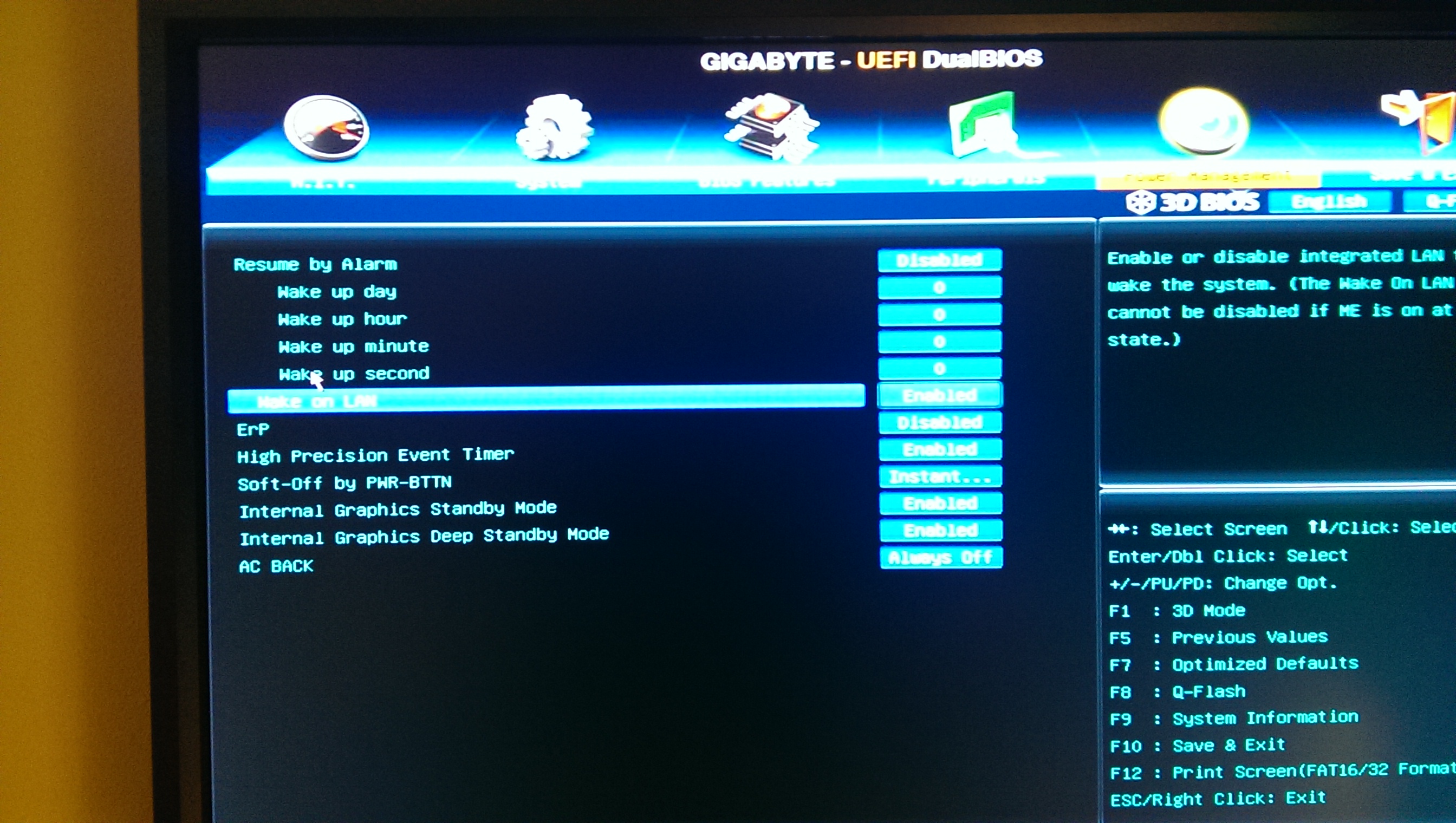
One other thing (and I know this Win 8) but would this make any difference? I didn't change it but I noticed this setting in the motherboard BIOS:

Power Options - Add or Remove "Min/Max processor state"

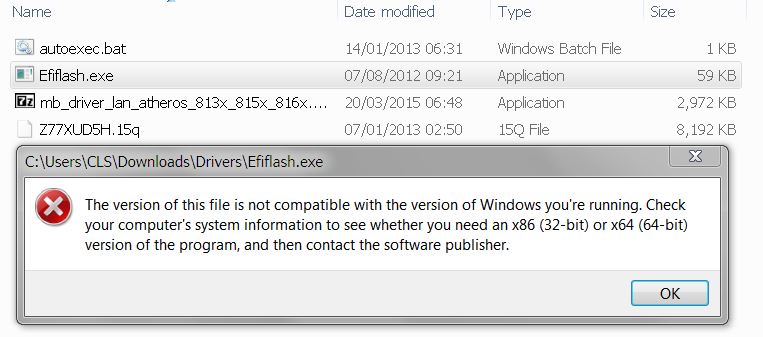
Also, I said I was running the latest BIOS, but am I wrong? Here's the downlaods from their website:

GIGABYTE - Motherboard - Socket 1155 - GA-Z77X-UD5H (rev. 1.0)

But I have the third one down, as the top two display the following when I try to install them (even though I've clicked the correct version to download):

DEO2gu4.jpg


Just adding anything I can think of here without making any more dumb changes to the machine myself.
 
Last edited:

My Computer My Computer

At a glance

Windows 7 Professional 64-bit SP1Interl Core i5 3570k @ 3.40 GHz16 BG DDR32047MB NVIDIA GTX 660 Ti
Computer type
PC/Desktop
Computer Manufacturer/Model Number
Quiet PC
OS
Windows 7 Professional 64-bit SP1
CPU
Interl Core i5 3570k @ 3.40 GHz
Motherboard
Gigabyte Z77X-UD5H
Memory
16 BG DDR3
Graphics Card(s)
2047MB NVIDIA GTX 660 Ti
Hard Drives
238GB SSD2 ATA DEVICE
Antivirus
Symantec Endpoint
Browser
IE
I wouldn't use "BETA" releases for the BIOS anyway. It looks like it's for a UEFI boot system. Is yours UEFI or Legacy boot? You would be better off checking your versions of the drivers against the list in the link below. Especially, the INF installer. That update should be installed first. It supplies Windows with information about how to handle the motherboard hardware (chipsets). It won't hurt to install it over the top of the current settings if they are the same. Then check the version dates of the other hardware updates.

GIGABYTE - Motherboard - Socket 1155 - GA-Z77X-UD5H (rev. 1.0)

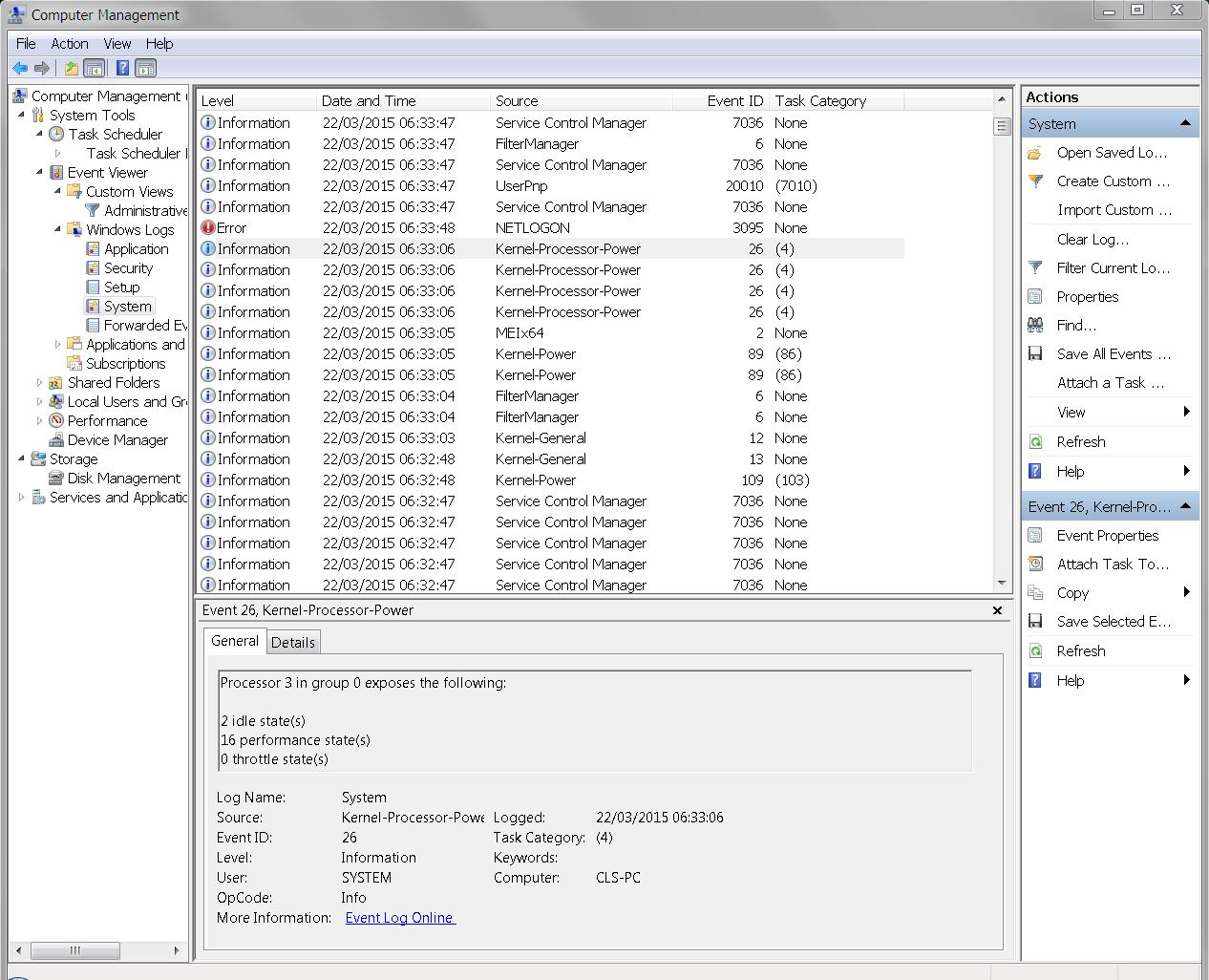
Yeah, don't change the power settings unless the maximum is set below 100%. The idle states you see for the processors are normal. That's why they are marked as Information. Windows' processor manager will turn the processors on and off depending on the workload. It reduces the temperature of the CPU and conserves power. There's no reason to run a processor if there's nothing for it to do and the switch occurs almost instantaneously so you don't really loose anything.

I would be more concerned with the Error above those processor idles. You can filter that display and select Warnings, Errors and Critical entries. Or just click on the Administrative Summery and pick.

If you didn't build your system, you check whether it was setup as EFI or Legacy boot here:
BIOS Mode - See if Windows Boot in UEFI or Legacy Mode
 

My Computer My Computer

At a glance

Windows 7 Pro-x64i7-2600 3.4GHz - 3.8GHz Turbo8Gb - 2x4GB, Muskin 991770 PC3-1333Integrated Intel HD 2000
Computer type
PC/Desktop
Computer Manufacturer/Model Number
Built 2/11/2011
OS
Windows 7 Pro-x64
CPU
i7-2600 3.4GHz - 3.8GHz Turbo
Motherboard
Intel DH67BL-B3
Memory
8Gb - 2x4GB, Muskin 991770 PC3-1333
Graphics Card(s)
Integrated Intel HD 2000
Sound Card
Integrated Intel 10.1 HD, RealTek ALC892
Monitor(s) Displays
Asus LCD VH222H, Haier HL24XSL2a
Screen Resolution
1920x1080, 1920x1080
Hard Drives
Crucial SSD C300-128Gb,
Western Digital WD5002AALX - 500Gb,
Western Digital WD7501AALS - 750Gb
PSU
Seasonic 650W 80+ Gold Modular
Case
Rosewill Defender
Cooling
Stock CPU, Four 120mm case fans, PCH fan added
Keyboard
Logitech EX100 Y-RBH94 Wireless
Mouse
Logitech EX100 M-RCE95 Wireless
Internet Speed
3.0/1.5 Mbs
Antivirus
Microsoft Security Essentials
Browser
Microsoft Internet Explorer 11
Other Info
Antec Veris Premier-Multimedia IR Station,
Cyber Accoustics-3602 Speakers,
AFT XM-5U Card Reader,
Hauppauge TV-HVR-2250,
Sony LX300 USB Turntable
Yes, it has EFI.

Installed the INF thing, did a reboot. Did you then mean that I should install the other things on the list? I tried updating the BIOS to the latest non-Beta one and it said gave me this error message:

1nh7wGU.jpg


I had a look at the BIOS (didn't change anything) and it's version F14, so either it's not installing because it's already on there or because there's a problem. I took a screen shot (below) of settings that may or may not make any difference, and also saw that some Intel setting for ISCT was disabled - again, no idea what that means.

PsLqekg.jpg
 

My Computer My Computer

At a glance

Windows 7 Professional 64-bit SP1Interl Core i5 3570k @ 3.40 GHz16 BG DDR32047MB NVIDIA GTX 660 Ti
Computer type
PC/Desktop
Computer Manufacturer/Model Number
Quiet PC
OS
Windows 7 Professional 64-bit SP1
CPU
Interl Core i5 3570k @ 3.40 GHz
Motherboard
Gigabyte Z77X-UD5H
Memory
16 BG DDR3
Graphics Card(s)
2047MB NVIDIA GTX 660 Ti
Hard Drives
238GB SSD2 ATA DEVICE
Antivirus
Symantec Endpoint
Browser
IE
-Update-

I think the error messages have changed since installing the INF thing, now this one seems to be the lag event (although the Kernal item is just below it on the list, so who knows):

- <Event xmlns="http://schemas.microsoft.com/win/2004/08/events/event">
- <System>
<Provider Name="e1cexpress" />
<EventID Qualifiers="40964">27</EventID>
<Level>3</Level>
<Task>0</Task>
<Keywords>0x80000000000000</Keywords>
<TimeCreated SystemTime="2015-03-22T19:23:04.080015100Z" />
<EventRecordID>418675</EventRecordID>
<Channel>System</Channel>
<Computer>CLS-PC</Computer>
<Security />
</System>
- <EventData>
<Data />
<Data>Intel(R) 82579V Gigabit Network Connection</Data>
<Binary>0000040002003000000000001B0004A00000000000000000000000000000000000000000000000001B0004A0</Binary>
</EventData>
</Event>
 

My Computer My Computer

At a glance

Windows 7 Professional 64-bit SP1Interl Core i5 3570k @ 3.40 GHz16 BG DDR32047MB NVIDIA GTX 660 Ti
Computer type
PC/Desktop
Computer Manufacturer/Model Number
Quiet PC
OS
Windows 7 Professional 64-bit SP1
CPU
Interl Core i5 3570k @ 3.40 GHz
Motherboard
Gigabyte Z77X-UD5H
Memory
16 BG DDR3
Graphics Card(s)
2047MB NVIDIA GTX 660 Ti
Hard Drives
238GB SSD2 ATA DEVICE
Antivirus
Symantec Endpoint
Browser
IE
That looks like a network disconnect. It's hard to read the XML. That's why I like the "in window" select/copy and not the copy on the right pane.

Continue with the list. Check the versions of the updates to your hardware drivers. If the driver updates weren't applied, apply them. I wouldn't worry about the BIOS if it's up to date.

If the disconnects continue and the Gigabit driver is up to date, repeat the wire checks mentioned before. If it still continues, check on a motherboard RMA.

Forgot to mention:
This explains the ISCT. I would leave it disabled. The BIOS entries should be explained in your motherboard manual.
 
Last edited:

My Computer My Computer

At a glance

Windows 7 Pro-x64i7-2600 3.4GHz - 3.8GHz Turbo8Gb - 2x4GB, Muskin 991770 PC3-1333Integrated Intel HD 2000
Computer type
PC/Desktop
Computer Manufacturer/Model Number
Built 2/11/2011
OS
Windows 7 Pro-x64
CPU
i7-2600 3.4GHz - 3.8GHz Turbo
Motherboard
Intel DH67BL-B3
Memory
8Gb - 2x4GB, Muskin 991770 PC3-1333
Graphics Card(s)
Integrated Intel HD 2000
Sound Card
Integrated Intel 10.1 HD, RealTek ALC892
Monitor(s) Displays
Asus LCD VH222H, Haier HL24XSL2a
Screen Resolution
1920x1080, 1920x1080
Hard Drives
Crucial SSD C300-128Gb,
Western Digital WD5002AALX - 500Gb,
Western Digital WD7501AALS - 750Gb
PSU
Seasonic 650W 80+ Gold Modular
Case
Rosewill Defender
Cooling
Stock CPU, Four 120mm case fans, PCH fan added
Keyboard
Logitech EX100 Y-RBH94 Wireless
Mouse
Logitech EX100 M-RCE95 Wireless
Internet Speed
3.0/1.5 Mbs
Antivirus
Microsoft Security Essentials
Browser
Microsoft Internet Explorer 11
Other Info
Antec Veris Premier-Multimedia IR Station,
Cyber Accoustics-3602 Speakers,
AFT XM-5U Card Reader,
Hauppauge TV-HVR-2250,
Sony LX300 USB Turntable
You mean like this?

- System

- Provider

[ Name] e1cexpress

- EventID 27

[ Qualifiers] 40964

Level 3

Task 0

Keywords 0x80000000000000

- TimeCreated

[ SystemTime] 2015-03-23T05:55:35.189215200Z

EventRecordID 418822

Channel System

Computer CLS-PC

Security


- EventData


Intel(R) 82579V Gigabit Network Connection
0000040002003000000000001B0004A00000000000000000000000000000000000000000000000001B0004A0

Got another one I hadn't spotted before because it only seems went off once yesterday:

- System

- Provider

[ Name] e1cexpress

- EventID 27

[ Qualifiers] 40964

Level 3

Task 0

Keywords 0x80000000000000

- TimeCreated

[ SystemTime] 2015-03-23T05:55:35.189215200Z

EventRecordID 418822

Channel System

Computer CLS-PC

Security


- EventData


Intel(R) 82579V Gigabit Network Connection
0000040002003000000000001B0004A00000000000000000000000000000000000000000000000001B0004A0

Would one solution to this be to disbale or remove it? Below are the connection ports I have on the machine; am I correct in thinking I have the Ethernet cable in the correct port? If so is the other one redundant?

XRONovh.jpg


On the list of drivers on the Gigabyte website, neither the VGA drivers will install, as I "don't meet the minimum system requirements"...

Last question: can you explain "repeat wire checks" to a techno-idiot? I didn't quite follow it. Do you mean turn the router on and off or reset it completely with the button on the side?
 
Last edited:

My Computer My Computer

At a glance

Windows 7 Professional 64-bit SP1Interl Core i5 3570k @ 3.40 GHz16 BG DDR32047MB NVIDIA GTX 660 Ti
Computer type
PC/Desktop
Computer Manufacturer/Model Number
Quiet PC
OS
Windows 7 Professional 64-bit SP1
CPU
Interl Core i5 3570k @ 3.40 GHz
Motherboard
Gigabyte Z77X-UD5H
Memory
16 BG DDR3
Graphics Card(s)
2047MB NVIDIA GTX 660 Ti
Hard Drives
238GB SSD2 ATA DEVICE
Antivirus
Symantec Endpoint
Browser
IE
"Wire checks" as noted in #3 of the list. That's probably not necessary now since the error is saying it's disconnected and it is. :rolleyes:

That motherboard has two Ethernet ports. The errors appear to be initiated by the first adapter. If you're not using it, remove or disable it in the Hardware Manager. Better yet, check the motherboard manual and see if there's procedure for disabling it. Such as pins or switches. (Or in the BIOS.)

Verify the Model AND Revision Number of your motherboard. The problems with drivers could be associated with an incorrect selection or you selected 32-bit drivers. I have always had problems navigating the Gigobites site so I used your initial link for my post. My security settings have never worked there and I'm not changing those for one site. ;)
 

My Computer My Computer

At a glance

Windows 7 Pro-x64i7-2600 3.4GHz - 3.8GHz Turbo8Gb - 2x4GB, Muskin 991770 PC3-1333Integrated Intel HD 2000
Computer type
PC/Desktop
Computer Manufacturer/Model Number
Built 2/11/2011
OS
Windows 7 Pro-x64
CPU
i7-2600 3.4GHz - 3.8GHz Turbo
Motherboard
Intel DH67BL-B3
Memory
8Gb - 2x4GB, Muskin 991770 PC3-1333
Graphics Card(s)
Integrated Intel HD 2000
Sound Card
Integrated Intel 10.1 HD, RealTek ALC892
Monitor(s) Displays
Asus LCD VH222H, Haier HL24XSL2a
Screen Resolution
1920x1080, 1920x1080
Hard Drives
Crucial SSD C300-128Gb,
Western Digital WD5002AALX - 500Gb,
Western Digital WD7501AALS - 750Gb
PSU
Seasonic 650W 80+ Gold Modular
Case
Rosewill Defender
Cooling
Stock CPU, Four 120mm case fans, PCH fan added
Keyboard
Logitech EX100 Y-RBH94 Wireless
Mouse
Logitech EX100 M-RCE95 Wireless
Internet Speed
3.0/1.5 Mbs
Antivirus
Microsoft Security Essentials
Browser
Microsoft Internet Explorer 11
Other Info
Antec Veris Premier-Multimedia IR Station,
Cyber Accoustics-3602 Speakers,
AFT XM-5U Card Reader,
Hauppauge TV-HVR-2250,
Sony LX300 USB Turntable

Checked right through the manual and online and could find nothing about disabling it in the BIOS, so just did it in Windows; no change, still the 40 second delay.

Spoke to the wonderful people who built it (Quiet PC) and they are going to take it back in and take a look. Probably have to wipe the drive and it will cost a bit in couriers, but at least it will be fixed.
 

My Computer My Computer

At a glance

Windows 7 Professional 64-bit SP1Interl Core i5 3570k @ 3.40 GHz16 BG DDR32047MB NVIDIA GTX 660 Ti
Computer type
PC/Desktop
Computer Manufacturer/Model Number
Quiet PC
OS
Windows 7 Professional 64-bit SP1
CPU
Interl Core i5 3570k @ 3.40 GHz
Motherboard
Gigabyte Z77X-UD5H
Memory
16 BG DDR3
Graphics Card(s)
2047MB NVIDIA GTX 660 Ti
Hard Drives
238GB SSD2 ATA DEVICE
Antivirus
Symantec Endpoint
Browser
IE
Hi Car,

Last thing then I'll bite the bullet and send the machine back. Windows update doesn't like this driver, could that be something to do with it? Not even really sure what it's for.

DapOAZL.png
 

My Computer My Computer

At a glance

Windows 7 Professional 64-bit SP1Interl Core i5 3570k @ 3.40 GHz16 BG DDR32047MB NVIDIA GTX 660 Ti
Computer type
PC/Desktop
Computer Manufacturer/Model Number
Quiet PC
OS
Windows 7 Professional 64-bit SP1
CPU
Interl Core i5 3570k @ 3.40 GHz
Motherboard
Gigabyte Z77X-UD5H
Memory
16 BG DDR3
Graphics Card(s)
2047MB NVIDIA GTX 660 Ti
Hard Drives
238GB SSD2 ATA DEVICE
Antivirus
Symantec Endpoint
Browser
IE
That update is for Advanced Format Disks and is pretty old. There's a seemingly unrelated quirk associated with this update. It requires three other updates to be installed first. Check your update history for these three updates: KB2515325, KB2522422, KB 2492386. These must be installed first then a reboot.

That Management Engine Interface may be related. It's the backdoor update firmware/software. It's not needed unless your PC is part of an IT network that applies updates but I've heard that some software may depend on the drivers. I disabled that hardware portion of my PC right after I built it. I don't particularly like the idea of it even being there. It allows your PC to be turned on remotely for updates.

Right click on the flag in lower right corner of the desktop and select Open Windows Update. In the left pane, click on Check for Updates. It seems you may be behind in Windows updates and this will force a review.

Forgot to mention: You may want to Unhide updates first and review the list. For some reason, you may not be getting all updates. Perhaps someone is being TOO selective. ;)
 
Last edited:

My Computer My Computer

At a glance

Windows 7 Pro-x64i7-2600 3.4GHz - 3.8GHz Turbo8Gb - 2x4GB, Muskin 991770 PC3-1333Integrated Intel HD 2000
Computer type
PC/Desktop
Computer Manufacturer/Model Number
Built 2/11/2011
OS
Windows 7 Pro-x64
CPU
i7-2600 3.4GHz - 3.8GHz Turbo
Motherboard
Intel DH67BL-B3
Memory
8Gb - 2x4GB, Muskin 991770 PC3-1333
Graphics Card(s)
Integrated Intel HD 2000
Sound Card
Integrated Intel 10.1 HD, RealTek ALC892
Monitor(s) Displays
Asus LCD VH222H, Haier HL24XSL2a
Screen Resolution
1920x1080, 1920x1080
Hard Drives
Crucial SSD C300-128Gb,
Western Digital WD5002AALX - 500Gb,
Western Digital WD7501AALS - 750Gb
PSU
Seasonic 650W 80+ Gold Modular
Case
Rosewill Defender
Cooling
Stock CPU, Four 120mm case fans, PCH fan added
Keyboard
Logitech EX100 Y-RBH94 Wireless
Mouse
Logitech EX100 M-RCE95 Wireless
Internet Speed
3.0/1.5 Mbs
Antivirus
Microsoft Security Essentials
Browser
Microsoft Internet Explorer 11
Other Info
Antec Veris Premier-Multimedia IR Station,
Cyber Accoustics-3602 Speakers,
AFT XM-5U Card Reader,
Hauppauge TV-HVR-2250,
Sony LX300 USB Turntable
I would recommend you also have KB971033

You should find in under Install Updates.
 

My Computer My Computer

At a glance

Windows 10 Pro. 64/ version 1709 Windows 7 Pr...Intel i7-6800K @ 4.3Corsair Platinum 16 gig @2400EVGA GTX 1070 OC
Computer type
PC/Desktop
Computer Manufacturer/Model Number
Home made Desktop
OS
Windows 10 Pro. 64/ version 1709 Windows 7 Pro/64
CPU
Intel i7-6800K @ 4.3
Motherboard
ASUS X-99 Deluxe II
Memory
Corsair Platinum 16 gig @2400
Graphics Card(s)
EVGA GTX 1070 OC
Monitor(s) Displays
Asus 27" LED LCD/VE278Q
Screen Resolution
1920-1080 or 1280-720 HDMI
Hard Drives
INTEL SSD 730-240 Gb Sata 3.0/
PSU
EVGA Platium 1200W
Case
Phanteks Luxe Tempered Glass 8 fans/ one radiator
Cooling
XSPC/ Water Cooled CPU
Keyboard
Das 4 Professional
Mouse
Logitech M705/MX Anywhere 2-S
Internet Speed
100 mbits
Antivirus
Microsoft Security Essentials/ Malwarebytes Premium 3.0/ SAS
Browser
I.E. 11 default/Firefox/ ISP Time Warner Cable/Spectrum
Other Info
LG BluRay Burner/
Sound system-KLipsch-THX/
Icy Dock ssd Hot Swap bays.
No hidden updates on here, all other updates applied other than the Intel one that wont install. There's also now more Errors in Even Log, some of which mention Intel.

KB2515325 and KB971033 are installed, KB2522422 and KB 2492386 not installed.
 

My Computer My Computer

At a glance

Windows 7 Professional 64-bit SP1Interl Core i5 3570k @ 3.40 GHz16 BG DDR32047MB NVIDIA GTX 660 Ti
Computer type
PC/Desktop
Computer Manufacturer/Model Number
Quiet PC
OS
Windows 7 Professional 64-bit SP1
CPU
Interl Core i5 3570k @ 3.40 GHz
Motherboard
Gigabyte Z77X-UD5H
Memory
16 BG DDR3
Graphics Card(s)
2047MB NVIDIA GTX 660 Ti
Hard Drives
238GB SSD2 ATA DEVICE
Antivirus
Symantec Endpoint
Browser
IE
Did you Google these and see what they are for.

KB2522422 and KB 2492386
It's possible they don't apply to your system.

Windows updates KB2492386, KB2515325, KB2522422, KB982018 screwing - Microsoft Community

Cannot print from Internet Explorer 9 using some Canon printers
https://support.microsoft.com/en-us/kb/2522422

If they don't apply to your system you can just hide them and Windows Updates will stop bother you with them.

If by chance you are still using I.E. 9 that needs updated to I.E. 11. Unless you have a good reason not to.

Is this a company computer? The reason I ask is your system specs show this.

Antivirus Symantec Endpoint

Symantec Endpoint Protection-Antivirus Software
 

My Computer My Computer

At a glance

Windows 10 Pro. 64/ version 1709 Windows 7 Pr...Intel i7-6800K @ 4.3Corsair Platinum 16 gig @2400EVGA GTX 1070 OC
Computer type
PC/Desktop
Computer Manufacturer/Model Number
Home made Desktop
OS
Windows 10 Pro. 64/ version 1709 Windows 7 Pro/64
CPU
Intel i7-6800K @ 4.3
Motherboard
ASUS X-99 Deluxe II
Memory
Corsair Platinum 16 gig @2400
Graphics Card(s)
EVGA GTX 1070 OC
Monitor(s) Displays
Asus 27" LED LCD/VE278Q
Screen Resolution
1920-1080 or 1280-720 HDMI
Hard Drives
INTEL SSD 730-240 Gb Sata 3.0/
PSU
EVGA Platium 1200W
Case
Phanteks Luxe Tempered Glass 8 fans/ one radiator
Cooling
XSPC/ Water Cooled CPU
Keyboard
Das 4 Professional
Mouse
Logitech M705/MX Anywhere 2-S
Internet Speed
100 mbits
Antivirus
Microsoft Security Essentials/ Malwarebytes Premium 3.0/ SAS
Browser
I.E. 11 default/Firefox/ ISP Time Warner Cable/Spectrum
Other Info
LG BluRay Burner/
Sound system-KLipsch-THX/
Icy Dock ssd Hot Swap bays.
That update is for Advanced Format Disks and is pretty old. There's a seemingly unrelated quirk associated with this update. It requires three other updates to be installed first. Check your update history for these three updates: KB2515325, KB2522422, KB 2492386. These must be installed first then a reboot.

That Management Engine Interface may be related. It's the backdoor update firmware/software. It's not needed unless your PC is part of an IT network that applies updates but I've heard that some software may depend on the drivers. I disabled that hardware portion of my PC right after I built it. I don't particularly like the idea of it even being there. It allows your PC to be turned on remotely for updates.

Right click on the flag in lower right corner of the desktop and select Open Windows Update. In the left pane, click on Check for Updates. It seems you may be behind in Windows updates and this will force a review.

Forgot to mention: You may want to Unhide updates first and review the list. For some reason, you may not be getting all updates. Perhaps someone is being TOO selective. ;)

I'd like to remove anything and everything relating to networking from my PC if I knew how, as it never has and never will be part of a network - I just want it to connect to the net and that's it.
 

My Computer My Computer

At a glance

Windows 7 Professional 64-bit SP1Interl Core i5 3570k @ 3.40 GHz16 BG DDR32047MB NVIDIA GTX 660 Ti
Computer type
PC/Desktop
Computer Manufacturer/Model Number
Quiet PC
OS
Windows 7 Professional 64-bit SP1
CPU
Interl Core i5 3570k @ 3.40 GHz
Motherboard
Gigabyte Z77X-UD5H
Memory
16 BG DDR3
Graphics Card(s)
2047MB NVIDIA GTX 660 Ti
Hard Drives
238GB SSD2 ATA DEVICE
Antivirus
Symantec Endpoint
Browser
IE
Back
Top