

It took about 1 minute to even load this window.... And here is what has happened:
Yesterday... i was just doing the normal things, i also downloaded the Opera 10.10 beta, loved it, defragged my computer. And shut down...
On restart(about 12 hrs frm last restart) I wanted to really download this new game that had come out, so i go on the internet, and i noticed some SUPER slow browsing, i thought it was because it was a beta... so i uninstalled Opera.
I then went into my Minefield broswer... It was also super slow - i thought it was because i had tweaked it inside of about:config, and uninstalled it, planning to reinstall it at a later time.
I then went into my Chrome Browser...
(Lol)
And it was also being SUPERRRRRRRRRRRRR laggy, and it being a Dev. Release version, i uninstalled it, planning on installing the stable version maybe later...
Then.. i go into Ie8.... Its also deathly slow... I go to mozilla.com ( takes like 2 and a half minutes to load it) and then try to download mozilla ff normal browser... it sais 1 hr remaining and it had a download speed of less than 30 kb/s... my connection is at 54mb/s...
Help?
I dont kno WHY so suddenly my internet got super slow(BTW its wireless) BUT my brother, has exact same laptop, though his isnt tweaked as much as mine, nor does he really do much crazy stuff to it, his internet is working fine.. and normally my computer is super speedy - jst like his...
Here is a screen shot of my internet speed - and also a time of the FF download being supeeeeer slow... -->]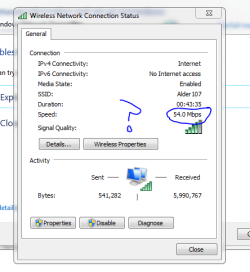
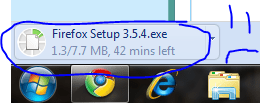
Yesterday... i was just doing the normal things, i also downloaded the Opera 10.10 beta, loved it, defragged my computer. And shut down...
On restart(about 12 hrs frm last restart) I wanted to really download this new game that had come out, so i go on the internet, and i noticed some SUPER slow browsing, i thought it was because it was a beta... so i uninstalled Opera.
I then went into my Minefield broswer... It was also super slow - i thought it was because i had tweaked it inside of about:config, and uninstalled it, planning to reinstall it at a later time.
I then went into my Chrome Browser...
(Lol)
And it was also being SUPERRRRRRRRRRRRR laggy, and it being a Dev. Release version, i uninstalled it, planning on installing the stable version maybe later...
Then.. i go into Ie8.... Its also deathly slow... I go to mozilla.com ( takes like 2 and a half minutes to load it) and then try to download mozilla ff normal browser... it sais 1 hr remaining and it had a download speed of less than 30 kb/s... my connection is at 54mb/s...
Help?
I dont kno WHY so suddenly my internet got super slow(BTW its wireless) BUT my brother, has exact same laptop, though his isnt tweaked as much as mine, nor does he really do much crazy stuff to it, his internet is working fine.. and normally my computer is super speedy - jst like his...
Here is a screen shot of my internet speed - and also a time of the FF download being supeeeeer slow... -->]
My Computer
- Computer Manufacturer/Model Number
- HP dv6000t CTO Entertainment Lappy |My Desktop @ Bottom
- OS
- 7 x64/ Back-Track 4
- CPU
- Intel Core 2 Duo CPU 8300@ 2.4 Ghz
- Motherboard
- HP's Own
- Memory
- 4096 MB DDR2
- Graphics Card(s)
- Nvidia 8400M GS
- Sound Card
- Altec Lansing (The usual on Laptops )
- Monitor(s) Displays
- Laptop Screen. 17' Wide.
- Screen Resolution
- 1280 x 800
- Hard Drives
- 150 GB HDD.
- Cooling
- 2 External Fans, Undervolted, Coolant
- Keyboard
- Norm. Cheap Random Keyboard
- Mouse
- Norm. Cheap Random Mouse
- Other Info
- This is my Homemade Desktop :)
HDD: Western Digital Caviar Blue 320GB 16MB 7200RPM SATA2
And more to come in a bit! :D


