Superbar... love or hate?

manpacker

New member
Local time
1:35 PM
Messages
7
Just seeking everyone's opinion:
After trying out the RC for weeks, i've found it hard to get used to the superbar. I love the way it works for most programmes, but on certain occasions, it is just plain headache.

1. Multiple MSN conversations
I have to do a 2 point click, first the messenger icon, then the respective chat window (which can be on the other edge of the screen). Try doing it 5-10 times a minute and you'd know how headache it can be. I also can't tell which conversation's on alert without hovering/clicking on the icon, thus unable to ignore the less impt conversations. Alt+tab/flip3d doesn't highlight the alert windows too, and its annoying especially when one has to cycle through so many chat windows to get to the right one. I hope MS re-thinks how messenger should work on superbar.

2. Multiple tiling
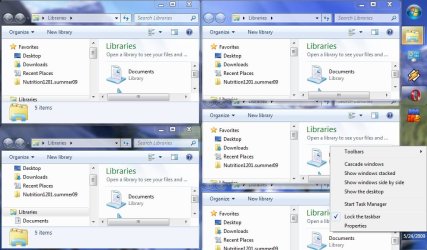
Yes.. aero snap is touted as a usability upgrade, but it only works for 2 window comparisons. What if i want 3? 4? or tile a whole page of windows? I can no longer use the ctrl-select-tile windows method on this new bar.

Anyone find the above problematic? Care to share your experience in getting used to the new UI?

Thanks!
 

My Computer

Computer Manufacturer/Model Number
Lenovo T400
OS
windows 7 build 7100 x64
At first I loved it...oh look at these cool previews! After a while it got annoying since it took 2 clicks instead of one.
 

My Computer

Computer Manufacturer/Model Number
Haha! You peeked. Why so nosey?
OS
XP / Windows 7 Pro RTM
exactly! and messenger itself has its own button on the taskbar (instead of the notifications section) that just takes up space...
 

My Computer

Computer Manufacturer/Model Number
Lenovo T400
OS
windows 7 build 7100 x64

My Computer

Computer type
PC/Desktop
Computer Manufacturer/Model Number
Self built custom
OS
64-bit Windows 11 Pro for Workstations
CPU
Intel i7-8700K OC'd to 5 GHz
Motherboard
ASUS ROG Maximus XI Formula Z390
Memory
64 GB (4x16GB) G.SKILL TridentZ RGB DDR4 3600 MHz
Graphics Card(s)
ASUS ROG-STRIX-GTX1080TI-O11G-GAMING
Sound Card
Integrated
Monitor(s) Displays
2 x Samsung Odyssey G7 27"
Screen Resolution
2560x1440
Hard Drives
1TB Samsung 990 PRO M.2,
4TB Samsung 990 PRO PRO M.2,
TerraMaster F8 SSD Plus NAS
PSU
Seasonic Prime Titanium 850W
Case
Thermaltake Core P3
Cooling
Corsair Hydro H115i
Keyboard
Logitech wireless K800
Mouse
Logitech MX Master 4
Internet Speed
2 Gb/s Download and 100 Mb/s Upload
Antivirus
Malwarebyte Anti-Malware Premium
Browser
Google Chrome
Other Info
Logitech Z625 speaker system,
Logitech BRIO 4K Pro webcam,
HP Color LaserJet Pro MFP M477fdn,
APC SMART-UPS RT 1000 XL - SURT1000XLI,
Galaxy S23 Plus phone
Thanks, I learned a new trick with Live Messenger :)
 

My Computer

Computer type
PC/Desktop
Computer Manufacturer/Model Number
Built them myself, Science Experiments !
OS
Win7 Enterprise, Win7 x86 (Ult 7600), Win7 x64 Ult 7600, TechNet RTM on AMD x64 (2.8Ghz)
CPU
AMD fx8350 4ghz, AMD-32 2400mhz, AMD-64 3200mhz, AMDx64 2.8G
Motherboard
SIS 755, ECS-K8M890M-M (Ult 7600), GigaByte & others
Memory
2gb, 4gb on the Ult 7600, 4gb on Technet RTM, 32gb on FX8350
Graphics Card(s)
Draw my own Graphics, several nVidia cards
Sound Card
on motherboard
Monitor(s) Displays
19" flat scr, 28" I-Inc widescr,22" Emprex Widescr, 23" Acer
Screen Resolution
1280 x 1024, 1440 x 900, 1920 x 1080
Hard Drives
6 pata Ide HD's & 2 Sata HD's
added 80gb external on Ult 7600 computer,
numerous extra 1tb, 2TB, 3Tb SATA HD's
A collection of ext HD Docks w/ HDs
PSU
430w, 550w, 600w, 700, 800, etc
Case
All Generic Full Towers
Cooling
Open Air & a few fans, some w/ colored LEDs
Keyboard
Compaq & Dell recycled from GoodWill
Mouse
Made in China Optical Wired Mouse
Internet Speed
Fast Cable InterNet
Antivirus
AVG Free on 24 different Desktops, NO Problems!
Browser
IE 8 is preferred, but use FireFox sometimes
Other Info
Linksys Routers, switches, & Hubs
Too Many USB Flash Drives to count, Biggest is 64GB !
Eight computers in my home network.
Sixteen computers at my business network.
Linked via TeamViewer !
Lots of old used spare computer parts everywhere!
If you select to stack of side by side with multiple windows/programs open it will tile all of them.
 

My Computer

OS
7264x64/7260x86
Im still loving the new taskbar. Its much better than what went before. I have msn in vista compatibility mode so that it appears in the notification area.
 

My Computer

Computer Manufacturer/Model Number
self built
OS
Windows 7 Professional 64-bit
CPU
Intel E8400 3GHz
Motherboard
Intel DX48BT2
Memory
Kingston PC3-10700H 4Gb
Graphics Card(s)
XFX Radeon HD 5850 BlackEd.
Sound Card
Asus Xonar DG
Monitor(s) Displays
2x Samsung SM-T220HD 22"
Screen Resolution
1680x1050 on two monitors
Hard Drives
OCZ Vertex 2 120gb 3.5" (OS)
Seagate Momentus XT 500gb
Samsung F3 1Tb (games)
2x Samsung F1 1Tb
PSU
Thermaltake ToughPower 850w
Case
Thermaltake Armor
Cooling
Scythe Mugen II
Keyboard
Microsoft Comfort Curve USB
Mouse
Razer Diamondback 3G
Internet Speed
8128/443
I don't know if this would help the OP, but I've changed the default taskbar setting from "always combine, hide labels" to "combine when taskbar is full". This at least makes it immediately obvious which apps are actually running instead of having to hover over an icon and see if a window preview appears.
 

My Computer

Computer type
PC/Desktop
OS
Windows 7 x64
CPU
Intel Core2 Extreme Q6850 3.00GHz
Motherboard
EVGA 132-CK-NF79
Memory
8 GB
Graphics Card(s)
Radeon R7 260X
Sound Card
Xonar DS
Hard Drives
Hitachi Deskstar 1 tb
What I like about is Programs assigned to it don't open a new window. It combines quick luanch and tasks. That saves space and I find myself keeping more programs open than before. I didn't like it when the old taskbar was full and cluttered with programs actively being used and others that I want to keep open, but aren't used that often.
 

My Computer

Computer Manufacturer/Model Number
POS
OS
OS3.5
CPU
celery
Motherboard
Good Question ...Unknown
Memory
memory never forgets
Graphics Card(s)
OB
Sound Card
OB
Monitor(s) Displays
HUGE
Screen Resolution
168000000x105000000
Hard Drives
full
PSU
OEM 65watt
Case
N/A
Cooling
OB
Keyboard
OB
Mouse
mouse
Internet Speed
1 Trillion MBps
Other Info
Still An Awesome Forum!
If you select to stack of side by side with multiple windows/programs open it will tile all of them.

May i know what you meant by this? Is there a way to select multiple windows/programs?
 

My Computer

Computer Manufacturer/Model Number
Lenovo T400
OS
windows 7 build 7100 x64
Right click on the taskbar, you have options to "show windows "stacked" or "side by side".

Stacked tiles the windows top/bottom. Side by Side does them left/right. If you have more than two open it will tile them.
 

Attachments

  • stack.jpg
    stack.jpg
    94.1 KB · Views: 104

My Computer

OS
7264x64/7260x86
If you want it old vista style, where it says combine, change it t6o never combine and it goes like it used to, and tick the use small icons to make the taskbar small.

Correct me if im wrong, im at school, and using Xp :P

Ill edit if its wrong when i gets home ;)

Enzo.
 

My Computer

Computer Manufacturer/Model Number
Custom Build
OS
W7 RTM Ultimate x64
CPU
Intel Q8400 @ 2.66GHZ
Motherboard
Gigabyte GA-EG45M-UD2H
Memory
4GB DDR2-800
Graphics Card(s)
Gainward GTS 450 GLH 1GB Edition
Sound Card
Integrated 8 Channel
Monitor(s) Displays
AOC 23.6 Inch Widescreen LCD
Screen Resolution
1920x1080
Hard Drives
Seagate 500GB Internal
Western Digital 1TB Internal

Hitachi 1TB External
PSU
Apevia Java Power 500W
Case
Cooler Master HAF 922 Black
Cooling
Stock Intel CPU Fan
Keyboard
HP SK-2960 Multimedia Keyboard
Mouse
Logitech M350 Wireless Gaming Mouse
Internet Speed
1.5MB
I suppose once I checked the "Use small icons" box, the new taskbar became more likeable. As it was from a fresh installation, it was way too big. I also instruct Windows 7 to show all my icons instead of hiding them, if I don't want an icon to show I'll edit the properties of that particular program. Other than that, nice.
 

My Computer

OS
Windows 7 Ultimate x64
CPU
Intel Core i7 920 D0 @ 4.0 GHz
Motherboard
Asus Rampage II Gene
Memory
Corsair XMS3 1600 MHz 6 x 2GB (12GB)
Graphics Card(s)
VisionTek ATI Radeon HD 4870 X2
Sound Card
Creative X-Fi XtremeGamer
Monitor(s) Displays
Eizo Nanao S2100 21"
Screen Resolution
1600 x 1200
Hard Drives
Western Digital VelociRaptor 150GB
Western Digital Cavier 500GB
PSU
Seasonic M12D 850 watt
Case
Antec Mini P180
Cooling
2 x Sanyo Denki 9G1212H101, 1 x Sanyo Denki 9G1212
Keyboard
Logitech Illuminated Keyboard
Mouse
Logitech MX-610
Honestly, out of everything 7 brings, IMO the superbar is the best reason to upgrade, perhaps second to speed improvements, though vista wasnt unbearable on my rig.

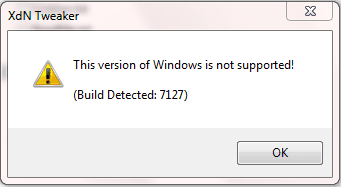
I don't ever do the two clicks things, i just click once on the preview. You can also tweak the speed of the previews to become instant via the program mentioned here: Lifehacker - Xdn Tweaker Updates to Tweak Windows 7 - windows 7

I can't live without the superbar anymore, lol. I actually find it most useful for MSN/Live Messenger, where I can quickly check on someones messages via aero peek, without the orange glow dissapearing, so I can remember to respond later. It's also pretty easily customizable to be more old-school if you want.

Oh, and the reason the Superbar is so big is because Windows 7 has much better touch support than vista, and big icons are easier to hit that a skinny taskbar. I also personally find the big icons to be more aesthetically pleasing than the small ones, but that's just me. I do miss the way the orb would stick out of the taskbar though :P
 

My Computer

Computer Manufacturer/Model Number
Compaq CQ50-107NR
OS
Windows 7 Build 7077 x64
CPU
AMD Athlon Dual Core QL-60 - 1.9Ghz
Memory
2GB
Graphics Card(s)
NVIDIA GeForce 8200 M G
Screen Resolution
1280 x 800
Hard Drives
120GB, Not sure of RPM but prolly 5400 or lower.
The only thing that annoys me with the new Taskbar is that it has become a bit more tedious to minimize windows when windows are combined. For instance if I only have one Word window open I can simply click the Word icon on the taskbar to minimize/maximize it (as done in the old taskbar). But if I have two or more windows open, I first has to select the specific window I want to minimize and then click in the top-right corner, or I can right-click on the thumbnail itself and select minimize. In the first case I have to move the mouse more to minimize, in the other I have to click an extra time to do what only takes one click normally.
What I would've liked would be that when you click the thumbnail of the currently selected window it would minimize it (as if it had been a program on the old taskbar).

Am I missing a smarter way to do this? (I know about the Windows-key shortcut, but I can't use that since my keyboard doesn't have any Windows keys).

Otherwise I really like the new taskbar, its much nicer to have all ones open programs grouped together so they don't clutter the taskbar as they easily did with the old one. Also the jumplists are a great feature, they've made it much easier for me to continue work on the latest documents opened in Word and such. I also like how they've added functionality to the thumbnails, when compared to Vista where it was just a gimmick.
So overall I like it a lot!
 
Last edited:

My Computer

Computer Manufacturer/Model Number
IBM 183223G (R50p)
OS
Windows 7 x86 Build 7100 (RC)
CPU
Intel(R) Pentium(R) M processor 1700MHz, ~1.7GHz
Motherboard
Phoenix FirstBIOS(tm) Notebook Pro Version 2.0 for IBM Think
Memory
1022MB RAM
Graphics Card(s)
ATI MOBILITY FIRE GL T2/T2e 128 MB
Sound Card
Intel(r) 82801DB/DBM AC '97 Audio Controller
Screen Resolution
1600 x 1200 (32 bit) (60Hz)
Keyboard
Standard PS/2 Keyboard
Mouse
PS/2 Compatible Mouse
I think its really handy, as what Napilopez said, its easy to check on your conversations, and i dont mind having to do this extra click, im young, i gots plenty of time, no rush :P

Enzo.
 

My Computer

Computer Manufacturer/Model Number
Custom Build
OS
W7 RTM Ultimate x64
CPU
Intel Q8400 @ 2.66GHZ
Motherboard
Gigabyte GA-EG45M-UD2H
Memory
4GB DDR2-800
Graphics Card(s)
Gainward GTS 450 GLH 1GB Edition
Sound Card
Integrated 8 Channel
Monitor(s) Displays
AOC 23.6 Inch Widescreen LCD
Screen Resolution
1920x1080
Hard Drives
Seagate 500GB Internal
Western Digital 1TB Internal

Hitachi 1TB External
PSU
Apevia Java Power 500W
Case
Cooler Master HAF 922 Black
Cooling
Stock Intel CPU Fan
Keyboard
HP SK-2960 Multimedia Keyboard
Mouse
Logitech M350 Wireless Gaming Mouse
Internet Speed
1.5MB

My Computer

Computer Manufacturer/Model Number
Lenovo T400
OS
windows 7 build 7100 x64
Back
Top