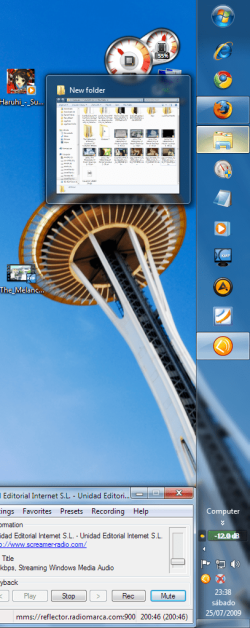
SuperBar Vs Normal Taskbar

With a widescreen monitor, it makes more sense to me to put the taskbar on the left side of the screen (vertically). This optimizes screen real-estate for most applications. But when the bar is on the side of the screen, it puts the start menu button at the top of the screen. Anyone know a way to flip it vertically?

Either way, if you have a nice widescreen monitor, i recommend trying the taskbar on the side of the screen. It takes a bit to get used to, but you may just like it better :)
 

My Computer

OS
Windows 7 RC
CPU
Q9550
Motherboard
GA-P35-DS3L
Memory
4GB DDR2
Graphics Card(s)
MSI 4870 1GB
PSU
500W StealthXStream
Case
Cooler Master CM-690
Cooling
Tuniq Tower 120 + Stock case cooling
I use the "vista" taskbar. I've tried hard to like and use the new taskbar each and every time I installed a new build but I've come to the conclusion that its just not for me.
 

My Computer

OS
Windows 7 64bit Home
CPU
Q9650
Motherboard
Asus P5Q E
Memory
Kingston Hyper X 4x2048
Graphics Card(s)
His 4870
Sound Card
Onboard
Monitor(s) Displays
Dell 2008WFP
Screen Resolution
1920x1200
Hard Drives
Velociraptor
PSU
Enermax Modu+ 625w
Case
Antec 300
So you have 50 programs you use everyday?
People have different ways of doing things on a PC (which is what makes it great to me)...if he wants 50 QL links than I won't Judge...I personally like to hit start and type the program I want to run. This way benefits me on remember good commands and locations of programs
 

My Computer

Computer Manufacturer/Model Number
Compal JFT02 (Custom Build Laptop)
OS
Windows 7 Home Premium x64 - Mac OS X 10.6.4 x64
CPU
Intel Core 2 Duo T9300 2.5 GHz
Motherboard
JFT02
Memory
4GB Kingston DDR2-800
Graphics Card(s)
NVIDIA Geforce 8600M GT (512MB Model)
Sound Card
Realtek HD Audio
Monitor(s) Displays
WUXGA Standard Laptop Display
Screen Resolution
1680*1050
Hard Drives
Toshiba 320GB 5400RPM Laptop HD
PSU
Standard Laptop Power Supply
Case
Standard Laptop Case
Cooling
Standard Laptop Cooling
Keyboard
Standard Laptop 105 Key-Keyboard
Mouse
Synaptics Touchpad
Internet Speed
Verizion Online DSL 3360/864 kbs (dl/up)
So you have 50 programs you use everyday?
I just counted and I actually use 73 programs everyday. Why are you asking?

BTW, I also use classic theme and run the starter edition. Got a problem with that?
 

My Computer

Computer Manufacturer/Model Number
Haha! You peeked. Why so nosey?
OS
XP / Windows 7 Pro RTM
I just counted and I actually use 73 programs everyday. Why are you asking?

BTW, I also use classic theme and run the starter edition. Got a problem with that?

lol relax dude, I'm just curious.

What do you do btw that you use that many different programs?

Could I see a screenshot of your taskbar too?
 
Last edited:

My Computer

OS
7264x64/7260x86
I'm glad other people hate the start menu also. How do you turn on the old taskbar?
 

My Computer

OS
Vista x64
People have different ways of doing things on a PC (which is what makes it great to me)...if he wants 50 QL links than I won't Judge...I personally like to hit start and type the program I want to run. This way benefits me on remember good commands and locations of programs

yep, that's what i have started doing, press the windows key, then tap tap tap - program starts without having to grab the mouse...:)

i'm getting to love the superbar more each day as i'm learning how to use jumplists more effectively.

man, what a great OS! shame we've got to pay for it soon :cry: :D
 

My Computer

Computer Manufacturer/Model Number
mickey megabyte 1234
OS
ultimate 64 sp1
CPU
i5 2500K [email protected]
Motherboard
MSI P67A-GD53
Memory
8 gigs GSkill Ripjaws 1600
Graphics Card(s)
amd hd6950
Sound Card
creative x-fi gamer
Monitor(s) Displays
samsung 24"
Screen Resolution
1920x1080
Hard Drives
ocz vertex 2e 60 gig, samsung f3 1tb, buffalo 2tb ext
PSU
antec 550
Case
antec three hundred
Cooling
i'm a cooling fan
Keyboard
saitek eclipse ii
Mouse
logitech g3
Internet Speed
about 4 Mbps
Other Info
i love win7
I just love the new taskbar. I use it on the right and it's perfect for me.
 

Attachments

  • 2qar87m.png
    2qar87m.png
    136.6 KB · Views: 82

My Computer

OS
Windows 7 Professional x86 RTM
CPU
Athlon XP 2800
Motherboard
ABIT NF7-S v2.0
Memory
1.5 Gb
Graphics Card(s)
ATI Radeon 9600
Sound Card
nForce2 SOUNDSTORM
Monitor(s) Displays
V7 S17PS
Screen Resolution
1280x1024 72Hz
Hard Drives
SEAGATE BARRACUDA 160Gb
PSU
Levicom 450W
Internet Speed
10MB ADSL
I just counted and I actually use 73 programs everyday. Why are you asking?

BTW, I also use classic theme and run the starter edition. Got a problem with that?
+1 for convenient quick-launching galore - but I do love the new taskbar. It just needs some launch enhancemenmt. I tried 7 Dock and some of the other freeware and they didn't do it for me. In the end I ended shelling out a bit of cash for what for me is a great product: True Launch Bar, which not only has a super-configurable launching environment, but also has a slew of incredible add-ons / plug-ins you can install for free:

True Launch Bar

But this stuff is highly personal to your way of working, so yes, YMMV :p
 

Attachments

  • TLB2.jpg
    TLB2.jpg
    44.4 KB · Views: 69

My Computer

Computer Manufacturer/Model Number
Custom workstation /// Lenovo X61t tablet notebook
OS
Windows 7 RTM x64
CPU
Core i7 980X @ 4.04GHz OC /// Core Duo L7500 @ 1.6GHz
Motherboard
Asus P6T6 WS Revolution ///
Memory
12GB G. Skill @ DDR-1600 OC /// 4GB
Graphics Card(s)
Saphire HD4870 Toxic 1GB /// Intel Mobile GMA X3100
Monitor(s) Displays
Dual Eizo 24" SX2461W /// 12"
Screen Resolution
1920x1200 /// 1400x1050
Hard Drives
Workstation:
5x 750GB Barracuda-11 on Areca ARC-1220;
4x 1.5TB Barracuda-11 on Intel ICH10R;
Volumes:
300GB RAID 0, 2.7TB RAID 10 on Intel;
100GB RAID 0, 1.4TB RAID 10 on Areca ///
Notebook: G.Skill Titan 256GB SSD
PSU
Tagan ITZ 1100
Case
GHS-1500 ///
Cooling
Thermalright IFX-14 + a slew of stealth fans ///
Keyboard
Logitech Edge ///
Mouse
Logitech Wireless Optical Trackball
Internet Speed
5Mbps down / 820Kbps up
Other Info
Main use: photography;
DVD Drive: L.G GGW-H20L Blu-Ray / DVD;
OC: QPI/DRAM @ 1.33v, CPU @ 1.293v, DRAM Bus @ 1.65v, CPU PLL @ 1.88v, CPU mult = 25x, BCLK = 160, DDR3-1604 @ 7-8-7-24
Love the superbar. sometimes I try going back to the old one, but only because I liked how the start orb jutted out of the glass bar =P But I actually prefer the look of the large icons(I like the detail in the larger icons). The new taskbar also makes sense for people with touch computers. The old taskbar simply feels yucky to me now, and its a pain when I'm using a non-7 computer =P. Aero peek and desktop preview are amazing btw.
 

My Computer

Computer Manufacturer/Model Number
Compaq CQ50-107NR
OS
Windows 7 Build 7077 x64
CPU
AMD Athlon Dual Core QL-60 - 1.9Ghz
Memory
2GB
Graphics Card(s)
NVIDIA GeForce 8200 M G
Screen Resolution
1280 x 800
Hard Drives
120GB, Not sure of RPM but prolly 5400 or lower.
This is my only annoyance.

The gap from the bottom of the box, and the bottom of the taskbar. It annoying when you click it accidently when trying to click a box.

Can this be changed?
I only get this gap when I have a toolbar set up with large icons, but yes, I admit it is quite annoying. Windows 7 was NOT built very well to support toolbars, one of my lifesavers in all my years of windows since 95! I have not yet found a way to put a separate toolbar anywhere on the screen.. MS also needs to allow the Start button to be placed at the bottom when users opt to dock the taskbar to the side...

EDIT: This problem does not exist with small icons enabled in the toolbar and in the superbar
 

My Computer

OS
Windows 7 RC build 7100
Aero peek and desktop preview are amazing btw.
Aero peek helps me a bit, but I still don't get the point of desktop preview unless you want to use the fairly useless MS gadgets extensively.

Maybe they'll come out with better stuff, but for now, I disable Desktop Preview. Anybody have any idea how annoying it is to accidentally move your mouse to the bottom right corner of the screen and that article you were reading on the net magically disappears? its incredibly distracting.

I often move my mouse down there to get it out of the way, and then MS interprets that to mean that my MOUSE wasn't in the way, my inconsequential window I happened to be using was in the way, and should be moved out of the way so I can look at my beautiful desktop background.


:sarc:
 

My Computer

OS
Windows 7 RC build 7100
I only get this gap when I have a toolbar set up with large icons, but yes, I admit it is quite annoying.

EDIT: This problem does not exist with small icons enabled in the toolbar and in the superbar
Hmm, I'm using big icons and don't have that space ...
 

My Computer

Computer Manufacturer/Model Number
Custom workstation /// Lenovo X61t tablet notebook
OS
Windows 7 RTM x64
CPU
Core i7 980X @ 4.04GHz OC /// Core Duo L7500 @ 1.6GHz
Motherboard
Asus P6T6 WS Revolution ///
Memory
12GB G. Skill @ DDR-1600 OC /// 4GB
Graphics Card(s)
Saphire HD4870 Toxic 1GB /// Intel Mobile GMA X3100
Monitor(s) Displays
Dual Eizo 24" SX2461W /// 12"
Screen Resolution
1920x1200 /// 1400x1050
Hard Drives
Workstation:
5x 750GB Barracuda-11 on Areca ARC-1220;
4x 1.5TB Barracuda-11 on Intel ICH10R;
Volumes:
300GB RAID 0, 2.7TB RAID 10 on Intel;
100GB RAID 0, 1.4TB RAID 10 on Areca ///
Notebook: G.Skill Titan 256GB SSD
PSU
Tagan ITZ 1100
Case
GHS-1500 ///
Cooling
Thermalright IFX-14 + a slew of stealth fans ///
Keyboard
Logitech Edge ///
Mouse
Logitech Wireless Optical Trackball
Internet Speed
5Mbps down / 820Kbps up
Other Info
Main use: photography;
DVD Drive: L.G GGW-H20L Blu-Ray / DVD;
OC: QPI/DRAM @ 1.33v, CPU @ 1.293v, DRAM Bus @ 1.65v, CPU PLL @ 1.88v, CPU mult = 25x, BCLK = 160, DDR3-1604 @ 7-8-7-24
Someone asked before but it wasnt answered. When you dock your Task bar on the left or right of the screen, is there any tweak that can be done to flip it so the start menu is on the bottom of the screen, vice the top?
 

My Computer

Computer Manufacturer/Model Number
Built
OS
Windows 7 RTM
CPU
Intel I7 920 2.67 ghz
Motherboard
EVGA X58
Memory
6GB CORSAIR DOMINATOR
Graphics Card(s)
GeForce GTX 260 Core 216 896MB 448-bit GDDR3 PCI Express 2.0
Aero peek helps me a bit, but I still don't get the point of desktop preview unless you want to use the fairly useless MS gadgets extensively.
I'll occasionally use it if I'm reading something personal and someone comes around quickly. Then again, I also have to due with kids constantly trying to look at what's on my screen and who I'm talking to on MSN.

I often move my mouse down there to get it out of the way, and then MS interprets that to mean that my MOUSE wasn't in the way, my inconsequential window I happened to be using was in the way, and should be moved out of the way so I can look at my beautiful desktop background.

:sarc:

Move it to the bottom-left? ;)

Edit: Almost forgot, The Superbar is awesome.
 

My Computer

Computer Manufacturer/Model Number
HP Pavillion dv2550se
OS
Windows 7 Build 7229 x64
CPU
Intel Core2 Duo T5250 @ 1.50GHz
Memory
2GB DDR2
Graphics Card(s)
Moble Intel 965 Express
Screen Resolution
1280x800
Hard Drives
160GB
750GB External
i wonder if i get that space because of using the quick launch and having the icons as big?
 

My Computer

Computer Manufacturer/Model Number
Custom Built
OS
Windows 7 RTM X64
CPU
E6600
Motherboard
Gigabyte P31-DS3L
Memory
4GB
Graphics Card(s)
9800GTX+
Sound Card
Creative XtremeGamer
Monitor(s) Displays
23" Dell
Screen Resolution
1920X1080
Hard Drives
Samsung 250GB
Samsung 750GB
PSU
OCZ 600w
Case
Antec 300
Internet Speed
8MB
lol relax dude, I'm just curious.

What do you do btw that you use that many different programs?

Could I see a screenshot of your taskbar too?
You know those guys that hang on the back of garbage trucks? I'm one of them. :sick:
 

Attachments

  • WindowClipping (11).png
    WindowClipping (11).png
    8.9 KB · Views: 101

My Computer

Computer Manufacturer/Model Number
Haha! You peeked. Why so nosey?
OS
XP / Windows 7 Pro RTM
You know those guys that hang on the back of garbage trucks? I'm one of them. :sick:


Seems like over kill but whatever works for ya.
 

My Computer

Computer Manufacturer/Model Number
Built
OS
Windows 7 RTM
CPU
Intel I7 920 2.67 ghz
Motherboard
EVGA X58
Memory
6GB CORSAIR DOMINATOR
Graphics Card(s)
GeForce GTX 260 Core 216 896MB 448-bit GDDR3 PCI Express 2.0
i wonder if i get that space because of using the quick launch and having the icons as big?
I've used the quick launch and no space ...

Seems like over kill but whatever works for ya.
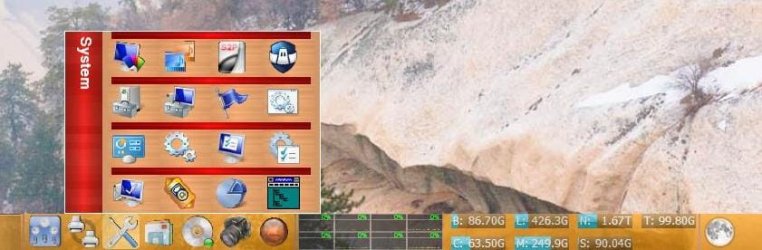
I have 87 quick launch shortcuts in my taskbar, grouped into 7 pop-ups:

Monitors
Printers
System
MS Office+
DVD/CD/Home Theater
Photography
Utils & Stuff

Some shortcuts are repeated in some groups, e.g. MS Picture Manager is under Photography and under MS Office+; the Canon iPF6100 and Pixma 9500 Pro printers are under Printers and under Photography, etc. Everybody does different things in different ways. But I'd go nuts with a solid line of 70-80 icons :). I gotta have those hover-over shortcut group pop-ups to organize them by use.
 
Last edited:

My Computer

Computer Manufacturer/Model Number
Custom workstation /// Lenovo X61t tablet notebook
OS
Windows 7 RTM x64
CPU
Core i7 980X @ 4.04GHz OC /// Core Duo L7500 @ 1.6GHz
Motherboard
Asus P6T6 WS Revolution ///
Memory
12GB G. Skill @ DDR-1600 OC /// 4GB
Graphics Card(s)
Saphire HD4870 Toxic 1GB /// Intel Mobile GMA X3100
Monitor(s) Displays
Dual Eizo 24" SX2461W /// 12"
Screen Resolution
1920x1200 /// 1400x1050
Hard Drives
Workstation:
5x 750GB Barracuda-11 on Areca ARC-1220;
4x 1.5TB Barracuda-11 on Intel ICH10R;
Volumes:
300GB RAID 0, 2.7TB RAID 10 on Intel;
100GB RAID 0, 1.4TB RAID 10 on Areca ///
Notebook: G.Skill Titan 256GB SSD
PSU
Tagan ITZ 1100
Case
GHS-1500 ///
Cooling
Thermalright IFX-14 + a slew of stealth fans ///
Keyboard
Logitech Edge ///
Mouse
Logitech Wireless Optical Trackball
Internet Speed
5Mbps down / 820Kbps up
Other Info
Main use: photography;
DVD Drive: L.G GGW-H20L Blu-Ray / DVD;
OC: QPI/DRAM @ 1.33v, CPU @ 1.293v, DRAM Bus @ 1.65v, CPU PLL @ 1.88v, CPU mult = 25x, BCLK = 160, DDR3-1604 @ 7-8-7-24
Back
Top