Surfing the web my PC crashed and continues to crash occasionally.

aew22

New member
Local time
11:13 AM
Messages
2
I was on the internet just cruising around when my sony vaio crashed. Turned it back on to run my kaspersky virus check and it crashed again before i could finish, under 10 minutes. Turned it back on once again only to have it crash even sooner within the first 5 minutes. Continued to try other options until it wouldnt even let me log on i would enter my password only to a black screen and my cursor.

I had a friend help me out and I did a system restore in safe mode and now I'm able to do everything as usual, or so it appears. My question would be why did that happen and will it happen again? Any help or recomendations are appreciated! I attached my BSOD...or so i think not sure if i needed it or not or even sure what it is not a tech retard but no expert either.

Thanks
 

My Computer My Computer

At a glance

windows 7 Home Premium x64
OS
windows 7 Home Premium x64
Hello aww22. Uninstall Kaspersky using Kaspersky Removal Tool. Use Microsoft Security Essentials as your antivirus with windows inbuilt firewall, and free MBAM as the on demand scanner.
Download, install and update those, and then run full system scans with both of them, one by one.

Do some disc checks.

  1. Update your SSD's Firmware (Skip it, if you dont have a SSD)
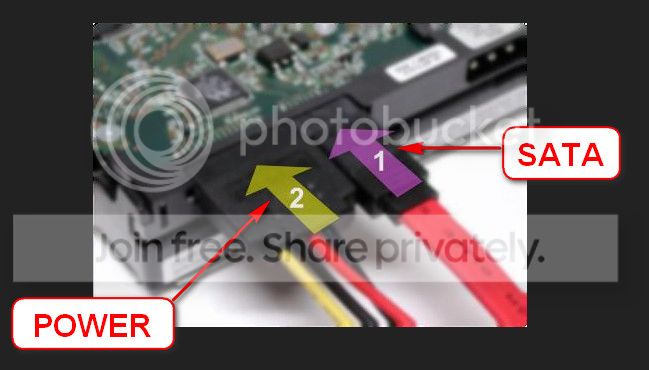
  2. Re-seat the sata and power.
    72974453_zps85c47d93.jpg
  3. Run chkdsk /f/r, following the option two of the tutorial Disk Check
  4. Seatool for dos: SeaTools | Seagate download
    Burn it in a blank cd. boot from the CD, click on "Accept", wait for it to finish detecting the drives, then in the upper left corner select "Basic Tests", then select "Long Test" and let it run.
Let us know the results.
 

My Computer My Computer

At a glance

Microsoft Windows 10 Pro Insider Preview 64-bitIntel(R) Core(TM) i3-4130 CPU @ 3.40GHzCorsair Vengence 4GB x2 (8.00GB Dual-Channel ...2047MB GeForce GTS 450 (ZOTAC International)
Computer type
PC/Desktop
Computer Manufacturer/Model Number
Self Assembled
OS
Microsoft Windows 10 Pro Insider Preview 64-bit
CPU
Intel(R) Core(TM) i3-4130 CPU @ 3.40GHz
Motherboard
Gigabyte Technology Co., Ltd. B85M-D3H
Memory
Corsair Vengence 4GB x2 (8.00GB Dual-Channel DDR3 @ 798MHz)
Graphics Card(s)
2047MB GeForce GTS 450 (ZOTAC International)
Sound Card
Onboard (Realtek High Definition Audio)
Monitor(s) Displays
LG Flatron E2040T
Screen Resolution
1600x900
Hard Drives
Western Digital 1 TB
Seagate 500 GB
PSU
Corsair VS550
Case
Cooler Master K380
Cooling
Cooler Master Seidon 120V Plus
Keyboard
Logitech MK260r
Mouse
Logitech MK260r
Internet Speed
PMPL Broadband
Antivirus
Windows Defender + MBAM
Browser
Firefox
Other Info
Dell Studio 15" Laptop
1. I ran the malware scan which found "PUM.Hijack.startmenu" I chose to remove this.
2. Next I unistalled kaspersky and ran microsoft security essentials which found "Exploit:Java/CVE-2008-5353" which i also removed.
3. Finally I ran the Seatools for DOS from a disc, Both the short dst and long test passed.

Seems everything is back up and running as normal which is great!

The only question I have is should i quit paying for my virus protection (kaspersky) and permanently switch to the free Microsoft Program. Will it give me the same protection? Have I been wasting my money on spendy virus protection that isn't up to par?

Thanks for all your help!
 

My Computer My Computer

At a glance

windows 7 Home Premium x64
OS
windows 7 Home Premium x64
Hello mate. Kaspersky is a very nice program and widely trusted. But it is causing crashes for your case that you have seen already.

You may do either of the followings:
1. Download a fresh copy of Kaspersky, the latest version. Observe if it is causing any crashes or not. If not, stick with it; but update the version at the first possibility.

2. Stick with MSE and MBAM. It is the most trusted combination. MSE is most lightweight on the system and never cause a crash for it. Most of SF members use this combination; and we never face any virus and malware.

Let us know how it goes.
 

My Computer My Computer

At a glance

Microsoft Windows 10 Pro Insider Preview 64-bitIntel(R) Core(TM) i3-4130 CPU @ 3.40GHzCorsair Vengence 4GB x2 (8.00GB Dual-Channel ...2047MB GeForce GTS 450 (ZOTAC International)
Computer type
PC/Desktop
Computer Manufacturer/Model Number
Self Assembled
OS
Microsoft Windows 10 Pro Insider Preview 64-bit
CPU
Intel(R) Core(TM) i3-4130 CPU @ 3.40GHz
Motherboard
Gigabyte Technology Co., Ltd. B85M-D3H
Memory
Corsair Vengence 4GB x2 (8.00GB Dual-Channel DDR3 @ 798MHz)
Graphics Card(s)
2047MB GeForce GTS 450 (ZOTAC International)
Sound Card
Onboard (Realtek High Definition Audio)
Monitor(s) Displays
LG Flatron E2040T
Screen Resolution
1600x900
Hard Drives
Western Digital 1 TB
Seagate 500 GB
PSU
Corsair VS550
Case
Cooler Master K380
Cooling
Cooler Master Seidon 120V Plus
Keyboard
Logitech MK260r
Mouse
Logitech MK260r
Internet Speed
PMPL Broadband
Antivirus
Windows Defender + MBAM
Browser
Firefox
Other Info
Dell Studio 15" Laptop
Back
Top