
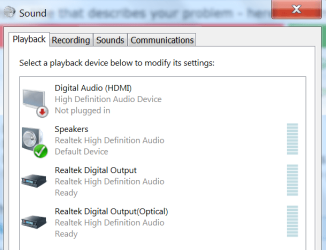
System was working fine until earlier in the week. Turned it on and nothing via HDMI, no sound and no picture. I didn't change anything, honest! In Control Panel/Devices and Printers, the Pioneer VSX-1124-K is there, shown as Pioneer AVR 2014. When I go to Control Panel/Hardware and Sound/Sound, this is what I see:
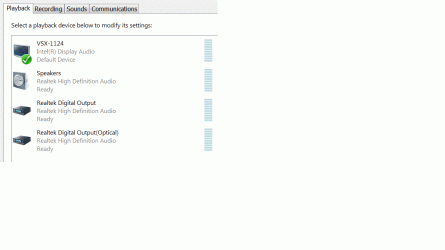
What I should be seeing is this:
What I'm seeing in Device Manager for Sound, video and game controllers is Realtek High Definition and High Definition Audio Device. Sorry but I don't have a screen print of it.
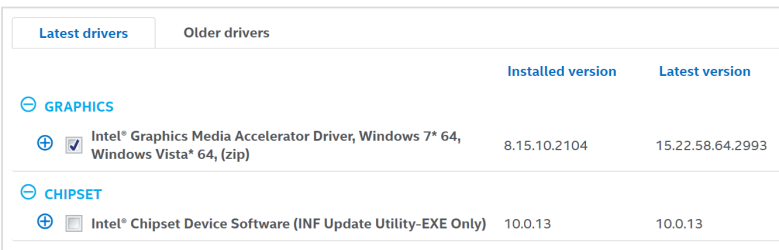
When I go to the Intel Driver Update Utility, it gives me this even though these two there now are the current drivers from Gigabyte's website.
***Update*** I downloaded and installed the graphics file from Intel and now Sound looks like this:

And Device Manager looks like this:
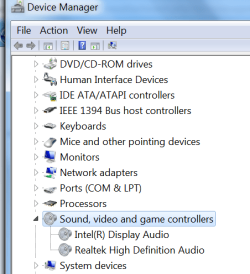
I should be able to see the receiver in Sound but I can't. It's like Windows isn't seeing the receiver when the system starts. Can anyone tell me what's going on and how to get it to work again?
Thanks so much in advance!!!
Jim
What I should be seeing is this:
What I'm seeing in Device Manager for Sound, video and game controllers is Realtek High Definition and High Definition Audio Device. Sorry but I don't have a screen print of it.
When I go to the Intel Driver Update Utility, it gives me this even though these two there now are the current drivers from Gigabyte's website.
***Update*** I downloaded and installed the graphics file from Intel and now Sound looks like this:
And Device Manager looks like this:
I should be able to see the receiver in Sound but I can't. It's like Windows isn't seeing the receiver when the system starts. Can anyone tell me what's going on and how to get it to work again?
Thanks so much in advance!!!
Jim
My Computer
At a glance
Windows 7 ultimate 64 bitIntel i3-5304 gbOnboard
- Computer type
- PC/Desktop
- OS
- Windows 7 ultimate 64 bit
- CPU
- Intel i3-530
- Motherboard
- Gigabyte GA-H55M-USB3
- Memory
- 4 gb
- Graphics Card(s)
- Onboard
- Sound Card
- Onboard
- Other Info
- It's an HTPC, connected HTPC->HDMI->Pioneer VSX-1124-K->HDMI->Sony KDL-46-W3000
