Solved SURT link is bad

Sevendaez

New member
Local time
9:31 AM
Messages
24

My Computer My Computer

Computer type
PC/Desktop
OS
Windows 7 Pro x64
Hi Sevendaez,

Strange, I've accessed the links on the thread many times without fail, including just a few seconds ago.
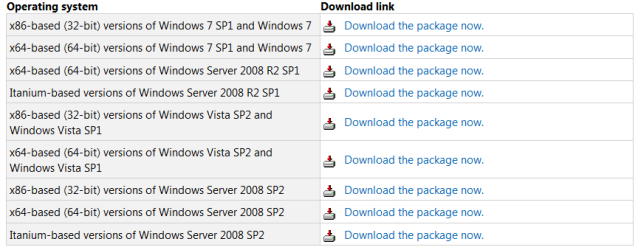
Scrolling down the page gives you access to the SURT tool various versions System Update Readiness Tool fixes Windows Update errors in Windows 8, Windows 7, Windows Vista, Windows Server 2008 R2, and Windows Server 2008, which, as far as I know, has always been functioning correctly.

Are you having issues with your computer accessing links?

The link directs you to:
https://support.microsoft.com/en-us...-by-using-the-dism-or-system-update-readiness

SURT Tool Download Links Capture.PNG
 

My Computer My Computer

Computer type
PC/Desktop
Computer Manufacturer/Model Number
HP Desktop & Compaq Laptop
OS
Win 10 x64, Linux Lite, Win 7 x64, BlackArch, & Kali
Hard Drives
Samsung 850 Pro 256Gb,
Hitachi HDD 1Tb,
Crucial MX SSD 250Gb
Segate 3Tb USB 3.0 Ext. Backup HDD
Internet Speed
150Mbps dn, 20Mbps up
Antivirus
Avast Free, Malwarebytes Anti-Exploit & Anti-Ransomware
Browser
Firefox, Chrome, Opera, & VPN
With the machine related to this question, yes, it white-pages. But I remember using my working machine and it behaved the same. I dunno. Works on it now. (Still white-pages on the other machine.) So the link I gave is the direct link.
 

My Computer My Computer

Computer type
PC/Desktop
OS
Windows 7 Pro x64
Yes, the link you provided is indeed, a direct link. Are you per chance using Firefox Quantum browser? I've had some issues with white page tabs and white pages on some hyperlinks the past few weeks, and had to leave the tab open and then it worked. Those seem to have been corrected by Mozilla. At least I've not experienced white page tabs or initial browser opening to white page for a few days now.

If you have SURT errors I may be the one to provide assistant to you! Have repository in excess of 400k cat, mum, and manifests.
 

My Computer My Computer

Computer type
PC/Desktop
Computer Manufacturer/Model Number
HP Desktop & Compaq Laptop
OS
Win 10 x64, Linux Lite, Win 7 x64, BlackArch, & Kali
Hard Drives
Samsung 850 Pro 256Gb,
Hitachi HDD 1Tb,
Crucial MX SSD 250Gb
Segate 3Tb USB 3.0 Ext. Backup HDD
Internet Speed
150Mbps dn, 20Mbps up
Antivirus
Avast Free, Malwarebytes Anti-Exploit & Anti-Ransomware
Browser
Firefox, Chrome, Opera, & VPN
IE11. I haven't put FF back on this machine, because it's messed up, but I probably should because IE is so messed up. I haven't gotten anything from SURT. It installed and the nothing. Am I supposed to run something?...I didn't see anything on that. This all is related to my 'update reset PC' thread.
 

My Computer My Computer

Computer type
PC/Desktop
OS
Windows 7 Pro x64
As I stated previously, I run Firefox Quantum, and there were a few bugs as I described, but seem to be corrected. I prefer FF because of the plethora of customization features, about:config, add-ons, etc.

If you downloaded and ran SURT, temporary files called CheckSUR.log and CheckSUR.persist.log are created in:

C:\Windows\Logs\CBS

Temporary is as it states, temporary, if you don't copy those files from there original location to another, they will disappear in a short period of time and you'll have to run SURT tool again to recreate those files. I attached a zipped batch file I created to locate those logs and place them on your desktop, unzip it and run it right after running SURT. If you would like to see the code, right-click the batch file and choose edit, it will open in Notepad.
 

Attachments

My Computer My Computer

Computer type
PC/Desktop
Computer Manufacturer/Model Number
HP Desktop & Compaq Laptop
OS
Win 10 x64, Linux Lite, Win 7 x64, BlackArch, & Kali
Hard Drives
Samsung 850 Pro 256Gb,
Hitachi HDD 1Tb,
Crucial MX SSD 250Gb
Segate 3Tb USB 3.0 Ext. Backup HDD
Internet Speed
150Mbps dn, 20Mbps up
Antivirus
Avast Free, Malwarebytes Anti-Exploit & Anti-Ransomware
Browser
Firefox, Chrome, Opera, & VPN
Yeah, both say no errors. MS community folks advised running DISM, and it won't, so they say do a clean re-install. The registry is obviously cornfugled (though 'Favorites' for IE, for example, is correct but won't do what it's supposed to). But beyond that it means something just whirled the main User folders (data) away. I tried the SURT hot-fix. The sole entry in the CBS files is for SURT. Unless Mbytes had a hand in it.
 

My Computer My Computer

Computer type
PC/Desktop
OS
Windows 7 Pro x64

My Computer My Computer

Computer type
PC/Desktop
Computer Manufacturer/Model Number
HP Desktop & Compaq Laptop
OS
Win 10 x64, Linux Lite, Win 7 x64, BlackArch, & Kali
Hard Drives
Samsung 850 Pro 256Gb,
Hitachi HDD 1Tb,
Crucial MX SSD 250Gb
Segate 3Tb USB 3.0 Ext. Backup HDD
Internet Speed
150Mbps dn, 20Mbps up
Antivirus
Avast Free, Malwarebytes Anti-Exploit & Anti-Ransomware
Browser
Firefox, Chrome, Opera, & VPN
That seems about the same as re-installing, given I'm missing profile files. In any case, I ended up using my year-old disc back-up. Amazing what little had changed, and there was some liberation in that some things weren't there to bother with or remove out of lack of use. Only a few Win updates and re-installing a few programs were necessary. Fortunately, and rather presciently, I'd manually backed up my IE favorites a few days before the corruption.

Thanks for your assistance.
 

My Computer My Computer

Computer type
PC/Desktop
OS
Windows 7 Pro x64
No problem Sevendaez, regular backups a must! It's not a question of if, it's a question of when you will need them.

Happy computing!
 

My Computer My Computer

Computer type
PC/Desktop
Computer Manufacturer/Model Number
HP Desktop & Compaq Laptop
OS
Win 10 x64, Linux Lite, Win 7 x64, BlackArch, & Kali
Hard Drives
Samsung 850 Pro 256Gb,
Hitachi HDD 1Tb,
Crucial MX SSD 250Gb
Segate 3Tb USB 3.0 Ext. Backup HDD
Internet Speed
150Mbps dn, 20Mbps up
Antivirus
Avast Free, Malwarebytes Anti-Exploit & Anti-Ransomware
Browser
Firefox, Chrome, Opera, & VPN
Back
Top