
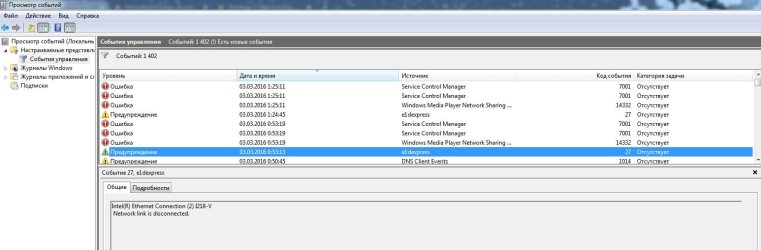
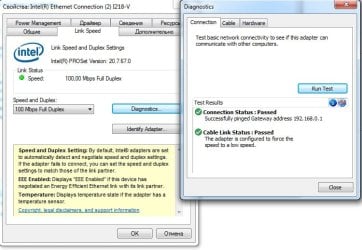
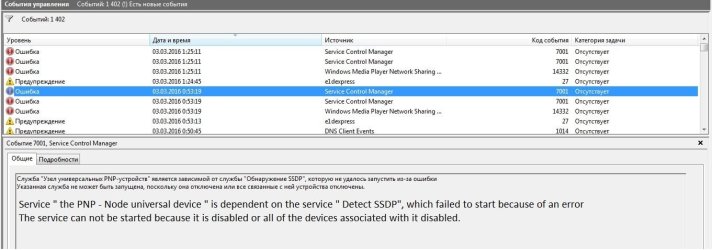
Hello , the problem is this: While surfing the web browser, downloading files or other network activity all okay when I go online game ( CS:GO , League of Legends , World of Tanks) ) I start to lost packets ,after that just (Connection problem)and i need to reconnect or restart my ethernet adapter, it does not depend on time, load or from the network server, one time everything is OK and sometimes LAG and dissconected ,cable for direct \ cable from the router, it does not matter , the problem remains.Help please what to do, where to find the problem. Configuration of computer Motherboard : Z97-Pro Gamer , on adapter Intel(R) Ethernet Connection I218-V (last driver from Intel), Win7 Ultimate
btw similar problem has been described here but there is no solution
http://www.sevenforums.com/network-sharing/337269-ethernet-port-keeps-disconnecting-please-help.html
___________________________________________________________________________________________
>ipconfig /all
Microsoft Windows [Version 6.1.7601] Copyright (c) 2009 Microsoft Corporation. All rights reserved. C: \ Users \ AnandaShake> ipconfig / all Setting the IP protocol for Windows
Computer Name. . . . . . . . . : AnandaShake-PC
Primary DNS-suffix. . . . . . : Type node. . . . . . . . . . . . . :
Hybrid IP-routing enabled. . . . : No
WINS-proxy included. . . . . . . : No Connect Ethernet adapter Local Area Networks:
DNS-suffix Connections. . . . . : Description. . . . . . . . . . . . . :
Intel (R) Ethernet Connection (2) I218-V
Physical address. . . . . . . . . : F0-79-59-66-52-E1
DHCP included. . . . . . . . . . . : Yes
Auto included. . . . . . : Yes
IPv4-address. . . . . . . . . . . . : 192.168.0.100 (Primary)
Subnet mask. . . . . . . . . . : 255.255.255.0
Rent taken. . . . . . . . . . : March 3, 2016 0:53:19
Term of lease . . . . . . . . . . : March 3, 2016 2:53:33
Primary gateway. . . . . . . . . : 192.168.0.1
DHCP-server. . . . . . . . . . . : 192.168.0.1
DNS-servers. . . . . . . . . . . : 188.230.119.19 77.87.152.2
NetBios via TCP / IP. . . . . . . . : included
__________________________________________________
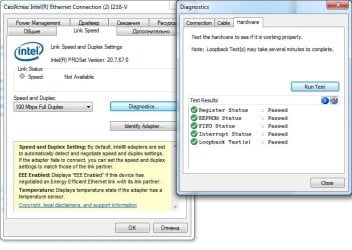
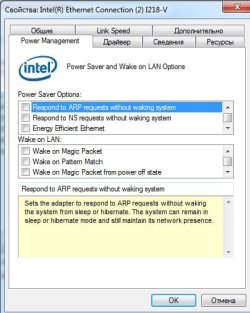
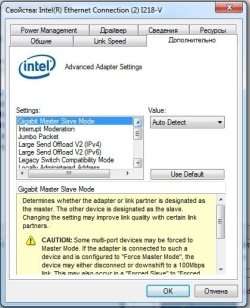
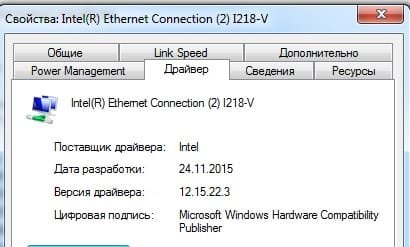
screenshots
btw similar problem has been described here but there is no solution
http://www.sevenforums.com/network-sharing/337269-ethernet-port-keeps-disconnecting-please-help.html
___________________________________________________________________________________________
>ipconfig /all
Microsoft Windows [Version 6.1.7601] Copyright (c) 2009 Microsoft Corporation. All rights reserved. C: \ Users \ AnandaShake> ipconfig / all Setting the IP protocol for Windows
Computer Name. . . . . . . . . : AnandaShake-PC
Primary DNS-suffix. . . . . . : Type node. . . . . . . . . . . . . :
Hybrid IP-routing enabled. . . . : No
WINS-proxy included. . . . . . . : No Connect Ethernet adapter Local Area Networks:
DNS-suffix Connections. . . . . : Description. . . . . . . . . . . . . :
Intel (R) Ethernet Connection (2) I218-V
Physical address. . . . . . . . . : F0-79-59-66-52-E1
DHCP included. . . . . . . . . . . : Yes
Auto included. . . . . . : Yes
IPv4-address. . . . . . . . . . . . : 192.168.0.100 (Primary)
Subnet mask. . . . . . . . . . : 255.255.255.0
Rent taken. . . . . . . . . . : March 3, 2016 0:53:19
Term of lease . . . . . . . . . . : March 3, 2016 2:53:33
Primary gateway. . . . . . . . . : 192.168.0.1
DHCP-server. . . . . . . . . . . : 192.168.0.1
DNS-servers. . . . . . . . . . . : 188.230.119.19 77.87.152.2
NetBios via TCP / IP. . . . . . . . : included
__________________________________________________
screenshots
Attachments
My Computer
- Computer type
- PC/Desktop
- OS
- Windows 7 Ultimate x64

 (( i try all link speeds and test it, nothing help btw screen from speedtest