Solved Suspicious TCP/UDP connections on Currports

oddblob

New member
Local time
7:02 PM
Messages
23
Hello, I've just ran the software 'Currports' And I've found some suspicious listings there... Here are a few (Should I be worried?)

Process Name:AppleMobileDeviceService
local port:27015
Remote address:127.0.0.1
Remote host name:www(dot)007guard(dot)com
State:Established

What has me suspicious is I'm pretty sure 007guard is known for malware, but where I'm confused is, in my Hosts file, 007guard is listed as 127.0.0.1 (I'm not really a networks guy, but doesn't that mean, any connections to that domain will go to 127.0.0.1 i.e home?)

There's a few similar ones as well, like Dropbox.exe and even Firefox.exe, iTunesHelper.exe, a few 'System'
and some 'Unknown's that go to odd sounding 'Remote Host Names'

I have Avast! installed, malwarebytes available, they've never flagged anything. I have had issues with malware in the past but it seemed my AV (AVG at the time) cleared that up. Also, the suspicious connection seem to be in the port ranges of around 20000 - 50000... Any other details you need, just ask!
Any advice is welcome! :)

Edit: So I accidently posted two threads on this, here was the second post, it has some extra information in it, I hope it's helpful!:

Hello, I've just ran the program Currports (Sort of like a detailed Netstat command) And I've found some suspicious connections, should I be worried about these? Is my computer likely to be infected with malware, these are some suspicious connections I've come across:

Process Name:AppleMobileDeviceService.exe
Protocol:TCP
Local Port: 27015
Local Address: 127.0.0.1
Remove Port:49212
Remote Address:127.0.0.1
Remote Host Name:www(dot)007guard(dot)com

This is the part that makes me suspicious, I'm pretty sure 007guard is known for being malware so is this legitimate? I get a bit confused as the addresses are both 127.0.0.1/home, is this something to do with 007guard being in my hosts file as 127.0.0.1. (I'm not really a networking guy, but doesn't the hosts file mean any connections to this domain will redirect back to the IP listed there, in this case, me?)

There's some other processes that are like this, Firefox.exe, iTunesHelper.exe, two 'System' and some 'Unknown's which have the Remote Host Name as some domains which look suspicious...(e100.net, akamaitechnologies.com, reverse.softlayer.com and some designermedia.com)The Unknown entries also have different IPs to 127.0.0.1, yet have there remote port listed as 80 (Web server?) so I'm assuming that is normal from me just using Firefox, but I only have this tab open...

Any advice on what I should do is welcome, having any connection to 007guard seems pretty suspicious to me...
 
Last edited:

My Computer My Computer

At a glance

WINdows 7 Home Premium 64bit
Computer type
Laptop
Computer Manufacturer/Model Number
Samsung
OS
WINdows 7 Home Premium 64bit
Antivirus
Avast!
Browser
Firefox
Regarding 007gaurd(dot)com

The information you show (thank you) tells me that AppleMobileDeviceService is directed to 127.0.0.1 which is a loopback address to your machine. It doesn't actually go anywhere.

I don't know much about 007gaurd and I have no idea if there is anything else lurking, but let's find out.

I'd recommend running a few scanners, start with Malwarebytes and
run a full system scan (about an hour on my machine)


Download Malwarebytes' (Mbam)
:warn: When installing Malwarebytes,
do NOT elect the free trial of the full version;
you only want the free version.

Post if Mbam finds and fices anything.

Thanks.
 

My Computer My Computer

At a glance

x64 (6.3.9600) Win8.1 Pro & soon dual boot x6...AMD A6-3420M APU with Radeon(tm) HD Graphics6.00 GBAMD Radeon(TM) HD 6520G
Computer type
Laptop
Computer Manufacturer/Model Number
HP Pavilion dv6-6c10us
OS
x64 (6.3.9600) Win8.1 Pro & soon dual boot x64 (6.1.7601) Win7_SP1 HomePrem
CPU
AMD A6-3420M APU with Radeon(tm) HD Graphics
Motherboard
Hewlett-Packard 1805
Memory
6.00 GB
Graphics Card(s)
AMD Radeon(TM) HD 6520G
Sound Card
(1) AMD High Definition Audio Device (2) IDT High Definiti
Monitor(s) Displays
HP W2072a 20" LCD (1600 x 900) @ 60 Hz
Screen Resolution
1366 x 768 x 32 bits (4294967296 colors) @ 60 Hz
Hard Drives
ST640LM0 00 HM641JI SATA Disk Device
Keyboard
Logitech k520 wireless KB
Mouse
Logitech m320 wireless mouse (bundled with KB)
Internet Speed
15/5 | 54 MB Wireless 'n'
Antivirus
Realtime: Defender or Avast | On-demand: Malwarebytes, ESET
Browser
IE 11 on Win8, IE 10 on win 7
Other Info
Media: [Gimp, Audacity, VLC] || Comm: [WEmail 2012, Skype] || Productivity: [OpenOffice,| Textpad] || Utils: [Sysinternals, cCleaner, Speccy, Defraggler]
A few more searches and this seems to be related to Spybot Search and Destroy immunization.

Open C:\Windows\System32\drivers\etc\hosts
-> there is no extension


If there is an entry 127.0.0.1 in there, close the file and let me know that hosts is fine.

If not, I'll come up with the easiest way to defin local host in your hosts file
-> it can get convoluted due to the status of the hosts file (you can't just edit and save, or copy and replace)


Beter yet - copy the contents of the hosts file and paste them in a post
-> select all of the text and click the # icon on the post menu to include it in a "code box"
 

My Computer My Computer

At a glance

x64 (6.3.9600) Win8.1 Pro & soon dual boot x6...AMD A6-3420M APU with Radeon(tm) HD Graphics6.00 GBAMD Radeon(TM) HD 6520G
Computer type
Laptop
Computer Manufacturer/Model Number
HP Pavilion dv6-6c10us
OS
x64 (6.3.9600) Win8.1 Pro & soon dual boot x64 (6.1.7601) Win7_SP1 HomePrem
CPU
AMD A6-3420M APU with Radeon(tm) HD Graphics
Motherboard
Hewlett-Packard 1805
Memory
6.00 GB
Graphics Card(s)
AMD Radeon(TM) HD 6520G
Sound Card
(1) AMD High Definition Audio Device (2) IDT High Definiti
Monitor(s) Displays
HP W2072a 20" LCD (1600 x 900) @ 60 Hz
Screen Resolution
1366 x 768 x 32 bits (4294967296 colors) @ 60 Hz
Hard Drives
ST640LM0 00 HM641JI SATA Disk Device
Keyboard
Logitech k520 wireless KB
Mouse
Logitech m320 wireless mouse (bundled with KB)
Internet Speed
15/5 | 54 MB Wireless 'n'
Antivirus
Realtime: Defender or Avast | On-demand: Malwarebytes, ESET
Browser
IE 11 on Win8, IE 10 on win 7
Other Info
Media: [Gimp, Audacity, VLC] || Comm: [WEmail 2012, Skype] || Productivity: [OpenOffice,| Textpad] || Utils: [Sysinternals, cCleaner, Speccy, Defraggler]
Regarding 007gaurd(dot)com
Post if Mbam finds and fices anything.

So, after finally getting Safe mode to work (Explorer.exe kept crashing for reasons unknown) I managed to get MBAM to run a scan, it came back with 10 objects found, nothing major, 'Conduit' and 'Spigot'. Which after some google searches is some toolbar/adware sometimes installed with software. These were unrelated to any of the programs that have 007guard(dot)com as there Remote Host Name.

I've been brainstorming a bit, and I was wondering if I changed the first line of Hosts from
127.0.0.1 www(dot)007guard(dot)com to
127.0.0.1 Some other website
And seeing if that changes the remote host name, is there a danger in editing this though? What permissions should I allow to do that. My Hosts file is a couple of thousands lines... which are all seemingly added by Spybot S&D, I'm under the idea at the moment that if it wasn't for this line in the Hosts file, then my computer would be connecting to malicious sites... any further advice?
Thanks for the help

Edit: I should probably also add, that for each of these suspicious TCP connections, there is more than one of the program, some of which connect to 0.0.0.0 with no port. And some of which have no information like that defined.
 
Last edited:

My Computer My Computer

At a glance

WINdows 7 Home Premium 64bit
Computer type
Laptop
Computer Manufacturer/Model Number
Samsung
OS
WINdows 7 Home Premium 64bit
Antivirus
Avast!
Browser
Firefox
Well oddblob,

If Mbam found ten malware programs, that's not a good sign.

Conduit and Spigot are not very nice players - I would not call them minor issues.

Let's see what else is there -> please attach the most recent Mbam log to a post.
C:\ProgramData\Malwarebytes\Malwarebytes' Anti-Malware\Logs\protection-log-yyyy-mm-dd

You might have to put the log in a zip file to attach it due to the forum post file types

After posting the Mbam log
Please download the Farbar Recovery Scan Tool
Select the 64-bit version.


Save it to your Desktop.
  • Double-click the downloaded file to run it.
  • When the tool opens click Yes to disclaimer.
  • Press the Scan button.
  • FRST64 makes a log (FRST.txt) in the same directory (Desktop) from which the tool is run.
Please provide the FRST.txt in your reply. <<---

Thanks
 

My Computer My Computer

At a glance

x64 (6.3.9600) Win8.1 Pro & soon dual boot x6...AMD A6-3420M APU with Radeon(tm) HD Graphics6.00 GBAMD Radeon(TM) HD 6520G
Computer type
Laptop
Computer Manufacturer/Model Number
HP Pavilion dv6-6c10us
OS
x64 (6.3.9600) Win8.1 Pro & soon dual boot x64 (6.1.7601) Win7_SP1 HomePrem
CPU
AMD A6-3420M APU with Radeon(tm) HD Graphics
Motherboard
Hewlett-Packard 1805
Memory
6.00 GB
Graphics Card(s)
AMD Radeon(TM) HD 6520G
Sound Card
(1) AMD High Definition Audio Device (2) IDT High Definiti
Monitor(s) Displays
HP W2072a 20" LCD (1600 x 900) @ 60 Hz
Screen Resolution
1366 x 768 x 32 bits (4294967296 colors) @ 60 Hz
Hard Drives
ST640LM0 00 HM641JI SATA Disk Device
Keyboard
Logitech k520 wireless KB
Mouse
Logitech m320 wireless mouse (bundled with KB)
Internet Speed
15/5 | 54 MB Wireless 'n'
Antivirus
Realtime: Defender or Avast | On-demand: Malwarebytes, ESET
Browser
IE 11 on Win8, IE 10 on win 7
Other Info
Media: [Gimp, Audacity, VLC] || Comm: [WEmail 2012, Skype] || Productivity: [OpenOffice,| Textpad] || Utils: [Sysinternals, cCleaner, Speccy, Defraggler]

My Computer My Computer

At a glance

WINdows 7 Home Premium 64bit
Computer type
Laptop
Computer Manufacturer/Model Number
Samsung
OS
WINdows 7 Home Premium 64bit
Antivirus
Avast!
Browser
Firefox
Don't worry about the Mbam log (we're batting 1000 on that - the image you posted isn't found either). I might have given you the wrong location - working off old inforamtion on where the log is stored - sorry abou that.
>> we'll skip the Mbam log for now

It looks as though you have more than one real time Anti-virus (AV) on your machine. This isn't a good idea as each one tries to figure out if the other(s) are malware and they tend to fight each other.

It could be that you just have some on-demand scanners. Depending on the scanner, they usually run fine with a real time AV program.

Please let me know what you have installed as far as AV and scanners. I'd like to get you down to one AV program and no scanners except for Mbam and Farbar. Once I get your list, I willl let you know what I think should be uninstalled or removed.

This is housekeeping on your system, it will help get your system disinfected by cutting through the clutter, but this step won't remove any malware in itself.

Other than that, I'm still parsing the FRST.log

Thanks
 

My Computer My Computer

At a glance

x64 (6.3.9600) Win8.1 Pro & soon dual boot x6...AMD A6-3420M APU with Radeon(tm) HD Graphics6.00 GBAMD Radeon(TM) HD 6520G
Computer type
Laptop
Computer Manufacturer/Model Number
HP Pavilion dv6-6c10us
OS
x64 (6.3.9600) Win8.1 Pro & soon dual boot x64 (6.1.7601) Win7_SP1 HomePrem
CPU
AMD A6-3420M APU with Radeon(tm) HD Graphics
Motherboard
Hewlett-Packard 1805
Memory
6.00 GB
Graphics Card(s)
AMD Radeon(TM) HD 6520G
Sound Card
(1) AMD High Definition Audio Device (2) IDT High Definiti
Monitor(s) Displays
HP W2072a 20" LCD (1600 x 900) @ 60 Hz
Screen Resolution
1366 x 768 x 32 bits (4294967296 colors) @ 60 Hz
Hard Drives
ST640LM0 00 HM641JI SATA Disk Device
Keyboard
Logitech k520 wireless KB
Mouse
Logitech m320 wireless mouse (bundled with KB)
Internet Speed
15/5 | 54 MB Wireless 'n'
Antivirus
Realtime: Defender or Avast | On-demand: Malwarebytes, ESET
Browser
IE 11 on Win8, IE 10 on win 7
Other Info
Media: [Gimp, Audacity, VLC] || Comm: [WEmail 2012, Skype] || Productivity: [OpenOffice,| Textpad] || Utils: [Sysinternals, cCleaner, Speccy, Defraggler]
Could you post the secondary Farbar log: addition.txt (it should be on your desktop)

Thanks
 

My Computer My Computer

At a glance

x64 (6.3.9600) Win8.1 Pro & soon dual boot x6...AMD A6-3420M APU with Radeon(tm) HD Graphics6.00 GBAMD Radeon(TM) HD 6520G
Computer type
Laptop
Computer Manufacturer/Model Number
HP Pavilion dv6-6c10us
OS
x64 (6.3.9600) Win8.1 Pro & soon dual boot x64 (6.1.7601) Win7_SP1 HomePrem
CPU
AMD A6-3420M APU with Radeon(tm) HD Graphics
Motherboard
Hewlett-Packard 1805
Memory
6.00 GB
Graphics Card(s)
AMD Radeon(TM) HD 6520G
Sound Card
(1) AMD High Definition Audio Device (2) IDT High Definiti
Monitor(s) Displays
HP W2072a 20" LCD (1600 x 900) @ 60 Hz
Screen Resolution
1366 x 768 x 32 bits (4294967296 colors) @ 60 Hz
Hard Drives
ST640LM0 00 HM641JI SATA Disk Device
Keyboard
Logitech k520 wireless KB
Mouse
Logitech m320 wireless mouse (bundled with KB)
Internet Speed
15/5 | 54 MB Wireless 'n'
Antivirus
Realtime: Defender or Avast | On-demand: Malwarebytes, ESET
Browser
IE 11 on Win8, IE 10 on win 7
Other Info
Media: [Gimp, Audacity, VLC] || Comm: [WEmail 2012, Skype] || Productivity: [OpenOffice,| Textpad] || Utils: [Sysinternals, cCleaner, Speccy, Defraggler]
Could you post the secondary Farbar log: addition.txt (it should be on your desktop)

Thanks
Sorry about the imgur link, the new link is: www.i.imgur.com/03gt3bx.jpg
Regarding mbam.../logs the folder was there, but no files.
Over a few years I've had multiple AVs: AVG, BitDefender, Norton, Mcafee and a few more, but I've always uninstalled them before installing a new one. My current one is Avast! And that's the only real time AV I'm aware of having, I also have mbam, spybot(outdated) and Trend Micro's RUBotted. Adwcleaner and FRST are extra scanners. Attatched should be Addition.zip.
View attachment Addition.zip
Thanks for this support! :)
 

My Computer My Computer

At a glance

WINdows 7 Home Premium 64bit
Computer type
Laptop
Computer Manufacturer/Model Number
Samsung
OS
WINdows 7 Home Premium 64bit
Antivirus
Avast!
Browser
Firefox
You're welcome and thanks for reposting imgur. To save you some time, if something doesn't quite work out (imgur) and I need it, I'll ask that you repost it - otherwise it's no big deal.

Ok, I'm just seeing ghosts of previous AV installs. I'd like to clean that up at some point because even remanats can get in the way of your current AV.

Avast!, Mbam, Adwcleaner, and FRST are fine.

Please uninstall SpyBot and RUBotted. You can reinstall them if you want after we get through this exercise.

The FRST.txt doesn't look as bad as I thought. I had to check some unfamiliar apps (jagex, Camdata) but we'll see in the next steps.

There are two, what look to be install pkgs, under your user profile. Both are world painter (minecraft?)
If you could verify that and you don't need them, I'll complete the fix script and let FRST take care of them.
In other words, you don't have to delete them FRST will.

If you want to keep them or one, let me know and I'll take them out of the script and you can manage those exe files.
If you don't know anything about those files, I suggest that they be removed by FRST.
 

My Computer My Computer

At a glance

x64 (6.3.9600) Win8.1 Pro & soon dual boot x6...AMD A6-3420M APU with Radeon(tm) HD Graphics6.00 GBAMD Radeon(TM) HD 6520G
Computer type
Laptop
Computer Manufacturer/Model Number
HP Pavilion dv6-6c10us
OS
x64 (6.3.9600) Win8.1 Pro & soon dual boot x64 (6.1.7601) Win7_SP1 HomePrem
CPU
AMD A6-3420M APU with Radeon(tm) HD Graphics
Motherboard
Hewlett-Packard 1805
Memory
6.00 GB
Graphics Card(s)
AMD Radeon(TM) HD 6520G
Sound Card
(1) AMD High Definition Audio Device (2) IDT High Definiti
Monitor(s) Displays
HP W2072a 20" LCD (1600 x 900) @ 60 Hz
Screen Resolution
1366 x 768 x 32 bits (4294967296 colors) @ 60 Hz
Hard Drives
ST640LM0 00 HM641JI SATA Disk Device
Keyboard
Logitech k520 wireless KB
Mouse
Logitech m320 wireless mouse (bundled with KB)
Internet Speed
15/5 | 54 MB Wireless 'n'
Antivirus
Realtime: Defender or Avast | On-demand: Malwarebytes, ESET
Browser
IE 11 on Win8, IE 10 on win 7
Other Info
Media: [Gimp, Audacity, VLC] || Comm: [WEmail 2012, Skype] || Productivity: [OpenOffice,| Textpad] || Utils: [Sysinternals, cCleaner, Speccy, Defraggler]
Please uninstall SpyBot and RUBotted. You can reinstall them if you want after we get through this exercise.

There are two, what look to be install pkgs, under your user profile. Both are world painter (minecraft?)
If you could verify that and you don't need them, I'll complete the fix script and let FRST take care of them.
In other words, you don't have to delete them FRST will.

I've uninstalled the Spybot and RUBotted, and the two worldpainter files in my user profile. May I ask what this fix script is?
 

My Computer My Computer

At a glance

WINdows 7 Home Premium 64bit
Computer type
Laptop
Computer Manufacturer/Model Number
Samsung
OS
WINdows 7 Home Premium 64bit
Antivirus
Avast!
Browser
Firefox
Sure, I built the fix script using information from the FRST.txt file.

Instead of me explaining it, I'll post it with instructions. You can look at it and see what it will fix.

The fix is to remove the files in the script. The two World Painter exe files are at the top. If you don't want FRST to remove them, delete those two lines, but ONLY those two lines after you paste the script into a local text file.

The start and end must be there or the script won't work

start
..
..
end

The rest of the files are in your TEMP folder, so you can feel comfortable fixing those.

The instructions and the script are below:

:info: Please open Notepad (Start > All Programs > Accessories > Notepad)
Copy the entire contents of the Farbar script between the lines (but not the lines) below
Save it to your Desktop, and name it: fixlist.txt


start
C:\Users\Andrew\worldpainter_64_1.2.1.exe
C:\Users\Andrew\worldpainter_64_1.6.4.exe
C:\Users\Andrew\AppData\Local\Temp\DivXSetup.exe
C:\Users\Andrew\AppData\Local\Temp\jansi-32-git-Bukkit-1.6.4-R2.0-1-g988f599-b2919jnks.dll
C:\Users\Andrew\AppData\Local\Temp\jansi-64-git-Bukkit-1.6.4-R2.0-1-g988f599-b2919jnks.dll
C:\Users\Andrew\AppData\Local\Temp\jre-7u45-windows-i586-iftw.exe
C:\Users\Andrew\AppData\Local\Temp\jre-7u51-windows-i586-iftw.exe
C:\Users\Andrew\AppData\Local\Temp\log4net.dll
C:\Users\Andrew\AppData\Local\Temp\Quarantine.exe
C:\Users\Andrew\AppData\Local\Temp\RSPUpgradeInstaller.exe
C:\Users\Andrew\AppData\Local\Temp\SyncRestarter.exe
C:\Users\Andrew\AppData\Local\Temp\sync_upgrader.exe
end


Once again, run FRST64 as you did before.
When the tool opens click Yes to disclaimer.

Now, press the Fix button, only once, and wait.
When done, FRST produces Fixlog.txt on your Desktop.

:ar: Please provide the content of Fixlog.txt on your reply.
Thanks!
 

My Computer My Computer

At a glance

x64 (6.3.9600) Win8.1 Pro & soon dual boot x6...AMD A6-3420M APU with Radeon(tm) HD Graphics6.00 GBAMD Radeon(TM) HD 6520G
Computer type
Laptop
Computer Manufacturer/Model Number
HP Pavilion dv6-6c10us
OS
x64 (6.3.9600) Win8.1 Pro & soon dual boot x64 (6.1.7601) Win7_SP1 HomePrem
CPU
AMD A6-3420M APU with Radeon(tm) HD Graphics
Motherboard
Hewlett-Packard 1805
Memory
6.00 GB
Graphics Card(s)
AMD Radeon(TM) HD 6520G
Sound Card
(1) AMD High Definition Audio Device (2) IDT High Definiti
Monitor(s) Displays
HP W2072a 20" LCD (1600 x 900) @ 60 Hz
Screen Resolution
1366 x 768 x 32 bits (4294967296 colors) @ 60 Hz
Hard Drives
ST640LM0 00 HM641JI SATA Disk Device
Keyboard
Logitech k520 wireless KB
Mouse
Logitech m320 wireless mouse (bundled with KB)
Internet Speed
15/5 | 54 MB Wireless 'n'
Antivirus
Realtime: Defender or Avast | On-demand: Malwarebytes, ESET
Browser
IE 11 on Win8, IE 10 on win 7
Other Info
Media: [Gimp, Audacity, VLC] || Comm: [WEmail 2012, Skype] || Productivity: [OpenOffice,| Textpad] || Utils: [Sysinternals, cCleaner, Speccy, Defraggler]
Ok, I take it that you moved the World Painter exe files and TEMP\Quarantine?

If you told me that, I wouldn't have to ask :)

No problem if you did, it's your machine.

However, I don't know what's in Quarantine and I don't want it to come back on you. 99.99% of the time, you can delete anything in your temp folder - that's only temporary storage for things you're working on or installing.

What's the .01% - it's work in progress - a document, spreadsheet, or install. In that case you would wait to remove the file.

I'm cautious too, it's a good trait. But when I deal with Malware, I don't trust it - it is very clever at making itself look important, so that people do not remove it.

Anyway, should I wonder why the FRST fix threw up an error on TEMP\Quarantine ? Is a nasty bug preventing FRSt form doing it's job?

The next thing after you bring me up to date is another Mbam scan.
Close all applications before begining the scan.

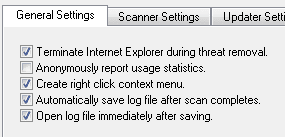
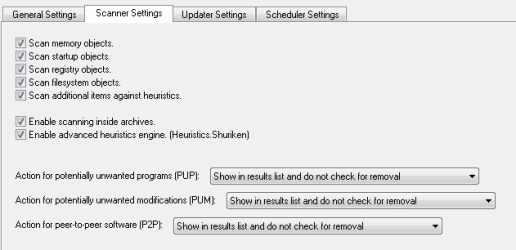
Make sure you check for updates and have the scan settings optimized.
edit: If anything is found by the scan you'll have to look at the list and place a checkmark in the box for it to be removed, otherwise, it's only listed per the settings.

Here's what I run on my machine for Mbam
 

Attachments

  • MbamSetGen.PNG
    MbamSetGen.PNG
    2.1 KB · Views: 29
  • MbamSetScan.PNG
    MbamSetScan.PNG
    4.3 KB · Views: 29

My Computer My Computer

At a glance

x64 (6.3.9600) Win8.1 Pro & soon dual boot x6...AMD A6-3420M APU with Radeon(tm) HD Graphics6.00 GBAMD Radeon(TM) HD 6520G
Computer type
Laptop
Computer Manufacturer/Model Number
HP Pavilion dv6-6c10us
OS
x64 (6.3.9600) Win8.1 Pro & soon dual boot x64 (6.1.7601) Win7_SP1 HomePrem
CPU
AMD A6-3420M APU with Radeon(tm) HD Graphics
Motherboard
Hewlett-Packard 1805
Memory
6.00 GB
Graphics Card(s)
AMD Radeon(TM) HD 6520G
Sound Card
(1) AMD High Definition Audio Device (2) IDT High Definiti
Monitor(s) Displays
HP W2072a 20" LCD (1600 x 900) @ 60 Hz
Screen Resolution
1366 x 768 x 32 bits (4294967296 colors) @ 60 Hz
Hard Drives
ST640LM0 00 HM641JI SATA Disk Device
Keyboard
Logitech k520 wireless KB
Mouse
Logitech m320 wireless mouse (bundled with KB)
Internet Speed
15/5 | 54 MB Wireless 'n'
Antivirus
Realtime: Defender or Avast | On-demand: Malwarebytes, ESET
Browser
IE 11 on Win8, IE 10 on win 7
Other Info
Media: [Gimp, Audacity, VLC] || Comm: [WEmail 2012, Skype] || Productivity: [OpenOffice,| Textpad] || Utils: [Sysinternals, cCleaner, Speccy, Defraggler]
The next thing after you bring me up to date is another Mbam scan.
Close all applications before begining the scan.

Yes, sorry, I removed the two worldpainter.exe files, I searched for Quarantine.exe in the directory listed, and found nothing, surely if it was malicious it would be staying there? I'll go into safe mode now and report back whatever mbam reports in the next post, thanks.
 

My Computer My Computer

At a glance

WINdows 7 Home Premium 64bit
Computer type
Laptop
Computer Manufacturer/Model Number
Samsung
OS
WINdows 7 Home Premium 64bit
Antivirus
Avast!
Browser
Firefox
Accidental post, sorry.

Not a problem, you can delete your own posts.

Clcik on the orange asterisk on the quoted text above - that takes you back to the original post.

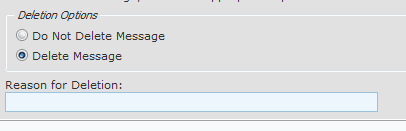
on the post you want to delete, click edit, then click delete
that expands the delete options
clcik the rasio button "Delete this msg"
add some explantion in the reason box
and click the "delete this message button"

the ooops msg should be gone.

just make sure you're deleting the correct msg. I've oops that and well ooops it's gone.
 

My Computer My Computer

At a glance

x64 (6.3.9600) Win8.1 Pro & soon dual boot x6...AMD A6-3420M APU with Radeon(tm) HD Graphics6.00 GBAMD Radeon(TM) HD 6520G
Computer type
Laptop
Computer Manufacturer/Model Number
HP Pavilion dv6-6c10us
OS
x64 (6.3.9600) Win8.1 Pro & soon dual boot x64 (6.1.7601) Win7_SP1 HomePrem
CPU
AMD A6-3420M APU with Radeon(tm) HD Graphics
Motherboard
Hewlett-Packard 1805
Memory
6.00 GB
Graphics Card(s)
AMD Radeon(TM) HD 6520G
Sound Card
(1) AMD High Definition Audio Device (2) IDT High Definiti
Monitor(s) Displays
HP W2072a 20" LCD (1600 x 900) @ 60 Hz
Screen Resolution
1366 x 768 x 32 bits (4294967296 colors) @ 60 Hz
Hard Drives
ST640LM0 00 HM641JI SATA Disk Device
Keyboard
Logitech k520 wireless KB
Mouse
Logitech m320 wireless mouse (bundled with KB)
Internet Speed
15/5 | 54 MB Wireless 'n'
Antivirus
Realtime: Defender or Avast | On-demand: Malwarebytes, ESET
Browser
IE 11 on Win8, IE 10 on win 7
Other Info
Media: [Gimp, Audacity, VLC] || Comm: [WEmail 2012, Skype] || Productivity: [OpenOffice,| Textpad] || Utils: [Sysinternals, cCleaner, Speccy, Defraggler]
Ok, don't sweat quarantine. As I said, TEMP is temporaty storage, whatever createed it might have cleaned up after itself. Some apps aren't real good at housekeeping.

edit: Ok waiting on Mbam scan results.
 

My Computer My Computer

At a glance

x64 (6.3.9600) Win8.1 Pro & soon dual boot x6...AMD A6-3420M APU with Radeon(tm) HD Graphics6.00 GBAMD Radeon(TM) HD 6520G
Computer type
Laptop
Computer Manufacturer/Model Number
HP Pavilion dv6-6c10us
OS
x64 (6.3.9600) Win8.1 Pro & soon dual boot x64 (6.1.7601) Win7_SP1 HomePrem
CPU
AMD A6-3420M APU with Radeon(tm) HD Graphics
Motherboard
Hewlett-Packard 1805
Memory
6.00 GB
Graphics Card(s)
AMD Radeon(TM) HD 6520G
Sound Card
(1) AMD High Definition Audio Device (2) IDT High Definiti
Monitor(s) Displays
HP W2072a 20" LCD (1600 x 900) @ 60 Hz
Screen Resolution
1366 x 768 x 32 bits (4294967296 colors) @ 60 Hz
Hard Drives
ST640LM0 00 HM641JI SATA Disk Device
Keyboard
Logitech k520 wireless KB
Mouse
Logitech m320 wireless mouse (bundled with KB)
Internet Speed
15/5 | 54 MB Wireless 'n'
Antivirus
Realtime: Defender or Avast | On-demand: Malwarebytes, ESET
Browser
IE 11 on Win8, IE 10 on win 7
Other Info
Media: [Gimp, Audacity, VLC] || Comm: [WEmail 2012, Skype] || Productivity: [OpenOffice,| Textpad] || Utils: [Sysinternals, cCleaner, Speccy, Defraggler]
edit: Ok waiting on Mbam scan results.

Okay, MBAM completed and returned absolutely nothing, which I guess is good! Or potentially really bad... :p

Also, I ran Currports on another P.C on my network (rarely used P.C, WIN7 Ultimate) and it had AppleMobileDeviceService with the remote host being 127.0.0.1 yet the remote host name was [P.C NAME]
As I'm pretty sure my p.c name is NOT 007guard(dot)com I'm left a bit confused here :confused: Oh, the other P.C also had an identical Hosts file to me.
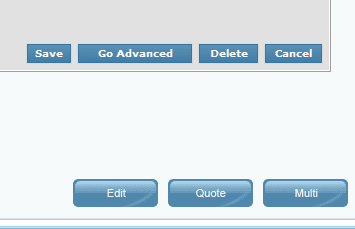
P.S There's not delete button for me :(

EDIT: Sorry, was tired when typing that, my P.C name is just the generic [username-pc]
 
Last edited:

My Computer My Computer

At a glance

WINdows 7 Home Premium 64bit
Computer type
Laptop
Computer Manufacturer/Model Number
Samsung
OS
WINdows 7 Home Premium 64bit
Antivirus
Avast!
Browser
Firefox
I need to refresh my memory by reading the thread again.

The hosts files is a means to redirect IP traffic to some address.

127.0.0.1 is the loop back address of every machine. What that means is when a domain name needs to be translated to the IP address, the protocol says look in hosts first, then the DNS.

If a domain is defined in the hosts file, the protocol uses that IP address otherwise it has to call on the DNS server to resolve the name to an IP address.

A std hosts file contains two entries, one for IPv4 and one for IPv6.

127.0.0.1 localhost
::1 localhost #[IPv6]

If there are other entries in the hosts file, then either you put them there or they are part of a defense mechanism of an AV program (Spybot S&D? or RUBotted?). I run Avast! and more scanners than I've suggested her, so it's not those.

Anyway, if the entries are 127.0.0.1 it's not an issue because it loops back to your machine - it doesn't go anywhere.
All of the domain names and addresses I've seen in this thred go into that loop, again that's ok.
127.0.0.1 AppleMobileDeviceService simply means that anything trying to reach AppleMobileDeviceService using IP will not go anywhere. same for anything else,

127.0.0.1 joes.com
127.0.0.1 joes.net
127.0.0.1 tomandjoes.org
putting any of those addesses in your browser won't see the light of day if they are defined in the hosts file as shown above.

Right click on Computer and selct properties - your computer name is on that window a litlte past the 1/2 mark

no delete button referes to deleting a post on this thread?
it has to be your post.

edit, delete, delete radio, delete this msg button

:ar: 4mDel0.PNG

:ar: 4mDel1.PNG

:ar: 4mDel2.PNG
 

My Computer My Computer

At a glance

x64 (6.3.9600) Win8.1 Pro & soon dual boot x6...AMD A6-3420M APU with Radeon(tm) HD Graphics6.00 GBAMD Radeon(TM) HD 6520G
Computer type
Laptop
Computer Manufacturer/Model Number
HP Pavilion dv6-6c10us
OS
x64 (6.3.9600) Win8.1 Pro & soon dual boot x64 (6.1.7601) Win7_SP1 HomePrem
CPU
AMD A6-3420M APU with Radeon(tm) HD Graphics
Motherboard
Hewlett-Packard 1805
Memory
6.00 GB
Graphics Card(s)
AMD Radeon(TM) HD 6520G
Sound Card
(1) AMD High Definition Audio Device (2) IDT High Definiti
Monitor(s) Displays
HP W2072a 20" LCD (1600 x 900) @ 60 Hz
Screen Resolution
1366 x 768 x 32 bits (4294967296 colors) @ 60 Hz
Hard Drives
ST640LM0 00 HM641JI SATA Disk Device
Keyboard
Logitech k520 wireless KB
Mouse
Logitech m320 wireless mouse (bundled with KB)
Internet Speed
15/5 | 54 MB Wireless 'n'
Antivirus
Realtime: Defender or Avast | On-demand: Malwarebytes, ESET
Browser
IE 11 on Win8, IE 10 on win 7
Other Info
Media: [Gimp, Audacity, VLC] || Comm: [WEmail 2012, Skype] || Productivity: [OpenOffice,| Textpad] || Utils: [Sysinternals, cCleaner, Speccy, Defraggler]
If there are other entries in the hosts file, then either you put them there or they are part of a defense mechanism of an AV program (Spybot S&D? or RUBotted?). I run Avast! and more scanners than I've suggested her, so it's not those.

Spybot S&D has added all the 1000+ entries to my hosts file, but I still don't get why some programs remote host name is 007guard(dot)com in Currports

I should also add my P.C name is NOT 007guard(dot)com as I said earlier, that was a pretty bad typo by me there... Very sorry! It's just [{myName}-PC], just the standard. Which still leaves me confused as to why the remote host names are 007guard(dot)com as you've helped me search for malware, and it doesn't seem to be that :S

Also, to do with deleting posts, not sure if it's linked to me being a new user or something, but there's only 'save' 'Go advanced' and 'cancel' Odd :S
 

My Computer My Computer

At a glance

WINdows 7 Home Premium 64bit
Computer type
Laptop
Computer Manufacturer/Model Number
Samsung
OS
WINdows 7 Home Premium 64bit
Antivirus
Avast!
Browser
Firefox
Back
Top