Suspicious 'Undo Rename' and delayed 'Undo Delete'

Francis93

New member
Guru
Gold Member
Local time
9:40 PM
Messages
1,113
Hey,

There are two things which have been bugging me off for some time now: a suspicious 'Undo Rename' in the right-click context menu even if I did not rename anything, and a delayed 'Undo Delete' in the right-click context (I deleted a shortcut from the desktop and it took some time for the Recycle Bin to be filled and an 'Undo Delete' option in the right-click menu to show up).

My User Account Control is set to maximum yet there's no UAC prompt to rename something. I didn't recall renaming a specific file(s) as well, all files from my desktop to folders remain "as is" or were unchanged.

Anyone here experienced the same, or am I just alone? I'm kinda paranoid today and I'm still looking for that renamed file.

Thanks and Happy Halloween.
 

My Computer

Computer type
PC/Desktop
Computer Manufacturer/Model Number
Custom Built
OS
Windows 7 Ultimate x64
CPU
Intel(R) Core(TM) 2 Quad Q8200 @ 2.33 GHz
Motherboard
Asus P5KPL-AM SE Motherboard
Memory
2x2GB Kingston DDR2
Graphics Card(s)
1GB AMD Radeon HD 5450
Sound Card
VIA Technologies High Definition Audio Device
Monitor(s) Displays
Samsung SyncMaster 733NW
Screen Resolution
1440x900
Hard Drives
SEAGATE 320GB Barracuda® 7200.12, SATA 3 Gb/s, 7200 RPM, 16MB cache x 2
Case
Custom Casing
Cooling
Ice cubes from the freezer ;)
Keyboard
Generic Plug & Play Keyboard
Mouse
Optical Mouse
Internet Speed
Very slow

My Computer

Computer Manufacturer/Model Number
HP Media Center
OS
Windows 7 32 bit
CPU
AMD 5200+ dual core
Memory
2 GB
Graphics Card(s)
NVidia GeForce 6150SE 128 MB
Monitor(s) Displays
CRT
Screen Resolution
1280x1024
Hard Drives
500 GB Sata internal :

SIIG USB 3.0 docking stations w/WD Caviar Black 6 Gb/s drives
Keyboard
PS/2
Mouse
PS/2 Wheel Mouse
Other Info
SIIG USB 3.0 PCIexpress card.
I don't recall running into that. But you can get weird stuff stuck in the Registry. On my Vista machine I couldn't delete anything in Explorer. Malwarebytes found a "no modify" key added onto Explorer in the Registry and cleaned it off.

Malwarebytes : Free anti-malware, anti-virus and spyware removal download

Alright, I'll scan my computer with MBAM. But I swear my computer is clean. My Hitman Pro has been scanning it daily and it hasn't found any infection.

What happened last night was very strange. I was just playing with Adobe Photoshop and after exiting the program, I right-clicked the desktop to refresh and this 'Undo Rename' suddenly appeared. I really couldn't recall what have I renamed. I didn't sleep well last night because of it. :(
 

My Computer

Computer type
PC/Desktop
Computer Manufacturer/Model Number
Custom Built
OS
Windows 7 Ultimate x64
CPU
Intel(R) Core(TM) 2 Quad Q8200 @ 2.33 GHz
Motherboard
Asus P5KPL-AM SE Motherboard
Memory
2x2GB Kingston DDR2
Graphics Card(s)
1GB AMD Radeon HD 5450
Sound Card
VIA Technologies High Definition Audio Device
Monitor(s) Displays
Samsung SyncMaster 733NW
Screen Resolution
1440x900
Hard Drives
SEAGATE 320GB Barracuda® 7200.12, SATA 3 Gb/s, 7200 RPM, 16MB cache x 2
Case
Custom Casing
Cooling
Ice cubes from the freezer ;)
Keyboard
Generic Plug & Play Keyboard
Mouse
Optical Mouse
Internet Speed
Very slow
The trouble with virus, rootkit and all the rest of it is there's no such thing as a "clean bill of health." There's always yet another malware that one program picks up and another doesn't. Makes it so you can never know for sure. Unfortunately.
 

My Computer

Computer Manufacturer/Model Number
HP Media Center
OS
Windows 7 32 bit
CPU
AMD 5200+ dual core
Memory
2 GB
Graphics Card(s)
NVidia GeForce 6150SE 128 MB
Monitor(s) Displays
CRT
Screen Resolution
1280x1024
Hard Drives
500 GB Sata internal :

SIIG USB 3.0 docking stations w/WD Caviar Black 6 Gb/s drives
Keyboard
PS/2
Mouse
PS/2 Wheel Mouse
Other Info
SIIG USB 3.0 PCIexpress card.
Done scanning with MBAM. Same results with Hitman Pro: Nothing found.
 

My Computer

Computer type
PC/Desktop
Computer Manufacturer/Model Number
Custom Built
OS
Windows 7 Ultimate x64
CPU
Intel(R) Core(TM) 2 Quad Q8200 @ 2.33 GHz
Motherboard
Asus P5KPL-AM SE Motherboard
Memory
2x2GB Kingston DDR2
Graphics Card(s)
1GB AMD Radeon HD 5450
Sound Card
VIA Technologies High Definition Audio Device
Monitor(s) Displays
Samsung SyncMaster 733NW
Screen Resolution
1440x900
Hard Drives
SEAGATE 320GB Barracuda® 7200.12, SATA 3 Gb/s, 7200 RPM, 16MB cache x 2
Case
Custom Casing
Cooling
Ice cubes from the freezer ;)
Keyboard
Generic Plug & Play Keyboard
Mouse
Optical Mouse
Internet Speed
Very slow

My Computer

Computer Manufacturer/Model Number
HP Media Center
OS
Windows 7 32 bit
CPU
AMD 5200+ dual core
Memory
2 GB
Graphics Card(s)
NVidia GeForce 6150SE 128 MB
Monitor(s) Displays
CRT
Screen Resolution
1280x1024
Hard Drives
500 GB Sata internal :

SIIG USB 3.0 docking stations w/WD Caviar Black 6 Gb/s drives
Keyboard
PS/2
Mouse
PS/2 Wheel Mouse
Other Info
SIIG USB 3.0 PCIexpress card.
Hi.

Sorry to dig up an old thread.
I just noticed the same thing in my context-menu. It shows "Undo Rename". If i click it, it shows "Undo Move". I haven't touched any file/folder. I haven't used File Explorer at all since booting up my PC. Unless it stores the last operation/s from the previous boot?
Is there a way to find out what file/folder this operation is pointing to?

Cheers.
 

My Computer

Computer type
Laptop
Computer Manufacturer/Model Number
Dell Precision M4400
OS
Windows 7 Professional x64 SP1
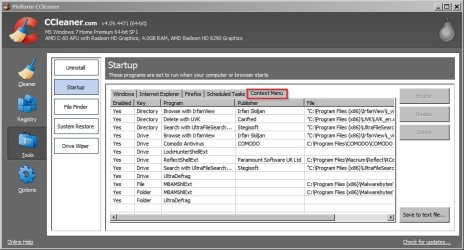
Ccleaner

Hi,

Do you have Ccleaner installed? If this is the case run the 64bit version

"C:\Program Files\CCleaner\CCleaner64.exe"

Then check the following screen for context menu entries. If you see the appropriate entry you can disable/ delete it from within Ccleaner.

Other than that it means using other third party context menu editors or else digging about in your registry.

CCleaner.jpg
 

My Computer

Computer type
Laptop
Computer Manufacturer/Model Number
ASUS
OS
Microsoft Windows 7 Home Premium 64-bit 7601 Multiprocessor Free Service Pack 1
CPU
AMD C-60 APU with Radeon(tm) HD Graphics
Motherboard
ASUSTeK COMPUTER INC. X501U
Memory
4.00 GB
Graphics Card(s)
AMD Radeon HD 6290 Graphics
Sound Card
(1) AMD High Definition Audio Device (2) Realtek High Defi
Screen Resolution
1366 x 768 x 32 bits (4294967296 colors) @ 60 Hz
Hard Drives
Hitachi HTS545050A7E380 SATA Disk Device
Antivirus
Comodo CIS & FW, SecureAplus App Whitelisting, Threatfire
Browser
Cyberfox 64bit, Opera 64bit, Airfox
Other Info
Spy-The-Spy, HitmanPro.Alert, Norton Connect Safe, MJRegWatcher, BitDefender TrafficLight, Voodoo Shield, Zemana AntiMalware
Everything seems normal.
What registry entires do i need to view to find out what file/folder 'File Explorer' will operate on if I click on "Undo/Redo Rename/Move/Delete"?
 

My Computer

Computer type
Laptop
Computer Manufacturer/Model Number
Dell Precision M4400
OS
Windows 7 Professional x64 SP1
Context Menu Entries

Do you mean "File Explorer" - as in third party software that you've installed?

Or File Explorer that's built into Windows?

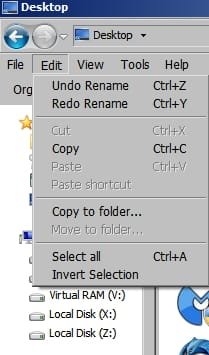
If it's the latter then it will simply undo the last file operation that you performed. In other words it applies to the last file or folder that you modified.

That's a standard Windows feature.


Menu.jpg

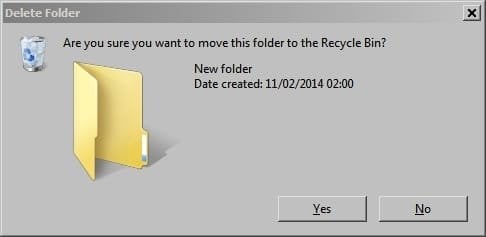
Try creating a new folder then within that folder create another new folder - then delete it. You will see that selecting Undo Delete retores it from the recycle bin!

New folder.jpgDelete Folder.jpgRestore folder.jpg
 
Last edited:

My Computer

Computer type
Laptop
Computer Manufacturer/Model Number
ASUS
OS
Microsoft Windows 7 Home Premium 64-bit 7601 Multiprocessor Free Service Pack 1
CPU
AMD C-60 APU with Radeon(tm) HD Graphics
Motherboard
ASUSTeK COMPUTER INC. X501U
Memory
4.00 GB
Graphics Card(s)
AMD Radeon HD 6290 Graphics
Sound Card
(1) AMD High Definition Audio Device (2) Realtek High Defi
Screen Resolution
1366 x 768 x 32 bits (4294967296 colors) @ 60 Hz
Hard Drives
Hitachi HTS545050A7E380 SATA Disk Device
Antivirus
Comodo CIS & FW, SecureAplus App Whitelisting, Threatfire
Browser
Cyberfox 64bit, Opera 64bit, Airfox
Other Info
Spy-The-Spy, HitmanPro.Alert, Norton Connect Safe, MJRegWatcher, BitDefender TrafficLight, Voodoo Shield, Zemana AntiMalware
Or File Explorer that's built into Windows?
This. I should probably have written "Windows Explorer". My apoligies.

I understand how it all works. I'll try to elaborate my issue.
- PC is off.
- I switch on PC and boot into windows.
- I open my browser to view content. I see a video I would like to watch but it's a bit dark. I decide i can brighten screen by going into gfx card setting.
- I go to desktop. Right-click on desktop because i can access gfx control panel shortcut from the context-menu.
- Hold on! Why is there an "Undo Rename" item in my context-menu?! I never did any file/folder renaming since I booted my PC.
- Curiously I click on "Undo Rename". Now it shows "Undo Move". WTF?! I haven't moved any file/folder either.
I haven't made any kind of file/folder copy/delete/move/rename operation since boot.

My questions is; Does Windows remember file/folder operations from last boot and carry it over to next boot? If not. Is there a registry entry that shows what file/folder Explorer will "Undo/Redo <operation>" on? If so. Please share. :)

Cheers.

PS. I mean... Unless I have the memory of a gold fish (which is kind of worrying me atm), I am quite sure i didn't do any file/folder operations before seeing this item in my context-menu.
 

My Computer

Computer type
Laptop
Computer Manufacturer/Model Number
Dell Precision M4400
OS
Windows 7 Professional x64 SP1
Research and findings

Hi, I've done some research and those "Undo Rename and Undo Delete" entries are normal. They appear after a user has renamed or deleted something. I find that those entries are not supposed to exist after a reboot. At least on my machine they vanish after a reboot.

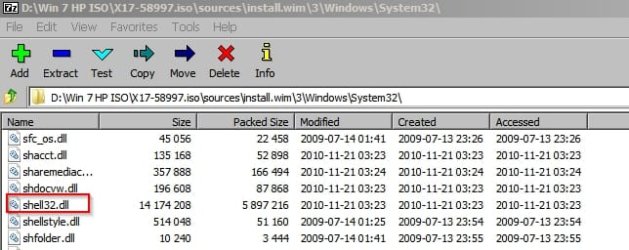
I reckon that it might be possible to relace your shell32.dll file from your Win 7 Ultimate ISO or DVD and replace it in your System32 and SysWOW64 folders and in theory it should return your context menu to default settings but I'm not at all confident that this will actually fix things. It's probably better to seek help on this from a more experienced forum member.

In any case a system image backup before going ahead is recommended.

Win 7 iso_sources.jpg
 

My Computer

Computer type
Laptop
Computer Manufacturer/Model Number
ASUS
OS
Microsoft Windows 7 Home Premium 64-bit 7601 Multiprocessor Free Service Pack 1
CPU
AMD C-60 APU with Radeon(tm) HD Graphics
Motherboard
ASUSTeK COMPUTER INC. X501U
Memory
4.00 GB
Graphics Card(s)
AMD Radeon HD 6290 Graphics
Sound Card
(1) AMD High Definition Audio Device (2) Realtek High Defi
Screen Resolution
1366 x 768 x 32 bits (4294967296 colors) @ 60 Hz
Hard Drives
Hitachi HTS545050A7E380 SATA Disk Device
Antivirus
Comodo CIS & FW, SecureAplus App Whitelisting, Threatfire
Browser
Cyberfox 64bit, Opera 64bit, Airfox
Other Info
Spy-The-Spy, HitmanPro.Alert, Norton Connect Safe, MJRegWatcher, BitDefender TrafficLight, Voodoo Shield, Zemana AntiMalware
It's OK now. I've found out what caused these suspicious entries. Turns out, if you copy/move/rename/delete a favourites link inside of Internet Explorer, it will use the shell to complete the operation causing a phantom unde/redo entry to appear in Windows Explorer.
I've been using Firefox for so long that I totally forgot that IE favourites are separate .url files inside of folders on the drive, whereas FF bookmarks are stored in a single file.

Anyways... Thanks for your time, Callender.
 

My Computer

Computer type
Laptop
Computer Manufacturer/Model Number
Dell Precision M4400
OS
Windows 7 Professional x64 SP1
For those who come across a phantom 'Undo/Redo <operarion>' entry appearing in Windows Explorer, or have just forgotten what file you last copied/moved/deleted/renamed, and would like to know what file Explorer will modify...
In Windows Explorer, set the layout to show both the 'Menu bar' and 'Status bar'. When both are visible, click 'Edit' on the 'Menu bar' and hover over the 'Undo/Redo' entry. The name of the file will be displayed on the 'Status bar'.
Unfortunately, it doesn't show directory structures.

Cheers.
 

My Computer

Computer type
Laptop
Computer Manufacturer/Model Number
Dell Precision M4400
OS
Windows 7 Professional x64 SP1
Back
Top