
cyanide911
New member
- Local time
- 3:52 AM
- Messages
- 5
Low Download speeds, possible svchost virus
Alright, so I need you guys' help.
I've been getting very low speeds in my downloads since a few days. Around 1/4 of what I should be getting.
But the thing is, that my torrents are downloading fine, at the usual high speeds they get.
EDIT: Checked again, torrents are slow too, now
It's just the HTTP downloads which are suffering, specifically from filesharing websites like RS or Hotfile. Streaming videos is a PAIN.
I checked using ProcessExplorer, svchost.exe is continuously recieving and sending some data to and from my computer. I have no update services or such running in the background so I don't know why this process is doing what it is.
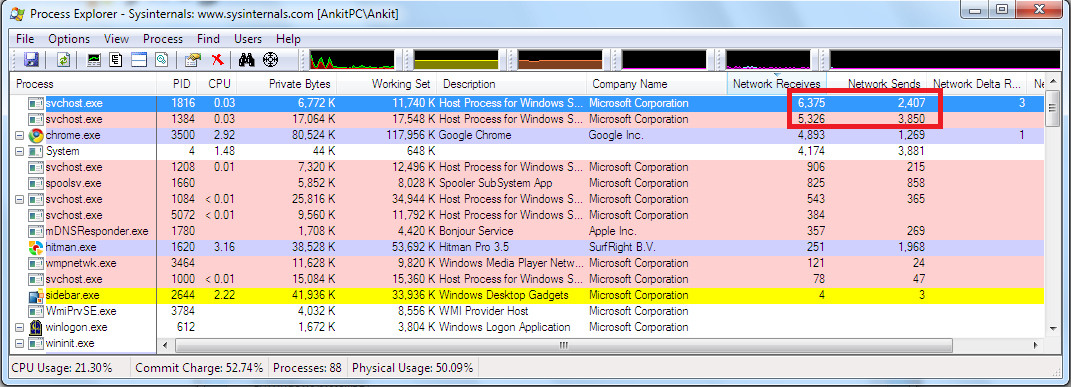
Any possible way I can diagnose this problem further? Probably there is some virus. Maybe my ISP have throttled/done something to the HTTP port.
I've done a scan using Microsoft Security Essentials, nothing found.
I searched a bit and on this fourm, found this: http://www.sevenforums.com/performance-maintenance/101726-svchost-exe-virus.html
He had a similar problem, and he solved it by running Hitman Pro. I tried it, it found a few things, cleaned them, but now there are still the 2 svchost.exe processes downloading stuff.
Alright, so I need you guys' help.
I've been getting very low speeds in my downloads since a few days. Around 1/4 of what I should be getting.
But the thing is, that my torrents are downloading fine, at the usual high speeds they get.
EDIT: Checked again, torrents are slow too, now
It's just the HTTP downloads which are suffering, specifically from filesharing websites like RS or Hotfile. Streaming videos is a PAIN.
I checked using ProcessExplorer, svchost.exe is continuously recieving and sending some data to and from my computer. I have no update services or such running in the background so I don't know why this process is doing what it is.
Any possible way I can diagnose this problem further? Probably there is some virus. Maybe my ISP have throttled/done something to the HTTP port.
I've done a scan using Microsoft Security Essentials, nothing found.
I searched a bit and on this fourm, found this: http://www.sevenforums.com/performance-maintenance/101726-svchost-exe-virus.html
He had a similar problem, and he solved it by running Hitman Pro. I tried it, it found a few things, cleaned them, but now there are still the 2 svchost.exe processes downloading stuff.
Last edited:
My Computer
- OS
- Windows 7 32bit


