svchost.exe *32 using 100% cpu

jasonp

New member
Local time
12:51 AM
Messages
14
Hi, my svchost is using 100% unused cpu, making my computer run incredibly slow. When I end the process it starts back up within 30 seconds. I've used multiple virus programs, cleaned and fixed my registry, and have tried to update windows. when i click go to service nothing is highlighted, I even tried manually clicking go to process on all running services.
I've searching on how to fix this for 3 days straight, any help would be appreciated.
OS Version: Microsoft Windows 7 Home Premium, 64 bit
Processor: AMD Phenom(tm) II X4 810 Processor, AMD64 Family 16 Model 4 Stepping 2
Processor Count: 4
RAM: 7935 Mb
Graphics Card: ATI Radeon HD 4650, 1024 Mb
Hard Drives: C: Total - 939430 MB, Free - 262409 MB; J: Total - 1907695 MB, Free - 1399556 MB;
Motherboard: Gateway, RS780
Antivirus: Microsoft Security Essentials, Disabled
 

Attachments
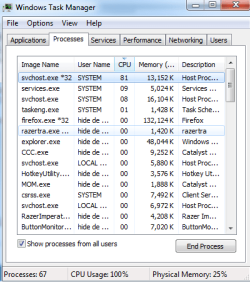
  • taskmngr.png
    taskmngr.png
    17.2 KB · Views: 33
Last edited:

My Computer

OS
windows 7
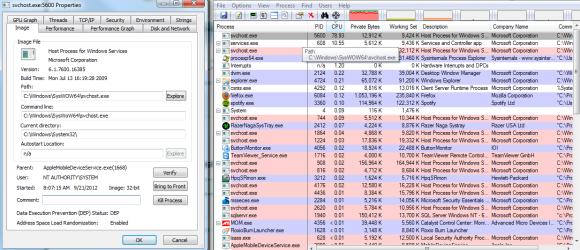
use process explorer and sort the process by CPU usage and then move the mouse over to the svchost*32 which you think is the one using most of the cpu and you will see on the popup the list of processes using svchost

Let me know what you see ... so i can advice accordingly
 

My Computer

Computer Manufacturer/Model Number
Nothing specific....what ever the clients provide for Repair
OS
Windows 7 ultimate x64
thanks for the reply, this is what came up
 

Attachments

  • svchost2.png
    svchost2.png
    64.4 KB · Views: 269

My Computer

OS
windows 7
Well lookee there

Thats the AppleMobileDeviceService.... that is using the SVchost with high CPU usage ...
 

My Computer

Computer Manufacturer/Model Number
Nothing specific....what ever the clients provide for Repair
OS
Windows 7 ultimate x64
Thats strange.... Hmm what version of itunes are you using ??? is you apple device connected now ??
 

My Computer

Computer Manufacturer/Model Number
Nothing specific....what ever the clients provide for Repair
OS
Windows 7 ultimate x64
I have itunes 10.5.3, and I have no apple device connected.
 

My Computer

OS
windows 7
hmmm

Could you update itune to 10.7.... but before you do this ... let see whats causing the high usage...

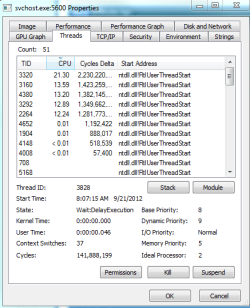
could you post the snapshot of the thread section of the same svchost
 

My Computer

Computer Manufacturer/Model Number
Nothing specific....what ever the clients provide for Repair
OS
Windows 7 ultimate x64
is this the thread section? and i'll try updating now...
 

Attachments

  • svchost3.png
    svchost3.png
    16.5 KB · Views: 62

My Computer

OS
windows 7
wait

before you update

can we have a teamviewer session... if you are interested ..use this ans PM me the use id and password of the teamviewer
 

My Computer

Computer Manufacturer/Model Number
Nothing specific....what ever the clients provide for Repair
OS
Windows 7 ultimate x64
I cant pm, probably because my account is new, is there any other way i can send you id and password?
 

My Computer

OS
windows 7
post a visitor msg to my profile
 

My Computer

Computer Manufacturer/Model Number
Nothing specific....what ever the clients provide for Repair
OS
Windows 7 ultimate x64
I don't have permission to make visitor messages either, sorry
 

My Computer

OS
windows 7
ok post it in here and later you can delete this entry once we finish.
 

My Computer

Computer Manufacturer/Model Number
Nothing specific....what ever the clients provide for Repair
OS
Windows 7 ultimate x64
Hello, I just restarted, my cpu was ~40% when i started up and after around a minute the svchost came up again and it's back at 100%, was there anything more i was supposed to type into cmd after restarting?
 

My Computer

OS
windows 7
Hello, I just restarted, my cpu was ~40% when i started up and after around a minute the svchost came up again and it's back at 100%, was there anything more i was supposed to type into cmd after restarting?

nope ... just try updating the itunes and let me know...
 

My Computer

Computer Manufacturer/Model Number
Nothing specific....what ever the clients provide for Repair
OS
Windows 7 ultimate x64
I updated itunes and not much changed. when looking up the ip on google (112.175.243.22) the only thing i havent done is run combofix

(wow, when I end the 3 svchost processes my cpu goes down to 0-1%,it goes back up though after 30 seconds)
 

My Computer

OS
windows 7
alright

lets get to the root cause of the problem

can we have a teamviewer session one more time ?
 

My Computer

Computer Manufacturer/Model Number
Nothing specific....what ever the clients provide for Repair
OS
Windows 7 ultimate x64
new pw
 
Last edited:

My Computer

OS
windows 7
Back
Top