
Svchost.exe (netsvcs) and download related issue

drZeyad

New member
Local time
5:42 AM
Messages
3
hello everyone,
i hope this is the right place to post this.

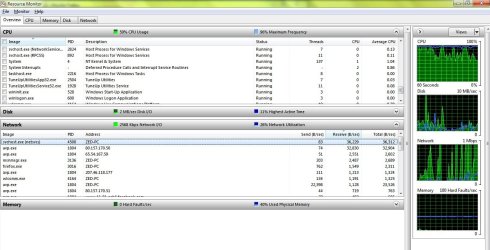
it started about 2 weeks ago, i noticed that this process, Svchost.exe (netsvcs), is always downloading something, i tried alot of ideas that i read about online and non of them worked, i was using certain anti-virus when it happened.

yesterday i did a complete format for the C drive, and setup a fresh version of windows 7, got Kaspersky, updated it, did a complete scan twice, and this process it still downloading !

please any ideas are welcome.
thanks in advance

GSI log:

GetSystemInfo Parser 2.96
 

Attachments
My Computer My Computer

At a glance

Windows 7 Ultimate x32
OS
Windows 7 Ultimate x32
hello everyone,
i hope this is the right place to post this.

it started about 2 weeks ago, i noticed that this process, Svchost.exe (netsvcs), is always downloading something, i tried alot of ideas that i read about online and non of them worked, i was using certain anti-virus when it happened.

yesterday i did a complete format for the C drive, and setup a fresh version of windows 7, got Kaspersky, updated it, did a complete scan twice, and this process it still downloading !

please any ideas are welcome.
thanks in advance

GSI log:

GetSystemInfo Parser 2.96

Svchost.exe is a com handler. It provides connectivity for other apps like your AVP, and many others. Its downloading at a minuscule rate (38kps.) and has little or no affect on the computer. svchost can consume huge amounts of cpu cycles and that is where is can be a problem.

Why are you concerned about the downloading? it could even be downloading AV sigs.
 

My Computer My Computer

At a glance

Win 8 Release candidate 8400[email protected]4 gigsNvidia 9600M
Computer Manufacturer/Model Number
HP Pavillion dv-7 1005 Tx
OS
Win 8 Release candidate 8400
CPU
[email protected]
Memory
4 gigs
Graphics Card(s)
Nvidia 9600M
Sound Card
HD built-in
Monitor(s) Displays
17" Wxga
Screen Resolution
1440x900
Cooling
none
Internet Speed
45Mb down 5Mb up
because i'm using a limited download connection :D, the anti-virus and the windows are up to date!
 

My Computer My Computer

At a glance

Windows 7 Ultimate x32
OS
Windows 7 Ultimate x32
hello everyone,
i found out which service was doin this, i'm gonna post it here in case someone had the same problem,
it's called BITS (Background Intelligent Transfer Service), i stopped it, disabled it and now everything is fine,
regards.
 

My Computer My Computer

At a glance

Windows 7 Ultimate x32
OS
Windows 7 Ultimate x32
hey you

i would love to here the solution, cause i'm struggling with the exact same problem.
 

My Computer My Computer

At a glance

win 7 professional x64
OS
win 7 professional x64
I would like to know too. I can locate the service BITS in Task Manager but I can't stop it -- Access Denied. There is never never never a time I want any background downloading to sneak in, so a permanent stopping/removal would be best.

By the way, this is not operating at a "minuscule rate", it is most of my bandwidth.
 

My Computer My Computer

At a glance

Win 7 Home Premium 64 bit
OS
Win 7 Home Premium 64 bit
Excessive bandwidth consumption svchost.exe

Same problem, I'm on limited internet access (satellite provider) and I kept exceeding my usage. Long story short, I've finally eliminated everything else and identified the problem as svchost.exe using NetLimiter3 (free download). I selected the process (it's usually listed as Process 700 or Process 708) and clicked on "kill process". It will start again upon reboot but I'll kill it each time until I do more research as to which instance of it I want to permanently delete.

My computer was using 100+ mb of bandwidth each hour.
 

My Computer My Computer

At a glance

Windows 7 65 bitAMD Athlon II X4 6404 GB
Computer Manufacturer/Model Number
HP
OS
Windows 7 65 bit
CPU
AMD Athlon II X4 640
Memory
4 GB
I seem to have solved my difficulty by instituting three restrictions.
Control Panel/Administrative Tools/Services
(1) disable: Background Intelligent Transfer Services
(2) set on manual: Windows Update

In spite of setting Control Panel/Windows Update/Change Settings to
Never Check for Updates
Windows seemed to be doing something without the two services set as above.


Adobe Reader was set, by default, under Preferences/Category Updater to Automatically download updates, without installing them.
(3) I changed that to Do Not

The following story isn't over yet, but while a friend who recently got cable broadband was happy, things did not seem quite right to me. I got him to run this Linux based check last night
Avira AntiVir Rescue System - Download
and it reported a half dozen different Trojans and something from Kazza, none of which were identified by the other security tools he has. The run was set up just to list the problems rather than to do anything about them, but that is a separate option.

He is rather clueless so I hope to be able to look at his results soon, and probably have the program remove what it found. Then I want to install and run the freeware version of Malwarebytes to look for more offenders
Malwarebytes : Free anti-malware, anti-virus and spyware removal download
 

My Computer My Computer

At a glance

Win 7 Home Premium 64 bit
OS
Win 7 Home Premium 64 bit
Back
Top