svchost.exe = slow startup (Win 7)

AVSIC

New member
Local time
8:37 AM
Messages
14
I wonder whether it is possible to speed up my OS (Win 7 Pro), that get slowed at the startup, by uninstalling some or most of updates?

FACTS:
It's relatively new OS that I bought together with my laptop. Hardware is not in question (3GB DDR3, Core 2 Due). I monitor my startup software with Winpatrol very accurately I must say.

Nevertheless, it seems that svchost.exe occupies more than 50% of CPU usage at startup that lasts about 10 mins before it starts to decrease percentage.
I found something quite similar to my problem: How to Solve the Svchost.Exe 100% Cpu Utilization Problem - wikiHow

I disabled Windows Updates and uninstalled unneeded ones but I left most of them (Security ones and MS Windows ones) untouched. There was actually no difference in speed, but, I think there is a problem.

So, to remove all updates or some of them or some other solution?
Thank you so much!
 

My Computer My Computer

OS
Windows 7 Pro
hello..
did you sure your computer not detected by virus??

when you type msconfig, going to startup tab..that's the application running on startup n some of the service is run at the time too. you can also disable from there.
 

My Computer My Computer

Computer Manufacturer/Model Number
built up
OS
windows 7
CPU
Phenom II AMD Dragon 3.5Ghz
Memory
DDR3 4GB
Graphics Card(s)
ATI Radeon 512Mb
Monitor(s) Displays
HP L1506
Screen Resolution
1152 x 864
Hard Drives
WDC 1 TB SATA-II Green Power
Keyboard
HP wireless keyboard
Mouse
HP Optic
Internet Speed
1GB
Thanks ryo for showing me a new interesting way to monitor what is running! ;)
I am however pretty sure there is no virus or spyware because of a trustful software - BitDefender Total Security 2010.

My question would be: is it safe to uninstall all MS Updates? Or this would not be wise...
 

My Computer My Computer

OS
Windows 7 Pro
my laptop, i'm disable the update..because i think n i not need the update.
so when if you not update the path of windows that's could be run too like usually. but you must make sure that's your uninstall is don't change the system of the windows.
 

My Computer My Computer

Computer Manufacturer/Model Number
built up
OS
windows 7
CPU
Phenom II AMD Dragon 3.5Ghz
Memory
DDR3 4GB
Graphics Card(s)
ATI Radeon 512Mb
Monitor(s) Displays
HP L1506
Screen Resolution
1152 x 864
Hard Drives
WDC 1 TB SATA-II Green Power
Keyboard
HP wireless keyboard
Mouse
HP Optic
Internet Speed
1GB
It would be too much complicated to ask which updates from the list "should" I remove, but for now I wouldn't do any removing, thank you!
I am interested in one more thing... if ALL MS Updates are removed (including office 2007, security ones for Windows etc.) what would happen?
 

My Computer My Computer

OS
Windows 7 Pro
Do you know for sure which svchost.exe is consuming the CPU on startup? There are many, and each can contain multiple services. Just because *a* svchost.exe is consuming memory doesn't mean you have a windows update problem (besides, that was actually an MSI engine problem, on XP, which was fixed for XPSP2 with a hotfix (and included in XPSP3). The problem should not exist on a Vista or Win7 machine.
 

My Computer My Computer

Computer type
PC/Desktop
Computer Manufacturer/Model Number
Custom
OS
Windows 10 Pro x64
CPU
Intel Core i7 4790K @ 4.5GHz
Motherboard
Asus Maximus Hero VII
Memory
32GB DDR3
Graphics Card(s)
Nvidia GeForce GTX970
Sound Card
Realtek HD Audio
Screen Resolution
1920x1200
Hard Drives
1x Samsung 250GB SSD
4x WD RE 2TB (RAIDZ)
PSU
Corsair AX760i
Case
Fractal Design Define R4
Cooling
Noctua NH-D15
It would be too much complicated to ask which updates from the list "should" I remove, but for now I wouldn't do any removing, thank you!
I am interested in one more thing... if ALL MS Updates are removed (including office 2007, security ones for Windows etc.) what would happen?

sorry for the late reply.. don't remove the security or office 2007,i think you're using office 2007. that's such of program, and i think you need it. right?
so you can choose what the feature or programs that's you're using.
 

My Computer My Computer

Computer Manufacturer/Model Number
built up
OS
windows 7
CPU
Phenom II AMD Dragon 3.5Ghz
Memory
DDR3 4GB
Graphics Card(s)
ATI Radeon 512Mb
Monitor(s) Displays
HP L1506
Screen Resolution
1152 x 864
Hard Drives
WDC 1 TB SATA-II Green Power
Keyboard
HP wireless keyboard
Mouse
HP Optic
Internet Speed
1GB
Don't know if you are still keeping up with this, but I would not remove any updates, and leave windows updates as auto or ask you first. They can fix minor problems and help keep out malware (just having an AV is never enough). svchost are your services. A lot of the ones that run automatically can by set to manual and there are a couple that should be turned off for security reasons, like remote registry. You can find list online that tell you which ones can be set to manual or disabled. Be assured that not all can or should be. Also, I disable superfetch. By default it runs at startup and starts loading programs you use a lot. It can help those programs load faster when you actually open them but it can also slow down your PC when you login.
 

My Computer My Computer

Computer type
Laptop
Computer Manufacturer/Model Number
Toshiba P775-S7100
OS
Windows 7 Professional SP1 64-bit
CPU
Intel Core i5-2450M @2.5 GHz
Memory
6 GB DDR3 1333MHz
Graphics Card(s)
Intel HD 3000
Monitor(s) Displays
Built-in 17.3" LED; 22" Insignia NS-L22Q-10A
Screen Resolution
1600x900; 1360x768
Hard Drives
750 GB Hitachi
1TB Seagate FreeAgent External
Internet Speed
Verizon DSL Speed(Down/Up): 3360 Kbps / 800 Kbps
Antivirus
MSE and MBAM Pro
Browser
IE10
Don't know if you are still keeping up with this, but I would not remove any updates, and leave windows updates as auto or ask you first. They can fix minor problems and help keep out malware (just having an AV is never enough). svchost are your services. A lot of the ones that run automatically can by set to manual and there are a couple that should be turned off for security reasons, like remote registry. You can find list online that tell you which ones can be set to manual or disabled. Be assured that not all can or should be. Also, I disable superfetch. By default it runs at startup and starts loading programs you use a lot. It can help those programs load faster when you actually open them but it can also slow down your PC when you login.

i don't disable all the update, i just configure that by myself,,if i think that's feature or program doesn't use for me..so i custom it.
 

My Computer My Computer

Computer Manufacturer/Model Number
built up
OS
windows 7
CPU
Phenom II AMD Dragon 3.5Ghz
Memory
DDR3 4GB
Graphics Card(s)
ATI Radeon 512Mb
Monitor(s) Displays
HP L1506
Screen Resolution
1152 x 864
Hard Drives
WDC 1 TB SATA-II Green Power
Keyboard
HP wireless keyboard
Mouse
HP Optic
Internet Speed
1GB
IMHO it is not wise to remove Windows updates unless you find one that is causing problems with your system. I have never had Windows updates slow down any of my computers. Office 2007 can slow things down if it is started at boot. Using msconfig/start up and turn off Office and see if it starts quicker. If Office is needed at times just put it on your desktop and start it when needed. Using msconfig how many things have check marks; I have 5 every thing else starts when I ask it to. Just because you have programs doesn't mean they have to start at boot. Some time when download a program it will install itself to start at boot weather you want it to or not, so check that also in msconfig.
 

My Computer My Computer

Computer type
PC/Desktop
Computer Manufacturer/Model Number
Home made Desktop
OS
Windows 10 Pro. 64/ version 1709 Windows 7 Pro/64
CPU
Intel i7-6800K @ 4.3
Motherboard
ASUS X-99 Deluxe II
Memory
Corsair Platinum 16 gig @2400
Graphics Card(s)
EVGA GTX 1070 OC
Monitor(s) Displays
Asus 27" LED LCD/VE278Q
Screen Resolution
1920-1080 or 1280-720 HDMI
Hard Drives
INTEL SSD 730-240 Gb Sata 3.0/
PSU
EVGA Platium 1200W
Case
Phanteks Luxe Tempered Glass 8 fans/ one radiator
Cooling
XSPC/ Water Cooled CPU
Keyboard
Das 4 Professional
Mouse
Logitech M705/MX Anywhere 2-S
Internet Speed
100 mbits
Antivirus
Microsoft Security Essentials/ Malwarebytes Premium 3.0/ SAS
Browser
I.E. 11 default/Firefox/ ISP Time Warner Cable/Spectrum
Other Info
LG BluRay Burner/
Sound system-KLipsch-THX/
Icy Dock ssd Hot Swap bays.
ryo, that was meant just for the OP, not you. He was considering removing security updates which is a big no-no. I choose which updates to install as well. For some reason Windows updates wanted to install an old version of my graphics card driver. I had to uninstall the driver and reinstall the new one, and reconfigure everything for it.
 

My Computer My Computer

Computer type
Laptop
Computer Manufacturer/Model Number
Toshiba P775-S7100
OS
Windows 7 Professional SP1 64-bit
CPU
Intel Core i5-2450M @2.5 GHz
Memory
6 GB DDR3 1333MHz
Graphics Card(s)
Intel HD 3000
Monitor(s) Displays
Built-in 17.3" LED; 22" Insignia NS-L22Q-10A
Screen Resolution
1600x900; 1360x768
Hard Drives
750 GB Hitachi
1TB Seagate FreeAgent External
Internet Speed
Verizon DSL Speed(Down/Up): 3360 Kbps / 800 Kbps
Antivirus
MSE and MBAM Pro
Browser
IE10
yap..like i said before..use msconfig at startup tab and services. that's can disable from there.
and the other information,some of the windows update is can cause a problem. and i saw many case of it. so that's i mean is you can custom what you want to install the update.
 

My Computer My Computer

Computer Manufacturer/Model Number
built up
OS
windows 7
CPU
Phenom II AMD Dragon 3.5Ghz
Memory
DDR3 4GB
Graphics Card(s)
ATI Radeon 512Mb
Monitor(s) Displays
HP L1506
Screen Resolution
1152 x 864
Hard Drives
WDC 1 TB SATA-II Green Power
Keyboard
HP wireless keyboard
Mouse
HP Optic
Internet Speed
1GB
ryo, that was meant just for the OP, not you. He was considering removing security updates which is a big no-no. I choose which updates to install as well. For some reason Windows updates wanted to install an old version of my graphics card driver. I had to uninstall the driver and reinstall the new one, and reconfigure everything for it.

yap i know that.. and i just explain. :o and congratulation on you 400 post. :party:
 

My Computer My Computer

Computer Manufacturer/Model Number
built up
OS
windows 7
CPU
Phenom II AMD Dragon 3.5Ghz
Memory
DDR3 4GB
Graphics Card(s)
ATI Radeon 512Mb
Monitor(s) Displays
HP L1506
Screen Resolution
1152 x 864
Hard Drives
WDC 1 TB SATA-II Green Power
Keyboard
HP wireless keyboard
Mouse
HP Optic
Internet Speed
1GB
Ok...
I have control over many startup programs and would like to ask something about services... For example, there are services related to VMware workstation that are "running". If these ones are stopped, will VMware app load normally when I want to load this program?
Or should I turn them on, and after that, start the program?

P.S. Sorry for the late reply.:)
 

My Computer My Computer

OS
Windows 7 Pro
when you stop the service..then you load the vmware..that would automatically run the service when you run the vmware...but you should try it..
 

My Computer My Computer

Computer Manufacturer/Model Number
built up
OS
windows 7
CPU
Phenom II AMD Dragon 3.5Ghz
Memory
DDR3 4GB
Graphics Card(s)
ATI Radeon 512Mb
Monitor(s) Displays
HP L1506
Screen Resolution
1152 x 864
Hard Drives
WDC 1 TB SATA-II Green Power
Keyboard
HP wireless keyboard
Mouse
HP Optic
Internet Speed
1GB
Thank you!
And how to prevent some services from starting at the startup?

Can this selection be done using msconfig by unchecking services I want to stop permanently?
Thank you once again for your time! ;)
 
Last edited:

My Computer My Computer

OS
Windows 7 Pro
yes you can disable it from msconfig. or other ways is from control panel then administrative tools and services.
search what service do you want to disable.
 

My Computer My Computer

Computer Manufacturer/Model Number
built up
OS
windows 7
CPU
Phenom II AMD Dragon 3.5Ghz
Memory
DDR3 4GB
Graphics Card(s)
ATI Radeon 512Mb
Monitor(s) Displays
HP L1506
Screen Resolution
1152 x 864
Hard Drives
WDC 1 TB SATA-II Green Power
Keyboard
HP wireless keyboard
Mouse
HP Optic
Internet Speed
1GB
I think it would be better to ask this before, rather than after doing changes:
Can a backup (even done by some program like CCleaner for example) help me returning to completely safer configuration and remove errors I can do by modifying services?
I will still think twice before doing so, but am afraid of making permanent errors that will keep showing even after backup... So, how much backup can help here? cca100%?
 

My Computer My Computer

OS
Windows 7 Pro
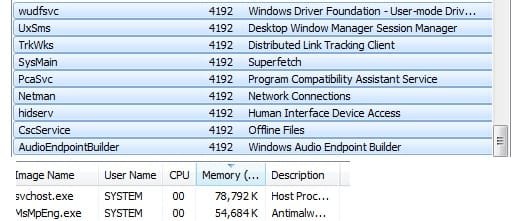
Hey, sorry to bump an old thread, however SCVHost is screwing my system. This week I did a fresh install of Windows, one day (like a week ago), my pc started lagging to no end, a simple "minimize" of firefox would take .5 of a second, I know my pc, i knew something was up, so i ran MSE & Malwarebytes... nothing, ran defrag, nothing, i ran ccleaner (registry cleaner), and nothing, after that I thought it was a virus, so i formatted my PC... to this day I still haven't fully restored the pc and it's doing it still... i've been having to leave Windows Task Manager open so I can see when it starts, it shoots up to 90k+ at times... when I went to processes it had the USB enumerator and several other "tasks" i don't recognize. When I see them open I'll take a screenshot and load it up here. I >THINK< it has to do with my Zune 30GB... it seems to act up more when it's plugged in... I'm not sure D:
 

My Computer My Computer

Computer Manufacturer/Model Number
HP Pavillion-Custom
OS
Windows 7 Ultimate 64bit
CPU
Intel Core 2 Quad CPU Q6600 @ 2.40GHz
Motherboard
dunno
Memory
4 GB Ram
Graphics Card(s)
ATI Radeon 4870
Sound Card
Built in
Monitor(s) Displays
21.5"ws & 20"
Screen Resolution
1680x1050 & 1600x1200
Hard Drives
1: 1TB Hitachi HDS
2: 500GB Seagate
PSU
850w
Case
HP Pavillion Style
Cooling
7 Interior fans + 2 power supply fans
Keyboard
MS Ergonomic 4000`
Mouse
Logitech MX518
Internet Speed
Comcast 20MB
Other Info
HP System
And, it did it again, as I stated it, here's a screenshot of the issues...
 

Attachments

  • pc issue.jpg
    pc issue.jpg
    25.5 KB · Views: 31

My Computer My Computer

Computer Manufacturer/Model Number
HP Pavillion-Custom
OS
Windows 7 Ultimate 64bit
CPU
Intel Core 2 Quad CPU Q6600 @ 2.40GHz
Motherboard
dunno
Memory
4 GB Ram
Graphics Card(s)
ATI Radeon 4870
Sound Card
Built in
Monitor(s) Displays
21.5"ws & 20"
Screen Resolution
1680x1050 & 1600x1200
Hard Drives
1: 1TB Hitachi HDS
2: 500GB Seagate
PSU
850w
Case
HP Pavillion Style
Cooling
7 Interior fans + 2 power supply fans
Keyboard
MS Ergonomic 4000`
Mouse
Logitech MX518
Internet Speed
Comcast 20MB
Other Info
HP System
Back
Top