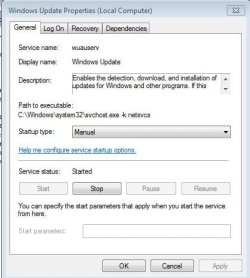
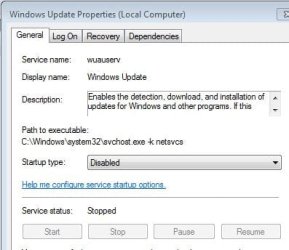
On start up,70% of ram is being used by my system.From taskmanager,i came to know that one of svchost processes(svchost processes->go to services->windows update) is comsuming app.1.5gb of ram.I came to know that windows update service "WUAUSERV" is causing trouble.I made startup type disabled and made service stopped.
Upon startup,this service is automatically started(this time startup type is manual) making me to repeat same thing.Is there any way to permanently disable this service so that it wont bother me again?
Upon startup,this service is automatically started(this time startup type is manual) making me to repeat same thing.Is there any way to permanently disable this service so that it wont bother me again?
Attachments
My Computer
At a glance
windows 7 ultimate 64 bitIntel core i3-2350M cpu@!2.30 Ghz4.00 GBAMD RADEON HD 6370M(1GB)
- Computer type
- Laptop
- Computer Manufacturer/Model Number
- LENOVO G570
- OS
- windows 7 ultimate 64 bit
- CPU
- Intel core i3-2350M cpu@!2.30 Ghz
- Motherboard
- Lenovo
- Memory
- 4.00 GB
- Graphics Card(s)
- AMD RADEON HD 6370M(1GB)
- Monitor(s) Displays
- Generic pnp Monitor
- Screen Resolution
- 1366*768
- Hard Drives
- ST9500325AS ATA device(500GB) NTFS
- Keyboard
- Standard ps/2 keyboard
- Mouse
- synaptics ps/2 port Touchpad
- Internet Speed
- 921.6 kbps(Dial up Connection)
- Antivirus
- Quick Heal,MSE
- Browser
- Opera,Chrome