Solved Swapping System Drive Letters in Dual Boot Setup

pjfarr

New member
Member
Local time
3:30 AM
Messages
78
I set up an XP/Win7 dual boot system using 2 partitions on a single hard disk (XP was pre-installed). All seemed to go smoothly, except for the fact that I couldn't boot from the Win7 DVD for some reason. The process would start loading files from the DVD but would keep stalling just after the progress bar got to 100% and disappeared. After several attempts and trying 2 different DVD drives, I ended up just running the Win7 setup.exe from XP and that got the install completed.

The problem is when I boot into Win7 the system drive is designated as "W:\" not "C:\" ("W" is the letter I assigned to it when creating the partition that would hold Win7). I hate this. Some people mentioned in different how-to's I checked out that their dual boot system automatically designates the system drive as "C:\" regardless of which OS they boot into or partition letters assigned to each OS. How can I get that to work?

Everything else seems to be working properly when in either XP or Win7.
 

My Computer

Computer Manufacturer/Model Number
ASUSTeK Computer INC.
OS
Microsoft Windows 7 Home Premium 32-bit 7601 Multiprocessor Free Service Pack 1
CPU
Intel(R) Core(TM)2 Quad CPU Q9400 @ 2.66GHz
Motherboard
ASUSTeK Computer INC. P5N-D
Memory
4.00 GB
Graphics Card(s)
NVIDIA GeForce 9800 GT
Sound Card
(1) Creative Audigy Audio Processor (WDM)
Screen Resolution
1280 x 1024 x 32 bits (4294967296 colors) @ 60 Hz
Hard Drives
(1) ST332062 0AS SCSI Disk Device (2) WDC WD32 00AAKS-00L9A SCSI Disk Device
Keyboard
Dell Media Keyboard (USB)
Mouse
MS Comfort Optical Mouse 3000 (USB)
The problem you are faced with is that by default Windows looks for the boot files on your C drive and that is why you've got a problem.

I'm fairly certain there is no other way round your problem, but to boot into Windows 7 and change the system (Windows) drive letter to C.

I'm just intrigued as to why you dislike the default settings so much.
 

My Computer

Computer Manufacturer/Model Number
HP Pavilion Elite 495UK
OS
Windows 7 Ultimate SP1 64-Bit
CPU
Intel Core i7 870 @ 2.93GHz
Motherboard
MSI 2A9C (CPU1)
Memory
8Gb Dual-Channel DDR3 @ 664MHz
Graphics Card(s)
nVidia GeForce GTX 460 1024MB dedicated RAM
Sound Card
Realtek HD Audio
Monitor(s) Displays
HP2310i
Screen Resolution
1920 x 1080
Hard Drives
1x1954GB Hitachi HDS22020ALA 330 (RAID), 1x1954GB Hitachi External for backup and storage
PSU
460W
Case
HP Elite
Cooling
Air cooled
Keyboard
Logitech K750 solar-powered keyboard
Mouse
Logitech Wireless M180 mouse
Internet Speed
2Mb
Other Info
Pure Avanti Flow Internet Radio with iPod Dock, 64Gb iPod, HP USB Speakers, Sony MDR-V500 Headphones, Sony Vaio F-Series Laptop
seavixen32:
By default settings do you mean the fact that Win7 defaulted to the "W:\" partition? I'm so used to the system drive being C:\ (which it is when I'm booted into XP) that it gets a little confusing, esp. since the C:\ is visible within Win7 in all navigational dialogs and I find myself going there by habit. Plus, I only plan on keeping XP until I get all my programs installed and configured on Win7 and give them all a thorough testing to make sure they're going to function properly in 7, which will take a few weeks or so. Then when XP's gone, I'd like my Win7 system drive to be C:\

When you say "boot into Windows 7 and change the system (Windows) drive letter to C", will that not wreak havoc on my system, esp. if the boot files are on C?
 

My Computer

Computer Manufacturer/Model Number
ASUSTeK Computer INC.
OS
Microsoft Windows 7 Home Premium 32-bit 7601 Multiprocessor Free Service Pack 1
CPU
Intel(R) Core(TM)2 Quad CPU Q9400 @ 2.66GHz
Motherboard
ASUSTeK Computer INC. P5N-D
Memory
4.00 GB
Graphics Card(s)
NVIDIA GeForce 9800 GT
Sound Card
(1) Creative Audigy Audio Processor (WDM)
Screen Resolution
1280 x 1024 x 32 bits (4294967296 colors) @ 60 Hz
Hard Drives
(1) ST332062 0AS SCSI Disk Device (2) WDC WD32 00AAKS-00L9A SCSI Disk Device
Keyboard
Dell Media Keyboard (USB)
Mouse
MS Comfort Optical Mouse 3000 (USB)
I'm still a bit confused as to why you changed the Windows 7 partition letter to W.

Please post a screenshot of your expanded disk management layout so we can see exactly what is going on.

http://www.sevenforums.com/tutorials/9733-screenshots-files-upload-post-seven-forums.html

What normally happens when you create a dual-boot system is this:

If you boot into XP that will take drive letter C and Windows 7 will take the next available drive letter; typically D.

If you boot into Windows 7 then 7 will take drive letter C.
 

My Computer

Computer Manufacturer/Model Number
HP Pavilion Elite 495UK
OS
Windows 7 Ultimate SP1 64-Bit
CPU
Intel Core i7 870 @ 2.93GHz
Motherboard
MSI 2A9C (CPU1)
Memory
8Gb Dual-Channel DDR3 @ 664MHz
Graphics Card(s)
nVidia GeForce GTX 460 1024MB dedicated RAM
Sound Card
Realtek HD Audio
Monitor(s) Displays
HP2310i
Screen Resolution
1920 x 1080
Hard Drives
1x1954GB Hitachi HDS22020ALA 330 (RAID), 1x1954GB Hitachi External for backup and storage
PSU
460W
Case
HP Elite
Cooling
Air cooled
Keyboard
Logitech K750 solar-powered keyboard
Mouse
Logitech Wireless M180 mouse
Internet Speed
2Mb
Other Info
Pure Avanti Flow Internet Radio with iPod Dock, 64Gb iPod, HP USB Speakers, Sony MDR-V500 Headphones, Sony Vaio F-Series Laptop
gregrocker:
Yeah, I had a feeling this happened because I installed Win7 while in XP (because I wasn't able to boot from the Win7 DVD). I didn't wipe the HD first because I wanted to keep XP and have access to it for the next few weeks. I didn't test the HD with the extended HD Diagnostic test you asked about, but before I created the extra partition for Win7, I did run an error check and full defrag.
 

My Computer

Computer Manufacturer/Model Number
ASUSTeK Computer INC.
OS
Microsoft Windows 7 Home Premium 32-bit 7601 Multiprocessor Free Service Pack 1
CPU
Intel(R) Core(TM)2 Quad CPU Q9400 @ 2.66GHz
Motherboard
ASUSTeK Computer INC. P5N-D
Memory
4.00 GB
Graphics Card(s)
NVIDIA GeForce 9800 GT
Sound Card
(1) Creative Audigy Audio Processor (WDM)
Screen Resolution
1280 x 1024 x 32 bits (4294967296 colors) @ 60 Hz
Hard Drives
(1) ST332062 0AS SCSI Disk Device (2) WDC WD32 00AAKS-00L9A SCSI Disk Device
Keyboard
Dell Media Keyboard (USB)
Mouse
MS Comfort Optical Mouse 3000 (USB)
I'm still a bit confused as to why you changed the Windows 7 partition letter to W.

If you install Windows 7 from the Win XP desktop, Windows 7 will use the same drive letters as Win XP.
Therefore if you install to Win XP drive W:, Windows 7 will take drive W: as it's drive letter.
 

My Computer

OS
ME/XP/Vista/Win7
When I set up the extra partition for Win7 on my C drive I assigned it the drive letter "W" since "C" wasn't available.
 

My Computer

Computer Manufacturer/Model Number
ASUSTeK Computer INC.
OS
Microsoft Windows 7 Home Premium 32-bit 7601 Multiprocessor Free Service Pack 1
CPU
Intel(R) Core(TM)2 Quad CPU Q9400 @ 2.66GHz
Motherboard
ASUSTeK Computer INC. P5N-D
Memory
4.00 GB
Graphics Card(s)
NVIDIA GeForce 9800 GT
Sound Card
(1) Creative Audigy Audio Processor (WDM)
Screen Resolution
1280 x 1024 x 32 bits (4294967296 colors) @ 60 Hz
Hard Drives
(1) ST332062 0AS SCSI Disk Device (2) WDC WD32 00AAKS-00L9A SCSI Disk Device
Keyboard
Dell Media Keyboard (USB)
Mouse
MS Comfort Optical Mouse 3000 (USB)
If you install Windows 7 from the Win XP desktop, Windows 7 will use the same drive letters as Win XP. Therefore if you install to Win XP drive W:, Windows 7 will take drive W: as it's drive letter.

All makes perfect sense. When starting the Win7 install from within XP it asked which partition I wanted to install to. I clicked the new partition of course since I was keeping XP, and the new partition was "W".
 

My Computer

Computer Manufacturer/Model Number
ASUSTeK Computer INC.
OS
Microsoft Windows 7 Home Premium 32-bit 7601 Multiprocessor Free Service Pack 1
CPU
Intel(R) Core(TM)2 Quad CPU Q9400 @ 2.66GHz
Motherboard
ASUSTeK Computer INC. P5N-D
Memory
4.00 GB
Graphics Card(s)
NVIDIA GeForce 9800 GT
Sound Card
(1) Creative Audigy Audio Processor (WDM)
Screen Resolution
1280 x 1024 x 32 bits (4294967296 colors) @ 60 Hz
Hard Drives
(1) ST332062 0AS SCSI Disk Device (2) WDC WD32 00AAKS-00L9A SCSI Disk Device
Keyboard
Dell Media Keyboard (USB)
Mouse
MS Comfort Optical Mouse 3000 (USB)
I'm still a bit confused as to why you changed the Windows 7 partition letter to W.

If you install Windows 7 from the Win XP desktop, Windows 7 will use the same drive letters as Win XP.
Therefore if you install to Win XP drive W:, Windows 7 will take drive W: as it's drive letter.

Thanks for that, as the OP says, it all makes sense now.
 

My Computer

Computer Manufacturer/Model Number
HP Pavilion Elite 495UK
OS
Windows 7 Ultimate SP1 64-Bit
CPU
Intel Core i7 870 @ 2.93GHz
Motherboard
MSI 2A9C (CPU1)
Memory
8Gb Dual-Channel DDR3 @ 664MHz
Graphics Card(s)
nVidia GeForce GTX 460 1024MB dedicated RAM
Sound Card
Realtek HD Audio
Monitor(s) Displays
HP2310i
Screen Resolution
1920 x 1080
Hard Drives
1x1954GB Hitachi HDS22020ALA 330 (RAID), 1x1954GB Hitachi External for backup and storage
PSU
460W
Case
HP Elite
Cooling
Air cooled
Keyboard
Logitech K750 solar-powered keyboard
Mouse
Logitech Wireless M180 mouse
Internet Speed
2Mb
Other Info
Pure Avanti Flow Internet Radio with iPod Dock, 64Gb iPod, HP USB Speakers, Sony MDR-V500 Headphones, Sony Vaio F-Series Laptop
If you install Win7 from XP desktop, it will take another letter besides C because XP is holding C.

XP is sitting on C and too old to know how to release it so that the booted OS can always be C as when Win7 and Vista are installed from boot.
 
At this point I have no problem starting over and giving it another go. Is the best way to go to delete the Win7 partition and recreate it without assigning it a drive letter? I still won't be able to boot from the Win7 DVD, since for some reason neither of my DVD drives will co-operate which is how I got into this mess in the first place. Someone recommended this article about installing Win7 from a USB drive, which sounds promising, but involved.
 

My Computer

Computer Manufacturer/Model Number
ASUSTeK Computer INC.
OS
Microsoft Windows 7 Home Premium 32-bit 7601 Multiprocessor Free Service Pack 1
CPU
Intel(R) Core(TM)2 Quad CPU Q9400 @ 2.66GHz
Motherboard
ASUSTeK Computer INC. P5N-D
Memory
4.00 GB
Graphics Card(s)
NVIDIA GeForce 9800 GT
Sound Card
(1) Creative Audigy Audio Processor (WDM)
Screen Resolution
1280 x 1024 x 32 bits (4294967296 colors) @ 60 Hz
Hard Drives
(1) ST332062 0AS SCSI Disk Device (2) WDC WD32 00AAKS-00L9A SCSI Disk Device
Keyboard
Dell Media Keyboard (USB)
Mouse
MS Comfort Optical Mouse 3000 (USB)

My Computer

Computer Manufacturer/Model Number
HP Pavilion Elite 495UK
OS
Windows 7 Ultimate SP1 64-Bit
CPU
Intel Core i7 870 @ 2.93GHz
Motherboard
MSI 2A9C (CPU1)
Memory
8Gb Dual-Channel DDR3 @ 664MHz
Graphics Card(s)
nVidia GeForce GTX 460 1024MB dedicated RAM
Sound Card
Realtek HD Audio
Monitor(s) Displays
HP2310i
Screen Resolution
1920 x 1080
Hard Drives
1x1954GB Hitachi HDS22020ALA 330 (RAID), 1x1954GB Hitachi External for backup and storage
PSU
460W
Case
HP Elite
Cooling
Air cooled
Keyboard
Logitech K750 solar-powered keyboard
Mouse
Logitech Wireless M180 mouse
Internet Speed
2Mb
Other Info
Pure Avanti Flow Internet Radio with iPod Dock, 64Gb iPod, HP USB Speakers, Sony MDR-V500 Headphones, Sony Vaio F-Series Laptop
You want to boot the installer or you'll not solve the drive letter problem. You also need it for Repairs if Win7 won't start.

Write the DVD ISO (extracted with ImgBurn) to flash stick using Universal USB Installer with Win7 in dropdown menu. Boot under USB, Removable, or HD's using one time Boot Menu key.

But you should be able to boot a good DVD if you tried other OD's. Did you burn it yourself? If so, confirm ISO or download another and burn to DVD using ImgBurn at 4x speed. Then use the one-time BIOS Boot Menu key, or set it to boot in BIOS: How to Boot your Computer from a Bootable CD or DVD
 
Thanks for all the great info guys.
seavixen32, the article looks interesting but I'll have more time to read it later this week. If I try the boot from USB technique, will it work with a USB Ext. drive too? I just glanced over the article at this point but it seems to be geared toward Flash drives.

gregrocker, it's a commercial DVD. I did see a "Removable" listing in my BIOS under in Boot sequence and it was the first listed until I changed it to my DVD drive, so my pc will boot from a USB drive. But as I asked sv32 does that go for an ext. HD as well?
 

My Computer

Computer Manufacturer/Model Number
ASUSTeK Computer INC.
OS
Microsoft Windows 7 Home Premium 32-bit 7601 Multiprocessor Free Service Pack 1
CPU
Intel(R) Core(TM)2 Quad CPU Q9400 @ 2.66GHz
Motherboard
ASUSTeK Computer INC. P5N-D
Memory
4.00 GB
Graphics Card(s)
NVIDIA GeForce 9800 GT
Sound Card
(1) Creative Audigy Audio Processor (WDM)
Screen Resolution
1280 x 1024 x 32 bits (4294967296 colors) @ 60 Hz
Hard Drives
(1) ST332062 0AS SCSI Disk Device (2) WDC WD32 00AAKS-00L9A SCSI Disk Device
Keyboard
Dell Media Keyboard (USB)
Mouse
MS Comfort Optical Mouse 3000 (USB)
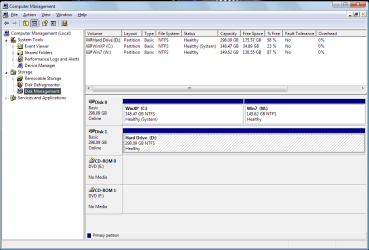
theog:
Is this what you're asking for?It's my Disk Management dialog (while in XP)

mmc.png
 

My Computer

Computer Manufacturer/Model Number
ASUSTeK Computer INC.
OS
Microsoft Windows 7 Home Premium 32-bit 7601 Multiprocessor Free Service Pack 1
CPU
Intel(R) Core(TM)2 Quad CPU Q9400 @ 2.66GHz
Motherboard
ASUSTeK Computer INC. P5N-D
Memory
4.00 GB
Graphics Card(s)
NVIDIA GeForce 9800 GT
Sound Card
(1) Creative Audigy Audio Processor (WDM)
Screen Resolution
1280 x 1024 x 32 bits (4294967296 colors) @ 60 Hz
Hard Drives
(1) ST332062 0AS SCSI Disk Device (2) WDC WD32 00AAKS-00L9A SCSI Disk Device
Keyboard
Dell Media Keyboard (USB)
Mouse
MS Comfort Optical Mouse 3000 (USB)
I'd use a flash stick as externals can be problematic but stick works every time.

Then set your HD first in BIOS so the stick doesn't interfere later during install by autostarting at reboots.

Use the one-time BIOS Boot Menu key to initially boot the flash stick.
 
I already own a program called PowerISO and I have a 4GB flash drive that's only been used a few times. I can clear everything off it, np.

So in PowerISO I would choose "Make image from CD/DVD ROM", select .iso as destination file and the flash drive as the destination. Correct?
 

My Computer

Computer Manufacturer/Model Number
ASUSTeK Computer INC.
OS
Microsoft Windows 7 Home Premium 32-bit 7601 Multiprocessor Free Service Pack 1
CPU
Intel(R) Core(TM)2 Quad CPU Q9400 @ 2.66GHz
Motherboard
ASUSTeK Computer INC. P5N-D
Memory
4.00 GB
Graphics Card(s)
NVIDIA GeForce 9800 GT
Sound Card
(1) Creative Audigy Audio Processor (WDM)
Screen Resolution
1280 x 1024 x 32 bits (4294967296 colors) @ 60 Hz
Hard Drives
(1) ST332062 0AS SCSI Disk Device (2) WDC WD32 00AAKS-00L9A SCSI Disk Device
Keyboard
Dell Media Keyboard (USB)
Mouse
MS Comfort Optical Mouse 3000 (USB)
I'm pretty sure however that PowerISO will extract the ISO intact as well as ImgBurn.

However the only app I've found which never fails writing to flash stick is Universal USB Installer with Win7 in dropdown menu. It's tiny and doesn't even need to be installed, just run it.
 
Back
Top