Solved Swapping System Drive Letters in Dual Boot Setup

You can make a bootable usb from an .iso with PowerIso.

Or, you can do it the easy way and Run as admin on the NT6Installer.cmd in here: View attachment NT6INSTALLER.zip
 

My Computers My Computers

System One System Two

  • Computer type
    PC/Desktop
    OS
    7 X64
    CPU
    i5 8400
    Motherboard
    gigabyte b365m ds3h
    Memory
    2x8gb 3200mhz
    Hard Drives
    various
    PSU
    pure power 11 400w cm
    Case
    Coolermaster
    Cooling
    cryorig m9i
  • Computer type
    PC/Desktop
    OS
    7x64
    CPU
    g5400
    Motherboard
    ga b365m ds3h
    Memory
    8gb ddr4 2400
    PSU
    xfx pro 450w

My Computer My Computer

Computer Manufacturer/Model Number
ASUSTeK Computer INC.
OS
Microsoft Windows 7 Home Premium 32-bit 7601 Multiprocessor Free Service Pack 1
CPU
Intel(R) Core(TM)2 Quad CPU Q9400 @ 2.66GHz
Motherboard
ASUSTeK Computer INC. P5N-D
Memory
4.00 GB
Graphics Card(s)
NVIDIA GeForce 9800 GT
Sound Card
(1) Creative Audigy Audio Processor (WDM)
Screen Resolution
1280 x 1024 x 32 bits (4294967296 colors) @ 60 Hz
Hard Drives
(1) ST332062 0AS SCSI Disk Device (2) WDC WD32 00AAKS-00L9A SCSI Disk Device
Keyboard
Dell Media Keyboard (USB)
Mouse
MS Comfort Optical Mouse 3000 (USB)
Yes. Use the installer Custom>Drive options to delete, create new, format and install.

You may need to use the method I gave you to write to stick if it won't boot.
 
Got 'er done this morning. Booting and installing from the USB stick went smoothly, and now the system drive is always designated as "C:\" regardless of which OS I boot into. Just want I wanted, thanks guys for all the top-notch help!

And now, just a couple new issues (*siiigh*):

* There are now 2 listings for Windows 7 in the boot menu (under "Earlier Version Of Windows"). How do I get rid of the extra one?

* When in XP, the drive letter for my Docs drive is D:\, which is what I want (it's an actual physical drive, not partition). When in Win7, it's bumped to E:\ as XP grabs the D:\ slot. I don't really care where the XP drive is designated when in Win7, as long as it's not D:\ as that breaks a lot of my shortcuts and custom hotkeys. Anyone know how to fix this new stupidness?
 

My Computer My Computer

Computer Manufacturer/Model Number
ASUSTeK Computer INC.
OS
Microsoft Windows 7 Home Premium 32-bit 7601 Multiprocessor Free Service Pack 1
CPU
Intel(R) Core(TM)2 Quad CPU Q9400 @ 2.66GHz
Motherboard
ASUSTeK Computer INC. P5N-D
Memory
4.00 GB
Graphics Card(s)
NVIDIA GeForce 9800 GT
Sound Card
(1) Creative Audigy Audio Processor (WDM)
Screen Resolution
1280 x 1024 x 32 bits (4294967296 colors) @ 60 Hz
Hard Drives
(1) ST332062 0AS SCSI Disk Device (2) WDC WD32 00AAKS-00L9A SCSI Disk Device
Keyboard
Dell Media Keyboard (USB)
Mouse
MS Comfort Optical Mouse 3000 (USB)
If you sort the boot menu out that will probably sort out the drive letter issue.

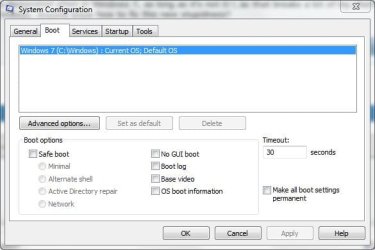
Click Start and type msconfig in the Search field then press Enter to bring up the System Configuration window.

Click the Boot tab and delete the redundant Windows 7 listing.

Boot.JPG
 

My Computer My Computer

Computer Manufacturer/Model Number
HP Pavilion Elite 495UK
OS
Windows 7 Ultimate SP1 64-Bit
CPU
Intel Core i7 870 @ 2.93GHz
Motherboard
MSI 2A9C (CPU1)
Memory
8Gb Dual-Channel DDR3 @ 664MHz
Graphics Card(s)
nVidia GeForce GTX 460 1024MB dedicated RAM
Sound Card
Realtek HD Audio
Monitor(s) Displays
HP2310i
Screen Resolution
1920 x 1080
Hard Drives
1x1954GB Hitachi HDS22020ALA 330 (RAID), 1x1954GB Hitachi External for backup and storage
PSU
460W
Case
HP Elite
Cooling
Air cooled
Keyboard
Logitech K750 solar-powered keyboard
Mouse
Logitech Wireless M180 mouse
Internet Speed
2Mb
Other Info
Pure Avanti Flow Internet Radio with iPod Dock, 64Gb iPod, HP USB Speakers, Sony MDR-V500 Headphones, Sony Vaio F-Series Laptop
Well, that was easy, lol. I actually tried looking in that tab already, but I was in XP at the time and Win7 wasn't even listed there and I thought I was screwed with another problem. Then it occurred to me to boot into 7 and try it from there.

So extra "Windows 7" is gone from boot menu (thanks, man.), but new drive letter issue remains. It's not an anal thing, I swear. My Doc drive has to be D:\ in both OS's due to a stack of shortcuts and custom hotkeys.
 

My Computer My Computer

Computer Manufacturer/Model Number
ASUSTeK Computer INC.
OS
Microsoft Windows 7 Home Premium 32-bit 7601 Multiprocessor Free Service Pack 1
CPU
Intel(R) Core(TM)2 Quad CPU Q9400 @ 2.66GHz
Motherboard
ASUSTeK Computer INC. P5N-D
Memory
4.00 GB
Graphics Card(s)
NVIDIA GeForce 9800 GT
Sound Card
(1) Creative Audigy Audio Processor (WDM)
Screen Resolution
1280 x 1024 x 32 bits (4294967296 colors) @ 60 Hz
Hard Drives
(1) ST332062 0AS SCSI Disk Device (2) WDC WD32 00AAKS-00L9A SCSI Disk Device
Keyboard
Dell Media Keyboard (USB)
Mouse
MS Comfort Optical Mouse 3000 (USB)
I think the only way round that one is to choose a different drive letter for your Documents drive that is well away from the C & D letters that XP and Win 7 use, something like J or K depending what other stuff you have in the way of optical and card reader drives.
 

My Computer My Computer

Computer Manufacturer/Model Number
HP Pavilion Elite 495UK
OS
Windows 7 Ultimate SP1 64-Bit
CPU
Intel Core i7 870 @ 2.93GHz
Motherboard
MSI 2A9C (CPU1)
Memory
8Gb Dual-Channel DDR3 @ 664MHz
Graphics Card(s)
nVidia GeForce GTX 460 1024MB dedicated RAM
Sound Card
Realtek HD Audio
Monitor(s) Displays
HP2310i
Screen Resolution
1920 x 1080
Hard Drives
1x1954GB Hitachi HDS22020ALA 330 (RAID), 1x1954GB Hitachi External for backup and storage
PSU
460W
Case
HP Elite
Cooling
Air cooled
Keyboard
Logitech K750 solar-powered keyboard
Mouse
Logitech Wireless M180 mouse
Internet Speed
2Mb
Other Info
Pure Avanti Flow Internet Radio with iPod Dock, 64Gb iPod, HP USB Speakers, Sony MDR-V500 Headphones, Sony Vaio F-Series Laptop
What if I was to use Disk Manager in Win7 to change XP to W and Docs back to D, then boot into XP and change Win7 to W (Docs are already on D there). Will it all stay that way? Or am I just asking for trouble because I can't leave well enough alone and deserve every bad thing that happens to me?

Currently:
In XP: XP=C (correct), Win7=G, Docs=D (correct)
In Win7: Win7=C (correct), XP=D, Docs=E

My Wish:
In both OS's: Booted OS=C (as it is now), other OS=W, Docs=D
 

My Computer My Computer

Computer Manufacturer/Model Number
ASUSTeK Computer INC.
OS
Microsoft Windows 7 Home Premium 32-bit 7601 Multiprocessor Free Service Pack 1
CPU
Intel(R) Core(TM)2 Quad CPU Q9400 @ 2.66GHz
Motherboard
ASUSTeK Computer INC. P5N-D
Memory
4.00 GB
Graphics Card(s)
NVIDIA GeForce 9800 GT
Sound Card
(1) Creative Audigy Audio Processor (WDM)
Screen Resolution
1280 x 1024 x 32 bits (4294967296 colors) @ 60 Hz
Hard Drives
(1) ST332062 0AS SCSI Disk Device (2) WDC WD32 00AAKS-00L9A SCSI Disk Device
Keyboard
Dell Media Keyboard (USB)
Mouse
MS Comfort Optical Mouse 3000 (USB)
What if I was to use Disk Manager in Windows 7 to change XP to W and Docs back to D, then boot into XP and change Windows 7 to W (Docs are already on D there). Will it all stay that way?

You will be fine to do that.
 

My Computers My Computers

System One System Two

  • Computer type
    PC/Desktop
    OS
    7 X64
    CPU
    i5 8400
    Motherboard
    gigabyte b365m ds3h
    Memory
    2x8gb 3200mhz
    Hard Drives
    various
    PSU
    pure power 11 400w cm
    Case
    Coolermaster
    Cooling
    cryorig m9i
  • Computer type
    PC/Desktop
    OS
    7x64
    CPU
    g5400
    Motherboard
    ga b365m ds3h
    Memory
    8gb ddr4 2400
    PSU
    xfx pro 450w
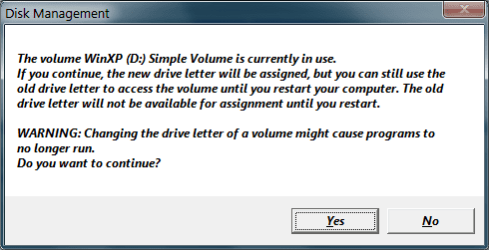
I attempted to make that change via Win7 Disk Manager, and got this and got very scared, so I answered "No" :

mmc_warn.png
 
Last edited:

My Computer My Computer

Computer Manufacturer/Model Number
ASUSTeK Computer INC.
OS
Microsoft Windows 7 Home Premium 32-bit 7601 Multiprocessor Free Service Pack 1
CPU
Intel(R) Core(TM)2 Quad CPU Q9400 @ 2.66GHz
Motherboard
ASUSTeK Computer INC. P5N-D
Memory
4.00 GB
Graphics Card(s)
NVIDIA GeForce 9800 GT
Sound Card
(1) Creative Audigy Audio Processor (WDM)
Screen Resolution
1280 x 1024 x 32 bits (4294967296 colors) @ 60 Hz
Hard Drives
(1) ST332062 0AS SCSI Disk Device (2) WDC WD32 00AAKS-00L9A SCSI Disk Device
Keyboard
Dell Media Keyboard (USB)
Mouse
MS Comfort Optical Mouse 3000 (USB)
Just click Yes, it just means the drive letter will change when you restart your computer.

Windows won't change drive letters while the computer is being used.
 

My Computer My Computer

Computer Manufacturer/Model Number
HP Pavilion Elite 495UK
OS
Windows 7 Ultimate SP1 64-Bit
CPU
Intel Core i7 870 @ 2.93GHz
Motherboard
MSI 2A9C (CPU1)
Memory
8Gb Dual-Channel DDR3 @ 664MHz
Graphics Card(s)
nVidia GeForce GTX 460 1024MB dedicated RAM
Sound Card
Realtek HD Audio
Monitor(s) Displays
HP2310i
Screen Resolution
1920 x 1080
Hard Drives
1x1954GB Hitachi HDS22020ALA 330 (RAID), 1x1954GB Hitachi External for backup and storage
PSU
460W
Case
HP Elite
Cooling
Air cooled
Keyboard
Logitech K750 solar-powered keyboard
Mouse
Logitech Wireless M180 mouse
Internet Speed
2Mb
Other Info
Pure Avanti Flow Internet Radio with iPod Dock, 64Gb iPod, HP USB Speakers, Sony MDR-V500 Headphones, Sony Vaio F-Series Laptop
Well I put the changes through and all is right again, although I have to admit I put it off for a couple hours due to nerves. I was reading too many contradicting things about changing drive letters of partitions with system files on them but finally bit the bullet.

Booted OS on C:\check.
Docs on D:\check.
Optical Drives on E:\ and F:\check.
Non-booted OS on W:\check.

Thank you, guys. Thank you, thank you. I appreciate the time you put into this.
 

My Computer My Computer

Computer Manufacturer/Model Number
ASUSTeK Computer INC.
OS
Microsoft Windows 7 Home Premium 32-bit 7601 Multiprocessor Free Service Pack 1
CPU
Intel(R) Core(TM)2 Quad CPU Q9400 @ 2.66GHz
Motherboard
ASUSTeK Computer INC. P5N-D
Memory
4.00 GB
Graphics Card(s)
NVIDIA GeForce 9800 GT
Sound Card
(1) Creative Audigy Audio Processor (WDM)
Screen Resolution
1280 x 1024 x 32 bits (4294967296 colors) @ 60 Hz
Hard Drives
(1) ST332062 0AS SCSI Disk Device (2) WDC WD32 00AAKS-00L9A SCSI Disk Device
Keyboard
Dell Media Keyboard (USB)
Mouse
MS Comfort Optical Mouse 3000 (USB)
Good work.

It is a bit of a gray area because you almost always ruin your OS when you change it's drive letter, but W was not the true XP drive letter (C) but a placeholder letter for XP while booted into Win7.

What made it safe is SIW2 saying so because he is our teacher here.
 
What made it safe is SIW2 saying so because he is our teacher here.

Actually, it was the apparent confidence you had in that statement when you said it earlier that convinced me it was the way to go. Thanks again.
 

My Computer My Computer

Computer Manufacturer/Model Number
ASUSTeK Computer INC.
OS
Microsoft Windows 7 Home Premium 32-bit 7601 Multiprocessor Free Service Pack 1
CPU
Intel(R) Core(TM)2 Quad CPU Q9400 @ 2.66GHz
Motherboard
ASUSTeK Computer INC. P5N-D
Memory
4.00 GB
Graphics Card(s)
NVIDIA GeForce 9800 GT
Sound Card
(1) Creative Audigy Audio Processor (WDM)
Screen Resolution
1280 x 1024 x 32 bits (4294967296 colors) @ 60 Hz
Hard Drives
(1) ST332062 0AS SCSI Disk Device (2) WDC WD32 00AAKS-00L9A SCSI Disk Device
Keyboard
Dell Media Keyboard (USB)
Mouse
MS Comfort Optical Mouse 3000 (USB)
You're most welcome. Glad to help.

I deleted my comment after SIW2 weighed in because he is the word here.
 
Well done from me too, it's always nice to hear of a successful outcome.
 

My Computer My Computer

Computer Manufacturer/Model Number
HP Pavilion Elite 495UK
OS
Windows 7 Ultimate SP1 64-Bit
CPU
Intel Core i7 870 @ 2.93GHz
Motherboard
MSI 2A9C (CPU1)
Memory
8Gb Dual-Channel DDR3 @ 664MHz
Graphics Card(s)
nVidia GeForce GTX 460 1024MB dedicated RAM
Sound Card
Realtek HD Audio
Monitor(s) Displays
HP2310i
Screen Resolution
1920 x 1080
Hard Drives
1x1954GB Hitachi HDS22020ALA 330 (RAID), 1x1954GB Hitachi External for backup and storage
PSU
460W
Case
HP Elite
Cooling
Air cooled
Keyboard
Logitech K750 solar-powered keyboard
Mouse
Logitech Wireless M180 mouse
Internet Speed
2Mb
Other Info
Pure Avanti Flow Internet Radio with iPod Dock, 64Gb iPod, HP USB Speakers, Sony MDR-V500 Headphones, Sony Vaio F-Series Laptop
Back
Top