Syncing Iphone with outlook 2010?

mcniglet

New member
Local time
8:03 PM
Messages
5
Can it be done? keeps telling me that outlook is not default mail program, but it is.
 

My Computer

OS
win 7 x64
CPU
Intel I7 920 @ 4253mhz
Motherboard
Evga E758
Memory
6GB Corsair Dominator
Graphics Card(s)
H.I.S Radeon 4890
Sound Card
On board
Monitor(s) Displays
Acer 22" LCD & 25" HannsG
Screen Resolution
1680x1050 & 1920x1080
Hard Drives
Two Seagate 500 GB Raid
One WD Black 1 TB
PSU
Xclio 1080
Case
Xclio Flagship
Cooling
MegaHalems
Keyboard
Microsoft Reclusa
Mouse
Logitech g9
Internet Speed
6MB/sec
Win7 RC + Office 2010 + iPhone 3Gs = FUBAR. I too get same error message(s), also get 'sync in progress' ad infinitum.

SOLUTION!! Virtual PC! I admit its the king of kludge solutions, but I did the following:
- Install older version of Microsoft OFFICE on Virtual PC
- install 'integration features'
- copy PST file from share to C drive on Virtual PC
- copy pictures etc to C Drive on virtual PC
- install iTunes on Virtual PC
- enable integraton features on Virtual PC
- click the "USB" dropdown on the Upper Left of Virtual PC and dedicate the iPhone to Virtual PC, and iPhone will now sync.

FWIW,
Frustrated bleeding edge end-user
 
Last edited:

My Computer

Computer Manufacturer/Model Number
Dell
OS
w7
CPU
M6400
Memory
12Gig
Graphics Card(s)
512Mb
Monitor(s) Displays
two - 27"
Hard Drives
500Gb *2
Hello,

I have the same pb.
Win7 Ultimate x64 -> Itunes 9.02.25 64bits -> Outlook 2010
Itunes telling me that outlook is not default mail program !!

Any solution ?
 

My Computer

OS
WIN 7 - 7600.16385 x64
Apple has to fix their software.

You could sync your email to google, and then from google to your iphone. Or you can get a hosted Exchange service and sync directly to the iphone.
 

My Computer

Computer Manufacturer/Model Number
Black_Box (homebuilt)
OS
windows 7 RTM x64
CPU
Phenom II 965 Quad Core 3.4Ghz
Motherboard
Asus M4A79T Deluxe
Memory
Mushkin Blackline 8GB (4x2gb)
Graphics Card(s)
XFX Radeon 5970 Black Edition
Sound Card
onboard
Monitor(s) Displays
Dell 2408WPF-main Dell E248WFP-secondary
Screen Resolution
1920x1200-main 1920x1200-secondary
Hard Drives
OCZ Vertex Limited Edition 100GB (OS)
x1 WD Black Edition 500GB drive (Storage)
PSU
XFX 850w Black Edition (Modular)
Case
Mountian Mods H2go
Cooling
CoolITSystems ECO A.L.C.
Keyboard
Logitech MX 5500 wireless keyboard
Mouse
Razor Copperhead
Internet Speed
16Mb down/2Mb up Wowway Cable Internet
Since Office 2010 is still not in full-release you'll find many add-ons and external apps that used to work in 2000/2003/2007 will not yet work in 2010. I ran into that with an app I use to synch my calendar and contacts to Google to synch to my Droid, which reminds me, I need to see if it's been updated (which I doubt)...
 

My Computer

Computer Manufacturer/Model Number
Home built
OS
Windows 7 Home Premium x64
CPU
Phenom II X4 955 BE
Motherboard
Asus Sabertooth 990FX
Memory
8 GB OCZ BE 1667
Graphics Card(s)
EVGA GeForce GTX470 SC
Monitor(s) Displays
BenQ 19"
Screen Resolution
1280x1024
Hard Drives
256 GB OCZ Vertex 3 SSD
2x WD 1 TB
1x WD 2 TB
PSU
Thermaltake 850W
Case
Coolermaster Cosmos 1000
Cooling
Air
Keyboard
Logitech
Mouse
Cyborg R.A.T 7
Internet Speed
Standard RR
I've been having the same problem, running 32 bit Office 2010, iTunes will not pick it up, tried uninstalling and reinstalling everything, made sure the addin is checked in Outlook, even tried running a scanpst.exe but that file seems not to be included with Outlook 2010. Any help would be apreciated.
 

My Computer

Computer Manufacturer/Model Number
Dell Inspiron 560
OS
Windows 7 Home Premium
CPU
Intel COre Duo ES7500 2.93 GHZ
Memory
8 GB
Hard Drives
1 TB
As I mentioned above, many add-ins do not support Office 2010 yet as it has not been officially released. Wait until it's released and suddenly EVERYTHING will support it.

I have a Droid, Google's Calendar sync does not support Office 2010 yet, I'm using the RC at work for testing...
 

My Computer

Computer Manufacturer/Model Number
Home built
OS
Windows 7 Home Premium x64
CPU
Phenom II X4 955 BE
Motherboard
Asus Sabertooth 990FX
Memory
8 GB OCZ BE 1667
Graphics Card(s)
EVGA GeForce GTX470 SC
Monitor(s) Displays
BenQ 19"
Screen Resolution
1280x1024
Hard Drives
256 GB OCZ Vertex 3 SSD
2x WD 1 TB
1x WD 2 TB
PSU
Thermaltake 850W
Case
Coolermaster Cosmos 1000
Cooling
Air
Keyboard
Logitech
Mouse
Cyborg R.A.T 7
Internet Speed
Standard RR
iTunes 9.2 was released on 6/17/2010 and it supports Office 2010 for syncing. I tested it with x64 version and it works.
 

My Computer

OS
Win 7
iTunes 9.2 was released on 6/17/2010 and it supports Office 2010 for syncing. I tested it with x64 version and it works.
Interesting, I'll check it out.
 

My Computer

Computer Manufacturer/Model Number
Custom Build
OS
Windows 7 7600 1 X64
CPU
AMD PHENOM II X 550 PROCESSOR 3.1 ghz
Motherboard
ASUS M4A78-TE
Memory
Corsair 4 gig ddr 3
Graphics Card(s)
ati radeon 3300
Sound Card
ati hd
Monitor(s) Displays
syncmaster 2033sw
Screen Resolution
1600X900 60 hz refresh
Hard Drives
twin_seagates SATA's 1 TB & 500 Gig, hitachi_slimline 160 gig
PSU
antec_550 watt
Case
cooler master GLite
Cooling
stock_heat sink
Internet Speed
20mbs up/ 1.5mbs down
Other Info
favorite child "stewie"
favorite dog "brian"
Glad to hear that. Was hoping Apple would be smart enough to do that now.
 

My Computer

Computer Manufacturer/Model Number
Alienware X51
OS
Windows 7 Home Premium x64
CPU
Intel Core i7-2600 @3.40GHz
Memory
8.00GB DDR3
Graphics Card(s)
NVIDIA GeForce GTX 555 w/1.0GB RAM
Monitor(s) Displays
BenQ XL2420TX
Screen Resolution
1920x1080@120Hz
Hard Drives
1TB
PSU
330-watt
Keyboard
Logitech Wireless Illuminated Keyboard K800
Mouse
Razer Orochi
Internet Speed
Campus Internet
iTunes 9.2 and Office 2010 64-bit

iTunes 9.2 was released on 6/17/2010 and it supports Office 2010 for syncing. I tested it with x64 version and it works.

I just want to get this clear before I uninstall 32-bit Office 2010 and install the 64-bit version:

Are you syncing with the 64-bit version of Office 2010 or
the 32-bit version of Office 2010 installed 64-bit Windows 7?
 

My Computer

Computer type
PC/Desktop
Computer Manufacturer/Model Number
Me
OS
Windows 7 Ultimate 64-bit
CPU
Intel Core i7 3770K
Motherboard
Asus P8Z77-V PRO
Memory
G.Skill ARES DDR3 1600 - 3 x 4GB
Graphics Card(s)
ASUS HD7770-DC-1GD5-V2
Sound Card
on board
Monitor(s) Displays
ASUS PB278Q PLS LED LCD 6ms
Screen Resolution
2560 x 1440
Hard Drives
Samsung 840 EVO SSD 500GB
2 x Seagate SATA3 2TB 64Mb Cache (ST2000DM001)
PSU
Corsair HX-650
Case
Coolermaster Centurion 5 II
Cooling
Coolermaster Hyper 212 Plus
Keyboard
Logitech K290
Mouse
MS Wireless Laser Mouse 5000
Internet Speed
100Mb down / 2.5Mb up
Other Info
Leadtek DTV2000DS Dual HD TV Tuner
USB3 kit for 2 front panel USB3 ports
iTunes 9.2 was released on 6/17/2010 and it supports Office 2010 for syncing. I tested it with x64 version and it works.

I just want to get this clear before I uninstall 32-bit Office 2010 and install the 64-bit version:

Are you syncing with the 64-bit version of Office 2010 or
the 32-bit version of Office 2010 installed 64-bit Windows 7?
I'm using the 64 bit version both for Office and Itunes.
 

My Computer

Computer Manufacturer/Model Number
Custom Build
OS
Windows 7 7600 1 X64
CPU
AMD PHENOM II X 550 PROCESSOR 3.1 ghz
Motherboard
ASUS M4A78-TE
Memory
Corsair 4 gig ddr 3
Graphics Card(s)
ati radeon 3300
Sound Card
ati hd
Monitor(s) Displays
syncmaster 2033sw
Screen Resolution
1600X900 60 hz refresh
Hard Drives
twin_seagates SATA's 1 TB & 500 Gig, hitachi_slimline 160 gig
PSU
antec_550 watt
Case
cooler master GLite
Cooling
stock_heat sink
Internet Speed
20mbs up/ 1.5mbs down
Other Info
favorite child "stewie"
favorite dog "brian"
I got the Product Download Key version of Home and Business 2010, to which I had to download from Microsoft. I assume it only lets you download the 32-bit version as I see no option for the 64-bit. Anyways when I load up iTunes it won't give me the option to sync anything to Outlook. There's no sign of it anywhere in the drop down boxes. I've tried uninstalling both and re-installing and still nothing.

Any ideas?
 

My Computer

OS
Windows 7 Ultimate
i have also the Product Key Download Version (32bit) on Windows Ultimate 64bit with iTunes 9.2 64bit.
iTunes will also not recognize Outlook and no sync with calanedar, contacts , notes or whatever is possible.
is there any way i can obtain a 64bit download version?

i wish i could return the Product key version and would gladly spend the extra $$$ to get the DVD with both versions on it....

Who is to blame?
Apple for not integration the 32bit office version (worked fine previously wiht office 2007)
MS for not making the 64bit version available as download version?


update:
installed the 64bit version (a bit difficult to find) but now it works.
you need to check the extended download options, then you can DL the full installers of 32 and 64bit office 2010 when you have the keycard version.
the klick & run installer doesn not seem to work with itunes.
 
Last edited:

My Computer

OS
Windows 7 Ultimate 64bit
Where did you find the 64 bit version? I only get the option to install the click to run version.

And you're confirming that the 64 bit version does show up in iTunes?

For the download I just went to Using The Product Key Card - Microsoft Office and then put in my key and logged in to my account and all it gave me the click to run installation and I dot see anything else. What should I do to get 64 bit? If this solves the issue I'm all for it.
 

My Computer

OS
Windows 7 Ultimate
yes the 64bit office install definetly works with itunes 9.2 (64bit) :)

chekc the webpage where you can download the small installer for klcik and run.
there should be a link to extended download options.
just click there.
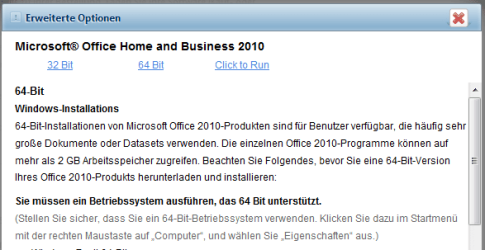
then a small popup appears and lets you choose between full installers of 32bit and 64bit as well as the click and run.
it is there to download and it works :)

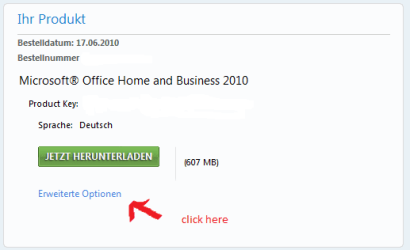
when you login into your account you see the details for your product keycard purchase.
there is a link to DOWNLOAD.
click there, you will get to a new page showing YOUR PRODUCT.
then click EXTENDED OPTIONS. this brings you to the popup that lets you select all versions of the installer.

i have some pics attached (in german, but you will get the idea)

Good luck!
 

Attachments

  • office.PNG
    office.PNG
    5.5 KB · Views: 49
  • 64bit.PNG
    64bit.PNG
    11.2 KB · Views: 53

My Computer

OS
Windows 7 Ultimate 64bit
Thanks so much I finally see the link! The issue is that it's my office PC i'm having the issues with so i'll have to give it a go on Monday.

But I definitely see it on the english download site, it says 'Advanced Options' and lets me choose 32, 64 or that awful crap click to run.

Thanks again! Hopefully it works!

Very odd the 32 bit wouldn't work but the 64 bit does. UNLESS the 32-bit does work its just the stupid 'click to run' version that doesn't. I'll have to do some playing around on Monday. I read elsewhere that the 64 bit version isn't compatible with various software so I wasn't sure if that might screw something up. Like AVG as it scans my Outlook emails, well it did, not sure if it does with 2010.
 

My Computer

OS
Windows 7 Ultimate
glad you could find it.
i am not sure if it is really 32bit or 64bit.
what i noticed is thet the click to run installation is installed on a virtual drive (has the letter Q on my PC)
i also noticed that i could not find outlook.exe on my PC when i had the click to run installation on my PC.
i think that is where the problem is. previously itunes 64bit also worked flawlessly on my 64bit Windows 7. so i guess since itunes can not locate outlook.exe it can not sync
i guess that a 32bit full install of office 2010 on windows 7 64bit would work as well with outlook, as the much needed outlook.exe will be there again.

no idea what this click to run really is. and what good it does..
 

My Computer

OS
Windows 7 Ultimate 64bit
All I read is that it install while you use it or some crap. No thanks!
 

My Computer

OS
Windows 7 Ultimate
Back
Top