Hi js,
In the same vein as what Jim said, I'd just go and get a new one, cost maybe 3.72BGP Intellect should have them, they're usually a CR2032
. Unless you have a manual from Intellect that tells you what the battery # is you'll have to remove the outer case of your machine to check for it. See how to change a CMOS battery link below and when inside the case be aware of the
ESD danger, all you have to do is touch the case with your finger to relieve the static charge, some will use a
ESD strap. while working inside the case.
Then while your there ask how to get into your BIOS because you'll have to reset the time there and check it within windows. There shouldn't be any other changes to your BIOS:
Date and Time - Change
Also ask if the battery is sitting in a clipped holder

or if it's in a holder and soldered in

This one is sitting in a clip:
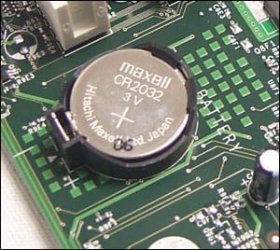
And if you're having trouble finding the battery get the make and model of your motherboard (MB) and we can help locate it for you, even better, take a shot of the MB or a snip of an existing pix and post that:
Screenshots and Files - Upload and Post in Seven Forums
This link suggests that you do reset the BIOS to its default values, but you'll still have to check the time, have you done any
overclocking to the BIOS?
How to replace the CMOS battery
Of course, this can all be avoided if your machine is still under warranty with Intellect, have them do it especially if it's soldered in, unless the warranty is out and you're handy with a soldering iron you're looking at their or another shop's service charge plus parts.



