System doesn't detect Graphics Card

CookieDough

New member
Local time
4:17 PM
Messages
3
Hello, I've been having this problem 2 days ago and it's a bit frustrating. I was just playing some games when it suddenly restarted automatically. My device manager doesn't seem to acknowledge my graphics card anymore for some apparent reason. I've tried plugging my monitor in my graphics card and it just seems like on a standby mode with the blank screen showing nothing. But when I plug my monitor to my motherboard port it shows up fine and is in the device manager. I've tried cleaning my drivers with "Driver Sweeper" then reinstalling the lastest driver for my graphics card, but that didn't do anything. I was hoping if anyone knows what's wrong with my graphics card :(. Thank you.

Is my graphics card burnt/broken?

EDIT:
Graphics card - Radeon x1900
 

My Computer

OS
Windows 7
OK first of all there are no drivers for Windows 7 supporting you card. Your card is not even supported by Windows Vista as support has been removed, therefore, the reason for the problems you have been experiencing is a driver issue not the card itself. You cannot use 6.5 drivers on you card, the reason why you are getting these blank screens and dropping out of games is because of the drivers.

Not the news you peobably wanted to here but an upgrade is needed the drivers which would have been used would have been Catalyst 9.3.

ATI Catalyst™ Display Driver
Version 9.3

9.3 Operating System(s)

Windows Vista - 32-Bit Edition Products Supported

AMD has moved a number of DX9 ATI Radeon™ graphics accelerators products to a legacy driver support structure. This change impacts Windows XP, Windows Vista, and Linux distributions. AMD has moved to a legacy software support structure for these graphics accelerator products in an effort to better focus development resources on future products.
The following products have been moved to the legacy software support structure (including Mobile and All-in-Wonder Variants):

ATI Radeon 9500 Series
ATI Radeon 9550 Series
ATI Radeon 9600 Series
ATI Radeon 9700 Series
ATI Radeon 9800 Series
ATI Radeon X300 Series
ATI Radeon X550 Series
ATI Radeon X600 Series
ATI Radeon X700 Series
ATI Radeon X800 Series
ATI Radeon X850 Series
ATI Radeon X1050 Series
ATI Radeon X1300 Series
ATI Radeon X1550 Series
ATI Radeon X1600 Series
ATI Radeon X1650 Series
ATI Radeon X1800 Series
ATI Radeon X1900 Series
ATI Radeon Xpress Series
ATI Radeon X1200 Series
ATI Radeon X1250 Series
ATI Radeon X2100 Series

AMD may periodically provide Windows XP and Windows Vista driver updates (for the products listed above) for critical fixes only. No new features will be provided in future driver updates. The Linux ATI Catalyst™ driver will only be supported in Linux distributions prior to February 2009 for the legacy products listed above.

Any customers using a combination of a ATI Radeon™ HD 2000 Series, ATI Radeon™ HD 3000 Series, or ATI Radeon™ HD 4000 Series product with any of the legacy products listed above in a single PC system must use the ATI Catalyst 9.3 or earlier driver. All future ATI Catalyst™ releases made available past the ATI Catalyst™ 9.3 release will not include support for the legacy products listed above or any of the features associated with those legacy products

 

My Computer

OS
Windows Vista 64-Bit
I having the same problem

I bought this new video card radeon 4350 the problem that im having is that
when it is plugged on add-in video card no display at all but when i plug the cable on integrated or on-board video card or what so ever... there goes the display...
when i look on the bios it doesn't detect anything... my desktop's spec's for other information

dell dimension e520
Intel(R) 3.40ghz
2gb ram
Geforce 7500 (integrated)
Windows 7 for OS
 

My Computer

OS
Windows 7 Ultimate x64
CPU
Intel Pentium D 945
Motherboard
Dell Inc. 0WG864(Microprocessor)
Memory
2.0gb DDR2
Graphics Card(s)
1280x1024 Intel(R) G865 Express Chipset Family
Sound Card
High Definition Audio Device
Screen Resolution
1280x1024
Hard Drives
78GB Seagate ST38015AS
go into the bios and disable the onboard then shut down install the card
then it should reconize the card on start up

you can leave the card in and do the same but to be safe disable the onboard and you should be able to use the card it has to be done in bios
 

My Computer

Computer type
PC/Desktop
Computer Manufacturer/Model Number
CoreI7-6700K MrFingerIII Special Builds
OS
Windows 10 Home Premium 64bit sp1
CPU
Intel I7-6700K @ 4.6 Ghz 1.344 volts everyday OC
Motherboard
Asrock Fatality K6 Z170 Socket 1151
Memory
32GB G-Skill TridentZ 3200mhz 16-18-18-38 DDR4
Graphics Card(s)
Sli Gigabyte Windforce GTX 980 G1
Sound Card
AC97 Creative Rage Tactic 3D Headphones Bluetooth
Monitor(s) Displays
27" Asus ROG Swift PG278Q G-Sync 48" Vizio Smart HD TV
Screen Resolution
2560x1440p 27"- 48" Currently Gaming at 2560x1440p Res 2K
Hard Drives
250GB Samsung Evo840SSD Seagate baracuda 500 GB WD Mybook 500Gb 1TB Seagate Barracuda
PSU
HX1050w Corsair Silver 80plus certified crosfire/sli
Case
Enthod Pro Full Tower
Cooling
Corsair H110i GT 280 mm High Performance WaterBlock
Keyboard
Logitech wireless keyboard
Mouse
Logitech wireless mouse
Internet Speed
Cox Cable 100+ mb
Antivirus
WebRoot Spysweeper with Antivirus
Browser
IE-10, Chrome, Opera
Other Info
My Other Rig is a AMD FX8320E @4.6Ghz 16GB Ballistic Sport Ram
Mobo Asrock Fatality 990FX 120GB OCZ SSD 1TB Seagate Barracuda Corsair H75 Cooling PSU Corsair CX750
GPU GTX Gigabyte 970G1
on my bios menu

after selecting video and what so ever
there are two selection between auto and onboard\PEG i've set it to auto
and nothing happens
 

My Computer

OS
Windows 7 Ultimate x64
CPU
Intel Pentium D 945
Motherboard
Dell Inc. 0WG864(Microprocessor)
Memory
2.0gb DDR2
Graphics Card(s)
1280x1024 Intel(R) G865 Express Chipset Family
Sound Card
High Definition Audio Device
Screen Resolution
1280x1024
Hard Drives
78GB Seagate ST38015AS
normally in windows 7 by default the card is always recognized so you should not need to alter bios?
if you have any driver or software for the card un-install it and turn off the pc take the card out replace it in the slots make sure its seated properly and reboot and windows should recognize and install drivers you can update after windows has finished with any extra software
 

My Computer

Computer Manufacturer/Model Number
packard bell IXTREME M5722
OS
Operating System : Windows 7 Home Premium Edition 6.01.7600 SP1 (x64)
CPU
Processor : Intel Core 2 Quad Q8300 @ 2500 MHz
Motherboard
Mainboard : Packard Bell (Acer EG43M )
Memory
Physical Memory :8GB Corsair4x 2GB 800MHz C5 DDR2
Graphics Card(s)
Video Card : XFX 6700 AMD
Monitor(s) Displays
Maestro 234DL - BenQ V2220 - BenQ VW2420H
Screen Resolution
Current Display :1920x1080p pixels at 60 Hz in HD LED
Hard Drives
Hard Disks : WDC (1000 GB)
Drive C: (Hard Disk) : 428 GB available on 491 GB
Drive D: (Hard Disk) : 426 GB available on 492 GB
SAMSUNG spinpoint HD103SJ 1000.2 GB
(X 2) KINGSTON SSD NOW V 30GB
PSU
XFX ProSeries 550W PSU
Case
PACKARD BELL IXTREME
Cooling
System Blower Current: 150mA Air Flow16CFM ;Akasa 90mm rear
Keyboard
Gigabyte Aivia K8100
Mouse
TRUST-Wireless Laser Mouse - Carbon edition MI-7770C
Internet Speed
TP-LINK > TL-WN951N / AV500 Gigabit Powerline Adapters
Browser
chrome dev
Other Info
EXTRA COOLING>(FAN CONTROLLER) PC Bay Cooler 3 x 40mm fans; Akasa AK-HD-BL Blue hard drive cooler 2 x 40 mm fan 4500 rpm 29.7 dBA
Bios> American Megatrends Inc.
Version : P01-A1
Date : 08/31/2009
my video card isn't showing at my device manager...
 

My Computer

OS
Windows 7 Ultimate x64
CPU
Intel Pentium D 945
Motherboard
Dell Inc. 0WG864(Microprocessor)
Memory
2.0gb DDR2
Graphics Card(s)
1280x1024 Intel(R) G865 Express Chipset Family
Sound Card
High Definition Audio Device
Screen Resolution
1280x1024
Hard Drives
78GB Seagate ST38015AS
Last edited by a moderator:

My Computer

Computer Manufacturer/Model Number
packard bell IXTREME M5722
OS
Operating System : Windows 7 Home Premium Edition 6.01.7600 SP1 (x64)
CPU
Processor : Intel Core 2 Quad Q8300 @ 2500 MHz
Motherboard
Mainboard : Packard Bell (Acer EG43M )
Memory
Physical Memory :8GB Corsair4x 2GB 800MHz C5 DDR2
Graphics Card(s)
Video Card : XFX 6700 AMD
Monitor(s) Displays
Maestro 234DL - BenQ V2220 - BenQ VW2420H
Screen Resolution
Current Display :1920x1080p pixels at 60 Hz in HD LED
Hard Drives
Hard Disks : WDC (1000 GB)
Drive C: (Hard Disk) : 428 GB available on 491 GB
Drive D: (Hard Disk) : 426 GB available on 492 GB
SAMSUNG spinpoint HD103SJ 1000.2 GB
(X 2) KINGSTON SSD NOW V 30GB
PSU
XFX ProSeries 550W PSU
Case
PACKARD BELL IXTREME
Cooling
System Blower Current: 150mA Air Flow16CFM ;Akasa 90mm rear
Keyboard
Gigabyte Aivia K8100
Mouse
TRUST-Wireless Laser Mouse - Carbon edition MI-7770C
Internet Speed
TP-LINK > TL-WN951N / AV500 Gigabit Powerline Adapters
Browser
chrome dev
Other Info
EXTRA COOLING>(FAN CONTROLLER) PC Bay Cooler 3 x 40mm fans; Akasa AK-HD-BL Blue hard drive cooler 2 x 40 mm fan 4500 rpm 29.7 dBA
Bios> American Megatrends Inc.
Version : P01-A1
Date : 08/31/2009
im using 64bit

i think it's because of dell's motherboard i think it's kinda picky

would you guys recommend to use xp instead of 7?

can anyone help me find my motherboard's driver here's the model wg864
 
Last edited by a moderator:

My Computer

OS
Windows 7 Ultimate x64
CPU
Intel Pentium D 945
Motherboard
Dell Inc. 0WG864(Microprocessor)
Memory
2.0gb DDR2
Graphics Card(s)
1280x1024 Intel(R) G865 Express Chipset Family
Sound Card
High Definition Audio Device
Screen Resolution
1280x1024
Hard Drives
78GB Seagate ST38015AS

My Computer

Computer Manufacturer/Model Number
packard bell IXTREME M5722
OS
Operating System : Windows 7 Home Premium Edition 6.01.7600 SP1 (x64)
CPU
Processor : Intel Core 2 Quad Q8300 @ 2500 MHz
Motherboard
Mainboard : Packard Bell (Acer EG43M )
Memory
Physical Memory :8GB Corsair4x 2GB 800MHz C5 DDR2
Graphics Card(s)
Video Card : XFX 6700 AMD
Monitor(s) Displays
Maestro 234DL - BenQ V2220 - BenQ VW2420H
Screen Resolution
Current Display :1920x1080p pixels at 60 Hz in HD LED
Hard Drives
Hard Disks : WDC (1000 GB)
Drive C: (Hard Disk) : 428 GB available on 491 GB
Drive D: (Hard Disk) : 426 GB available on 492 GB
SAMSUNG spinpoint HD103SJ 1000.2 GB
(X 2) KINGSTON SSD NOW V 30GB
PSU
XFX ProSeries 550W PSU
Case
PACKARD BELL IXTREME
Cooling
System Blower Current: 150mA Air Flow16CFM ;Akasa 90mm rear
Keyboard
Gigabyte Aivia K8100
Mouse
TRUST-Wireless Laser Mouse - Carbon edition MI-7770C
Internet Speed
TP-LINK > TL-WN951N / AV500 Gigabit Powerline Adapters
Browser
chrome dev
Other Info
EXTRA COOLING>(FAN CONTROLLER) PC Bay Cooler 3 x 40mm fans; Akasa AK-HD-BL Blue hard drive cooler 2 x 40 mm fan 4500 rpm 29.7 dBA
Bios> American Megatrends Inc.
Version : P01-A1
Date : 08/31/2009
can anyone help me find my motherboard's driver here's the model wg864
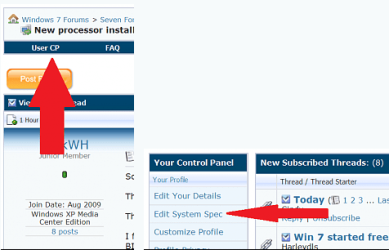
Please use this program to retrieve your full system specs. You need to include the motherboard manufacturer or the system manufacturer. Then we can be of more assistance. Speccy - System Information - Free Download

Once you have found out all your hardware please go to here and fill them out.

usercp 1.png

This way all a member needs to do is click on the My System Specs in the lower left hand corner of every post you make in order to know what system hardware you have.
Thanks. Fabe
 

My Computer

Computer Manufacturer/Model Number
Self Built
OS
Windows 7 ultimate 64 bit / XP Home sp3
CPU
intel Core 2 Duo E8400 3.0ghz
Motherboard
Asus P5ND bios 1401
Memory
8 gigs 1066 OCZ Fata1ty
Graphics Card(s)
EVGA GTX 580 Call of Duty Black Ops Edition
Sound Card
Creative Soundblaster Audigy 2zs
Monitor(s) Displays
Asus 24in LCD's 2MS X2
Screen Resolution
1920x1080p @60Hz
Hard Drives
WD Caviar 500 Black/ WD Caviar 200 Blue
PSU
OCZ 700W GameXtreme
Case
NZXT Apollo
Cooling
Corsair H50 CPU/120mm x3 /60mm x2 /Corsair Dominator Ram
Keyboard
Logitech Bluetooth Wireless MX5000
Mouse
Logitech Bluetooth Wireless MX1000
Internet Speed
Download 19.83 Upload 0.97
Other Info
Logitech Z2300 Speakers/ Bose Noise Cancelling Headphones/Avermedia PCI-e Hybrid TV Bravo/Epson NX415 all in one/ 4 Port Powered USB Hub/ LG 10x Bluray Burner /TSST Corp DVDRW External
Back
Top