System Event - Changing sound makes a sound, how to mute it?

shantyman

New member
Local time
7:28 PM
Messages
2
Location
Pembroke, ON
Did my searching and couldn't find this one...

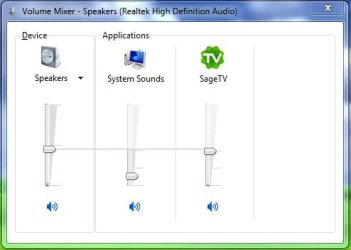
When I modify the speaker volume using the "Volume Mixer" icon, it generates a sound. When I adjust using the "Speakers/Headphones" icon, it does not make a sound.
I would like to mute the Windows 7 sound that happens when I adjust the sound, preferably without effecting the other system sounds? I can't find out which system 'event' it is that causes a sound to be generated when I modify the speaker volume. I'd like to mute it, i.e. no sound when I change the volume.
thanks
 

My Computer My Computer

At a glance

Windows 7 Home Premium 64bitPentium T4300
Computer Manufacturer/Model Number
Dell Inspiron 1545
OS
Windows 7 Home Premium 64bit
CPU
Pentium T4300

My Computer My Computer

At a glance

Windows 10, Home Clean InstallIntel Core2 processsor Q8200(2.33Ghz 1333FSB)...6 gbATI Radeon 256MB HD3650
Computer type
PC/Desktop
Computer Manufacturer/Model Number
Dell XPS 420
OS
Windows 10, Home Clean Install
CPU
Intel Core2 processsor Q8200(2.33Ghz 1333FSB) Quad Core Tech
Motherboard
Dell
Memory
6 gb
Graphics Card(s)
ATI Radeon 256MB HD3650
Sound Card
Intergrated 7.1 Channel Audio
Monitor(s) Displays
Dell SP2009W 20"
Hard Drives
640 GB Serial ATA Hard drive
Cooling
Fan
Keyboard
Dell USB Keyboard
Mouse
Dell Premium Optical USB
Internet Speed
DSL 2.85
well its not in that tutorial that I could see either...
Using the "Sound" control panel, in the list of "Program Events" that you can assign a sound to, there is no entry for "Change Volume" which is what I would like to see...
 

My Computer My Computer

At a glance

Windows 7 Home Premium 64bitPentium T4300
Computer Manufacturer/Model Number
Dell Inspiron 1545
OS
Windows 7 Home Premium 64bit
CPU
Pentium T4300
"System Sounds" adjustment is not sufficient?
Capture5.JPG
 

My Computer My Computer

At a glance

Windows 7 Home Premium 64 bitIntel Core i7-4790G.SKILL 8GB (2 x 4GB) DDR3 F3-10666CL9D-8GBNTAMD Radeon R7 250
Computer type
PC/Desktop
Computer Manufacturer/Model Number
Custom Build
OS
Windows 7 Home Premium 64 bit
CPU
Intel Core i7-4790
Motherboard
GA-Z87X-D3H
Memory
G.SKILL 8GB (2 x 4GB) DDR3 F3-10666CL9D-8GBNT
Graphics Card(s)
AMD Radeon R7 250
Sound Card
Realtek ALC892
Monitor(s) Displays
Samsung UN32EH5000, Dell 1703FPT
Screen Resolution
1920 x 1080, 1280 x 1024
Hard Drives
WD5003AZEX
WD10EZEX
Samsung HD103SJ
Samsung 128 GB 840 PRO
PSU
SeaSonic M12II SS-500GM
Case
Fractal Design Define R4
Cooling
Zalman CNPS9900ALED
Keyboard
Logitech K800
Mouse
Logitech M705
Internet Speed
16 Mbps
Antivirus
Avast
Browser
Firefox
Other Info
Bose Companion 2 Multimedia Speakers
Isn't it the 'default beep' sound?
 

My Computer My Computer

At a glance

Windows 7 Ultimate (SP1)AMD Sempron 3600+ATI Radeon Xpress 1150
Computer Manufacturer/Model Number
Vostro
OS
Windows 7 Ultimate (SP1)
CPU
AMD Sempron 3600+
Graphics Card(s)
ATI Radeon Xpress 1150
Screen Resolution
1200 x 800
Hard Drives
WD Scorpio Blue 500 GB
Back
Top