System freezes causing boot order to magically change?

mystikal

New member
Local time
4:25 PM
Messages
3
First off, my computer:
Windows 7 64 bit
8gb ram
128gb SSD with OS on it (boot 1) + 1 tb HDD with backup OS on it (boot 2) Nvidia GeForce 560 Ti
Intel i5 2500k 3.3 ghz

Now, for the problem. I will explain this as best as I can. Yesterday, my computer was working completely fine. I woke up today, and the first thing I see is my computer telling me that my copy of Windows is not genuine. Confused, I rebooted, and everything went back to normal.

Following this, a few hours later, my computer froze. I rebooted, and the same error popped up. This happened once more. After this, I realized that my computer magically decided to switch my boot order and boot to my 1tb HDD with the OS on it, which apparently isn't genuine. When I hit cancel and logged in, my SSD wasn't showing in my computer.

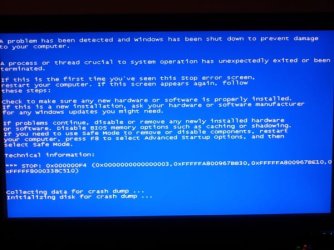
This just happened once more, after coming home from work. I thought my computer was fine, but I tried to minimize Chrome, and the entire system froze, again. Restarting, the boot order was switched twice this time, leaving me super confused.

The only thing that I think could have caused this, is a repairman at my house who cut the power which messed up my computer somehow. I don't have a backup and I don't have a restore point. Aside from that, I have no idea what is causing this. I just cleaned the dust out of my computer last week and I have never had any overheating problems. I have never seen anything like this before, so, any help would be appreciated.

A few more random things: I have had 3 system freezes while playing BF3. When I restart my computer, my SSD is not detected. When I turn it off, and then on. My SSD is recognized.

Now today, I reinstalled windows on my SSD and have a completely clean install. I decide to play TF2 for a bit and get a BSOD, which restarts my computer, which boots to my secondary HDD despite my SSD working fine. I have no idea why his is happening from a clean windows install.

I uploaded the reports from the SF Diag app below.
 

Attachments

My Computer My Computer

At a glance

Windows 7 Profession x64
OS
Windows 7 Profession x64
Okay, I am experiencing the exact same problem with a very similar system.

Windows 7 Home Premium x64
ASRock P67 Extreme4 Gen3
Intel i5-2500k @ stock 3.3 GHz
Nvidia GeForce GTX 570
8GB RAM
128GB Crucial M4 SSD


The CPU had been OC'd to 4.7GHz for about 1 year with no problems, however I put it back to stock while trying to figure out this problem.

So my apartment has crappy wiring and semi-frequent power flickers (Yeah, I know I need a UPS). I believe one occurred overnight less than a week ago because the LED lighting on my router which I normally turn off had been turned back on and my computer had reset to a boot device not found black screen. So I looked at my BIOS and my boot order had been reset. I fixed it and started up my computer.

Here's the problems I encountered (similar to OP):
While playing games, using Skype, Chrome, or Windows Explorer, or probably anything else the computer would randomly freeze up. I hadn't yet noticed this occur while it is sitting idle. The freezes appear to be more of an application not responding situation, but instead of being able to force quit, the computer just fails to execute any operation. So sometimes I can refocus on a different window, but I'm still forced to hard reset because the computer is completely locked up.

Occasionally when I restart the boot order gets reset again. I've only had this happen one more time beyond the initial occurrence.

Windows Update keeps updating and installing the same two .NET updates again and again and again, even though they're listed as being successfully installed in the programs list.

What I have done so far:
Wiped SSD and did a clean reinstall of Windows
Updated BIOS
Clocked CPU back to stock
Ran Windows Memory Diagnostic - OK

Initial impressions tell me the problem still persists. I've had a couple more freezes within the last hour similar to those experienced before. However, the Windows Update issue seems to be resolved now and I have yet to see the boot order reset again.

*UPDATE*
Freeze up happened again while refreshing browser page. Seems like all active applications sort of stop responding. Instead of hard restarting this time, I managed to get an "End Process" popup (I've had them before on these freezes, but it didn't seem to work). I mashed End Process about 100 times until the computer tried to do a system restart. It got partway though the process, locked up, and then proceeded to a BSOD (attached). It then restarted itself to having my boot order reset again and SSD not showing up as an option until I restarted again. Fixed boot order, and here I am again.
So no changes thus far.
//UPDATE

Anyone have a clue as to what is going on here?

Attached is my diag report.
 

Attachments

  • Cyths.zip
    Cyths.zip
    180.8 KB · Views: 0
  • BSODjpeg.jpg
    BSODjpeg.jpg
    42.8 KB · Views: 15
Last edited:

My Computer My Computer

At a glance

Windows 7 Home Premium x64
OS
Windows 7 Home Premium x64
Another update. I replaced the PSU in hopes voltage levels were unstable. Problem persists with a new PSU.
 

My Computer My Computer

At a glance

Windows 7 Home Premium x64
OS
Windows 7 Home Premium x64
I see the two of you are not getting any help here. You might get some responses if you post in Crashes and Debugging - Windows 7 Forums.

Meanwhile I would try to narrow the problem down to hardware or software. Mystikal should run his second OS, and Cyths could boot an Ubuntu Live disc. Boot from these instead of your SSD's to see if your hardware is OK.
 

My Computer My Computer

At a glance

Windows 7 Home Premium 64biti3-5308 Gbonboard
Computer Manufacturer/Model Number
HP p6370t
OS
Windows 7 Home Premium 64bit
CPU
i3-530
Motherboard
MSI - IONA
Memory
8 Gb
Graphics Card(s)
onboard
Sound Card
onboard
Monitor(s) Displays
Dell ST2400
Screen Resolution
1920x1080
Hard Drives
Intell 520 SSD 120Gb, WD6400AAKS, 640Gb & WD USB MyBook 1Tb
Internet Speed
1.5 Mmbps, Hughes Satellite
You will get a lot more help if one computer and OP in one thread at a time. Cyths if you could start your own new thread it would help. That way those that are helping can keep things straight.
 

My Computer My Computer

At a glance

Windows 10 Pro. 64/ version 1709 Windows 7 Pr...Intel i7-6800K @ 4.3Corsair Platinum 16 gig @2400EVGA GTX 1070 OC
Computer type
PC/Desktop
Computer Manufacturer/Model Number
Home made Desktop
OS
Windows 10 Pro. 64/ version 1709 Windows 7 Pro/64
CPU
Intel i7-6800K @ 4.3
Motherboard
ASUS X-99 Deluxe II
Memory
Corsair Platinum 16 gig @2400
Graphics Card(s)
EVGA GTX 1070 OC
Monitor(s) Displays
Asus 27" LED LCD/VE278Q
Screen Resolution
1920-1080 or 1280-720 HDMI
Hard Drives
INTEL SSD 730-240 Gb Sata 3.0/
PSU
EVGA Platium 1200W
Case
Phanteks Luxe Tempered Glass 8 fans/ one radiator
Cooling
XSPC/ Water Cooled CPU
Keyboard
Das 4 Professional
Mouse
Logitech M705/MX Anywhere 2-S
Internet Speed
100 mbits
Antivirus
Microsoft Security Essentials/ Malwarebytes Premium 3.0/ SAS
Browser
I.E. 11 default/Firefox/ ISP Time Warner Cable/Spectrum
Other Info
LG BluRay Burner/
Sound system-KLipsch-THX/
Icy Dock ssd Hot Swap bays.
Well I seem to have resolved my own problem. I'm not sure which did it, but I swapped my RAM into the other two bays and did a firmware update on my SSD.

3 hours and no crashes.

mystikal, if you're still having this problem and checking this thread, it might be worthwhile to attempt the same since we seem to be suffering the same symptoms.
 

My Computer My Computer

At a glance

Windows 7 Home Premium x64
OS
Windows 7 Home Premium x64
@Cyths

Glad to see you have the problem fixed!
 

My Computer My Computer

At a glance

Windows 7 Home Premium 64biti3-5308 Gbonboard
Computer Manufacturer/Model Number
HP p6370t
OS
Windows 7 Home Premium 64bit
CPU
i3-530
Motherboard
MSI - IONA
Memory
8 Gb
Graphics Card(s)
onboard
Sound Card
onboard
Monitor(s) Displays
Dell ST2400
Screen Resolution
1920x1080
Hard Drives
Intell 520 SSD 120Gb, WD6400AAKS, 640Gb & WD USB MyBook 1Tb
Internet Speed
1.5 Mmbps, Hughes Satellite
Did Cyths trick work

Hi mystikal,

I have very similar system with exactly the same problem, but I don't get any BSOD.

Did you try what Cyths suggested? If so can you let me know if it fixed it please?
 

My Computer My Computer

At a glance

Windows 7 Ultimate x64 Service Pack 1Intel I7 - 3770K8GB Corsair Vengence DDR3Intel HD4000
Computer Manufacturer/Model Number
DIY Built
OS
Windows 7 Ultimate x64 Service Pack 1
CPU
Intel I7 - 3770K
Motherboard
Asus P8Z77-M Pro
Memory
8GB Corsair Vengence DDR3
Graphics Card(s)
Intel HD4000
Sound Card
Realtek
Monitor(s) Displays
HP x2007v
Screen Resolution
1680 x 1050
Hard Drives
Corsair Force 3 240GB SSD
WDC WD6400AAKS HDD
Maxtor DTM3320820AS HDD
Cooling
Arctic Cooling Freezer 13 Pro CPU Cooler
Sorry if I'm digging up old posting(s)

I've been experiencing same problems for months now. Random Crashes, Freezes, Blue screens, Restarts, etc. Some times rearranged boot orders, Clock speed changes, missing SSD drive in BIOS (that reappears after hard reboot), BOOTMGR missing CTRL+ALT+DEL message, etc. I've tried overclocking, underclocking, stock speeds, new coolers on Drives & CPU, new PSU, rearranging PSU wiring & rails, different power strips & wall outlets, reseating RAM configurations in diff slots, & completely rebuilding the system (which is something I do pretty regularly anyway) with SSD HDDs plugged into different SATA ports, all with no results.

Installed SSD Tweaker (very handy software btw) to adjust TRIM & more. I have noticed that the temperature reading on the SSD says Overheated always, even right @ startup after being off for days. I've seen it said that it's not uncommon to have such faulty temp. readings on SSD's & that this really has no performance affects.

I was just looking to see if either (or any) of you found out more about these strange phenomena or if resolution(s) discovered. Any insight greatly appreciated.

Self-built: Win 7 Pro (SP1) /64bit
ASUS M4A89GTD-PRO/USB3 (AM3)
AMD Phenom II X4 980 Black {3.7/(OC)4.2 GHz}
8Gb Kingston (2x4) DDR3 {668MHz(9-9-9-24)}
MSI R6970 Lightning 2Gb DDR5 (GPU940MHz/MEM1400MHz)
Optiarc DVD RW w/ Lightscribe
A few DaemonTools Mounted Virtual Drives
WD Velociraptor 500Gb HDD (SATA6) {OS/Games)
Corsair Force 3 60Gb SSD (SATA6) {Programs/Storge)
^^^t h e^^c u l p r i t^^^
...also several various USB I/O Peripherals that I've determined to be inconsequential & dual monitors (though I can't see how it would make a difference, they are both ASUS 27" Landscape1080p & 24" Portrait1080p).
 

My Computer My Computer

At a glance

7 Pro (SP1) /64bAMD Phenom II x4 980Black 3.7GHz (OC 4.2GHz)Kingston 8Gb (2x4) Dual-Channel DDR3 @ 668MHz...MSI R6790 Lightning 2Gb DDR5
Computer type
PC/Desktop
Computer Manufacturer/Model Number
Self-built
OS
7 Pro (SP1) /64b
CPU
AMD Phenom II x4 980Black 3.7GHz (OC 4.2GHz)
Motherboard
ASUS M4A89GTD-PRO/USB3 (AM3)
Memory
Kingston 8Gb (2x4) Dual-Channel DDR3 @ 668MHz (9-9-9-24)
Graphics Card(s)
MSI R6790 Lightning 2Gb DDR5
Hard Drives
Corsair Force 3 SSD (SATA6) 60Gb {O.S./Games}
WD VelociRaptor HDD (SATA6) 500Gb {Progrms/Storage}
Samsung External HDD (eSATA3} 1.5Tb
Antivirus
MS Security Essentials
Browser
Chrome, IE, Firefox, Anonymous, Opera
Welcome to our Forum 333than.

It would be best to start a new Thread and state your problem. You will get help faster because your Thread will be seen by many.
 

My Computer My Computer

At a glance

Windows 10 Pro. 64/ version 1709 Windows 7 Pr...Intel i7-6800K @ 4.3Corsair Platinum 16 gig @2400EVGA GTX 1070 OC
Computer type
PC/Desktop
Computer Manufacturer/Model Number
Home made Desktop
OS
Windows 10 Pro. 64/ version 1709 Windows 7 Pro/64
CPU
Intel i7-6800K @ 4.3
Motherboard
ASUS X-99 Deluxe II
Memory
Corsair Platinum 16 gig @2400
Graphics Card(s)
EVGA GTX 1070 OC
Monitor(s) Displays
Asus 27" LED LCD/VE278Q
Screen Resolution
1920-1080 or 1280-720 HDMI
Hard Drives
INTEL SSD 730-240 Gb Sata 3.0/
PSU
EVGA Platium 1200W
Case
Phanteks Luxe Tempered Glass 8 fans/ one radiator
Cooling
XSPC/ Water Cooled CPU
Keyboard
Das 4 Professional
Mouse
Logitech M705/MX Anywhere 2-S
Internet Speed
100 mbits
Antivirus
Microsoft Security Essentials/ Malwarebytes Premium 3.0/ SAS
Browser
I.E. 11 default/Firefox/ ISP Time Warner Cable/Spectrum
Other Info
LG BluRay Burner/
Sound system-KLipsch-THX/
Icy Dock ssd Hot Swap bays.
Many Thanks.

That is a good suggestion. I will do a little editing to that message & try to figure out how to start my own thread, or post or, well... Thank You so much.
 

My Computer My Computer

At a glance

7 Pro (SP1) /64bAMD Phenom II x4 980Black 3.7GHz (OC 4.2GHz)Kingston 8Gb (2x4) Dual-Channel DDR3 @ 668MHz...MSI R6790 Lightning 2Gb DDR5
Computer type
PC/Desktop
Computer Manufacturer/Model Number
Self-built
OS
7 Pro (SP1) /64b
CPU
AMD Phenom II x4 980Black 3.7GHz (OC 4.2GHz)
Motherboard
ASUS M4A89GTD-PRO/USB3 (AM3)
Memory
Kingston 8Gb (2x4) Dual-Channel DDR3 @ 668MHz (9-9-9-24)
Graphics Card(s)
MSI R6790 Lightning 2Gb DDR5
Hard Drives
Corsair Force 3 SSD (SATA6) 60Gb {O.S./Games}
WD VelociRaptor HDD (SATA6) 500Gb {Progrms/Storage}
Samsung External HDD (eSATA3} 1.5Tb
Antivirus
MS Security Essentials
Browser
Chrome, IE, Firefox, Anonymous, Opera
Here you go.
Go back to the home page and scroll down to
General Discussion then go to Forum Tools and then Post a New Thread.
 

My Computer My Computer

At a glance

Windows 10 Pro. 64/ version 1709 Windows 7 Pr...Intel i7-6800K @ 4.3Corsair Platinum 16 gig @2400EVGA GTX 1070 OC
Computer type
PC/Desktop
Computer Manufacturer/Model Number
Home made Desktop
OS
Windows 10 Pro. 64/ version 1709 Windows 7 Pro/64
CPU
Intel i7-6800K @ 4.3
Motherboard
ASUS X-99 Deluxe II
Memory
Corsair Platinum 16 gig @2400
Graphics Card(s)
EVGA GTX 1070 OC
Monitor(s) Displays
Asus 27" LED LCD/VE278Q
Screen Resolution
1920-1080 or 1280-720 HDMI
Hard Drives
INTEL SSD 730-240 Gb Sata 3.0/
PSU
EVGA Platium 1200W
Case
Phanteks Luxe Tempered Glass 8 fans/ one radiator
Cooling
XSPC/ Water Cooled CPU
Keyboard
Das 4 Professional
Mouse
Logitech M705/MX Anywhere 2-S
Internet Speed
100 mbits
Antivirus
Microsoft Security Essentials/ Malwarebytes Premium 3.0/ SAS
Browser
I.E. 11 default/Firefox/ ISP Time Warner Cable/Spectrum
Other Info
LG BluRay Burner/
Sound system-KLipsch-THX/
Icy Dock ssd Hot Swap bays.
I noticed that 333than has a Corsair Force 3 60Gb SSD but it doesn't appear to be the system/boot drive - strange?. I have a Corsair Force 3 240Gb SSD as my boot drive and fixed this problem by updating the firmware to V5.05.
 

My Computer My Computer

At a glance

Windows 7 Ultimate x64 Service Pack 1Intel I7 - 3770K8GB Corsair Vengence DDR3Intel HD4000
Computer Manufacturer/Model Number
DIY Built
OS
Windows 7 Ultimate x64 Service Pack 1
CPU
Intel I7 - 3770K
Motherboard
Asus P8Z77-M Pro
Memory
8GB Corsair Vengence DDR3
Graphics Card(s)
Intel HD4000
Sound Card
Realtek
Monitor(s) Displays
HP x2007v
Screen Resolution
1680 x 1050
Hard Drives
Corsair Force 3 240GB SSD
WDC WD6400AAKS HDD
Maxtor DTM3320820AS HDD
Cooling
Arctic Cooling Freezer 13 Pro CPU Cooler
Back
Top