Solved Fresh install. Good. Attach another SSD in order to dual-boot. Busted.

Recusant

New member
Member
Local time
5:58 AM
Messages
82
Hi,

I've done a long-overdue clean install of Windows 7 and everything was fine (except for the 2-day wait for updates to become available). However, now i am trying to install a second SSD for the purposes of dual booting with Linux.

Windows just refuses to boot unless i disconnect that second SSD. There is no problem with detection or me not selecting the right boot device etc. Windows tries but fails to boot.

The bootloader loads and then it tells me that there was a problem starting windows. It gives me that white on black menu with (more or less): Try to repair the startup or boot normally. Both options simply return you to the same point after only a few seconds or if Grub is installed on the other drive it will hand over to Grub after saying "Windows is loading files..." - it will not boot into Windows.. Disconnect the other SSDs and everything works fine.

I used to dual-boot with this computer with these drives.

The only thing i can think of as being different is the BIOS setting was set for HDD before and now it is SSD. This was changed after the fresh Win7 install (i didn't even know it was a thing until i was having problems). It's an ASRock Extreme6 Z77 motherboard. The SSD setting does provide improved performance over the HDD setting so i'm loathed to return to it or reinstall with the SSD setting from the beginning. Note i tried to return the motherboard to Hard Drive setting but it made no difference.

:(

Thanks.
 
Last edited:

My Computer My Computer

At a glance

Windows 7 64BitNo Current PCNo Current PCNo Current PC
Computer type
PC/Desktop
OS
Windows 7 64Bit
CPU
No Current PC
Motherboard
No Current PC
Memory
No Current PC
Graphics Card(s)
No Current PC
Sound Card
No Current PC
Monitor(s) Displays
No Current PC
Hard Drives
No Current PC
PSU
No Current PC
Case
No Current PC
Cooling
No Current PC
Other Info
No Current PC
Hi,
I would remove the 7 ssd and then install the 2nd ssd and install linux,
I would also recommend using one of these to dual boot it makes life so much easier :)
Amazon.com: Vantec 2.5-Inch Dual Bay Trayless SATA III - 6G Mobile Rack (MRK-225S6-BK): Computers & Accessories

You might also end up with clock issues so refer to this
"Solved" Clock 6 hours advanced switching back to win-7 :( - Linux Mint Forums

Lastly updating issues
Windows Update will not update and I've tried multiple fixes

Clean install
windows update
 

My Computer My Computer

At a glance

Win-7-Pro64bit 7-H-Prem-64biti7-5930K 2nd i9-9940x both water blocked VRM'...Trident-z 3200C14 2nd Trident-z 3600C16EVGA 1080ti ftw3 2nd Titan Xp both water blocked
Computer type
PC/Desktop
Computer Manufacturer/Model Number
Custom assembled by me :}
OS
Win-7-Pro64bit 7-H-Prem-64bit
CPU
i7-5930K 2nd i9-9940x both water blocked VRM's too
Motherboard
ASUS SABERTOOTH X99 2nd ASUS x299 Apex
Memory
Trident-z 3200C14 2nd Trident-z 3600C16
Graphics Card(s)
EVGA 1080ti ftw3 2nd Titan Xp both water blocked
Sound Card
Built-in Realtek
Monitor(s) Displays
1-AOC G2460PG 24"G-Sync 144Hz/ 2nd 1-ASUS VG248QE 24" 144Hz
Screen Resolution
1920 x 1080 144Hz
Hard Drives
2-Samsung M.2 Evo & Evo Plus
2-Samsung 850 EVO 500GB SSD's/ 3-2.5 W.D. Black 1tb-&3-1tb/3-3.5 WD Black 1tb hdd's
PSU
EVGA SuperNOVA 1000-P2 2nd 1200-P2
Case
2-Corsair Obsidian Series 450D Black ATX Mid Tower
Cooling
Custom water loops
Keyboard
Logitech G710+/ 2nd Logitech G910
Mouse
2-RedDragon M901 Perdition 16400 dpi Gaming mouse = wired
Internet Speed
Comcast Ping 19ms 89.31mbps download speed 6.12mbps upload
Antivirus
Malwarebytes Pro/ Superantispyware Pro
Browser
FireFox & Pale moon
Other Info
2nd ASUS X299 Apex/Intel i9-9940x with Custom water loop/7H-Prem-x64/Corsair 450D case/Ram Trident-z 3600C16 4x8gb / Samsung970Evo plus 500gb SSD/Dual ssd EZ swap evo/PSU EVGA SuperNova 1200w-P2 80+Platinum/GPU Titan Xp /8-ML-140 on push-pull on 2-280GTX rads
Did you have the Windows drive hooked up when you installed Linux ?
 

My Computer My Computer

At a glance

Windows 10 Pro x64Intel Core i7 6700KGSkill TridentZ RGB 16GB 3600 16-16-16-36EVGA GTX 980 Ti SC x2
Computer type
PC/Desktop
Computer Manufacturer/Model Number
Skylake Special #666
OS
Windows 10 Pro x64
CPU
Intel Core i7 6700K
Motherboard
Asus Sabertooth Z170 Mark 1
Memory
GSkill TridentZ RGB 16GB 3600 16-16-16-36
Graphics Card(s)
EVGA GTX 980 Ti SC x2
Sound Card
Realtek High Definition
Monitor(s) Displays
AOC G2460PG
Screen Resolution
1920 x 1080 144Hz
Hard Drives
Samsung 860 Pro 256GB, Seagate Barracuda 4TB x2
PSU
EVGA 1000 P2, EVGA White Custom Braided Cables
Case
Corsair Vengeance C70 Gunmetal Black
Cooling
Corsair H100i v2, Corsair ML120 x2, Thermal Grizzly Kryonaut
Keyboard
Logitech G910 Orion Spectrum
Mouse
Logitech G700s
Internet Speed
Verizon Fios Quantum Gateway 75/75
Antivirus
Windows Defender, Malwarebytes Free 3.8.3
Browser
Chrome
Other Info
Corsair SP120 x4, LG Blu-ray Drive, Durabrand HT-395 100 Watt Dolby Digital Amp, Corsair H2100 Wireless 7.1 Headset
Hi,
I would remove the 7 ssd and then install the 2nd ssd and install linux,

That is on my to-do list, but i do not believe that will help me boot into Windows.

I've done a little more testing with a non-bootable HDD lying around and Windows boots fine with both attached.

I've also tried also changing cables around and that doesn't help.

I can boot into Linux SSD with Win7 SSD attached. No problems.

I've noticed in BIOS that i can set the boot device to either "Windows Boot Loader" or the actual SSD name. The actual SSD name will not allow me to boot - says along the lines of "non-bootable media, please insert blah blah". Using "Windows Boot Loader" allows me to boot (but not when i plug in the Linux SSD).
 

My Computer My Computer

At a glance

Windows 7 64BitNo Current PCNo Current PCNo Current PC
Computer type
PC/Desktop
OS
Windows 7 64Bit
CPU
No Current PC
Motherboard
No Current PC
Memory
No Current PC
Graphics Card(s)
No Current PC
Sound Card
No Current PC
Monitor(s) Displays
No Current PC
Hard Drives
No Current PC
PSU
No Current PC
Case
No Current PC
Cooling
No Current PC
Other Info
No Current PC
Did you have the Windows drive hooked up when you installed Linux ?

The Linux install is pre-existing, and it works fine still.

I did not have the Linux drive installed when installing Win7. This is how i have previously done it and i didn't have a problem then.

I've re-installed Linux (different flavours) perhaps half a dozen times over the years and i've never seen this issue. I've also cloned my Win7 install from HDD to SSD to a different SSD over the years and also never had this problem.

I'm really confused. I'm not an expert but i'd probably border on a power user so i'm not a fool. But it is not often i re-install Windows from scratch so maybe times have changed and i'm just missing something obvious...

Now i did have a motherboard bios firmware update several months ago, but everything was working fine in my dual-boot arrangement.
 

My Computer My Computer

At a glance

Windows 7 64BitNo Current PCNo Current PCNo Current PC
Computer type
PC/Desktop
OS
Windows 7 64Bit
CPU
No Current PC
Motherboard
No Current PC
Memory
No Current PC
Graphics Card(s)
No Current PC
Sound Card
No Current PC
Monitor(s) Displays
No Current PC
Hard Drives
No Current PC
PSU
No Current PC
Case
No Current PC
Cooling
No Current PC
Other Info
No Current PC
Hi,
All I've found in the past is it's better to keep Linux and windows as far away as possible from each other easy sway does that well that goes double for 7 & 10 :)
 

My Computer My Computer

At a glance

Win-7-Pro64bit 7-H-Prem-64biti7-5930K 2nd i9-9940x both water blocked VRM'...Trident-z 3200C14 2nd Trident-z 3600C16EVGA 1080ti ftw3 2nd Titan Xp both water blocked
Computer type
PC/Desktop
Computer Manufacturer/Model Number
Custom assembled by me :}
OS
Win-7-Pro64bit 7-H-Prem-64bit
CPU
i7-5930K 2nd i9-9940x both water blocked VRM's too
Motherboard
ASUS SABERTOOTH X99 2nd ASUS x299 Apex
Memory
Trident-z 3200C14 2nd Trident-z 3600C16
Graphics Card(s)
EVGA 1080ti ftw3 2nd Titan Xp both water blocked
Sound Card
Built-in Realtek
Monitor(s) Displays
1-AOC G2460PG 24"G-Sync 144Hz/ 2nd 1-ASUS VG248QE 24" 144Hz
Screen Resolution
1920 x 1080 144Hz
Hard Drives
2-Samsung M.2 Evo & Evo Plus
2-Samsung 850 EVO 500GB SSD's/ 3-2.5 W.D. Black 1tb-&3-1tb/3-3.5 WD Black 1tb hdd's
PSU
EVGA SuperNOVA 1000-P2 2nd 1200-P2
Case
2-Corsair Obsidian Series 450D Black ATX Mid Tower
Cooling
Custom water loops
Keyboard
Logitech G710+/ 2nd Logitech G910
Mouse
2-RedDragon M901 Perdition 16400 dpi Gaming mouse = wired
Internet Speed
Comcast Ping 19ms 89.31mbps download speed 6.12mbps upload
Antivirus
Malwarebytes Pro/ Superantispyware Pro
Browser
FireFox & Pale moon
Other Info
2nd ASUS X299 Apex/Intel i9-9940x with Custom water loop/7H-Prem-x64/Corsair 450D case/Ram Trident-z 3600C16 4x8gb / Samsung970Evo plus 500gb SSD/Dual ssd EZ swap evo/PSU EVGA SuperNova 1200w-P2 80+Platinum/GPU Titan Xp /8-ML-140 on push-pull on 2-280GTX rads
Hi,
All I've found in the past is it's better to keep Linux and windows as far away as possible from each other easy sway does that well that goes double for 7 & 10 :)

They are on different SSDs, that should be enough.

What is this "Windows Boot Loader" option in BIOS? I don't remember that before, i think it might have been introduced with the firmware update i did a few months ago. I think that might have something to do with my problems.

Question is, why would Windows see or care about what is on another SSD (with a different file system!). Why would the fact that is connected make any difference at all to Windows? What is Windows looking for?

EDIT: As my installation of Win7 was very old, it's quite possible it was first installed on legacy BIOS and not EUFI settings. It's been cloned twice but never re-installed from fresh since perhaps 3+ years ago. My brain hurts.
 
Last edited:

My Computer My Computer

At a glance

Windows 7 64BitNo Current PCNo Current PCNo Current PC
Computer type
PC/Desktop
OS
Windows 7 64Bit
CPU
No Current PC
Motherboard
No Current PC
Memory
No Current PC
Graphics Card(s)
No Current PC
Sound Card
No Current PC
Monitor(s) Displays
No Current PC
Hard Drives
No Current PC
PSU
No Current PC
Case
No Current PC
Cooling
No Current PC
Other Info
No Current PC
Hmm... i need 3 partitions for UEFI installation of Win7? I don't believe that's what i have.
UEFI (Unified Extensible Firmware Interface) - Install Windows 7 with

In the past, i must have installed Win7 under legacy/bios mode because i did not have 3 partitions. My installation media is OEM and must've been purchased in the first few months of Win7's existence - so it's very old and with no SP1+.

I'm going to try and install Win7 on a spare drive using the instructions above and try attaching other drives again and see what it does.

QUESTION: i have a legit Win7 Pro x64 disc that was downloaded from the digitalriver thing a while ago which would be much newer. Can i use that? I presume that is a retail disc though.
 

My Computer My Computer

At a glance

Windows 7 64BitNo Current PCNo Current PCNo Current PC
Computer type
PC/Desktop
OS
Windows 7 64Bit
CPU
No Current PC
Motherboard
No Current PC
Memory
No Current PC
Graphics Card(s)
No Current PC
Sound Card
No Current PC
Monitor(s) Displays
No Current PC
Hard Drives
No Current PC
PSU
No Current PC
Case
No Current PC
Cooling
No Current PC
Other Info
No Current PC
Of course you can use it.

It`s not a retail disc if you downloaded it, but there is no difference between an oem disc and a retail disc, only the activation keys are different.

You should download a fresh iso file with Service Pack 1.

I`m on my Windows 10 drive right now, and I don`t have the proper link stored, hopefully someone can post the direct Microsoft link for you to download Windows 7 Pro SP1 x64
 

My Computer My Computer

At a glance

Windows 10 Pro x64Intel Core i7 6700KGSkill TridentZ RGB 16GB 3600 16-16-16-36EVGA GTX 980 Ti SC x2
Computer type
PC/Desktop
Computer Manufacturer/Model Number
Skylake Special #666
OS
Windows 10 Pro x64
CPU
Intel Core i7 6700K
Motherboard
Asus Sabertooth Z170 Mark 1
Memory
GSkill TridentZ RGB 16GB 3600 16-16-16-36
Graphics Card(s)
EVGA GTX 980 Ti SC x2
Sound Card
Realtek High Definition
Monitor(s) Displays
AOC G2460PG
Screen Resolution
1920 x 1080 144Hz
Hard Drives
Samsung 860 Pro 256GB, Seagate Barracuda 4TB x2
PSU
EVGA 1000 P2, EVGA White Custom Braided Cables
Case
Corsair Vengeance C70 Gunmetal Black
Cooling
Corsair H100i v2, Corsair ML120 x2, Thermal Grizzly Kryonaut
Keyboard
Logitech G910 Orion Spectrum
Mouse
Logitech G700s
Internet Speed
Verizon Fios Quantum Gateway 75/75
Antivirus
Windows Defender, Malwarebytes Free 3.8.3
Browser
Chrome
Other Info
Corsair SP120 x4, LG Blu-ray Drive, Durabrand HT-395 100 Watt Dolby Digital Amp, Corsair H2100 Wireless 7.1 Headset
Of course you can use it.

It`s not a retail disc if you downloaded it, but there is no difference between an oem disc and a retail disc, only the activation keys are different.

You should download a fresh iso file with Service Pack 1.

I`m on my Windows 10 drive right now, and I don`t have the proper link stored, hopefully someone can post the direct Microsoft link for you to download Windows 7 Pro SP1 x64

Thanks - i already have the download from maybe a year ago. I got it while it was still available as i heard it was being taken down.
 

My Computer My Computer

At a glance

Windows 7 64BitNo Current PCNo Current PCNo Current PC
Computer type
PC/Desktop
OS
Windows 7 64Bit
CPU
No Current PC
Motherboard
No Current PC
Memory
No Current PC
Graphics Card(s)
No Current PC
Sound Card
No Current PC
Monitor(s) Displays
No Current PC
Hard Drives
No Current PC
PSU
No Current PC
Case
No Current PC
Cooling
No Current PC
Other Info
No Current PC
Understood :)

But i still don`t understand why you had any issues if you installed windows 7 on a separate drive while you had the linux drive disconnected.

You should then be able to bring up the boot menu (not the bios) to choose the other OS when you want to use it.

Setting the drive you want to boot into everyday 1st in the bios.
 

My Computer My Computer

At a glance

Windows 10 Pro x64Intel Core i7 6700KGSkill TridentZ RGB 16GB 3600 16-16-16-36EVGA GTX 980 Ti SC x2
Computer type
PC/Desktop
Computer Manufacturer/Model Number
Skylake Special #666
OS
Windows 10 Pro x64
CPU
Intel Core i7 6700K
Motherboard
Asus Sabertooth Z170 Mark 1
Memory
GSkill TridentZ RGB 16GB 3600 16-16-16-36
Graphics Card(s)
EVGA GTX 980 Ti SC x2
Sound Card
Realtek High Definition
Monitor(s) Displays
AOC G2460PG
Screen Resolution
1920 x 1080 144Hz
Hard Drives
Samsung 860 Pro 256GB, Seagate Barracuda 4TB x2
PSU
EVGA 1000 P2, EVGA White Custom Braided Cables
Case
Corsair Vengeance C70 Gunmetal Black
Cooling
Corsair H100i v2, Corsair ML120 x2, Thermal Grizzly Kryonaut
Keyboard
Logitech G910 Orion Spectrum
Mouse
Logitech G700s
Internet Speed
Verizon Fios Quantum Gateway 75/75
Antivirus
Windows Defender, Malwarebytes Free 3.8.3
Browser
Chrome
Other Info
Corsair SP120 x4, LG Blu-ray Drive, Durabrand HT-395 100 Watt Dolby Digital Amp, Corsair H2100 Wireless 7.1 Headset
I have never experienced this either. But note that the Linux SSD wasn't connected when i installed Windows (i've always removed it in the past).

From my reading around it seems that i am missing the EFI partition in Windows. It seems i need to manually do something there. I feel that might be what is screwing me up.

I'll do some installations on spare HDD tonight (i hope) and see how it goes.
 

My Computer My Computer

At a glance

Windows 7 64BitNo Current PCNo Current PCNo Current PC
Computer type
PC/Desktop
OS
Windows 7 64Bit
CPU
No Current PC
Motherboard
No Current PC
Memory
No Current PC
Graphics Card(s)
No Current PC
Sound Card
No Current PC
Monitor(s) Displays
No Current PC
Hard Drives
No Current PC
PSU
No Current PC
Case
No Current PC
Cooling
No Current PC
Other Info
No Current PC
How did you install Linux ? You only get an EFI partition with W7 is if you install to a GPT drive using UEFI

You can`t make any bios changes before you install 7, or you have to install W7 in UEFI.

However you had the bios set when you installed linux must be the same when you install 7.

But I don`t understand how W7 can boot fiine, then after you hook up the linux drive W7 won`t boot, that just doesn`t make sense.
 

My Computer My Computer

At a glance

Windows 10 Pro x64Intel Core i7 6700KGSkill TridentZ RGB 16GB 3600 16-16-16-36EVGA GTX 980 Ti SC x2
Computer type
PC/Desktop
Computer Manufacturer/Model Number
Skylake Special #666
OS
Windows 10 Pro x64
CPU
Intel Core i7 6700K
Motherboard
Asus Sabertooth Z170 Mark 1
Memory
GSkill TridentZ RGB 16GB 3600 16-16-16-36
Graphics Card(s)
EVGA GTX 980 Ti SC x2
Sound Card
Realtek High Definition
Monitor(s) Displays
AOC G2460PG
Screen Resolution
1920 x 1080 144Hz
Hard Drives
Samsung 860 Pro 256GB, Seagate Barracuda 4TB x2
PSU
EVGA 1000 P2, EVGA White Custom Braided Cables
Case
Corsair Vengeance C70 Gunmetal Black
Cooling
Corsair H100i v2, Corsair ML120 x2, Thermal Grizzly Kryonaut
Keyboard
Logitech G910 Orion Spectrum
Mouse
Logitech G700s
Internet Speed
Verizon Fios Quantum Gateway 75/75
Antivirus
Windows Defender, Malwarebytes Free 3.8.3
Browser
Chrome
Other Info
Corsair SP120 x4, LG Blu-ray Drive, Durabrand HT-395 100 Watt Dolby Digital Amp, Corsair H2100 Wireless 7.1 Headset

My Computer My Computer

At a glance

Multi-Boot W7_Pro_x64 W8.1_Pro_x64 W10_Pro_x6...AMD Athlon II x4 6206GB GSkill DDR2 800AMD 4670 GPU + AMD 4200 IGP
Computer type
PC/Desktop
Computer Manufacturer/Model Number
home built
OS
Multi-Boot W7_Pro_x64 W8.1_Pro_x64 W10_Pro_x64 +Linux_VMs +Chromium_VM
CPU
AMD Athlon II x4 620
Motherboard
Gigabyte GA-MA785G-UD3H
Memory
6GB GSkill DDR2 800
Graphics Card(s)
AMD 4670 GPU + AMD 4200 IGP
Sound Card
on board Realtek ALC889A
Monitor(s) Displays
RCA 40" LCD TV, Insignia 32" LCD TV, HP 15" LCD monitor
Screen Resolution
1680 x 1050
Hard Drives
OCZ Vertex 3 120GB,
Samsung F3 1TB (3),
Several others - WD, Seagate, Hitachi, ...
PSU
Corsair 500 W
Case
Rosewill mid tower
Cooling
CM 90mm rifle
Keyboard
Gyration wireless, Logitech wireless, Dell USB wired
Mouse
Gyration wireless, Logitech wireless, V7 USB wired
Internet Speed
Spectrum - 100Mbps D / 10Mbps U
Antivirus
Avast, MBAM3, EMET, WinPatrol
Browser
Pale Moon, Firefox, IE
Other Info
2 multi-boot PC's
Mainly HTPC/Office/Gen purpose (no gaming).
Trendnet USB KVM.
LG DVD burner/Blue Ray Player.
Tray system for removable SATA backup drives.

Not currently OCd, under-volted.
I use Hybrid sleep, rarely re-boot or shutdown.

Hauppauge HD-PVR, Avermedia PCIe TV Tuner, Hauppauge PCI TV Tuner.
How did you install Linux ?


  • I had Linux installed (on the other SSD) before i did a clean install of Win7. It was working perfectly well with my previous installation of Win7.
  • I disconnected all drives before installing Win7 fresh.
  • I would like to install Win7 using UEFI. It would not have been UEFI when i first installed it some 4 years ago so i'm inexperienced in the world of UEFI having never done it.
 

My Computer My Computer

At a glance

Windows 7 64BitNo Current PCNo Current PCNo Current PC
Computer type
PC/Desktop
OS
Windows 7 64Bit
CPU
No Current PC
Motherboard
No Current PC
Memory
No Current PC
Graphics Card(s)
No Current PC
Sound Card
No Current PC
Monitor(s) Displays
No Current PC
Hard Drives
No Current PC
PSU
No Current PC
Case
No Current PC
Cooling
No Current PC
Other Info
No Current PC
I agree with AddRAM - doesn't make sense.

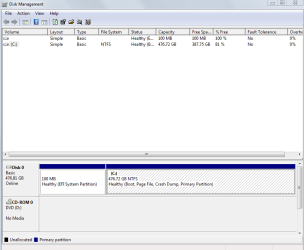
Boot Windows with the problem drive and post a maximized/resized screen print of Disk Management (DM).
Disk Management - Post a Screen Capture Image

If i connect the problem drive - i cannot boot windows. The Windows bootloader (not the bios/uefi boot manager) has a poo (refer much earlier).

Then Boot Windows with the drive that works and post that DM screen print.

At bottom.

If that doesn't help, post screen prints booting with a MiniTool Partition Wizard Bootable CD, with all drives connected.
Bootable Partition Manager| MiniTool Partition Wizard Bootable Edition

Bootable Partition Wizard, eh? I'll check that out in a bit.
 

Attachments

  • 2016-11-16 19_14_52-Disk Management.png
    2016-11-16 19_14_52-Disk Management.png
    16.3 KB · Views: 0

My Computer My Computer

At a glance

Windows 7 64BitNo Current PCNo Current PCNo Current PC
Computer type
PC/Desktop
OS
Windows 7 64Bit
CPU
No Current PC
Motherboard
No Current PC
Memory
No Current PC
Graphics Card(s)
No Current PC
Sound Card
No Current PC
Monitor(s) Displays
No Current PC
Hard Drives
No Current PC
PSU
No Current PC
Case
No Current PC
Cooling
No Current PC
Other Info
No Current PC
OK guys.

My UEFI noobness is on full display.

So... here's the summary:
1. Windows was not installed using the instructions here: UEFI (Unified Extensible Firmware Interface) - Install Windows 7 with. I actually just deleted all the partitions and told Windows to sort it out - the way i've always done it.
2. This made me think that i did that wrong but it didn't seem to make any difference on my tests.
3. My original Linux installation was BIOS - not UEFI. Because i'd never done this before i didn't realise that would present a problem. It did :D
4. Installed a fresh copy of Ubuntu on my other SSD and this didn't go right. I missed a step that is new to UEFI, and not required for BIOS. Sigh. Followed these instructions: Dual-boot Ubuntu 14.04 & Windows 7 on a PC with 2 HDDs and UEFI firmware | LinuxBSDos.com
5. Now it all works, however oddly (at least to me) i do not see my Windows SSD or it's bootloader in the boot options. I HAVE to boot to Ubuntu SSD and select Windows from Grub menu. I can probably swap to put Windows first in the list, but then i can't get into Ubuntu without changing the Windows bootloader to give me a menu using something like EasyBCD which i'm not going to do.

I'm so inexperienced with UEFI - it's just so different to BIOS which seemed much simpler. Does anyone think that my no.1 above has anything to do with no.5? I'm surprised i can't see the Windows SSD or bootloader. I've checked the settings in the UEFI and nothing seems amiss.

Thanks to everyone who tried to assist :)

I won't quite mark this as solved pending a response to my final paragraph/question.
 
Last edited:

My Computer My Computer

At a glance

Windows 7 64BitNo Current PCNo Current PCNo Current PC
Computer type
PC/Desktop
OS
Windows 7 64Bit
CPU
No Current PC
Motherboard
No Current PC
Memory
No Current PC
Graphics Card(s)
No Current PC
Sound Card
No Current PC
Monitor(s) Displays
No Current PC
Hard Drives
No Current PC
PSU
No Current PC
Case
No Current PC
Cooling
No Current PC
Other Info
No Current PC
I don't have any experience with a setup like yours.
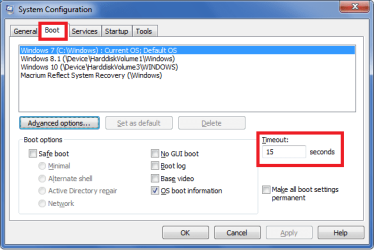
What you can try is check the Boot Timeout in msconfig.
If it's 0, set it to 10 or more seconds.
Then reattach the Linux SSD and bootup, see if that makes a difference, so you can select the Windows SSD.

Also, have you tried using the one-time Boot option when starting the PC ?
It's some key you tap when the PC is starting to bring up a boot device selection screen.
I don't know what that key is for your PC, it's different for different motherboards.

Here's a snip from my msconfig/Boot, this PC is Legacy MBR, multi-boot Windows, all OS's on the same SSD.

msconfig_Boot.png
 

My Computer My Computer

At a glance

Multi-Boot W7_Pro_x64 W8.1_Pro_x64 W10_Pro_x6...AMD Athlon II x4 6206GB GSkill DDR2 800AMD 4670 GPU + AMD 4200 IGP
Computer type
PC/Desktop
Computer Manufacturer/Model Number
home built
OS
Multi-Boot W7_Pro_x64 W8.1_Pro_x64 W10_Pro_x64 +Linux_VMs +Chromium_VM
CPU
AMD Athlon II x4 620
Motherboard
Gigabyte GA-MA785G-UD3H
Memory
6GB GSkill DDR2 800
Graphics Card(s)
AMD 4670 GPU + AMD 4200 IGP
Sound Card
on board Realtek ALC889A
Monitor(s) Displays
RCA 40" LCD TV, Insignia 32" LCD TV, HP 15" LCD monitor
Screen Resolution
1680 x 1050
Hard Drives
OCZ Vertex 3 120GB,
Samsung F3 1TB (3),
Several others - WD, Seagate, Hitachi, ...
PSU
Corsair 500 W
Case
Rosewill mid tower
Cooling
CM 90mm rifle
Keyboard
Gyration wireless, Logitech wireless, Dell USB wired
Mouse
Gyration wireless, Logitech wireless, V7 USB wired
Internet Speed
Spectrum - 100Mbps D / 10Mbps U
Antivirus
Avast, MBAM3, EMET, WinPatrol
Browser
Pale Moon, Firefox, IE
Other Info
2 multi-boot PC's
Mainly HTPC/Office/Gen purpose (no gaming).
Trendnet USB KVM.
LG DVD burner/Blue Ray Player.
Tray system for removable SATA backup drives.

Not currently OCd, under-volted.
I use Hybrid sleep, rarely re-boot or shutdown.

Hauppauge HD-PVR, Avermedia PCIe TV Tuner, Hauppauge PCI TV Tuner.
Looking further into this (lots more research and lots more experimentation) i think my motherboard has a 'limitation' (bug!). I've seen some other posts with similar, not exactly the same use-case, issues with similar vintage (some the same model) ASRock motherboards and UEFI booting.

I've managed to get it to work, from time to time, and by using rEFInd - but even that isn't robust. I reset my CMOS and the rEFInd bootloader is gone from my choices - and yet the Ubuntu one, missing for several reboots - is back!

I'm giving up and going back to BIOS mode until i can purchase newer, probably non-ASRock, hardware. Next time i'll be sure to buy a motherboard which states Linux support to start with (my ASRock did not).
 

My Computer My Computer

At a glance

Windows 7 64BitNo Current PCNo Current PCNo Current PC
Computer type
PC/Desktop
OS
Windows 7 64Bit
CPU
No Current PC
Motherboard
No Current PC
Memory
No Current PC
Graphics Card(s)
No Current PC
Sound Card
No Current PC
Monitor(s) Displays
No Current PC
Hard Drives
No Current PC
PSU
No Current PC
Case
No Current PC
Cooling
No Current PC
Other Info
No Current PC
I don`t see why you were using UEFI in the 1st place, there is no benefit to it in my opinion.

Hey I have a simple question while we`re here, if my windows drive is MBR and I install a 4 TB data drive and I initialize it GPT and chop it up to 2 partitions will windows be able to see the entire drive, or will I have to convert it to MBR ?

Thanks, Brian :)
 

My Computer My Computer

At a glance

Windows 10 Pro x64Intel Core i7 6700KGSkill TridentZ RGB 16GB 3600 16-16-16-36EVGA GTX 980 Ti SC x2
Computer type
PC/Desktop
Computer Manufacturer/Model Number
Skylake Special #666
OS
Windows 10 Pro x64
CPU
Intel Core i7 6700K
Motherboard
Asus Sabertooth Z170 Mark 1
Memory
GSkill TridentZ RGB 16GB 3600 16-16-16-36
Graphics Card(s)
EVGA GTX 980 Ti SC x2
Sound Card
Realtek High Definition
Monitor(s) Displays
AOC G2460PG
Screen Resolution
1920 x 1080 144Hz
Hard Drives
Samsung 860 Pro 256GB, Seagate Barracuda 4TB x2
PSU
EVGA 1000 P2, EVGA White Custom Braided Cables
Case
Corsair Vengeance C70 Gunmetal Black
Cooling
Corsair H100i v2, Corsair ML120 x2, Thermal Grizzly Kryonaut
Keyboard
Logitech G910 Orion Spectrum
Mouse
Logitech G700s
Internet Speed
Verizon Fios Quantum Gateway 75/75
Antivirus
Windows Defender, Malwarebytes Free 3.8.3
Browser
Chrome
Other Info
Corsair SP120 x4, LG Blu-ray Drive, Durabrand HT-395 100 Watt Dolby Digital Amp, Corsair H2100 Wireless 7.1 Headset
Back
Top