System Image - Access is denied (0x80070005)

Thanks whs,
I am just looking into the article "Imaging with free Macrium' authored by you.
With reference to the Warning in this, How can I confirm if the MBR resides on the C partition?
I am also going to view the 30 minutes tutorial as well download Macrium.
Before utilising this I would like to me more sure and certain.
Being at a remote place have no proper person to guide me,
this Forum had greatly helped me.
regards
rr
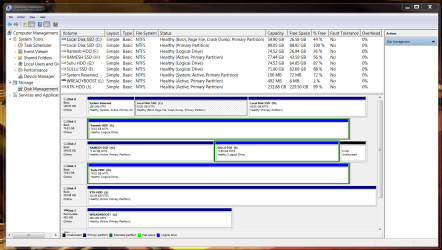
Look into Disk Management. If you have a small 100 or 200MB partition that is declared as active, the MBR will reside on that and not on C (thus the warning applies). But if you only have a C that is declared as active and maybe D partition, then the MBR will reside on C and you can proceed normally. The keyword is active - that means the MBR is on that partition.
 

My Computer My Computer

At a glance

Vista, Windows7, Mint Mate, Zorin, Windows 8from 1.6GHz Duo to i7
Computer Manufacturer/Model Number
HP, Dell, Gateway, Toshiba - 4 laptops and 2 desktops
OS
Vista, Windows7, Mint Mate, Zorin, Windows 8
CPU
from 1.6GHz Duo to i7
Monitor(s) Displays
2x HP w2207
Hard Drives
5x HDD, 7x SSD, 12x Externals
Keyboard
with trackball - no mices
Mouse
Trackball mice
Internet Speed
DSL 6000
Yes I do have
'System Reserved'
100 MB NTFS
Healthy (System, Active, Primary Partition)

It means that MBR resides on this?
Here is the snip.
Please.
 

Attachments

  • Disk Management  snip 8th May 2010.PNG
    Disk Management snip 8th May 2010.PNG
    77.6 KB · Views: 30

My Computer My Computer

At a glance

Windows 7 Ultimate x64 Version 6.1.7600 Build...Intel Core2 Quad Q9650 3.00GHz, 2888 Mgz, 4 C...4x2 (8gb)Corsair DDR3 1333ATI:Radeon:4870 GPU (2 nos. Crossfire Disabled)
Computer Manufacturer/Model Number
Self assembled.
OS
Windows 7 Ultimate x64 Version 6.1.7600 Build 7600
CPU
Intel Core2 Quad Q9650 3.00GHz, 2888 Mgz, 4 Cores, 4 Logica
Motherboard
Intel: DX48BT2
Memory
4x2 (8gb)Corsair DDR3 1333
Graphics Card(s)
ATI:Radeon:4870 GPU (2 nos. Crossfire Disabled)
Sound Card
Maudio:Firewire Solo
Monitor(s) Displays
3 nos LCD AOC
Screen Resolution
1920 x 1080
Hard Drives
2nos: Non Raid: Intel: SSDSA2MH160G2C1
2nos: Seagate 80gb (just connected/enabled)http://www.sevenforums.com/profile.php?do=extra
Added 1 Seagte 250gb.
PSU
Corsair HX1000W Modular
Case
Coolermaster HAF 932
Cooling
Liquid: Coolermaster Aquagate
Keyboard
TVS: mechanical
Mouse
Microsoft:Arc
Internet Speed
download:1.9Mb/s Upload:0.71Mb/s (keeps varying !)
Other Info
just added a BambooFun pen tablet.
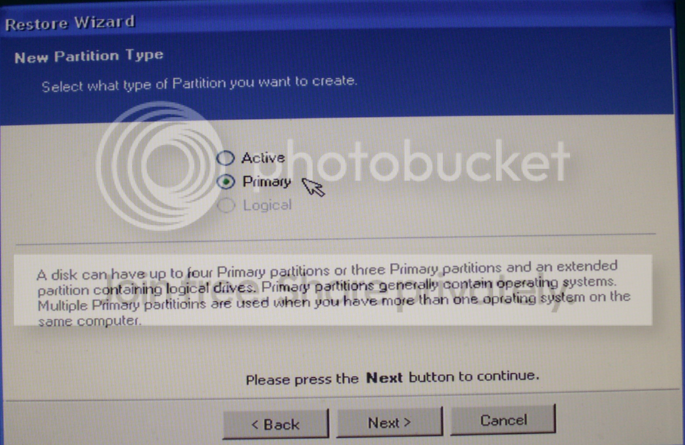
Yes, your MBR is on the 100MB partition. If you image your system, image only C and leave the 100MB partition as is. Since the MBR is universal, it will work with image should you ever have to pull it back in. Only notice the specialty explained in my warning and when it comes to the recovery step as shown in the picture1, say "Primary" and when it comes to the MBR question in picture2 say " Do not replace".

2010-03-25_1805.png

2010-03-25_1807.png


My Computer My Computer

At a glance

Vista, Windows7, Mint Mate, Zorin, Windows 8from 1.6GHz Duo to i7
Computer Manufacturer/Model Number
HP, Dell, Gateway, Toshiba - 4 laptops and 2 desktops
OS
Vista, Windows7, Mint Mate, Zorin, Windows 8
CPU
from 1.6GHz Duo to i7
Monitor(s) Displays
2x HP w2207
Hard Drives
5x HDD, 7x SSD, 12x Externals
Keyboard
with trackball - no mices
Mouse
Trackball mice
Internet Speed
DSL 6000
Thanks whs,
and I am equally thankfull to Karlsnooks,
for having given the advise.
Many many thanks.
RR
 

My Computer My Computer

At a glance

Windows 7 Ultimate x64 Version 6.1.7600 Build...Intel Core2 Quad Q9650 3.00GHz, 2888 Mgz, 4 C...4x2 (8gb)Corsair DDR3 1333ATI:Radeon:4870 GPU (2 nos. Crossfire Disabled)
Computer Manufacturer/Model Number
Self assembled.
OS
Windows 7 Ultimate x64 Version 6.1.7600 Build 7600
CPU
Intel Core2 Quad Q9650 3.00GHz, 2888 Mgz, 4 Cores, 4 Logica
Motherboard
Intel: DX48BT2
Memory
4x2 (8gb)Corsair DDR3 1333
Graphics Card(s)
ATI:Radeon:4870 GPU (2 nos. Crossfire Disabled)
Sound Card
Maudio:Firewire Solo
Monitor(s) Displays
3 nos LCD AOC
Screen Resolution
1920 x 1080
Hard Drives
2nos: Non Raid: Intel: SSDSA2MH160G2C1
2nos: Seagate 80gb (just connected/enabled)http://www.sevenforums.com/profile.php?do=extra
Added 1 Seagte 250gb.
PSU
Corsair HX1000W Modular
Case
Coolermaster HAF 932
Cooling
Liquid: Coolermaster Aquagate
Keyboard
TVS: mechanical
Mouse
Microsoft:Arc
Internet Speed
download:1.9Mb/s Upload:0.71Mb/s (keeps varying !)
Other Info
just added a BambooFun pen tablet.
Back
Top